

You’ve spent months writing posts and filing each one under a category or two. A few tags here, a few tags there.
Then you open Google Search Console and find dozens of category and tag archives in your index. Some have one post. Some are near-duplicates of each other. None of them rank on search engines.
That happens because WordPress creates a public archive page for every category and tag you add, and by default those pages are just a list of post excerpts with no unique content. A category page can be one of the strongest pages on your site, or one of the weakest, depending on how you set it up.
In this post I’ll explain how category and tag pages affect SEO, when to index or noindex them, and how to optimize WordPress category and tag pages using WordPress and Rank Math.
Key Takeaways:
- WordPress categories are hierarchical groupings meant for broad topics, while WordPress tags are flat labels meant for specific details, and the two should be optimized differently.
- Category pages can rank for broad, competitive keywords when they include a unique introduction, a custom SEO title, and strong internal links.
- Tag pages often create thin or duplicate content, so most sites should either noindex them or keep only a small, curated set indexed.
- Rank Math SEO lets you set titles, meta descriptions, robots meta, and sitemap inclusion for category and tag archives from Rank Math SEO → Titles & Meta.
- Empty or near-empty archives waste crawl attention and dilute site quality, which is why Rank Math includes a setting to noindex empty category and tag archives automatically.
Table Of Contents
1 What Are WordPress Category and Tag Pages?
WordPress category and tag pages are archive pages that WordPress generates automatically to list every post assigned to a given category or tag. Both are types of taxonomies, WordPress’s term for a system for grouping content.
The two taxonomies serve different purposes, as the following comparison shows:
| Categories | Tags | |
|---|---|---|
| Purpose | Broad topics (e.g., “WordPress SEO”) | Specific details (e.g., “Schema markup”) |
| Structure | Hierarchical (parent and child categories) | Flat (no hierarchy) |
| Required? | Yes, every post needs at least one | No, tags are optional |
| Default URL | example.com/category/wordpress-seo/ | example.com/tag/schema-markup/ |
| Typical SEO role | Topic hub that can rank | Navigation aid, usually noindexed |
2 Why Category and Tag Pages Matter for SEO
Category and tag pages matter for SEO because they shape how search engines understand your site’s topics and how link value flows between your posts.
Well-built category pages support your SEO in the following ways:
- Topical authority: A category page that groups 20 related posts tells Google your site covers that topic in depth.
- Broad keyword targeting: A category page can rank for a head term like “WordPress security,” while the individual posts inside it target long-tail variations.
- Internal link distribution: Category pages link to every post they contain, which helps new posts get discovered and crawled faster.
- Better user navigation: Visitors who land on a category page can browse related content instead of bouncing back to the search results.
Poorly managed taxonomies cause the opposite effect. Dozens of tag pages with one or two posts each create thin content, which means pages with little unique value. Overlapping tags such as “SEO tip,” “SEO tips,” and “SEO-tips” create duplicate content, because each archive shows almost the same list of posts.
The relationship works like this: too many low-value archives → diluted crawl attention → weaker signals about which pages matter. As a result, your important pages compete with your own clutter.
3 Should You Index or Noindex Category and Tag Pages?
You should index category pages that have enough posts and unique content to be useful on their own, and noindex tag pages unless they are curated and substantial.
A noindex tag tells search engines not to show a page in search results, while still letting them follow the links on that page.
The right choice depends on the type of archive, as summarized below:
| Archive Type | Recommendation | Reason |
|---|---|---|
| Main category pages with 5+ posts | Index | They can rank for broad topic keywords |
| Categories with 0–2 posts | Noindex (or merge) | They are thin and offer little value yet |
| Most tag pages | Noindex | They usually overlap with categories and each other |
| Curated tag pages with unique intros | Index selectively | They can work like mini topic hubs |
| WooCommerce product categories | Index | They are core shopping landing pages |
Note: Noindexing a page doesn’t remove it from your site. Readers can still use it to browse, and internal links on the page still pass value to your posts.
Rank Math lets you set these rules globally.
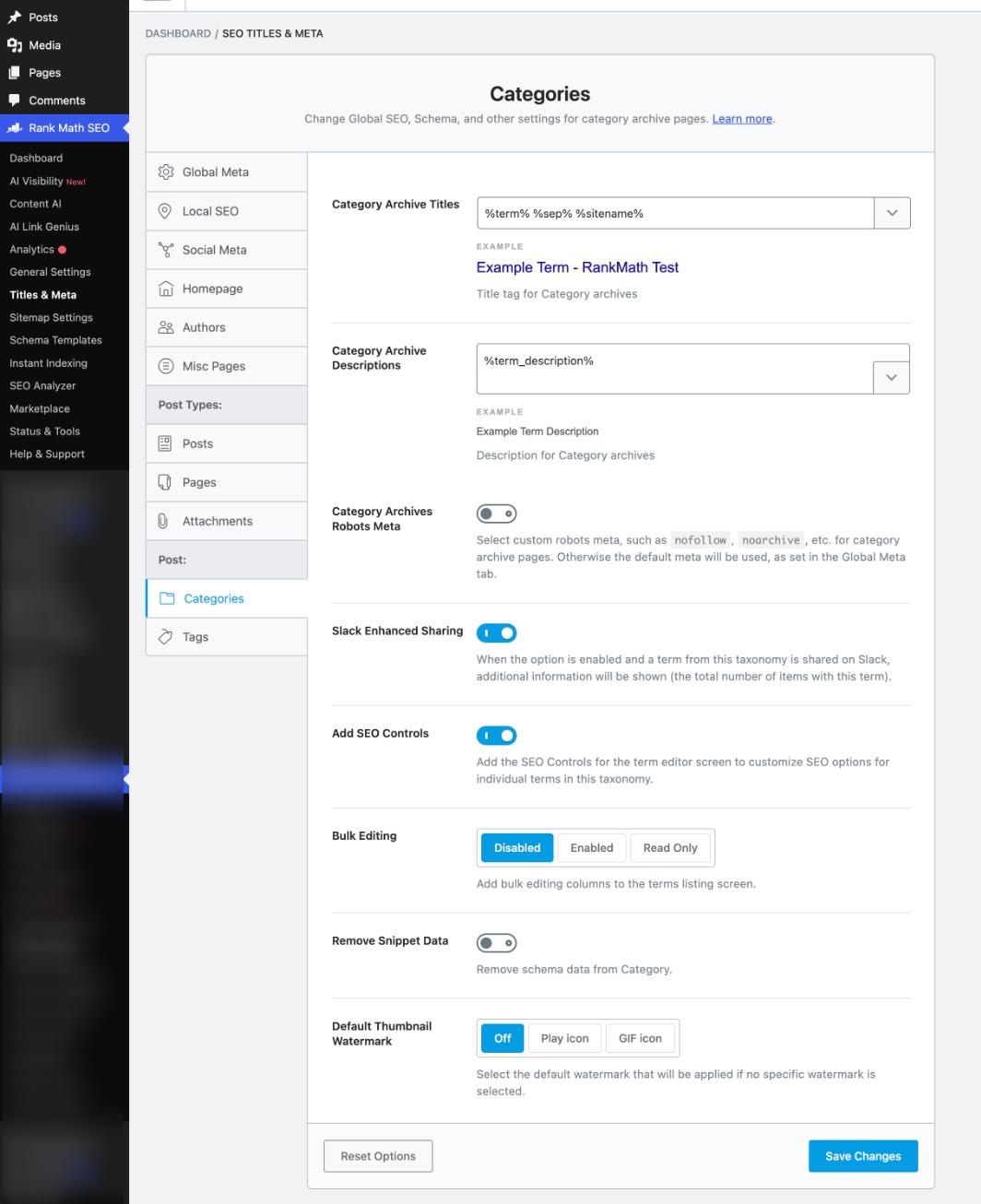
To do so, navigate to Rank Math SEO → Titles & Meta → Categories (or Tags) and adjust the robots meta for that taxonomy.
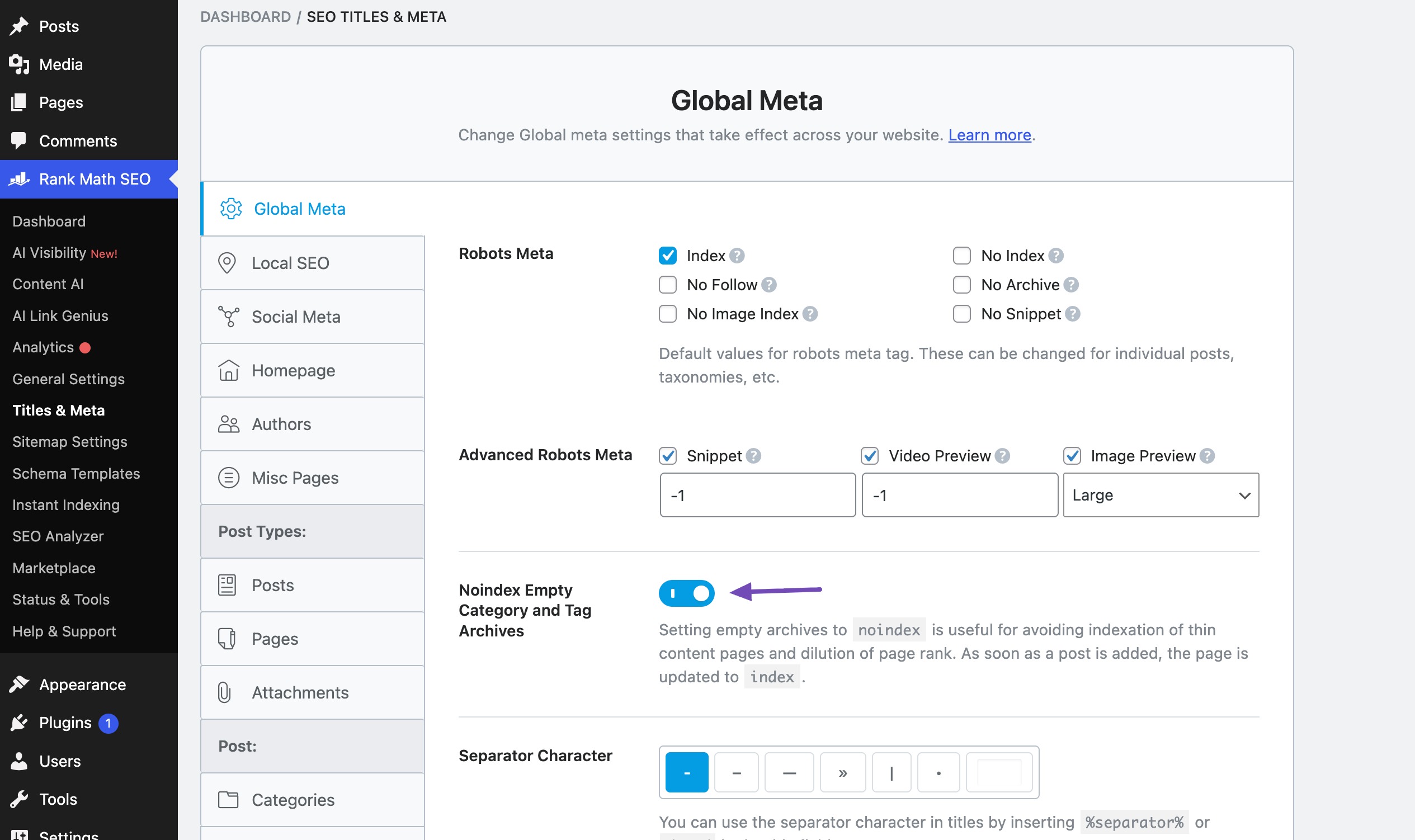
To handle empty archives automatically, navigate to Rank Math SEO → Titles & Meta → Global Meta and enable Noindex Empty Category and Tag Archives, which keeps archives with no posts out of the index.
You can also override the global rule on a single category or tag from its edit screen, which is useful when one tag deserves to rank while the rest stay noindexed.
4 How to Optimize WordPress Category Pages
Optimizing a WordPress category page means turning an auto-generated list of posts into a landing page with a clear topic, unique content, and a strong internal link structure.
4.1 Plan a Clean Category Structure
A clean category structure is a short list of broad, non-overlapping categories that reflects the main topics of your site. Most blogs work well with 5 to 10 top-level categories, with child categories only where a topic is large enough to split.
Use these rules when planning or cleaning up categories:
- Give each category a distinct topic that doesn’t overlap with another category.
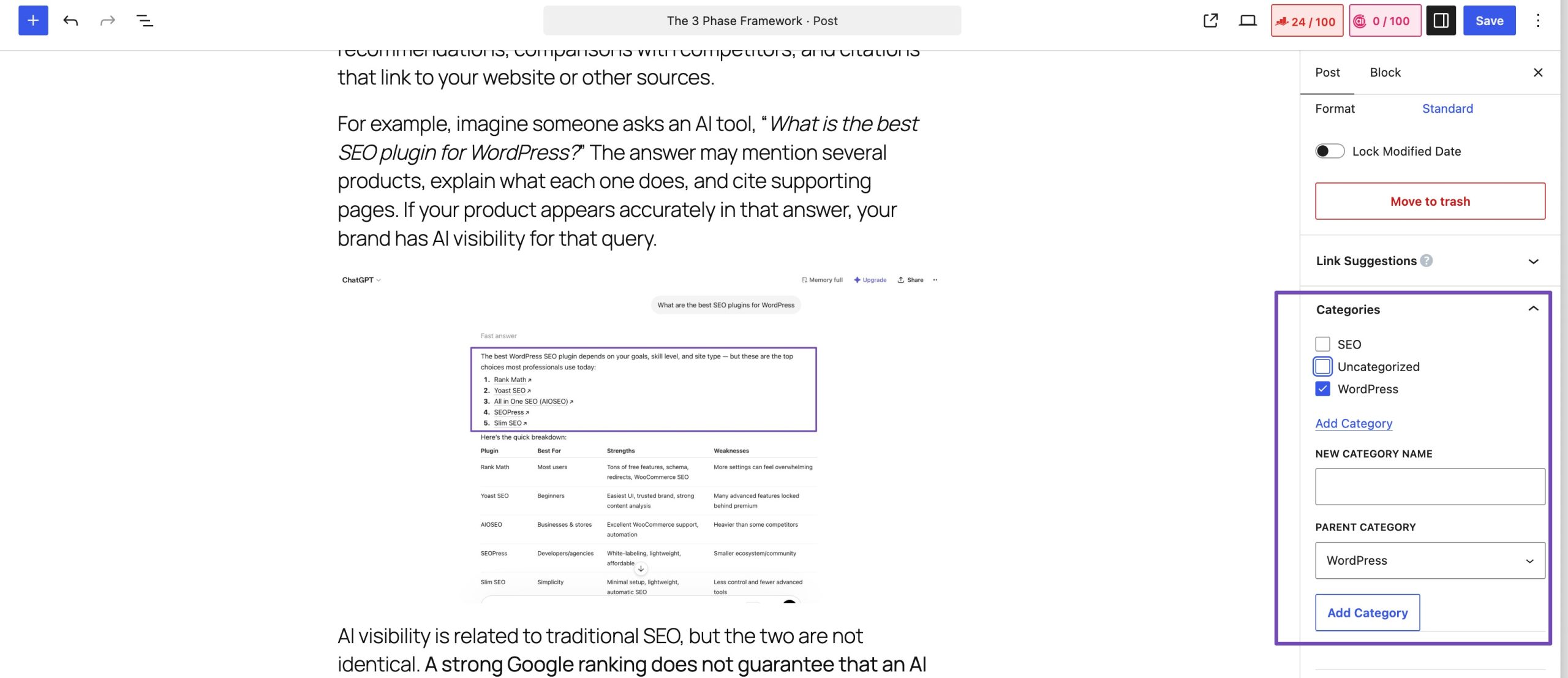
- Assign each post to one primary category whenever possible.
- Merge categories with only one or two posts into a related parent category.
- Remove or rename the default “Uncategorized” category so it doesn’t appear in search.
This matters because every category you create becomes a public URL. Fewer, stronger categories give each archive enough content to deserve a place in search results.
If a post belongs in more than one category, Rank Math lets you set a primary category, which controls which category appears in breadcrumbs and certain URL structures.
4.2 Write a Unique Category Description
A category description is the introductory text that appears at the top of a category archive, and it is the single biggest upgrade you can make to a category page. Without it, the page has no content of its own, only excerpts borrowed from other posts.
To add a description, go to Posts → Categories, click Edit under the category, and fill in the Description field.
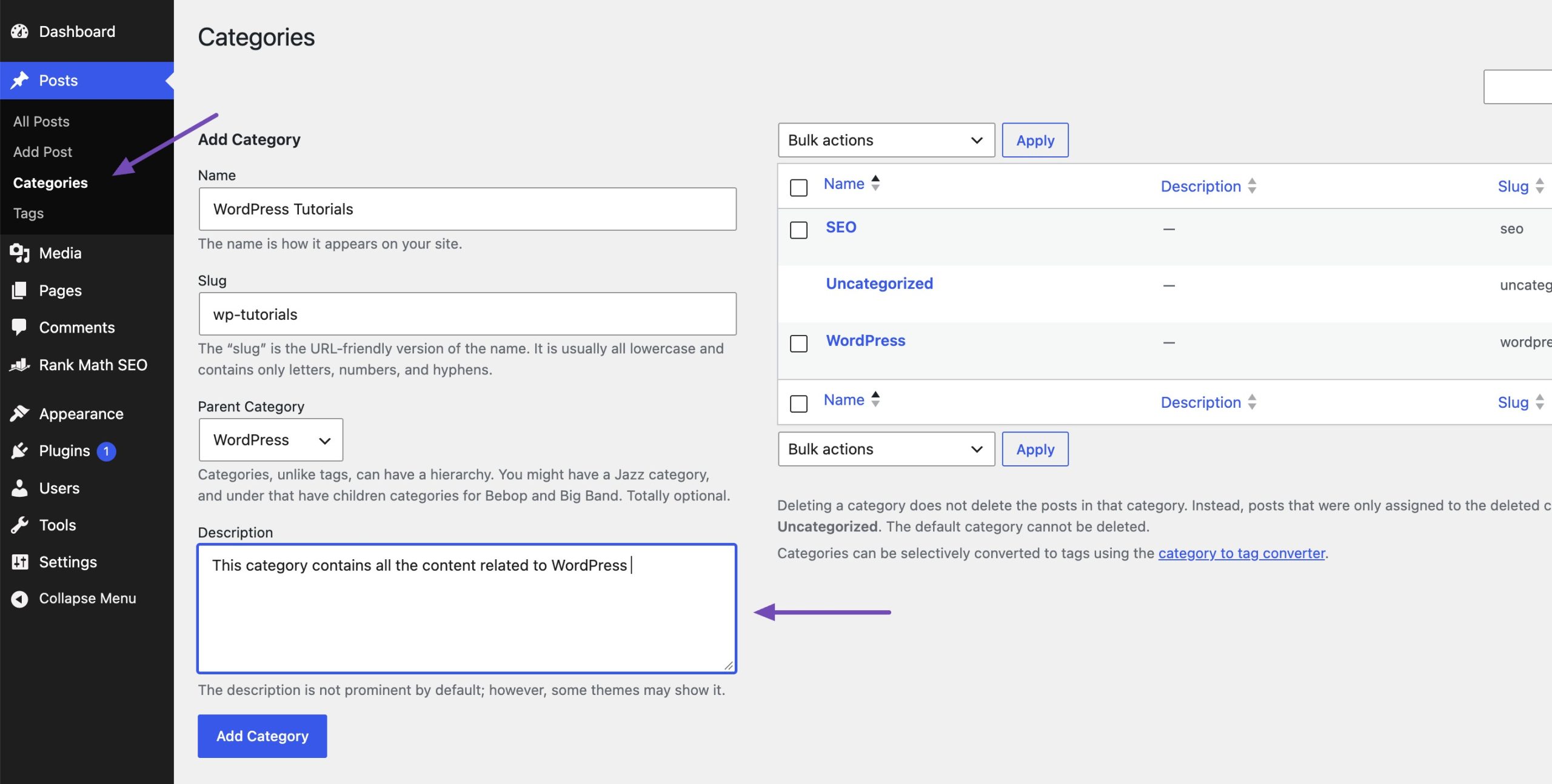
A strong category description includes the following elements:
- A first sentence that defines the topic and uses the category’s main keyword naturally.
- Two or three paragraphs explaining what readers will find and who it’s for.
- Links to your two or three best “start here” posts in the category.
- Optional: a short FAQ or a list of subtopics for larger categories.
Note: Some themes don’t display the category description on the front end. If you add a description and don’t see it on the archive, check your theme’s archive template or settings, because search engines can only reward content that’s actually on the page.
4.3 Set a Custom SEO Title and Meta Description
A custom SEO title and meta description control how your category page appears in Google’s search results, which directly affects click-through rate.
WordPress’s default category title is often just the category name plus your site name, which doesn’t tell searchers why they should click.
Rank Math gives you two ways to set these:
- Globally: Go to Rank Math SEO → Titles & Meta → Categories and set the default archive title and description using variables such as
%term%and%sitename%. - Per category: Open any category under Posts → Categories → Edit and scroll to the Rank Math meta box to write a custom SEO title, meta description, and focus keyword.
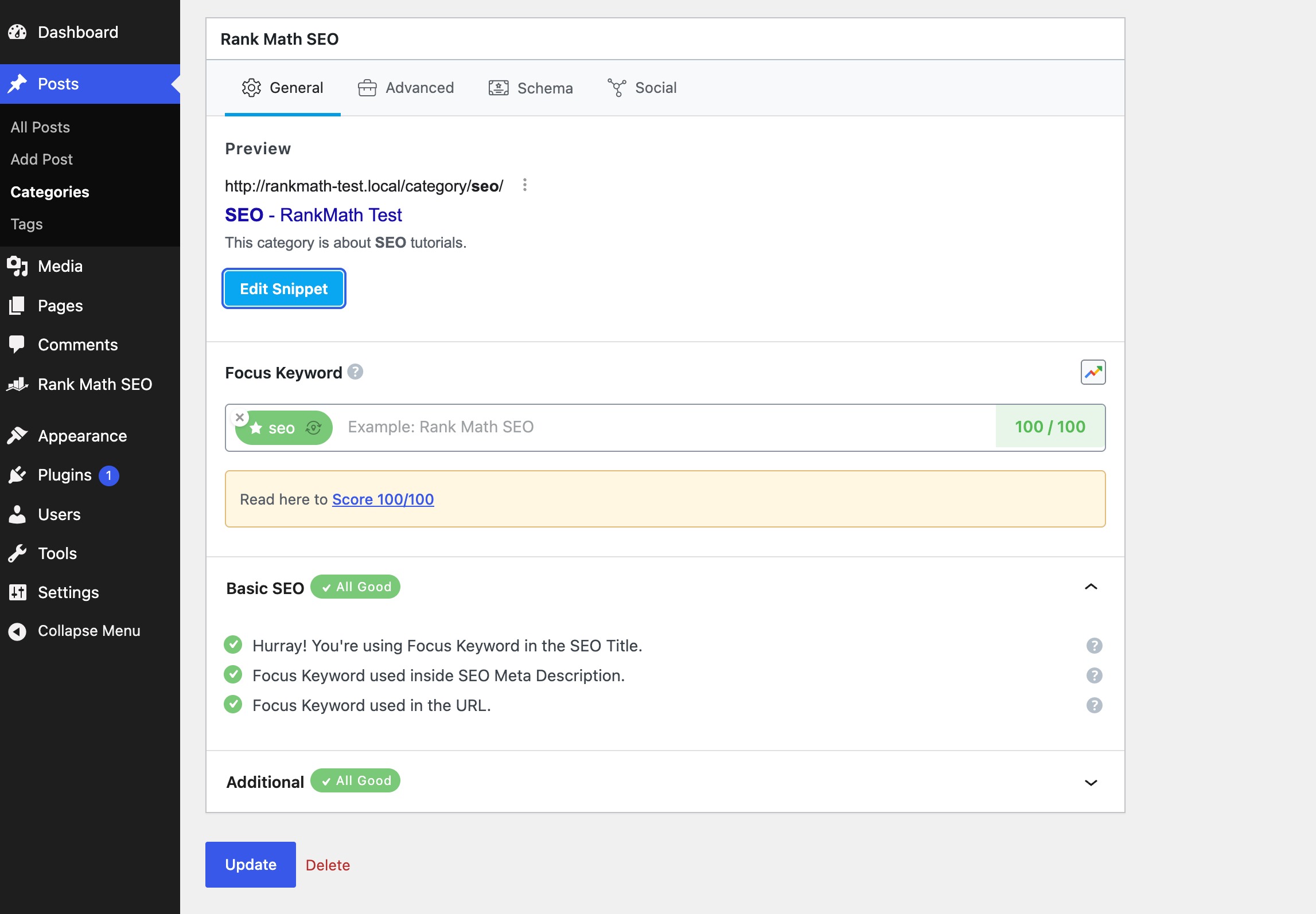
4.4 Clean Up Category URLs
A clean category URL is short, readable, and free of unnecessary words. By default, WordPress adds /category/ to every category URL, such as example.com/category/wordpress-seo/.
Rank Math can remove that base with the Strip Category Base option under Rank Math SEO → General Settings → Links, which turns the URL into example.com/wordpress-seo/. Rank Math also handles the redirect from the old URL so existing links keep working.
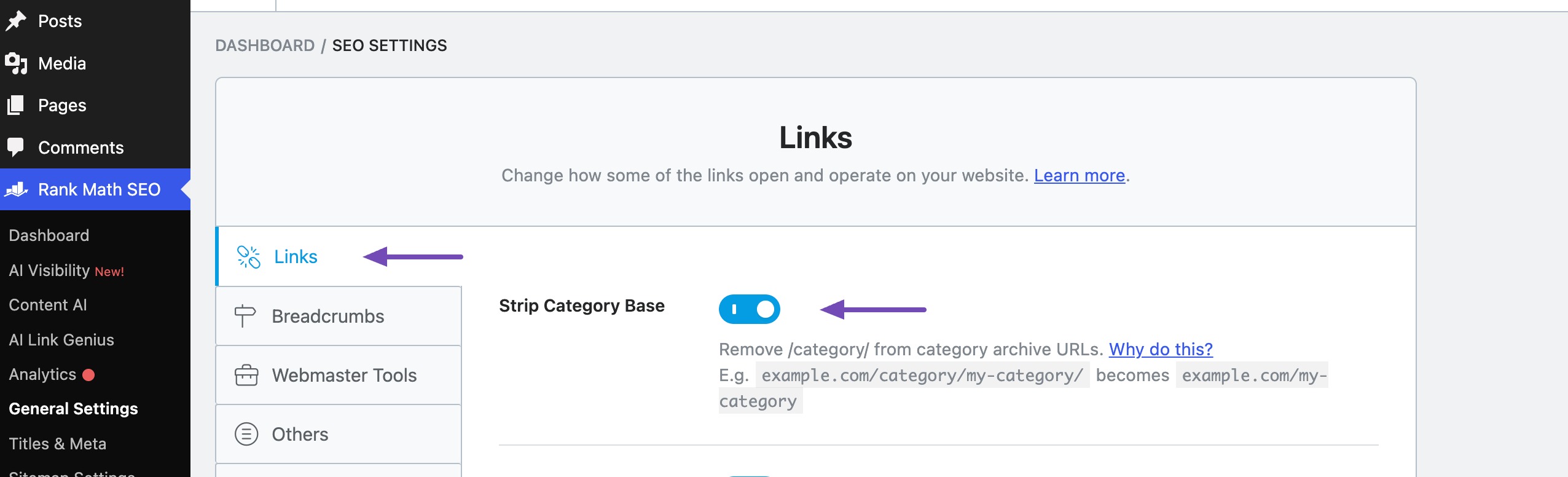
Note: Changing URLs on an established site affects every category link at once. Make the change during a quiet period, then check Google Search Console for crawl errors over the following weeks.
4.5 Add Internal Links and Breadcrumbs
Internal links and breadcrumbs help search engines understand where a category page sits in your site’s hierarchy and how important it is.
A category page that only appears in your sidebar receives far less internal link value than one that’s linked from your posts and navigation.
With Rank Math, you can now add internal links with the help of AI.
You can strengthen a category page’s internal links in the following ways:
- Add your main categories to your site’s primary navigation menu.
- Link to the relevant category page from inside your posts when you mention the topic.
- Link from the category description to your best posts, so link value flows in both directions.
- Enable breadcrumbs so every post links back to its category automatically.
To enable breadcrumbs in Rank Math, navigate to Rank Math SEO → General Settings → Breadcrumbs, as shown below.
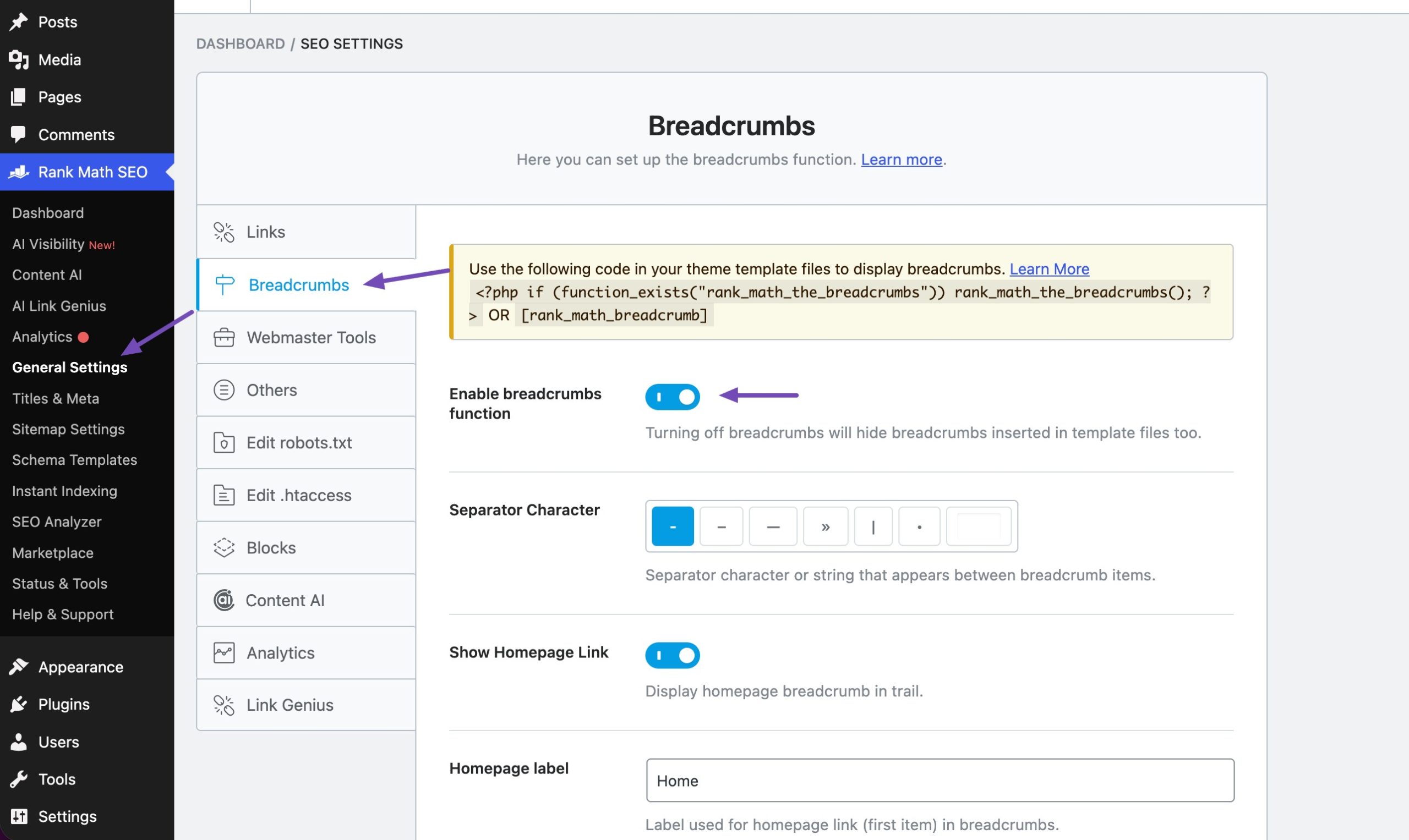
Rank Math also adds BreadcrumbList Schema, which can help Google display your site hierarchy in search results instead of a raw URL.
4.6 Include Category Pages in Your Sitemap
Your XML sitemap is the list of URLs you’re asking search engines to crawl, so it should include indexable category pages and exclude noindexed ones.
Listing a noindexed page in your sitemap sends mixed signals: you’re asking Google to crawl a page while telling it not to index that page.
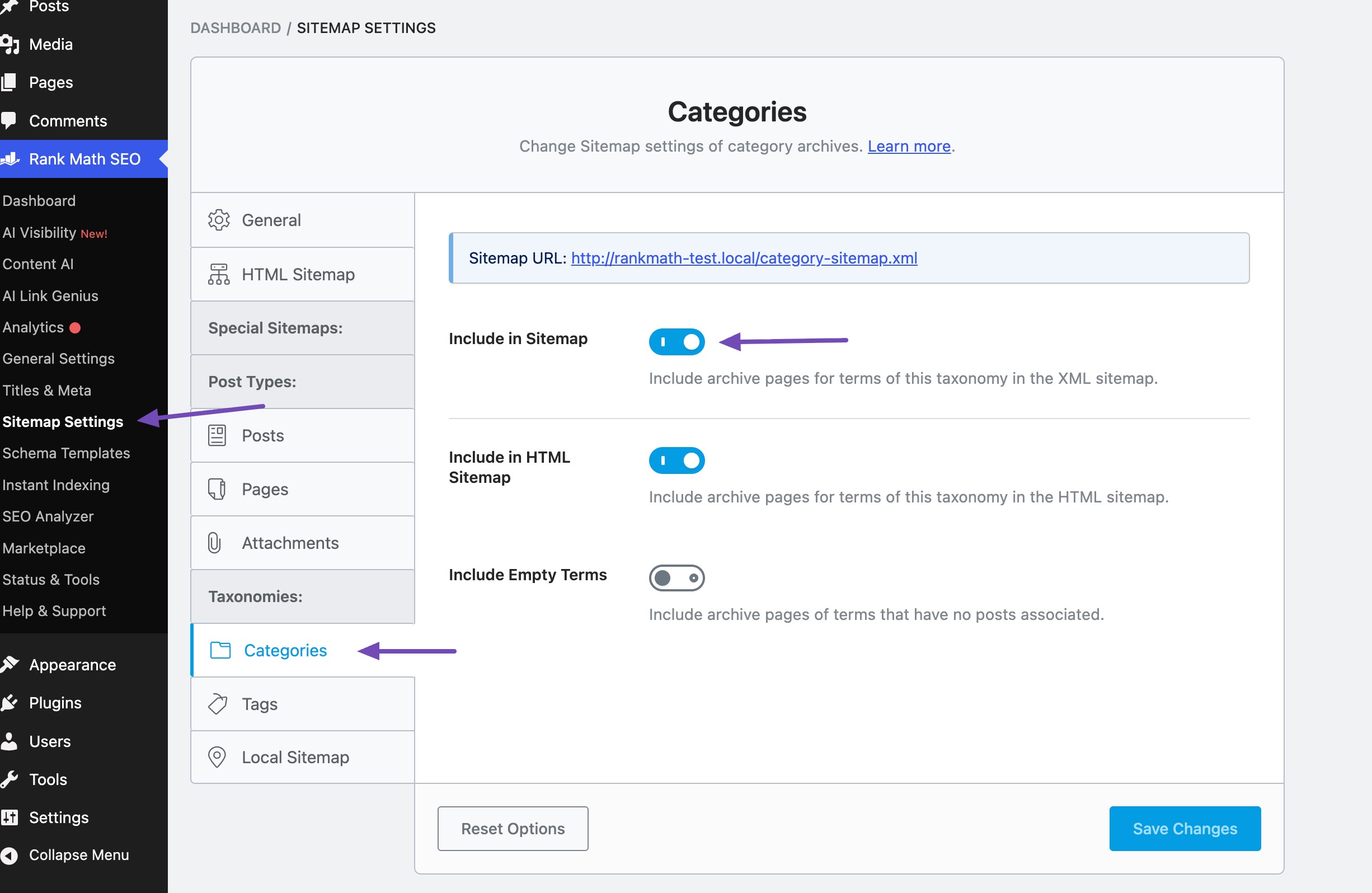
To control this in Rank Math, go to Rank Math SEO → Sitemap Settings, open the Categories and Tags tabs, and toggle Include in Sitemap to match your indexing decisions.
5 How to Optimize WordPress Tag Pages
Optimizing WordPress tag pages mostly means controlling them: limiting how many you create, preventing duplicates, and deciding which few, if any, deserve to be indexed.
Tags are useful for readers, but their flat, unlimited structure makes them the most common source of thin archives on WordPress sites.
Follow these steps to bring tag pages under control:
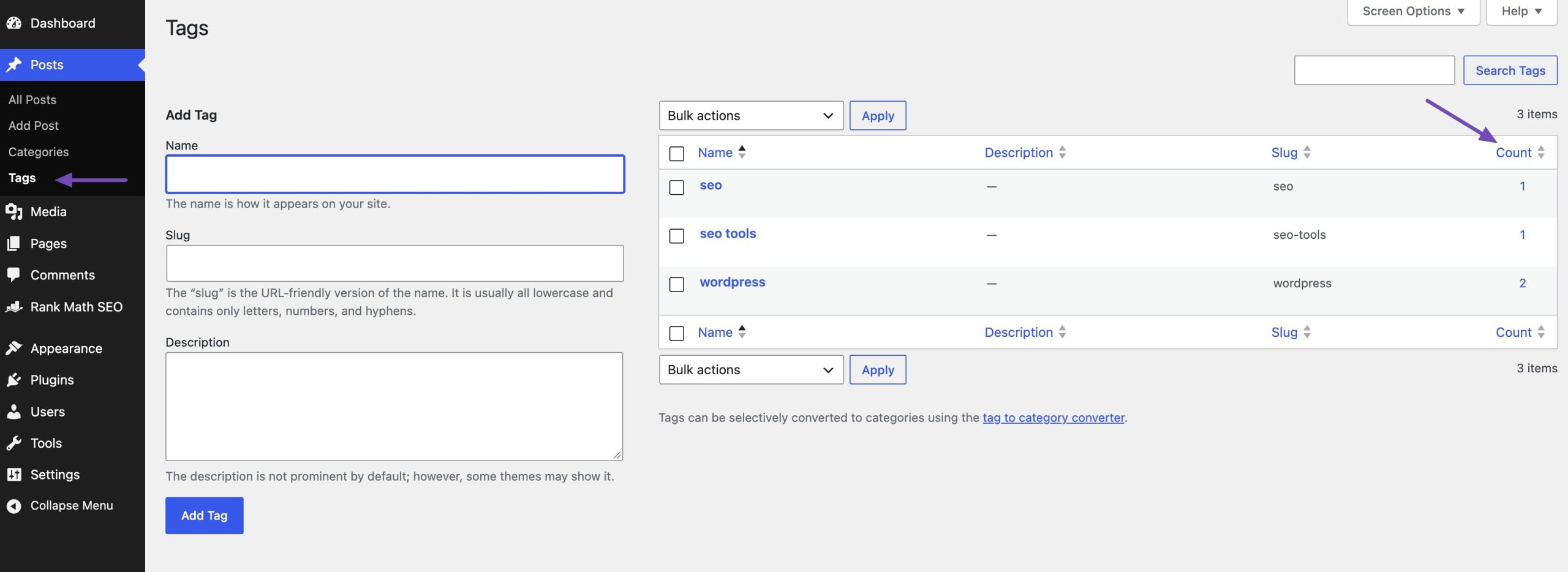
Audit your existing tags. Go to Posts → Tags from your WordPress dashboard and sort by the Count column to find tags with only one or two posts.
Merge or delete duplicates. Combine near-identical tags such as “SEO tip” and “SEO tips,” then redirect the removed tag URL to the one you keep. Rank Math’s Redirections module can handle this.
Set a tagging rule. Decide on a short list of approved tags and avoid creating new ones on the fly.
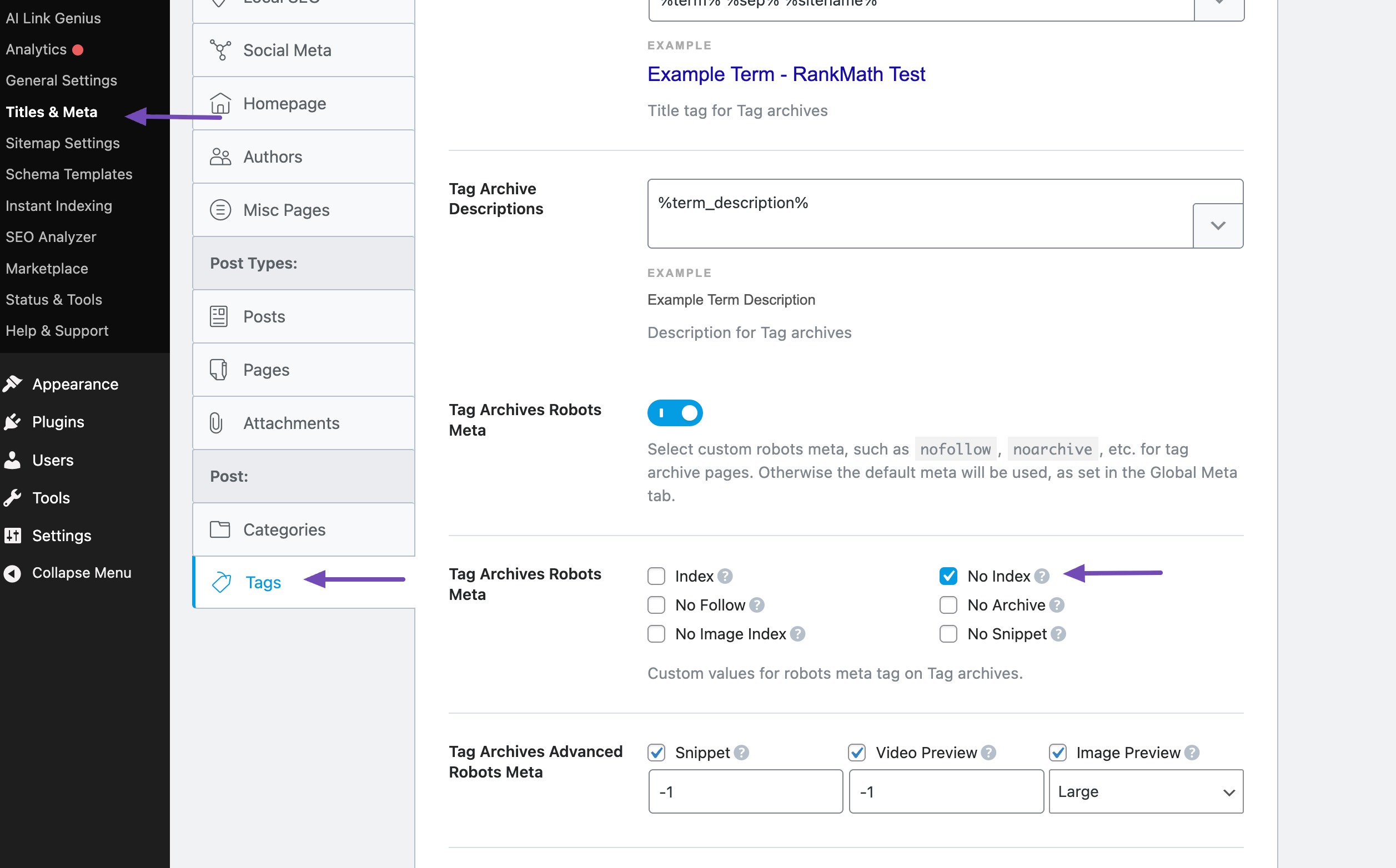
Noindex tags globally. Go to Rank Math SEO → Titles & Meta → Tags and set the robots meta to noindex for tag archives.
Promote only your best tags. If a tag has many posts and search demand, override the noindex on that tag’s edit screen and give it a unique description, just like a category page.
This approach works because it keeps the navigation benefit of tags for readers, while removing the low-value archives from search results.
6 Common Category and Tag Mistakes to Avoid
Common category and tag mistakes are setup habits that create thin, duplicate, or confusing archive pages. Most of them are easy to fix once you know what to look for.
- Deleting categories without redirects: Removed archive URLs return 404 errors and lose any links pointing to them, so always redirect them to the closest relevant category.
- Using the same word as a category and a tag: A category called “SEO” and a tag called “SEO” create two archives with nearly identical posts, which forces Google to choose between them.
- Leaving “Uncategorized” indexed: It signals an unfinished site and rarely contains a coherent topic.
- Creating a new tag for every post: This produces hundreds of one-post archives with no unique value.
- Indexing tags but leaving them out of the sitemap (or the reverse): Your robots meta and sitemap settings should always agree.
- Skipping category descriptions: Without unique content, even a large category page looks like a duplicate of your blog homepage.
7 Frequently Asked Questions
Should I noindex WordPress tag pages?
Yes, most WordPress sites should noindex tag pages because they tend to be thin and overlap with category pages. The exception is a small set of curated tags with many posts and a unique description, which can be indexed individually in Rank Math from the tag’s edit screen.
Do category pages help SEO?
Yes, category pages help SEO when they have unique content, a custom SEO title, and enough posts to cover a topic in depth. In that case, a category page can rank for broad keywords and pass internal link value to the posts it contains.
How many categories should a WordPress blog have?
Most WordPress blogs work best with 5 to 10 top-level categories. That range is large enough to separate your main topics, but small enough that each category archive has enough posts to be useful.
Can a post be in more than one category?
Yes, a WordPress post can belong to multiple categories, but assigning one primary category is better for SEO.
8 Conclusion
Optimizing WordPress category and tag pages can help improve your website’s SEO and make it easier for visitors to find relevant content.
Start by organizing your categories, adding unique descriptions, optimizing SEO titles and meta descriptions, and improving internal linking. For tag pages, focus on keeping only useful, well-organized pages indexed to avoid unnecessary or duplicate content.
You can use Rank Math to optimize category and tag pages, manage their indexing settings, and improve their visibility in search results.
Take some time to review your existing categories and tags, remove unnecessary ones, and make sure each page serves a clear purpose.
Pick your top three categories today, write a description for each, and watch them start working as landing pages.
If you like this post, let us know by tweeting @rankmathseo.