

You’ve been publishing content. Your rankings look fine. But leads have gone a little quiet, and you can’t quite work out why.
Often, it’s this. A potential customer asks ChatGPT, Google AI Mode, or Google Maps for a recommendation, and the answer names three businesses. None of them is yours. That customer never lands on your site, so your analytics never shows you the sale you lost.
This isn’t a niche behaviour anymore. OpenAI reported in February 2026 that ChatGPT had reached 900 million weekly active users.
Without a GEO plan, your brand doesn’t just rank lower. It slowly disappears from the answers your customers read.
In this post, we’ll walk through a six-part SEO and GEO checklist: your money pages, your public reputation, the attributes customers search for, proof of your work, partnerships, and community participation. Each section ends with a short checklist you can work through this week.
Table Of Contents
- Why SEO and GEO Belong on the Same Checklist
- Optimize Your Important Pages
- Audit Your Public Reputation
- Find the Attributes Customers Search For
- Show Your Work With Video
- Reach New Audiences Through Sponsorships and Affiliates
- Join the Communities Where Your Customers Ask Questions
- How to Measure Your SEO and GEO Progress
- Frequently Asked Questions
- Conclusion
1 Why SEO and GEO Belong on the Same Checklist
Generative engine optimization (GEO) is the practice of making your brand easy for AI systems like ChatGPT, Gemini, Perplexity, and Google AI Overviews to understand, trust, and recommend. SEO gets your pages ranked. GEO gets your brand named.
The two are tightly linked. Google’s own guidance on AI features says pages only need to be indexed and eligible for a snippet to appear as a supporting link in AI Overviews or AI Mode, and that there are no extra technical requirements or special Schema. In other words, good SEO is the entry ticket for GEO.
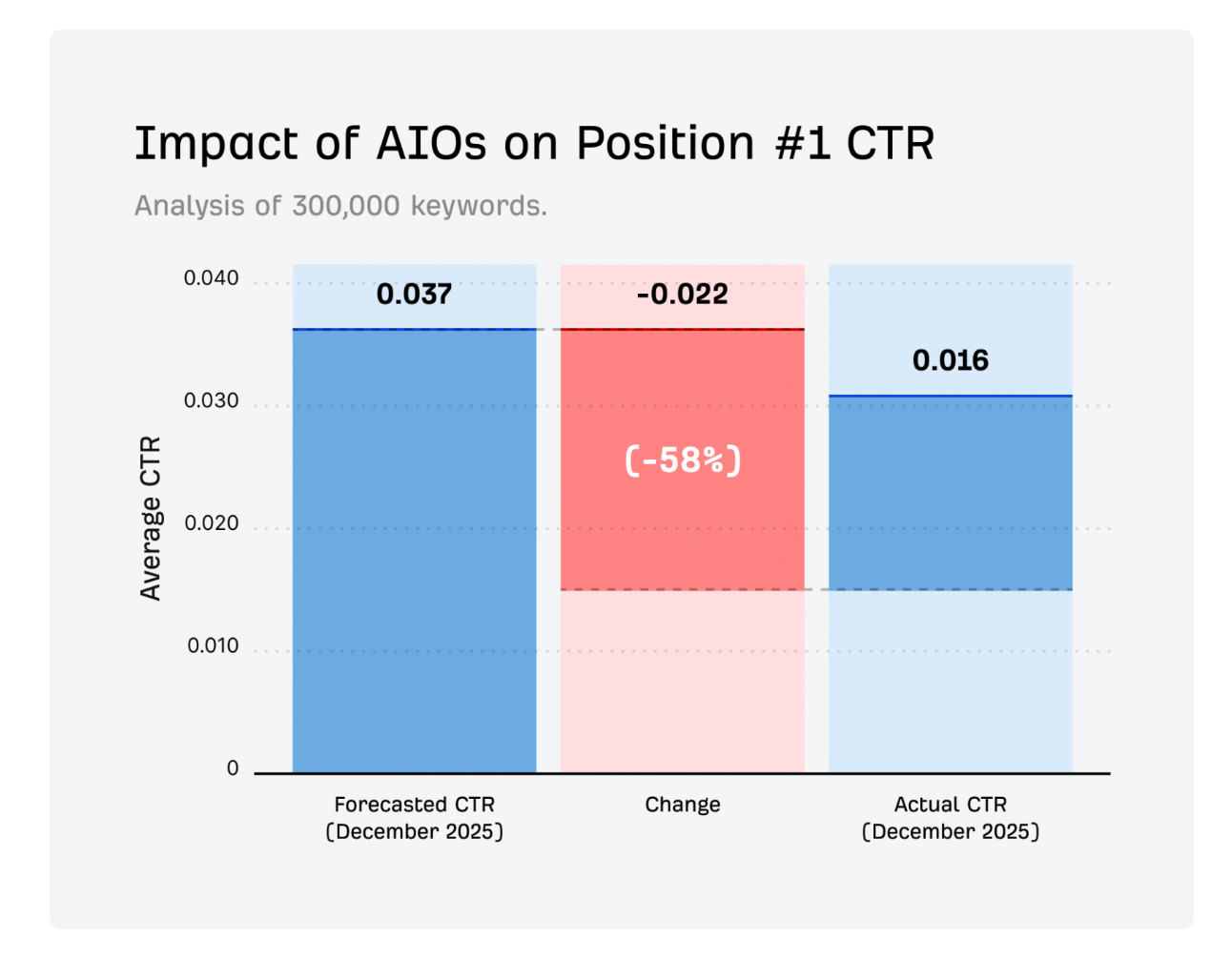
The reason GEO deserves its own attention is that clicks are shifting. Ahrefs found in February 2026 that when an AI Overview appears, the click-through rate for the top-ranking page is about 58% lower than it would otherwise be. That means ranking #1 alone no longer guarantees the traffic it used to.
The good news is that the visitors who do arrive from AI tools tend to be ready to act. This matters because a smaller number of AI referrals can still be worth more than a larger pile of casual clicks.
So the checklist below covers both: the pages and signals that help you rank, and the reputation and mentions that help AI recommend you.
2 Optimize Your Important Pages
Important pages are the pages on your site that directly lead to sales, sign-ups, or inquiries. Which pages count depends on your business model.
The important pages for each type of business usually include the following:
- Local businesses: homepage, service pages, location pages, and contact page
- SaaS companies: pricing page, feature or product pages, case studies, industry pages, and competitor alternative pages
- Everyone: any page a customer typically visits right before contacting you or buying
Start here because it’s where the payoff is clearest. A general blog post might earn an AI mention, but you’ll rarely know whether it moved your sales. Optimizing everything at once is a bit like throwing darts blindfolded.
2.1 Check Your Performance Data
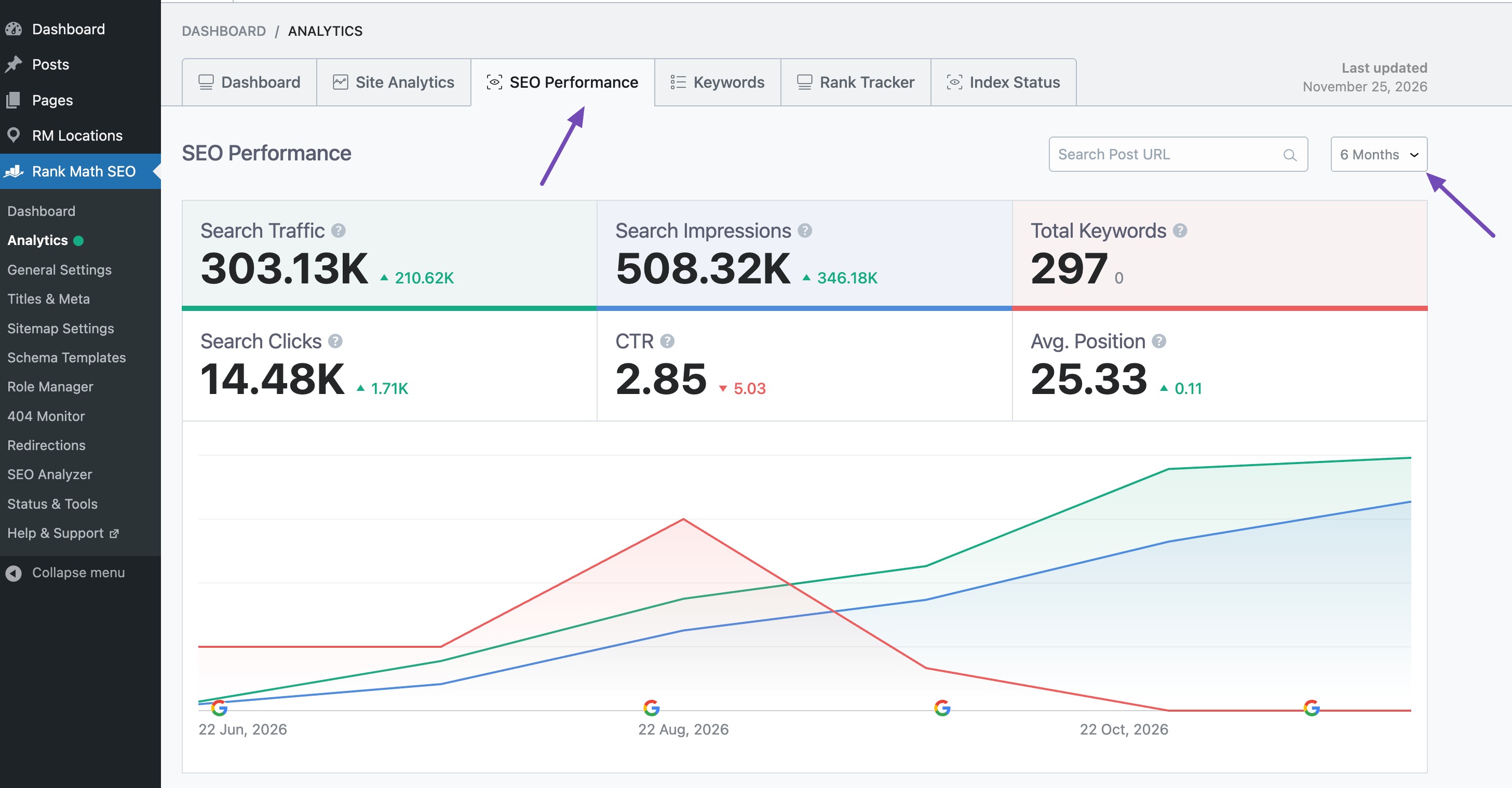
Performance data tells you whether an important page is growing, holding steady, or quietly slipping. Rank Math Analytics pulls this data from Google Search Console into your WordPress dashboard.
Navigate to Rank Math SEO → Analytics → SEO Performance, and set the date range to six months or longer, as shown below.
If impressions or traffic dropped around the same time as a Google update, read what that update targeted. Knowing the cause means you can fix the page with a clear reason instead of guessing.
Next, look at each important page on its own. If clicks and impressions are rising, great. If they’re falling, open the page-level report and check whether it’s a small wobble or a sharp drop. Either way, the next step is the same: look at the keywords the page ranks for.
It’s also worth opening Google Search Console’s Generative AI performance report, as shown below.
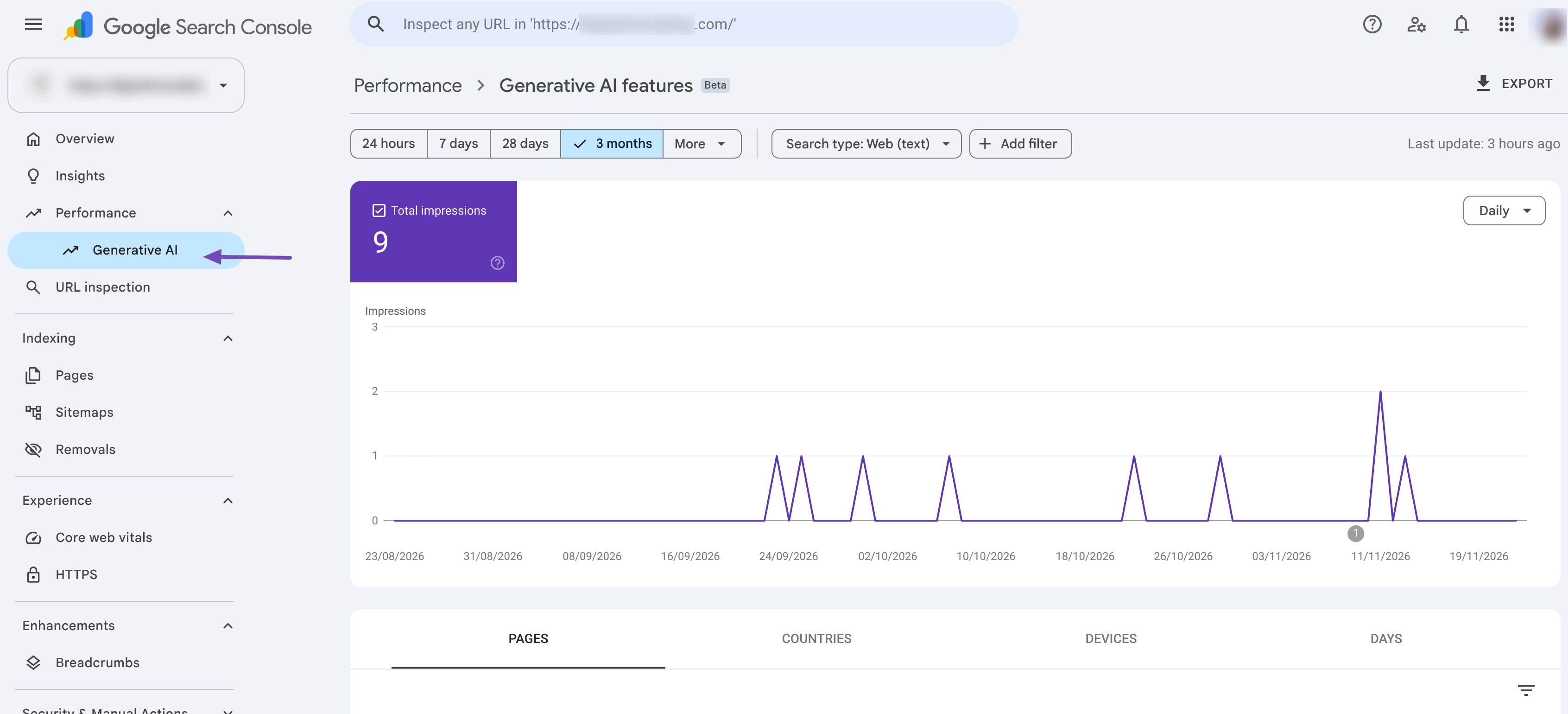
It shows how often your pages appear in AI Overviews and AI Mode, broken down by page, country, and device, with data starting from May 18, 2026.
2.2 Match the Search Intent Behind Your Keywords
Search intent is the reason behind a search, meaning what the person actually wants to find or do. A page that ranks for a keyword but doesn’t satisfy its intent will eventually lose ground.
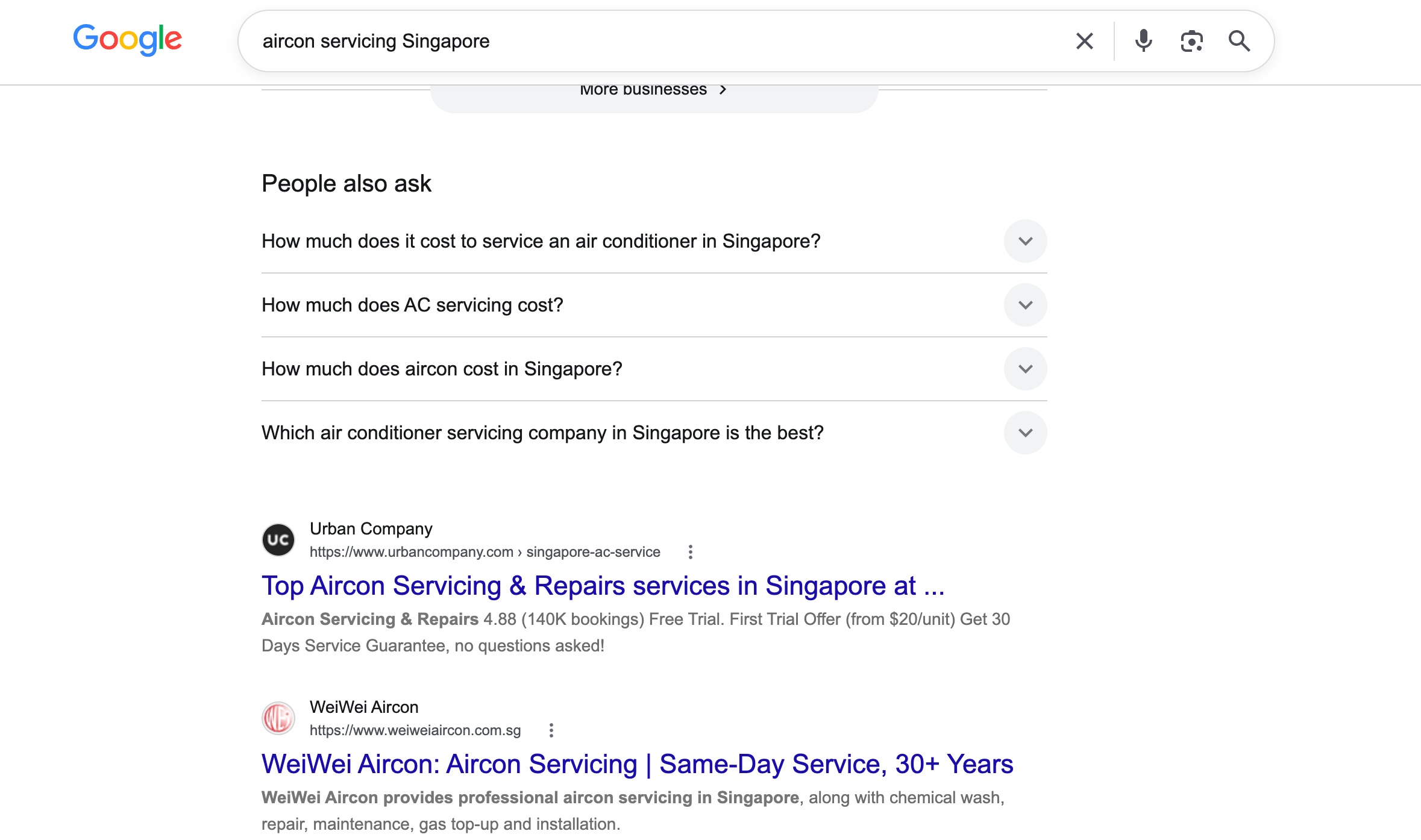
If a keyword’s intent isn’t obvious, search it on Google yourself. Say your page ranks for “aircon servicing Singapore.” Scroll through the results and note the questions in the People Also Search For section. Then ask yourself honestly whether your page answers them. Repeat this for the other keywords the page ranks for, not just the main one.
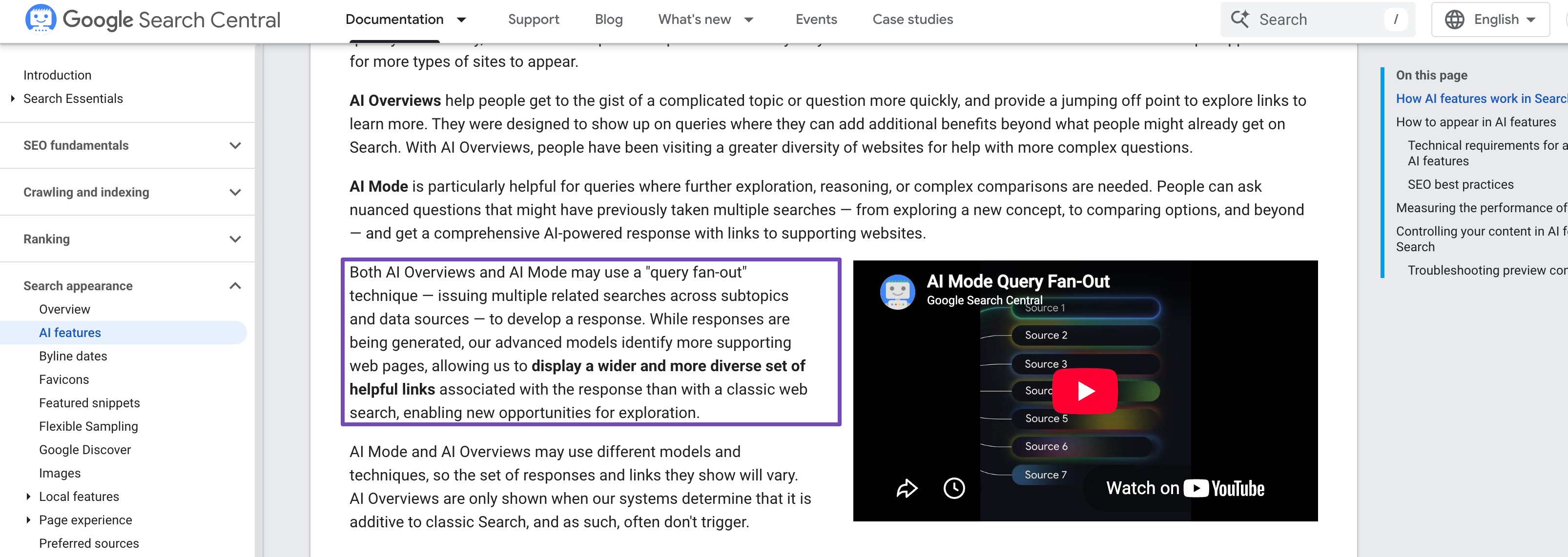
This step matters even more for AI search. Google says AI Overviews and AI Mode may use a “query fan-out” technique, running several related searches across subtopics to build one answer. A page that covers those related questions has more chances to be pulled in.
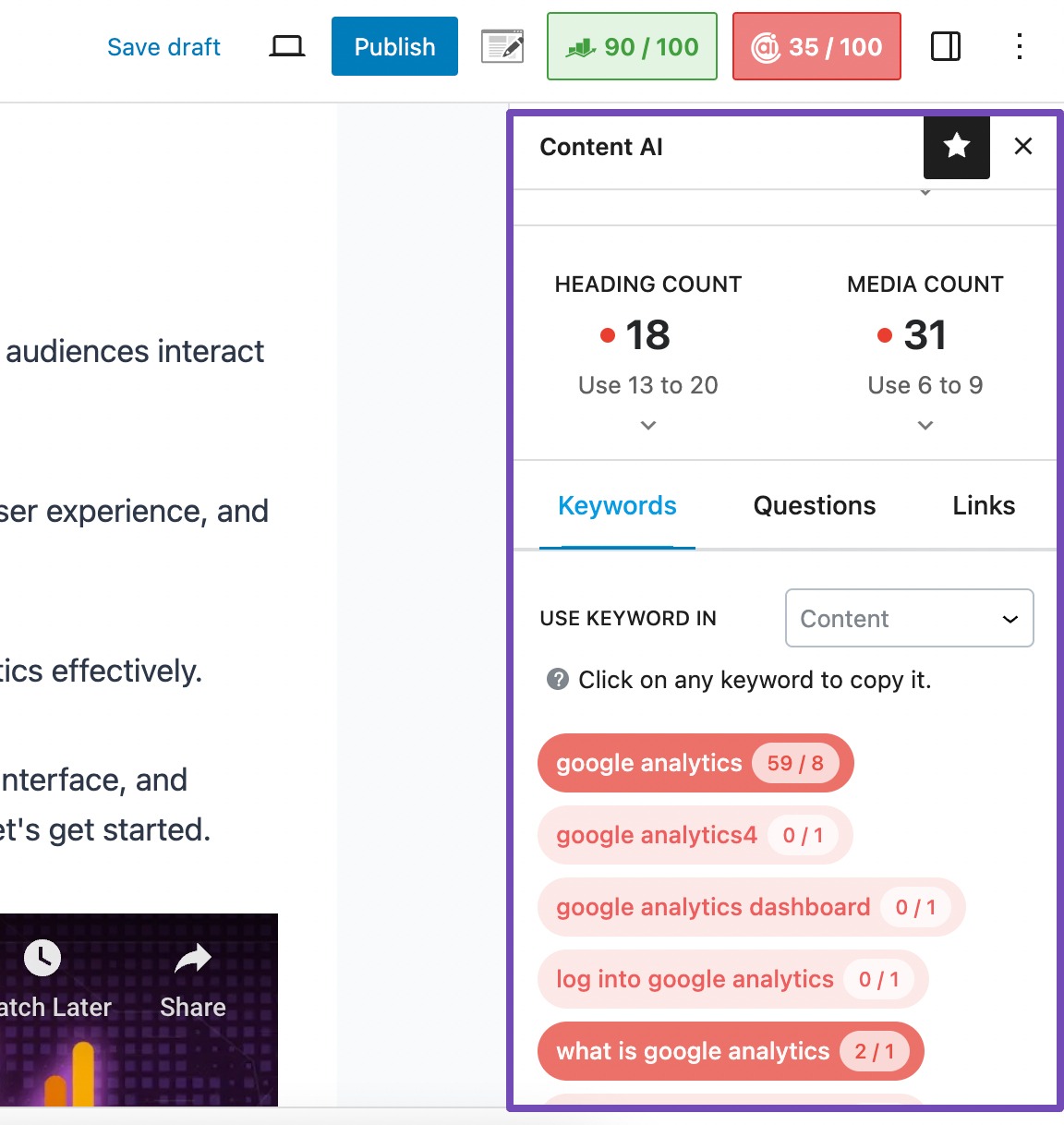
Content AI speeds this up. In the post editor, open the Rank Math sidebar, select the Content AI tab, choose the country you operate in, enter your focus keyword, and click Research. Content AI analyzes the pages already ranking in that location and suggests the following improvements:
- A recommended word count
- How many internal and external links the page should have
- Related keywords to include
- Questions the page should answer
- Credible external sources worth linking to
Note: Content AI is part of Rank Math AI and requires an active subscription.
2.3 Make the Page Impossible to Copy
A differentiated page is one whose content only makes sense for your business. Here’s a simple test: if you could paste your page onto a competitor’s website and nobody would notice, it needs work.
A differentiated service page usually spells out the following details: (aircon servicing example mentioned above)
- What’s included: for example, general servicing covers inspection, cleaning, and final checks
- What’s not included: stated upfront, so there are no surprises
- What happens when you find a problem: if a unit still isn’t cooling after cleaning, do you explain what needs investigating and get approval before any chargeable work?
- Every add-on cost: listed clearly, not hidden behind “starting from”
- Proof: customer reviews and real past jobs, with photos if you have them
This helps customers compare the work, not just the price. If you leave it out, they’ll assume your higher quote buys the same service as the cheaper one down the road.
It also helps with GEO. Google’s guidance says unique, non-commodity content is what it wants to surface in its AI experiences, and AI tools in general can only describe what they can find. A page that clearly explains your process gives them something specific to say about you.
2.4 Add Relevant Internal Links
Internal links connect your important pages to related pages on your site, which helps search engines understand your topical relevance and helps visitors find their next step.
Google lists making content “easily findable through internal links” as one of the SEO basics that still matter for AI features.
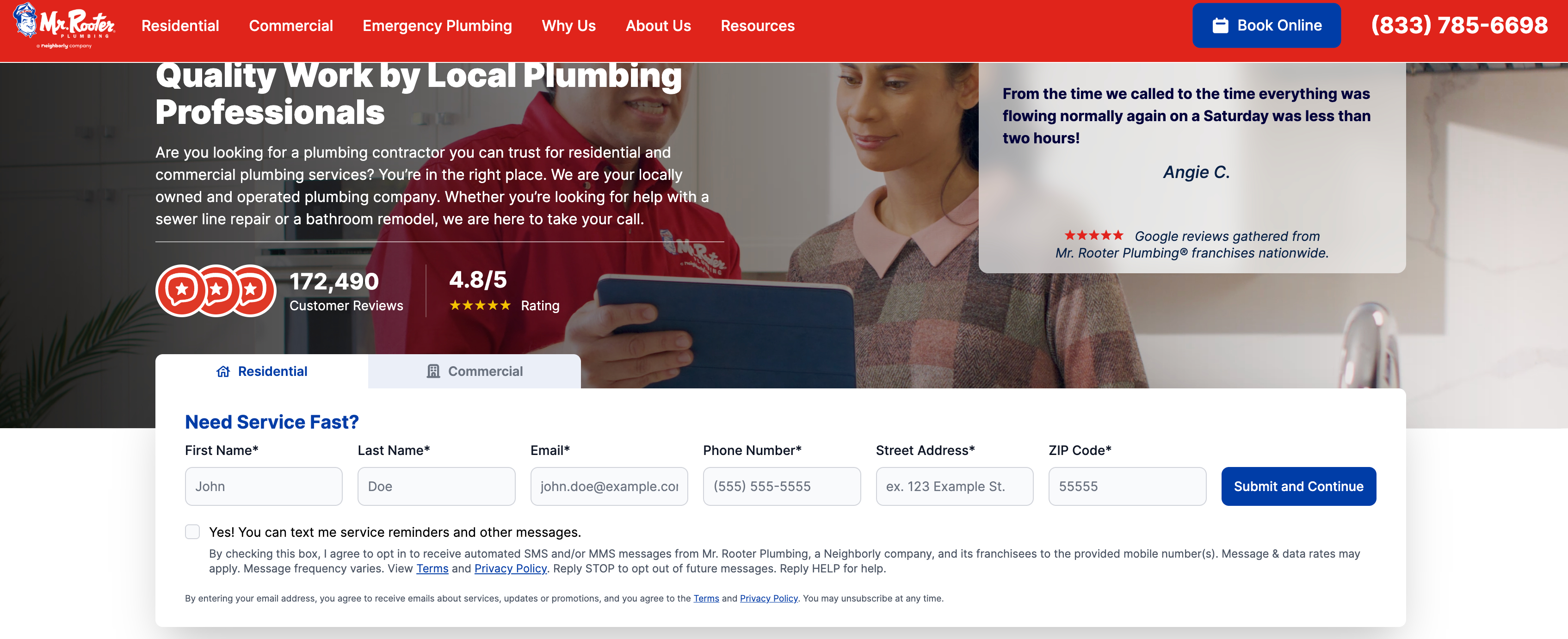
Mr. Rooter Plumbing is a good example. One of its service pages links to the booking page, related service pages, the pricing page, nearby location pages, and supporting blog posts. Every link gives the visitor a sensible next move.
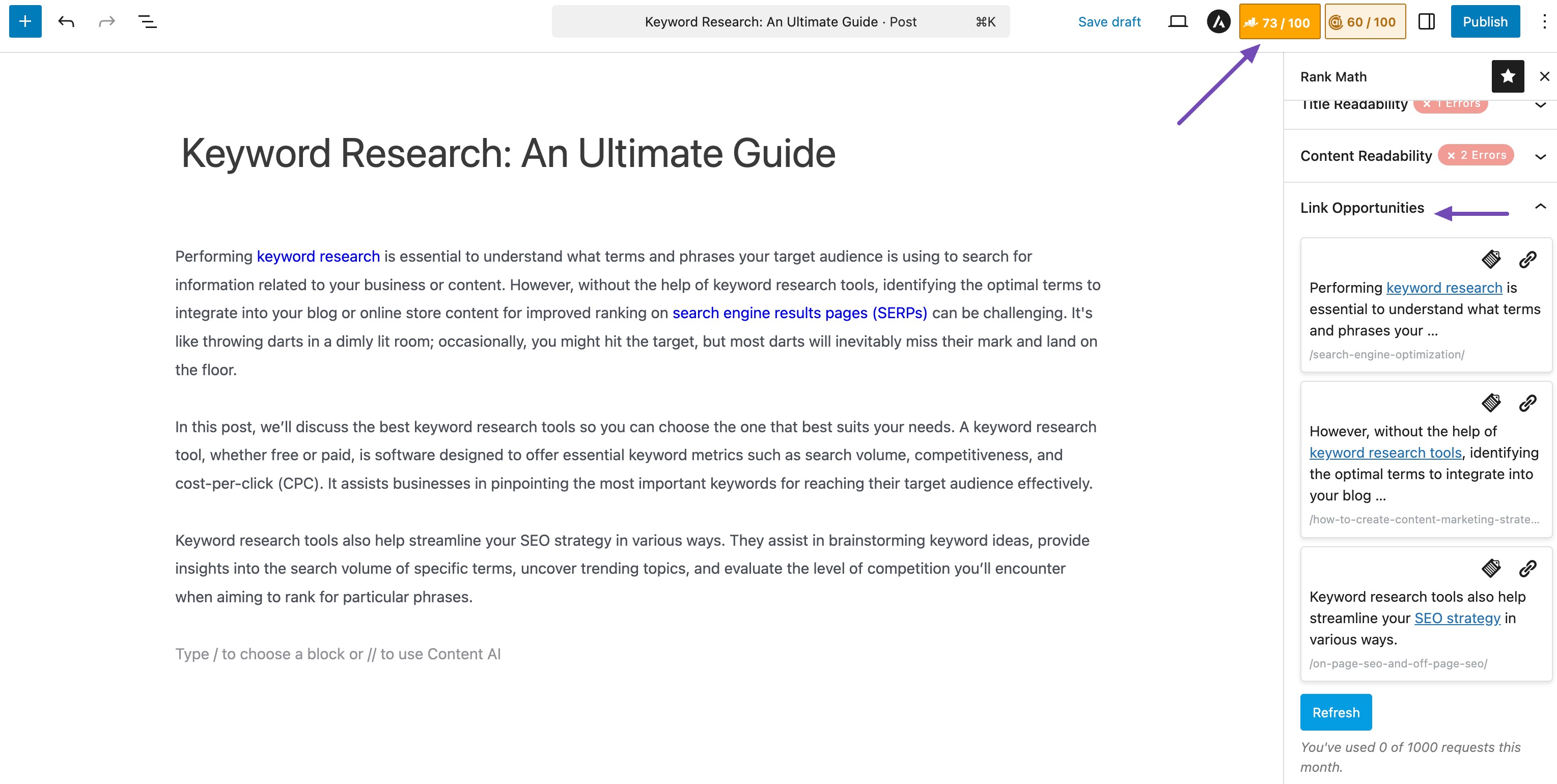
If you’re not sure what to link to, Rank Math AI can suggest links for you. On the page, open the Rank Math sidebar, select the Rank Math AI tab, expand Link Opportunities, and click Generate. It scans the page and the rest of your site, then recommends links with anchor text. Click a suggestion to add it.
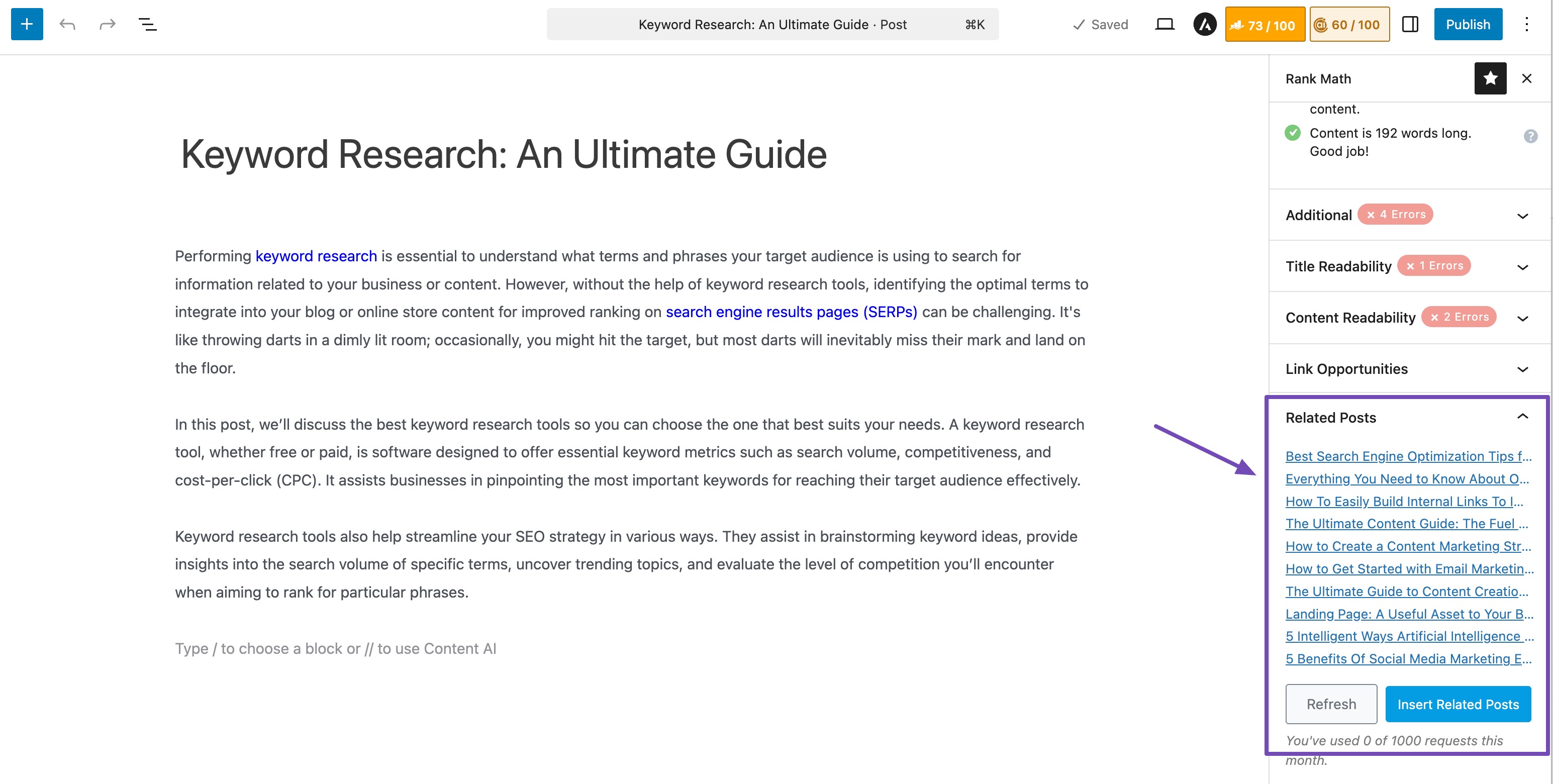
You can also use the related posts feature in Rank Math. To do so, navigate to the General tab of Rank Math and scroll to the Related Posts section, as shown below. Click Generate, wait a moment, then click Insert Related Posts to add them to the page. The number of posts shown depends on the block settings.
2.5 Clean Up the On-Page and Technical Basics
On-page and technical basics are the elements that help search engines and AI tools find, read, and trust your page. They won’t win rankings on their own, but they remove friction.
Run through these checks on every important page:
- SEO score: aim for at least 80 in Rank Math. It isn’t a ranking guarantee, but it means the page is easy to crawl and understand. If the sidebar flags an issue, click Fix with AI.
- Heading structure: one H1 for the page title, H2s for main topics, and H3s for subtopics within each H2.
- Answer-first paragraphs: under every heading, a short, direct paragraph that answers it. AI tools often lift exactly that paragraph.
- Schema markup: add the type that fits the page, such as LocalBusiness, Service, Product, or FAQ, using Rank Math’s Schema Generator. Google’s one rule here is that structured data must match what’s visible on the page.
- Crawl access: check that your robots.txt file, CDN, or security plugin isn’t blocking Googlebot or the AI crawlers you want to be found by.
- Freshness: update the page when prices, services, or details change, and show the date.
That last point is worth pausing on. Updating a page isn’t about changing the date for the sake of it. It’s about keeping prices, offers, and details accurate, because stale information is exactly what makes customers (and AI tools) lose trust.
Important pages checklist:
☐ List every page that drives sales or inquiries
☐ Review six or more months of data in Rank Math Analytics, with Google update markers on
☐ Check the Search Console Generative AI report for AI Overview and AI Mode impressions
☐ Check the intent behind each ranking keyword on Google
☐ Run Content AI research for each important page
☐ Spell out inclusions, exclusions, process, and add-on costs
☐ Add relevant internal links and related posts
☐ Reach an SEO score of 80+, fix headings, and add matching Schema
☐ Confirm crawlers aren’t blocked and key details are up to date
3 Audit Your Public Reputation
Public reputation is what customers say about your business outside your own website, on Google reviews, review platforms, forums, and social media. It ties directly to GEO because AI tools pull from those sources when they describe you.
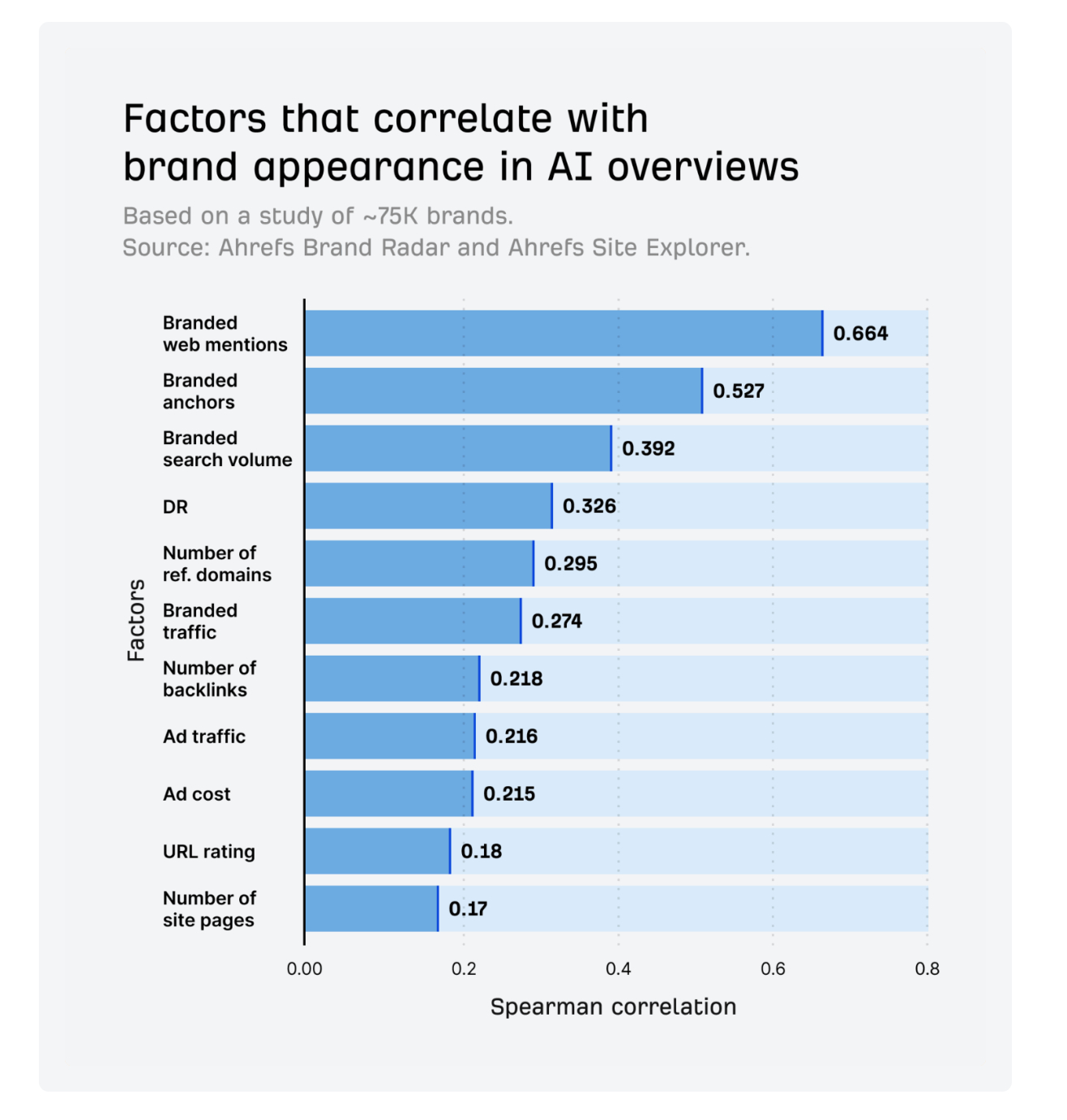
There’s data behind this. In a 2025 study of 75,000 brands, Ahrefs found that brand web mentions had a correlation of 0.664 with visibility in AI Overviews, compared with just 0.218 for backlinks. Correlation isn’t causation, but the pattern is clear: what the rest of the web says about you shapes what AI says about you.
If your website says you’re reliable, but customers elsewhere keep describing the same problems, AI answers will reflect the complaints, not your copy.
Start by opening an incognito window and searching the questions a cautious buyer would ask:
- Is [your business] reliable?
- Is [your business] any good?
- What do customers complain about with [your business]?
Look at what the AI Overview says and which sources it cites. Then ask ChatGPT, Perplexity, and Claude the same questions.
If the answers mention deep problems, like orders not arriving or rude, slow support, that’s an operations issue, not an SEO one. No amount of page optimization will fix a business that customers are unhappy with. Turning that around takes time and effort, and it starts with the product or service itself.
For smaller issues, be proactive. Respond to every negative review on your Google Business Profile and address complaints on the sites AI tools cite. A common rule of thumb is to aim for at least 10 positive reviews for every negative one, and in practice you’ll usually need more.
To keep an eye on how AI describes you over time, use Rank Math’s AI Visibility. Navigate to Rank Math SEO → AI Visibility and add your brand. Based on the tracking frequency and AI platforms you choose, AI Visibility automatically runs buyer-style prompts and analyzes the responses.
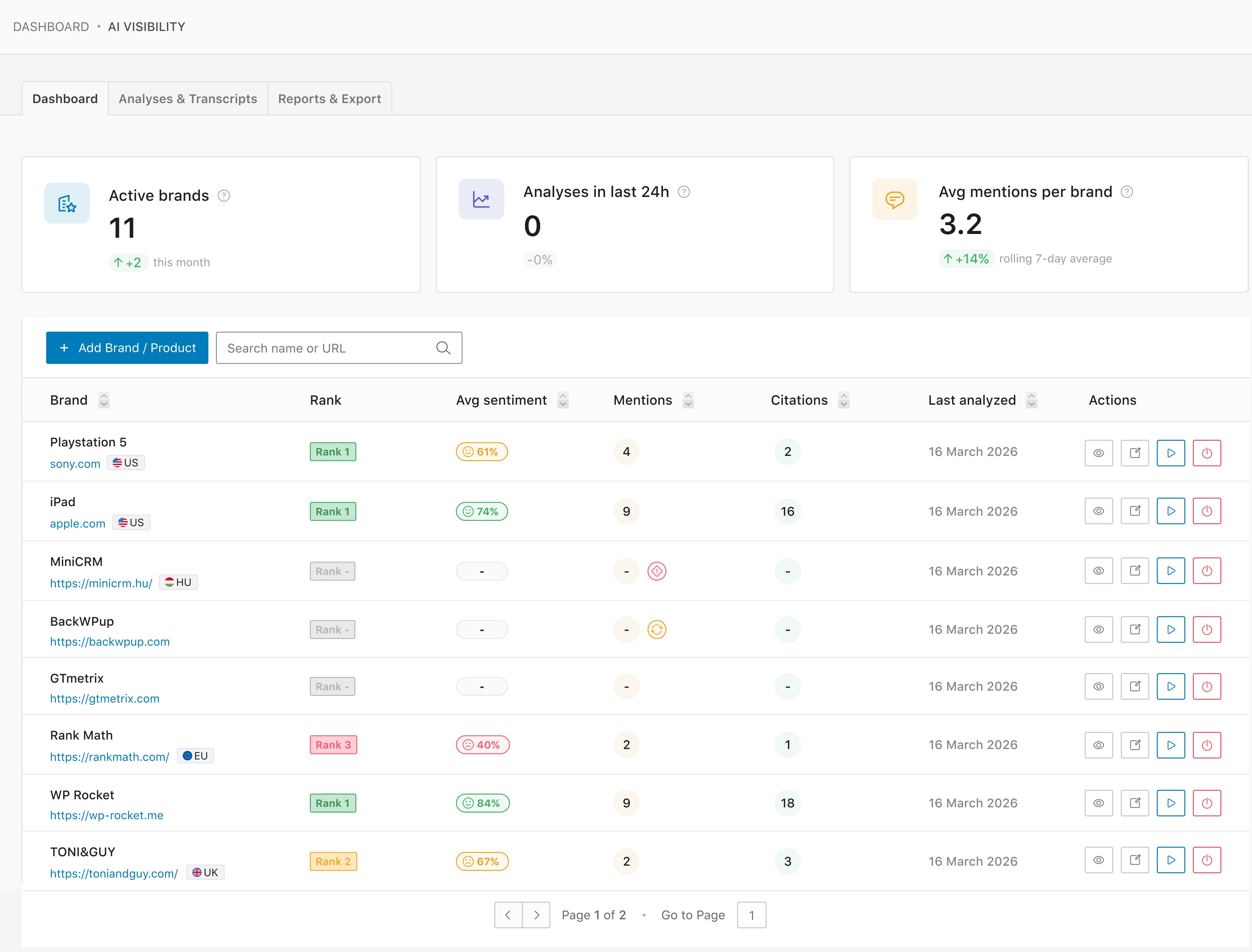
AI Visibility gives you the following views into how AI describes your brand:
- Buyer queries and responses: the prompts AI Visibility generated and what each AI model said
- Extracted signals: click View to see exactly what the tool pulled from each response
- Competitors: which brands AI mentions alongside or instead of yours
- Sentiment: under Analyses & Transcripts, click View Run Detail to see whether mentions are positive, neutral, or negative
If there’s no sentiment for a query, your brand wasn’t mentioned at all. If sentiment is poor, that’s where to focus. Sections 4 to 7 cover how.
Note: AI Visibility is a Rank Math AI feature and requires an active subscription. It currently tracks ChatGPT and Google Gemini.
Reputation checklist:
☐ Track mentions, competitors, and sentiment in AI Visibility
☐ Search reliability and complaint queries in incognito and note AI Overview sources
☐ Ask ChatGPT, Perplexity, and Claude the same questions
☐ Fix operational problems before marketing ones
☐ Respond to negative reviews on Google and on sources AI cites
☐ Ask happy customers for reviews, without incentives tied to a positive rating
4 Find the Attributes Customers Search For
Attributes are the specific details inside a search, like “pet friendly,” “outdoor seating,” or “seats 15 people.” They matter more than ever because people now ask AI tools long, detailed questions instead of typing short keywords.
For local businesses, the best place to find attributes is your competitors’ Google reviews.
Say you run a dog grooming business. Search “dog grooming” on Google Maps, open a competitor’s listing, and read through the reviews.
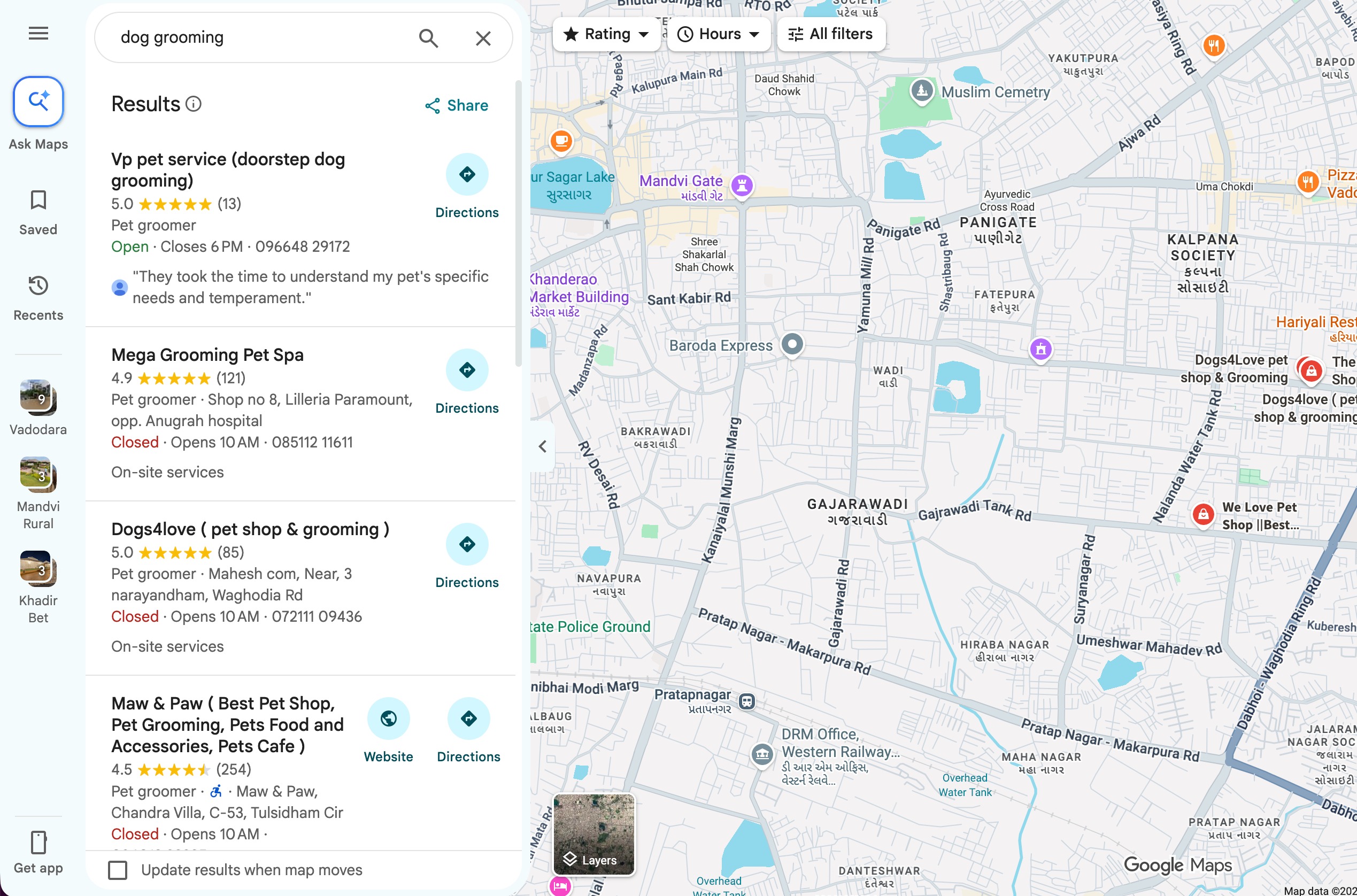
Jot down every attribute customers mention. In this example, they might include:
- Patient groomers
- Handling fussy or hyper dogs
- Teeth brushing
- Senior dog grooming
- Styling
- Affordability
- Complimentary photos
- Spotting skin issues
Move on to the next competitor and add anything new. You’ll start seeing patterns quickly.
Once you know which attributes matter, put them to work in three places:
- Your website: mention them naturally on the relevant service and location pages
- Your Google Business Profile: fill in every attribute option that applies, and mention the rest in your description, services, and posts
- Your review requests: if customers loved how you handled their anxious dog, it’s fine to ask them to mention what stood out, as long as you’re not scripting or rewarding positive reviews
That way, when someone asks a question with several attributes, your business has a better chance of being matched and recommended.
For SaaS businesses, the process is similar, but the sources are different. Read through Reddit, Quora, Trustpilot, G2, and similar platforms to understand how people feel about you and your competitors. Look for recurring problems, frustrations, and feature requests, then use them to improve both your product and the way you describe it.
Attributes checklist:
☐ Read competitor reviews on Google Maps and list every attribute
☐ Add relevant attributes to your website and Google Business Profile
☐ (SaaS) Review Reddit, Quora, Trustpilot, and G2 for recurring themes
☐ Feed common complaints and requests back into the product
5 Show Your Work With Video
Video is the fastest way to show customers what they’re paying for. Someone can read your whole service page and still not understand why your quote is higher, not because the page lacks detail, but because most people skim.
The lesson is simple: your website and Google Business Profile aren’t the only places customers find you. If you haven’t started making videos, start, and embed them on your important pages.
When you embed them, add a short written summary or transcript underneath. Google recommends keeping important content available in text form, and a summary gives both readers and AI tools something to quote.
Rank Math PRO handles the technical side. With the Video Sitemap enabled under Rank Math SEO → Sitemap Settings, Rank Math automatically adds video Schema and includes the video in your sitemap. That helps your page show up in regular search results and in Google’s Videos tab.
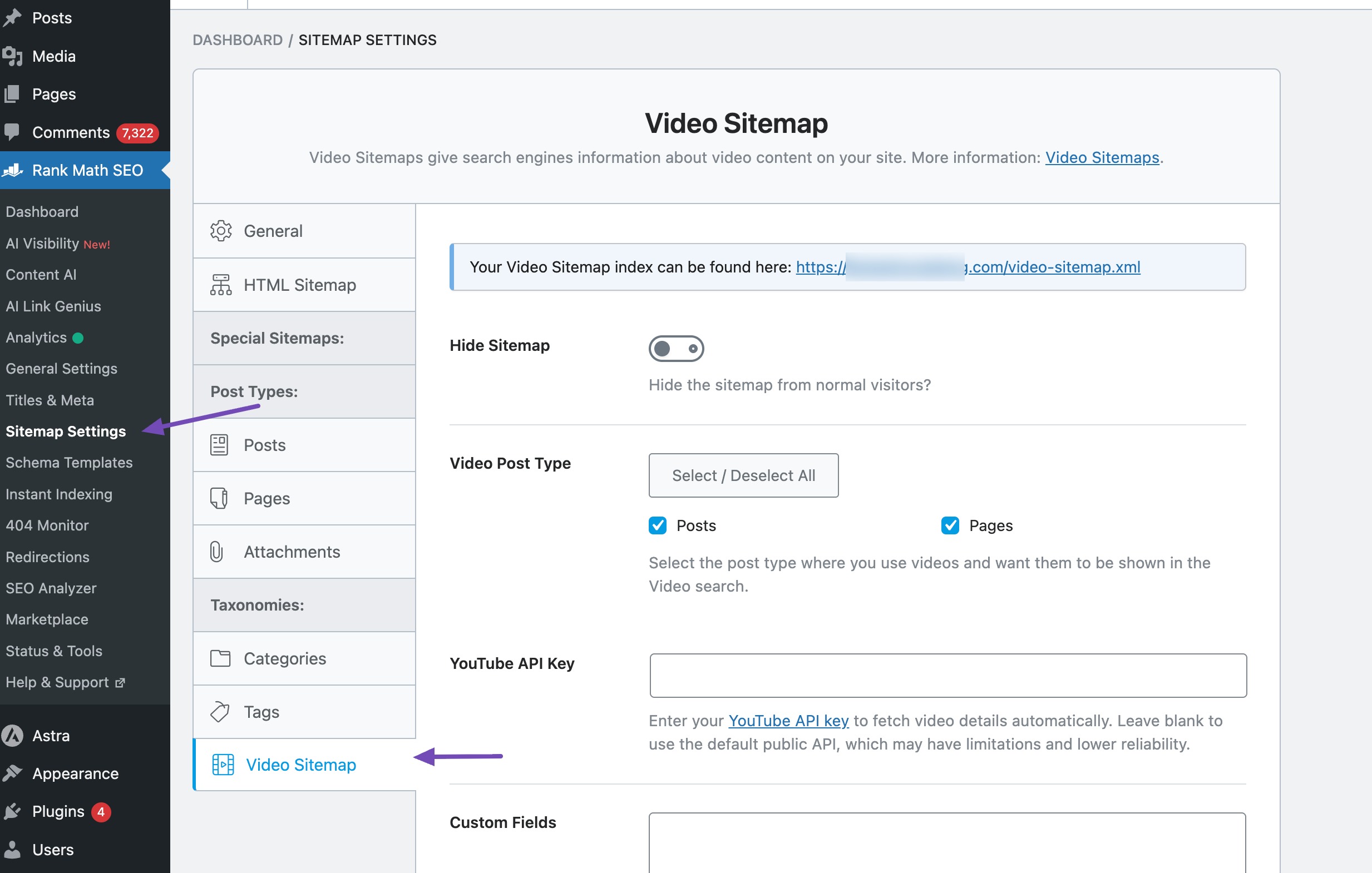
Note: Video Sitemap and automatic video Schema are Rank Math PRO features.
Video checklist:
☐ Record short videos explaining your process and what’s included
☐ Publish them where your customers spend time (YouTube, TikTok, Instagram)
☐ Embed videos on your important pages with a written summary or transcript
☐ Enable the Video Sitemap in Rank Math PRO
6 Reach New Audiences Through Sponsorships and Affiliates
Sponsorships and affiliate partnerships put your brand in front of an audience that someone else has already built trust with. Think of it as word-of-mouth marketing, just online.
The two models work differently:
- Sponsorship: you pay for agreed exposure, such as a set fee for a number of views or a fixed contract
- Affiliate partnership: the partner earns a commission only when their recommendation leads to a sale
The right partners depend on what you sell. Common partnership options by business type include:
- Local businesses: a local newsletter, a local creator, or an industry partner who reaches people in your service area
- SaaS companies: an educator, consultant, integration partner, or niche creator who shows how your software solves a real problem
- E-commerce brands: a creator, review publisher, or specialized community that helps shoppers pick the right product
This helps GEO as well. Every genuine recommendation on another site, newsletter, or YouTube channel is one more brand mention, and as the Ahrefs data in Section 3 showed, brand mentions are one of the strongest signals linked to AI visibility.
Partnerships checklist:
☐ List creators, newsletters, and partners your customers already follow
☐ Decide between a sponsorship, an affiliate model, or both
☐ Agree on clear disclosure for every paid or affiliate mention
☐ Start with one or two partners and measure the results
7 Join the Communities Where Your Customers Ask Questions
Community participation means showing up, genuinely, in the online places where potential customers ask questions, compare options, and share experiences. Think Reddit, Quora, Facebook groups, Slack communities, and niche forums.
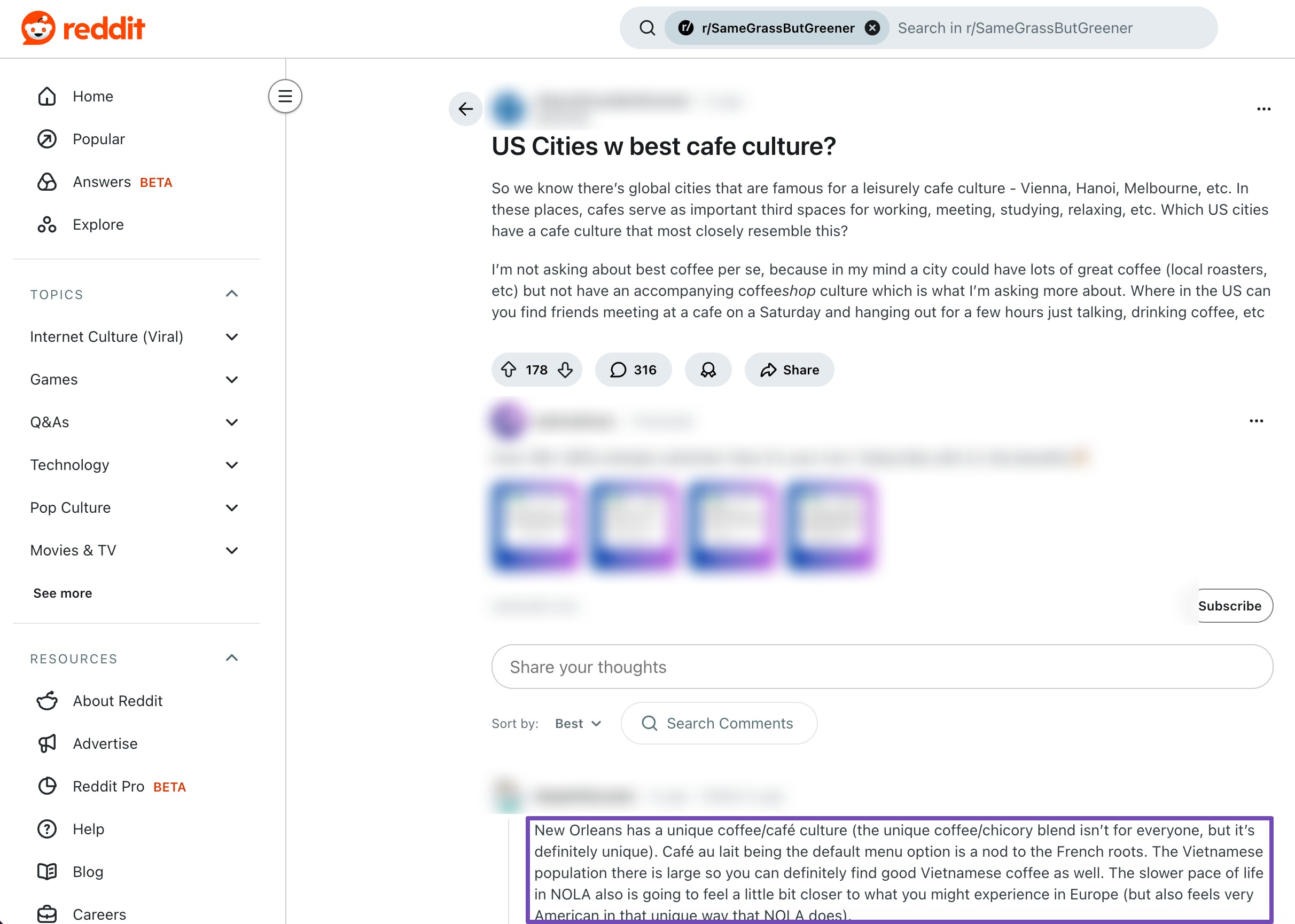
Community participation does two jobs at once. You learn what customers are confused about, and you become a helpful voice before they decide what to buy.
What that looks like depends on your business:
- Local businesses: answering questions in homeowner or neighborhood groups where people are trying to understand a service, a quote, or a repair
- SaaS companies: helping in industry forums, professional Slack groups, or product discussions where people are stuck on a real workflow problem
- E-commerce brands: contributing to hobby or buyer communities where people need help choosing, using, or maintaining a product
The benefit isn’t the link or the brand mention. It’s hearing the exact words people use, the objections they raise, and the questions your website still doesn’t answer. Feed that back into your important pages, and the whole checklist gets stronger.
A quick word on etiquette: be open about who you are. Most communities, Reddit included, have rules about self-promotion, and people can spot a disguised pitch from a mile away. Helpful answers from someone who clearly works in the industry tend to earn far more trust than anonymous praise.
Community checklist:
☐ Find two or three communities where your customers are active
☐ Answer questions helpfully, and be upfront about who you are
☐ Note recurring questions and objections
☐ Update your important pages to answer them
8 How to Measure Your SEO and GEO Progress
Measuring SEO and GEO means tracking both how your pages perform in search and how often AI tools mention and send visitors to your brand. No single tool covers everything, so it helps to combine a few.
These tools give you a fairly complete picture:
- Rank Math Analytics: clicks, impressions, keyword positions, and page-level trends from Google Search Console
- Search Console Generative AI report: how often your pages appear in AI Overviews and AI Mode
- Rank Math AI Visibility: brand mentions, competitors, and sentiment in ChatGPT and Gemini answers
- Google Analytics 4: referral visits from sources like chatgpt.com, perplexity.ai, and gemini.google.com, plus whether those visitors convert
- Your own sales data: ask new customers how they found you, and add “ChatGPT” or “AI assistant” as an option
Check these monthly rather than daily. AI answers vary from one run to the next, so trends over several weeks tell you far more than any single snapshot.
9 Frequently Asked Questions
What Is the Difference Between SEO and GEO?
SEO (search engine optimization) helps your pages rank in search results, while GEO (generative engine optimization) helps your brand get mentioned and recommended in AI answers from tools like ChatGPT, Gemini, and Google AI Mode. The two overlap heavily, because AI tools rely on the same pages, reviews, and mentions that search engines use.
Do I Need Special Schema or Files to Appear in AI Overviews?
No, Google says there are no additional technical requirements and no special schema.org markup needed to appear in AI Overviews or AI Mode. A page just needs to be indexed and eligible to show a snippet. Regular structured data that matches your visible content is still worth adding.
Which Pages Should I Optimize First?
Optimize the pages that directly drive revenue first: service, pricing, location, product, and comparison pages. Improvements to these pages have the clearest link to sales, which makes the results easier to measure.
How Can I See What AI Says About My Business?
You can ask ChatGPT, Perplexity, Claude, and Google AI Mode directly, using the questions a cautious buyer would ask. For ongoing tracking, Rank Math’s AI Visibility automatically runs buyer queries and reports your mentions, competitors, and sentiment over time.
10 Conclusion
Most sites aren’t missing one big thing. They’re missing a handful of small ones: a pricing page that doesn’t explain what’s included, a few unanswered negative reviews, attributes nobody thought to mention, a process customers can’t see.
You don’t need to fix everything at once. Pick the biggest gap and start there. Improve your important pages, earn trust, learn what customers actually need, show your work, reach new audiences, and help out where customers ask questions. Then check your numbers each month and adjust.
Your competitors are already showing up in AI answers. Run this checklist and make sure your brand does too.
If you like this post, let us know by tweeting @rankmathseo.