
Rank Math MCP lets you interact with the Rank Math SEO plugin right from your AI assistant. This means you can review and fix SEO and AI Visibility issues directly from your AI assistant, without logging into the WordPress dashboard. However, you first need to set up Rank Math MCP to get started.
In this knowledgebase article, we’ll walk you through everything you need to set up Rank Math MCP, from installing the required software to generating your WordPress credentials and connecting your AI assistant of choice.
In this article, we’ll cover:
1 What Is MCP?
MCP (Model Context Protocol) is an open standard that allows AI chatbots and assistants like Claude, ChatGPT, and GitHub Copilot to securely connect with external tools and data sources.
In the case of Rank Math, MCP lets your AI assistant communicate with Rank Math all without logging into WordPress. With this, you can retrieve SEO and AI Visibility insights, run SEO audits, and perform multiple content optimization tasks, all from your AI assistant.
For example, we instruct our AI assistant to run an SEO audit on our site and tell us any issues it detects. It will run the audit and then return a response, as shown below.
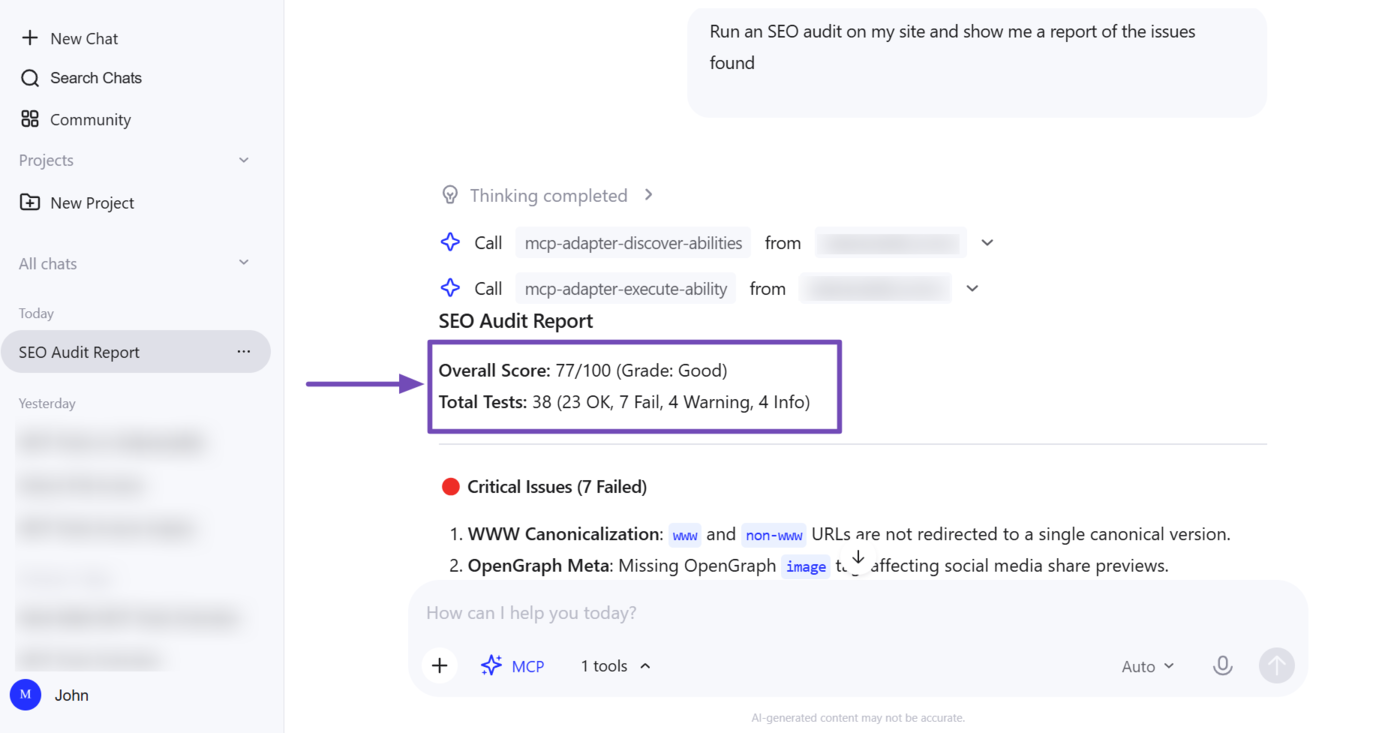
We can also instruct our AI assistant to start tracking a brand using AI Visibility, as shown below.
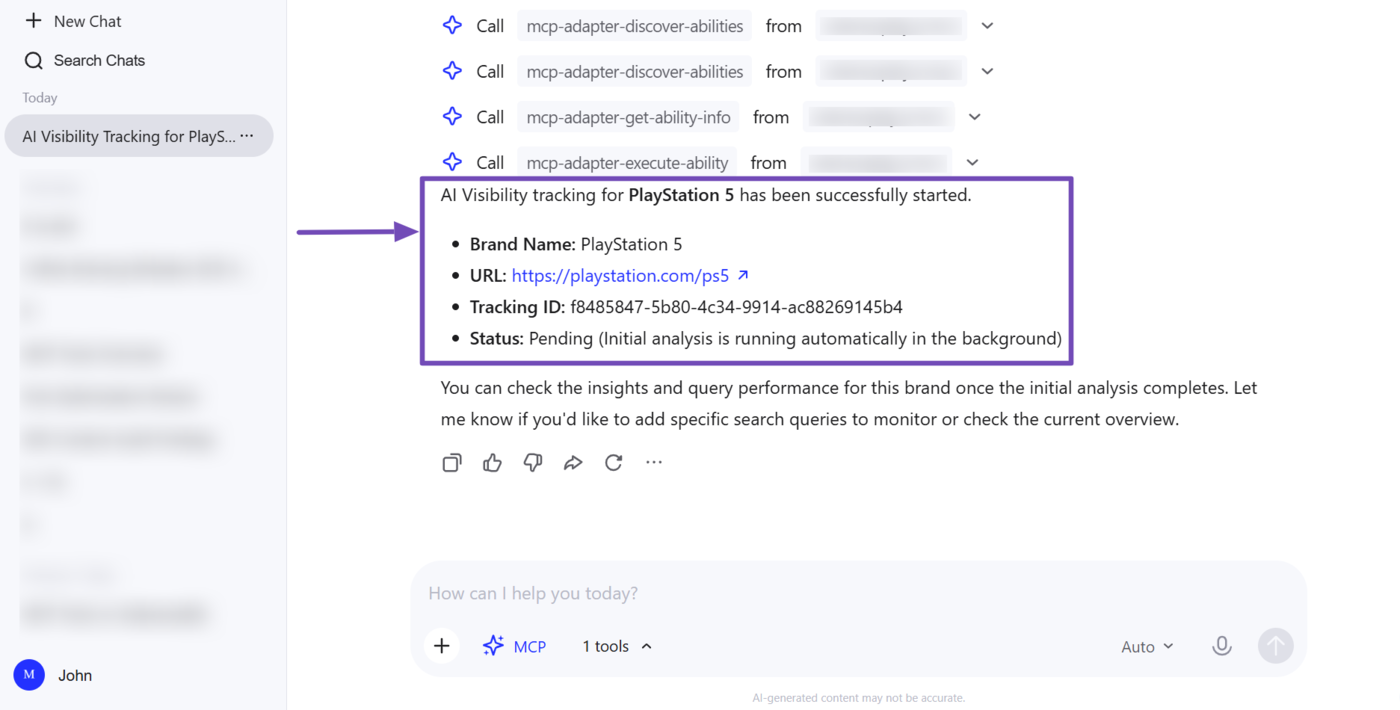
These are just two of the many things Rank Math can do using MCP. You can perform multiple other tasks too. For a full list of the MCP tools available in Rank Math, you can refer to this article.
2 Getting Started With Rank Math MCP
There are a few things you’ll need to have in place to get started with Rank Math MCP. These fall into two categories: the software you’ll need to install, and the WordPress credentials you’ll use to authenticate the connection. Let us address them below.
- Software requirements
- WordPress credentials
2.1 Software Requirements for MCP
The software required for MCP includes:
- A WordPress website with Rank Math SEO installed
- An AI assistant that supports MCP (e.g., Claude Desktop, ChatGPT, GitHub Copilot)
- Node.js installed on your device
a. Install Rank Math on Your Site
You can refer to this article on installing Rank Math on your WordPress site.
If you already installed Rank Math, make sure to update it to the latest version, as MCP is an emerging protocol and new capabilities are regularly added to WordPress and Rank Math.
b. Download Your AI Assistant
As for your AI assistant, make sure you download the relevant desktop app on your device, as most AI platforms don’t yet support MCP on the web versions of their chatbots. Here are the download pages for some popular AI desktop apps:
c. Install Node.js on Your Device
Most AI assistant desktop apps rely on the Node package manager (npm) or the npx package runner to run MCP servers, so you will often need Node.js installed on your device, since npm and npx are both installed automatically with Node.js.
You can head to this page to download Node.js on your device.
2.2 WordPress Credentials for MCP
MCP also requires your WordPress username and an application password to work. Here’s how to retrieve or generate them from your WordPress dashboard.
a. How to Retrieve Your WordPress Username
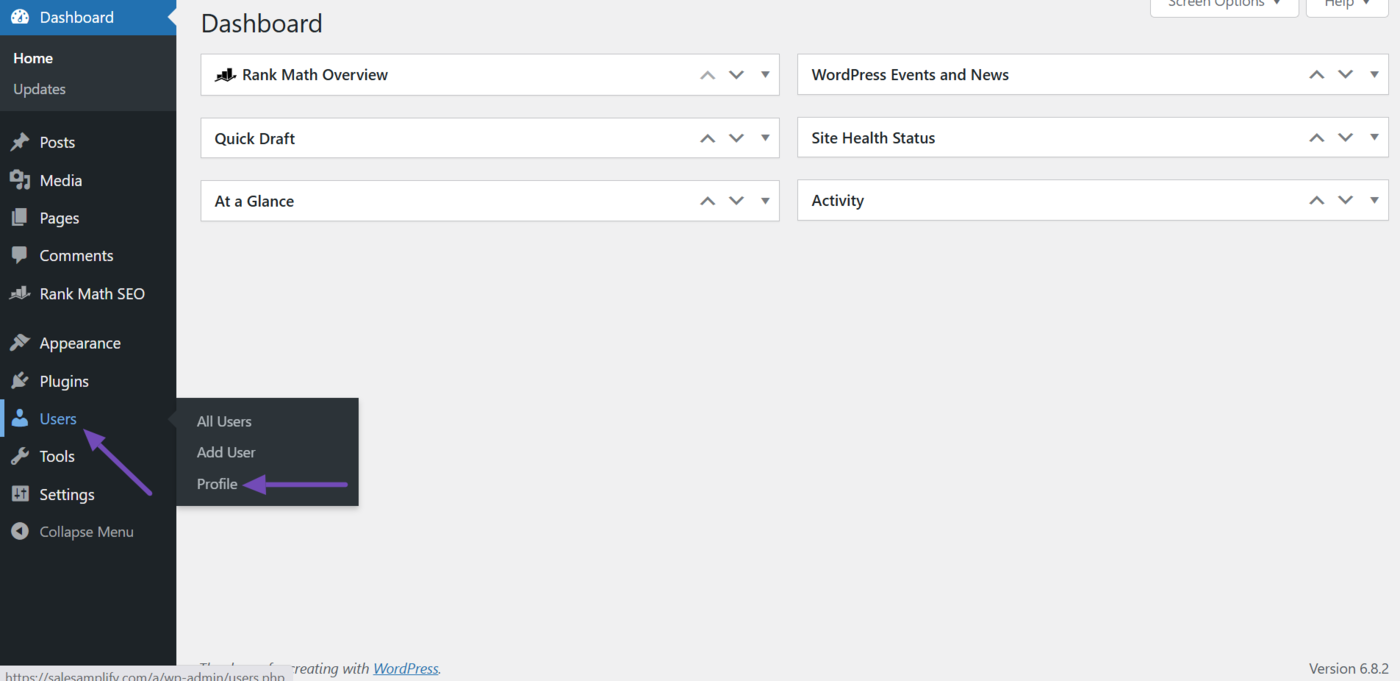
To get started, head to Users → Profile from your WordPress dashboard.
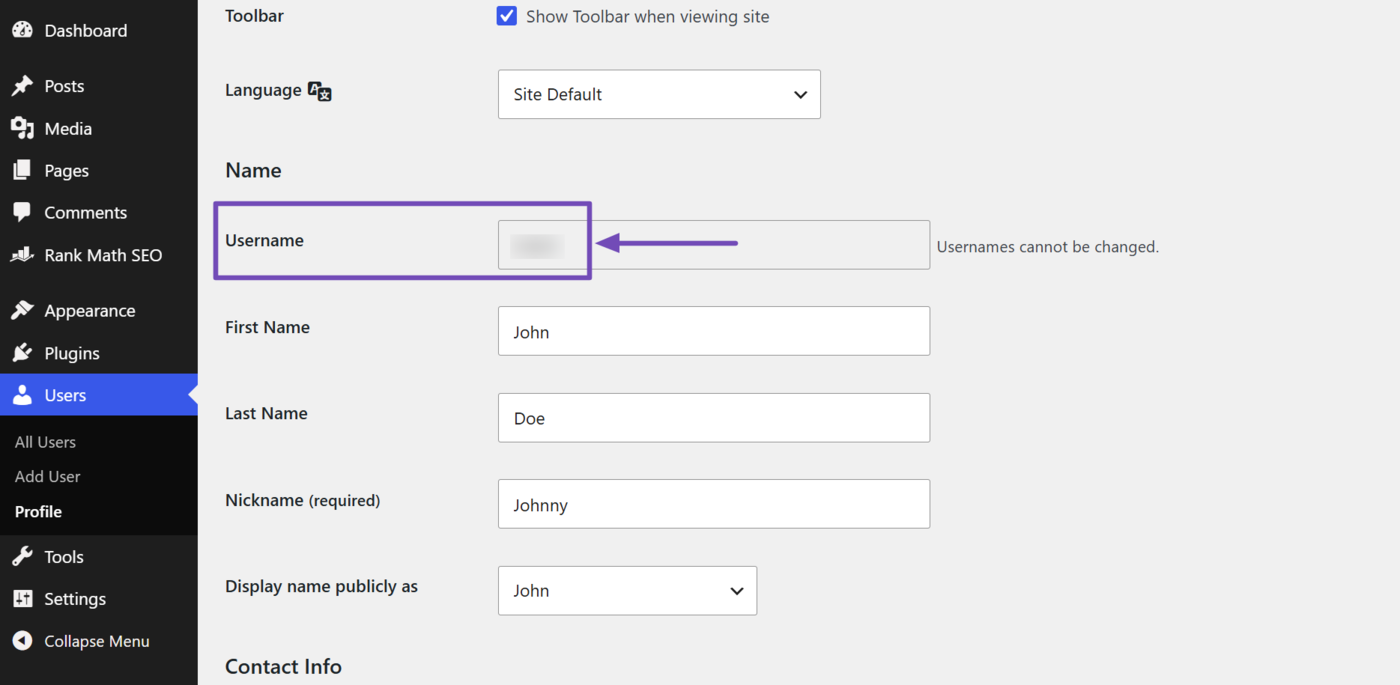
Scroll down to the Username field. Your username will be displayed there.
b. How to Generate an Application Password
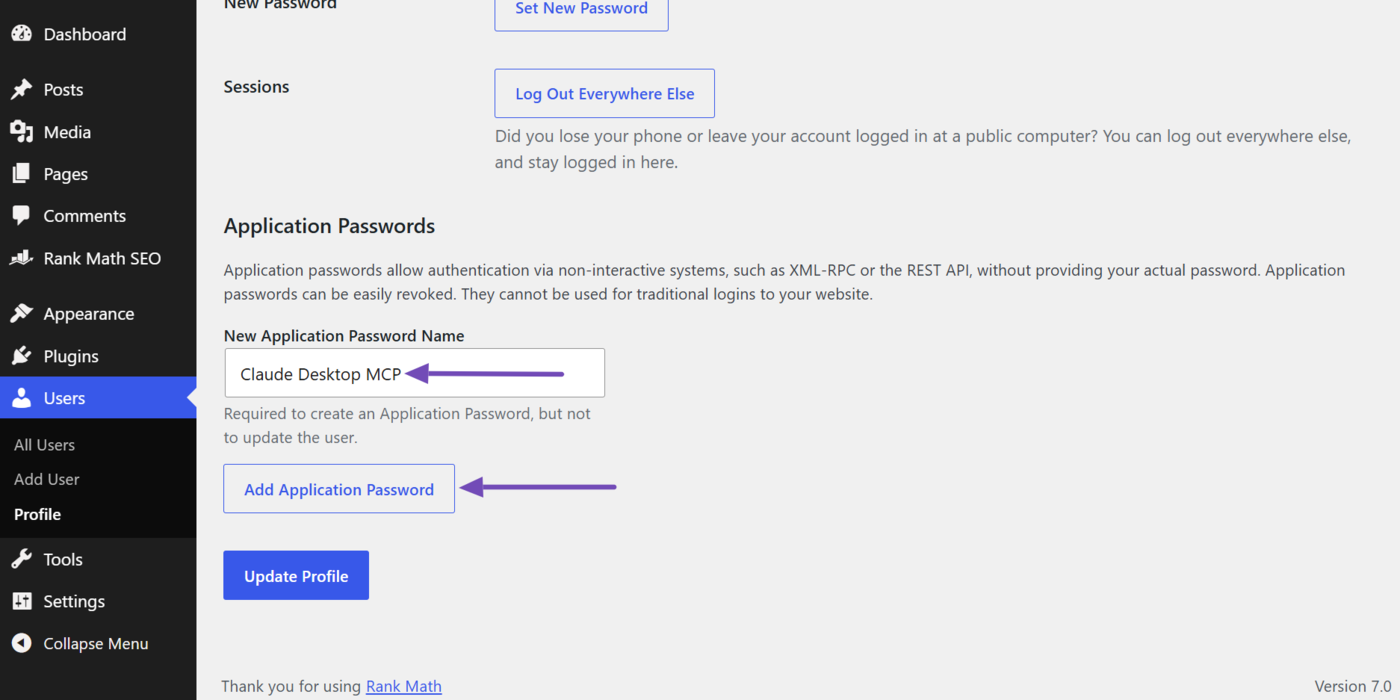
After retrieving your WordPress username, scroll down to the Application Passwords field. Here, enter a name for the password you want to create. You will use this same password to connect your AI assistant’s desktop app later.
For this example, we’re creating an application password for the Claude Desktop app, so we will name it “Claude Desktop MCP.” Once you have entered a name, click Add Application Password.
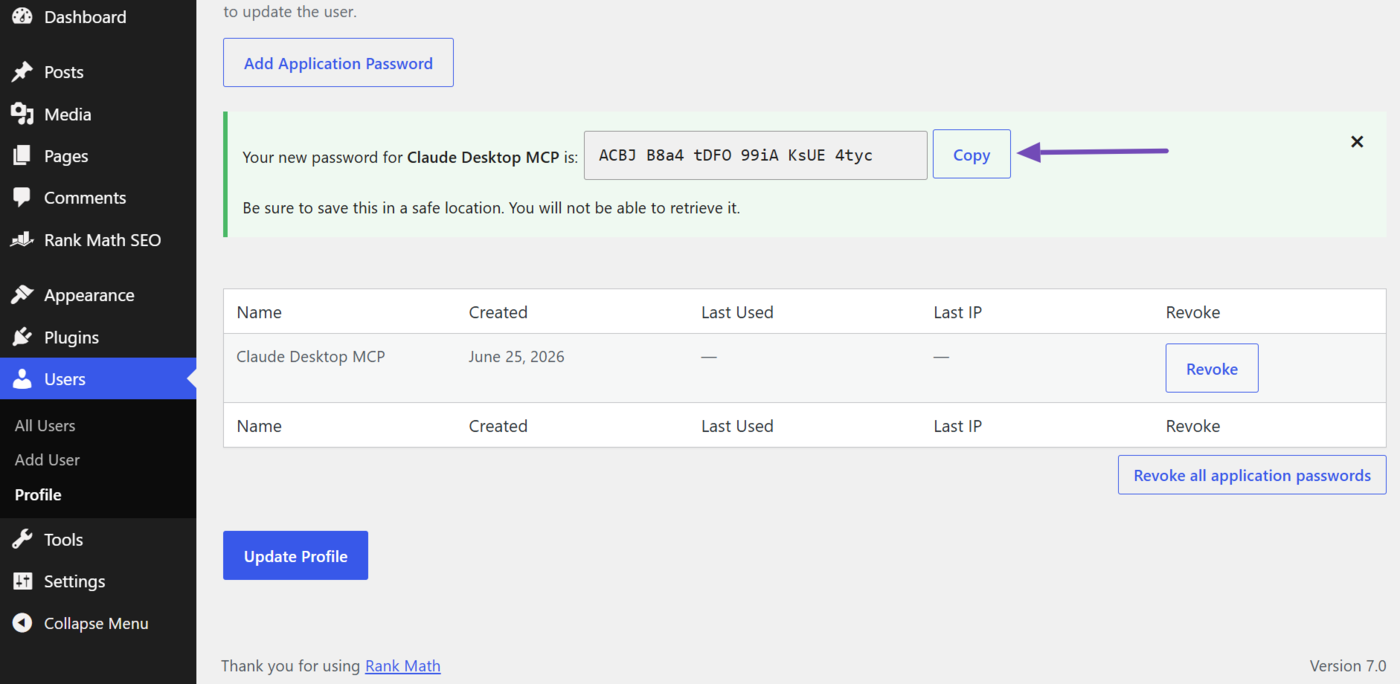
WordPress will generate the application password. Copy it somewhere safe, as WordPress will not show it to you again.
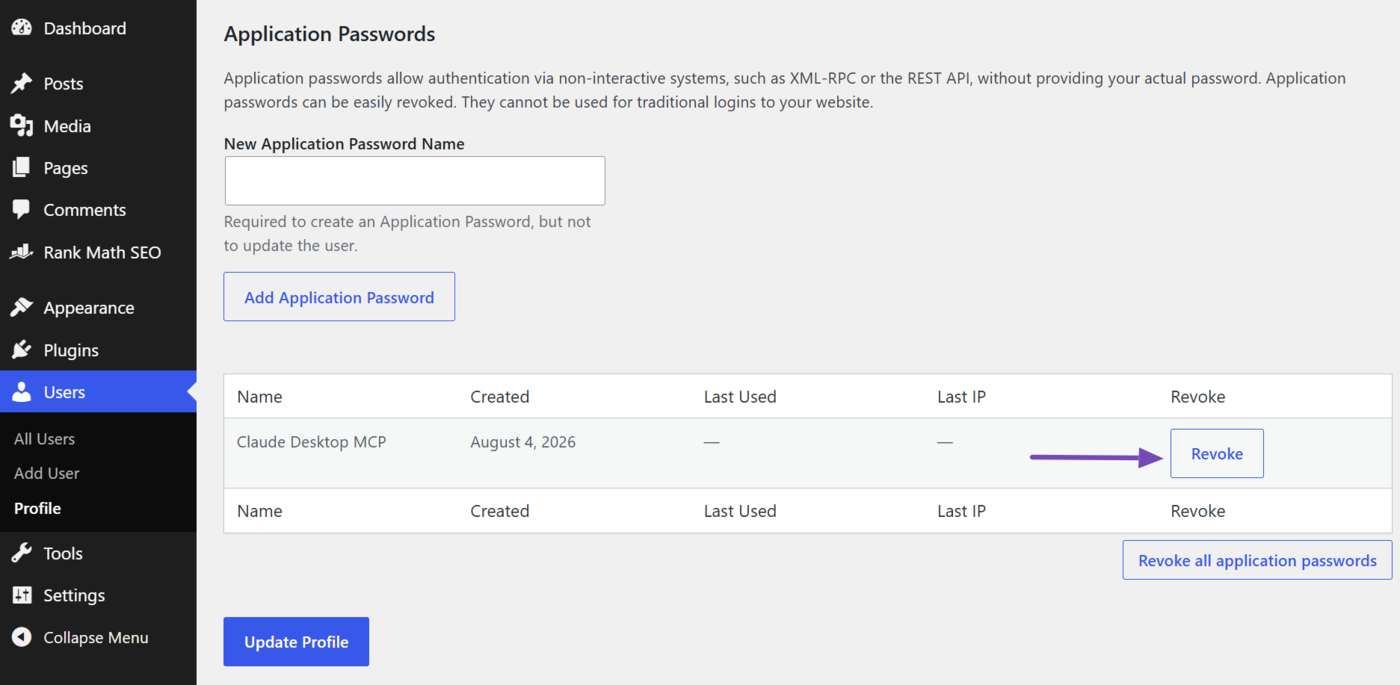
If you need to revoke this application password in the future, head to the password in the Application Passwords field and click Revoke, as shown below.
3 How to Connect Rank Math to Your AI Assistant
Now that you know more about Rank Math MCP and what you need to get started, the next step is to connect Rank Math to your AI assistant of choice using MCP.
The exact steps vary slightly depending on which AI assistant you use, so we have dedicated guides for each:
- How to Connect Rank Math With ChatGPT
- How to Connect Rank Math With Claude Desktop
- How to Connect Rank Math With GitHub Copilot
4 How to Use Rank Math MCP Tools
With Rank Math MCP connected, your AI assistant can now perform SEO tasks directly, without you logging into WordPress. To see the full list of available tools and how to use them, check out our guide on using Rank Math MCP Tools.
5 Frequently Asked Questions (FAQs)
Is Rank Math MCP free?
Yes. Rank Math MCP works with the free Rank Math SEO plugin, so you don’t need a paid plan to set it up and start using it.
Do I need a specific Rank Math plan to use MCP?
No, you do not need a specific plan to use Rank Math MCP. However, if you use your AI assistant to access Rank Math’s PRO features such as auditing a competitor’s site, or AI features such as retrieving an AI Visibility report through MCP, then you will need the corresponding Rank Math PRO or AI plan, just as you would if you were using those features directly inside WordPress.
Can I use MCP with multiple sites?
Yes, you can use Rank Math MCP with multiple sites. However, you will need to connect each site to your AI assistant individually.
Can I use Rank Math MCP with multiple AI assistants?
Yes, you can use Rank Math MCP with multiple AI assistants. For example, you can connect the same site to both Claude Desktop and ChatGPT at the same time.
Is my data secure when using MCP?
MCP uses secure authentication methods like application passwords rather than your main WordPress login credentials. This limits what the connected AI assistant can access and reduces the risk if a credential is ever compromised. You can always revoke MCP’s access at any time from your WordPress dashboard.
That is all on setting up Rank Math MCP. If you have any questions, you’re always more than welcome to contact our dedicated support team, who are available 24/7, 365 days a year.