
If you manage multiple WordPress websites, whether as an agency, freelancer, or as part of a multi-site business, reviewing and optimizing each site individually can quickly become repetitive and overwhelming.
That’s where Rank Math MCP comes in. It lets you run optimization workflows across multiple sites in your portfolio at the same time, without switching between WordPress dashboards or repeating manual checks on every site.
In this knowledgebase article, we’ll show you how to audit and optimize multiple sites at once using Rank Math MCP.
How to Optimize Your Portfolio:
- Getting started
- Auditing and optimizing your portfolio
- Audit and fix SEO issues across your portfolio
- Optimize specific webpages across your portfolio
- Optimize the link health of your sites
- Compare your sites against competitors PRO
- Tracking and optimizing AI Visibility across your brands Content AI
1 Getting Started
Before we begin, you need to connect your AI assistant to Rank Math and give each connected site a clear name. We will show you how to do that below.
1.1 Connect Your AI Assistant to Rank Math
The first step is to connect your AI assistant to your site using MCP (Model Context Protocol). Here’s how to connect some popular AI assistants:
- How to connect Rank Math with ChatGPT
- How to connect Rank Math with Claude Desktop
- How to connect Rank Math with GitHub Copilot
1.2 Give Each Connected Site a Clear Name
You’ll often reference specific sites (or groups of sites) when talking to your AI assistant.
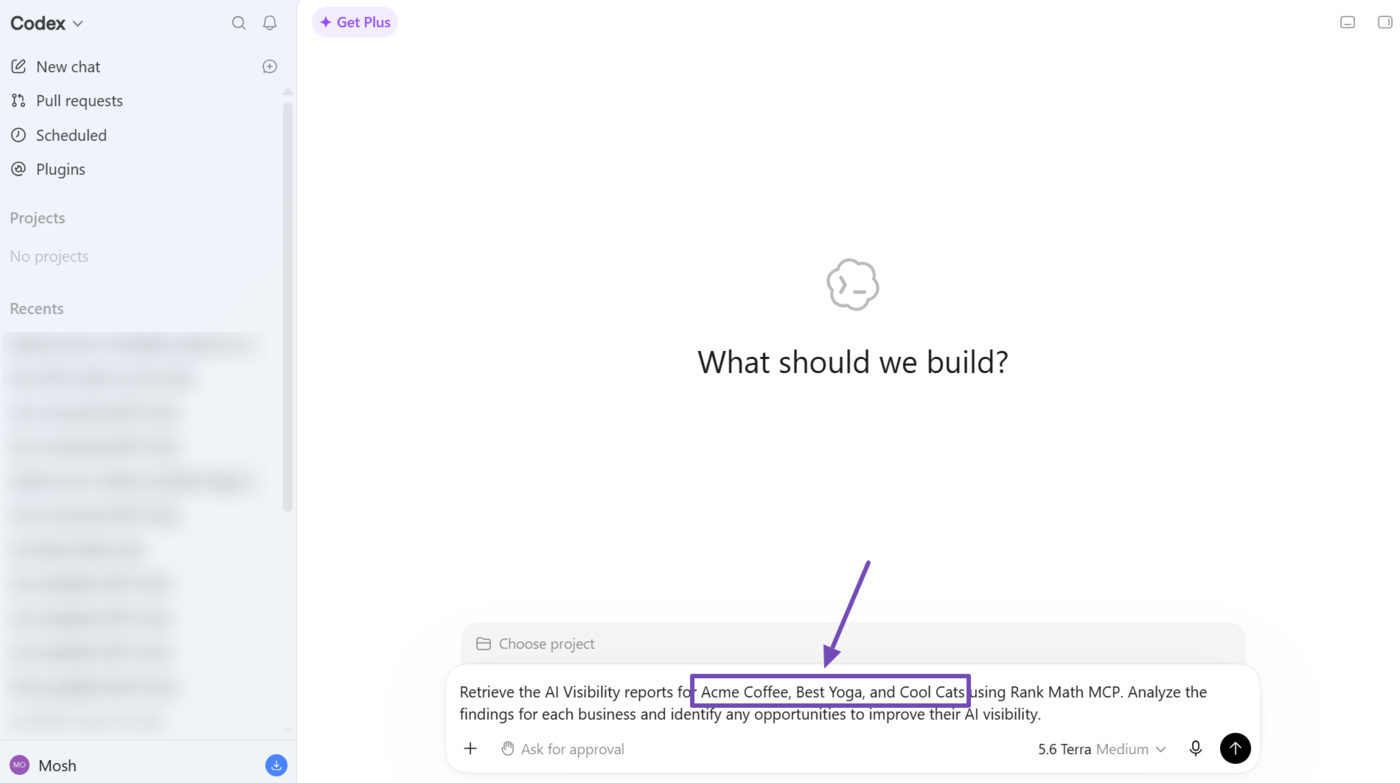
To make your sites easy to reference, you need to set their MCP server names to something memorable. Doing this also ensures your AI assistant implements your instructions on the correct site.
One great method is to set the site name as the MCP server name.
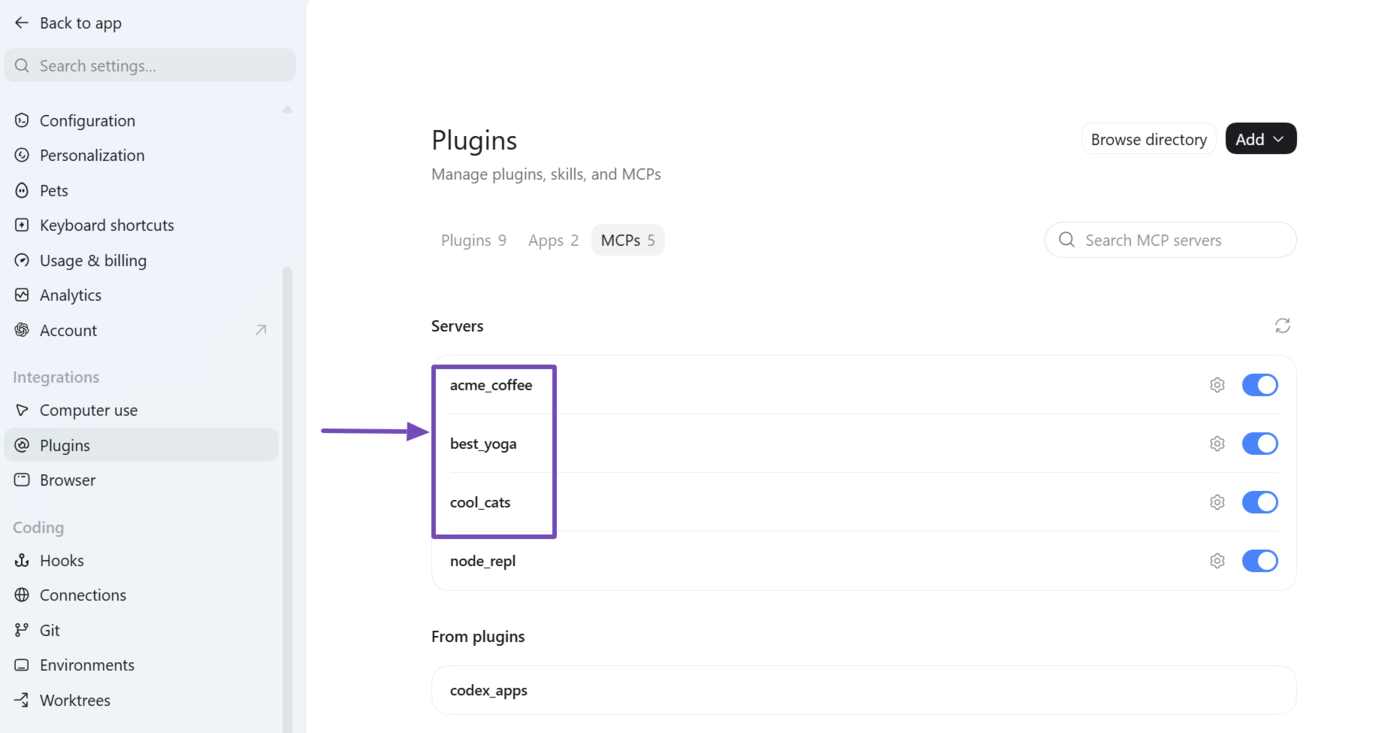
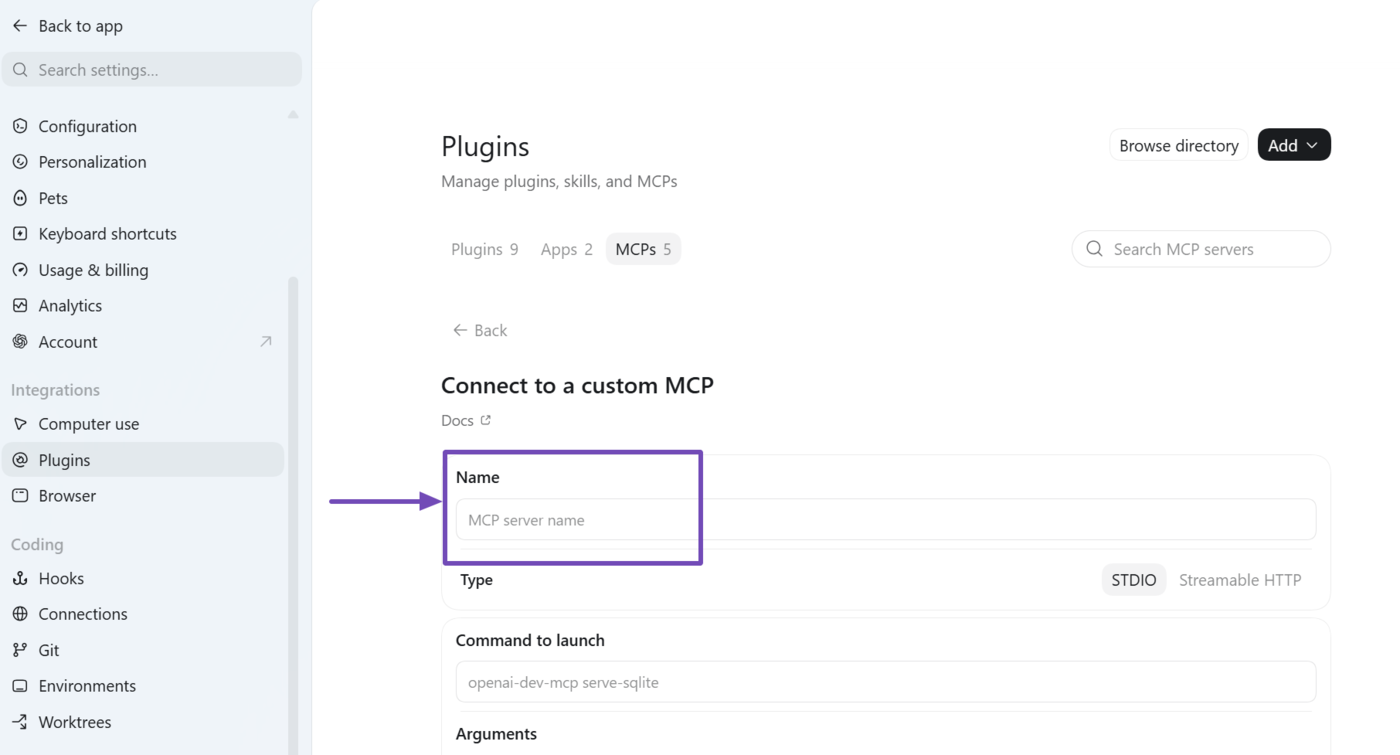
Here’s how to set your MCP server name:
If you connected your site using the quick add or OAuth option, the name field is usually the first one you see before entering your MCP details. The field is typically labeled Name or MCP server name, depending on the AI assistant.
Note: Some AI assistants may include a hyphen or underscore between separate words in your site name.
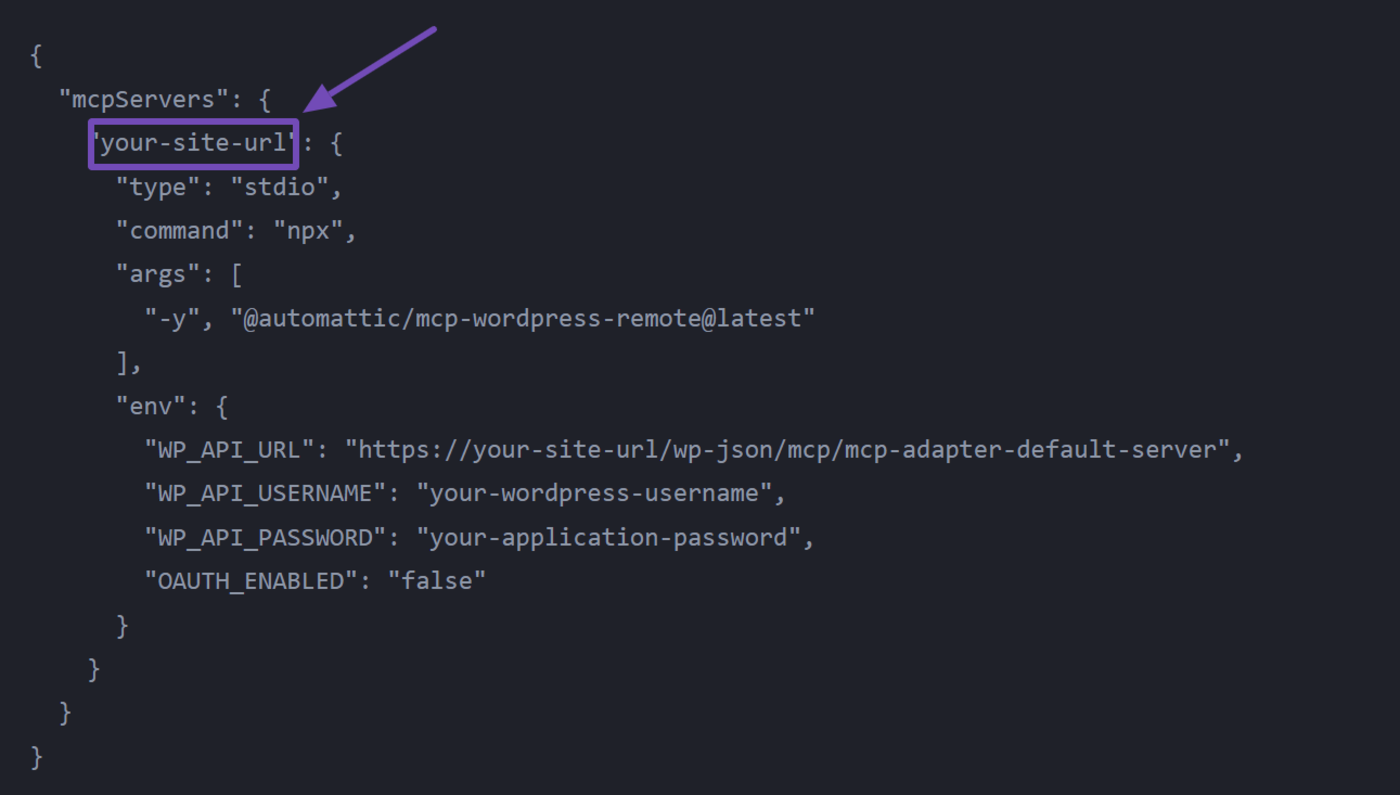
If you connected your site using JSON, you can enter your site name into the first placeholder reserved for your website URL.
Note: It is recommended to place a hyphen between separate words in your site name.
2 Auditing and Optimizing Your Portfolio
Here are some optimization tasks you can complete using Rank Math MCP. Note that you can run these tasks on one or more sites at once.
- Audit and fix SEO issues across your portfolio
- Optimize specific webpages across your portfolio
- Optimize the link health of your sites
- Compare your sites against competitors PRO
2.1 Audit and Fix SEO Issues Across Your Portfolio
You can prompt your AI assistant to run an SEO audit on your portfolio. Once done, you then get AI to fix the issues identified during the audit.
a. Audit the Sites in Your Portfolio
To get started, instruct your AI assistant to run an SEO audit on the sites in your portfolio.
Run an SEO audit on [site A] and [site B] using Rank Math MCP. Identify the sites with the biggest optimization opportunities and explain what needs to be improved
Note: If you’re running the audit on all connected sites, you can use a phrase such as “Run an SEO audit on every site in my portfolio using Rank Math MCP” instead of calling the sites one by one.
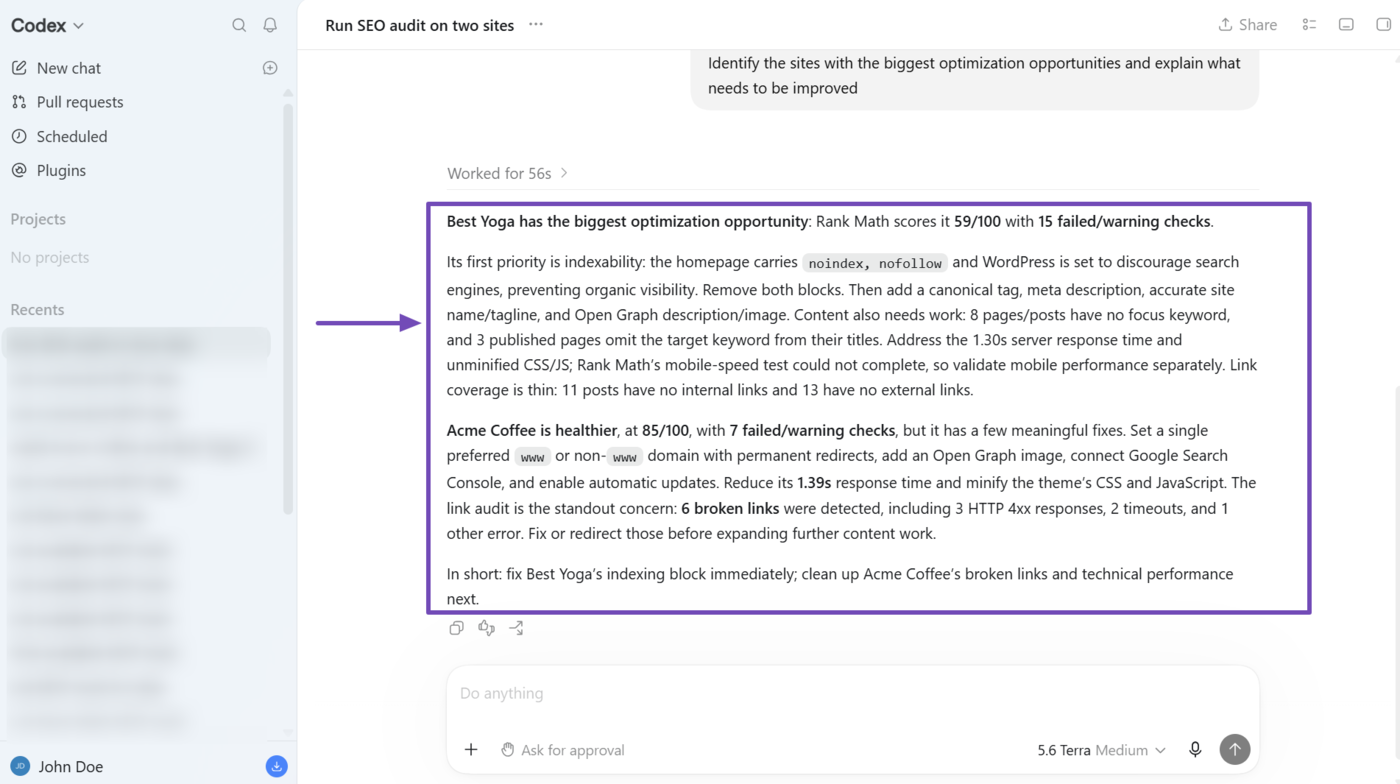
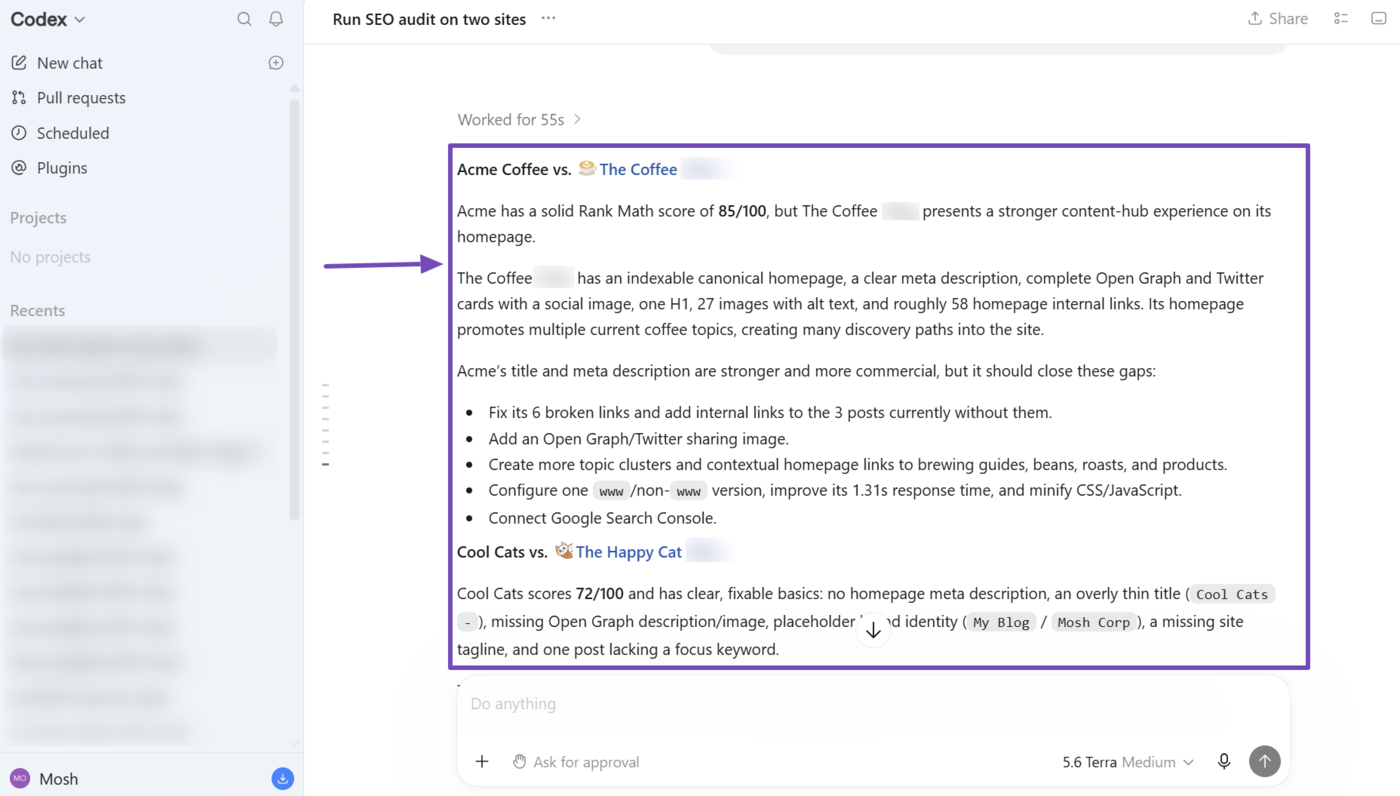
Here is the response returned by our AI assistant. As you can see the report is detailed with the SEO score of each site and insights into issues and improvements we could implement on them.
b. Fix the SEO Issues Identified During the Audit
Some of these issues identified during the audit can be automatically fixed using Rank Math MCP. You should instruct your AI assistant to do so using the prompt below:
Fix the SEO issues identified during the audit
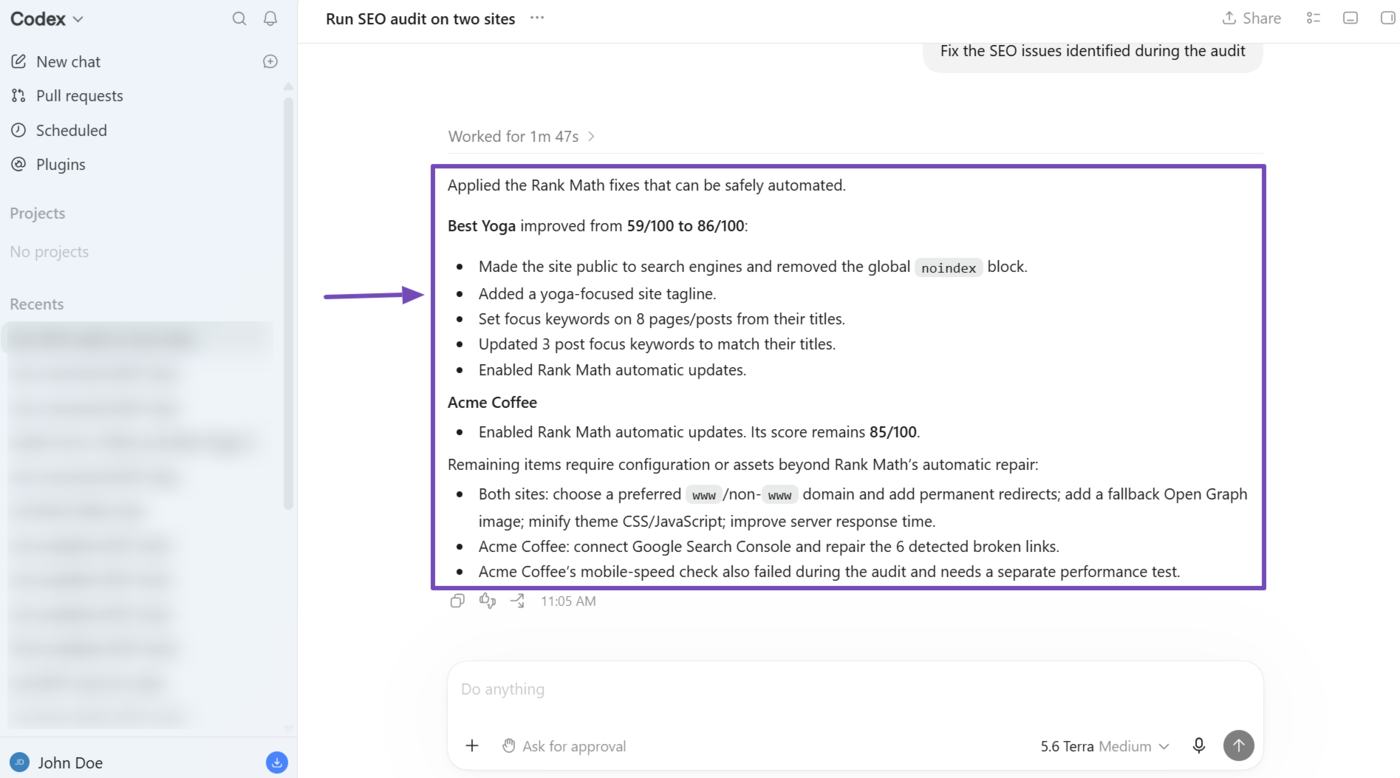
Rank Math will fix the SEO issues that can be fixed using MCP. For our example, our AI assistant reports on the issues that were fixed on both sites. It also lists the issues that need to be fixed manually.
2.2 Optimize Specific Webpages Across Your Portfolio
You can get your AI assistant to audit the Schema and SEO meta on specific webpages on your sites.
This is helpful for optimizing the homepages, landing pages, and other important pages on multiple sites at once. It can also help you spot issues, patterns, and opportunities on your best or worst performing sites.
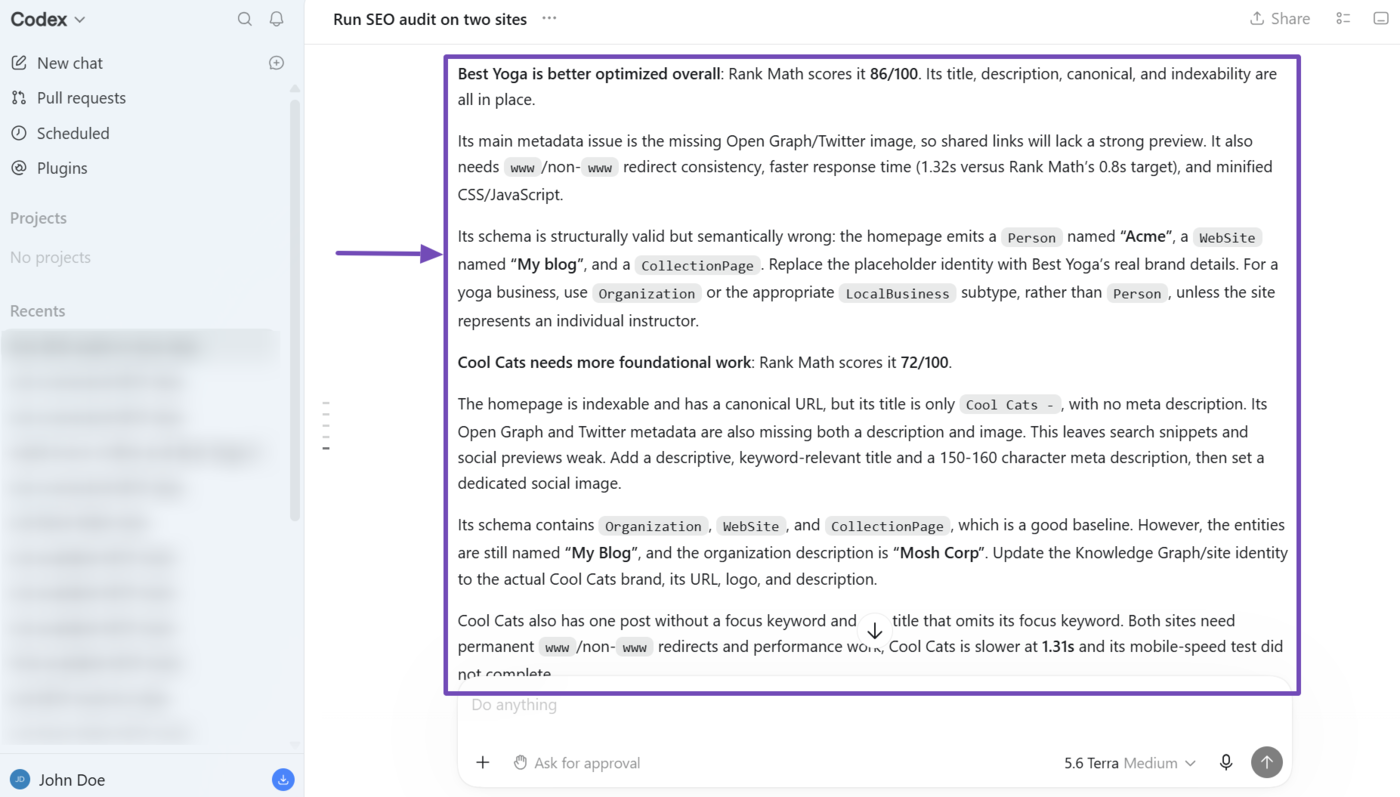
Get the SEO meta and Schema for the homepages of [site A] and [site B]. Let me know how well optimized they are and what can be improved
Your AI assistant will audit the sites and return with insights into them.
2.3 Optimize the Link Health of Your Sites
Rank Math MCP can give you details on the internal and external links across your sites. This helps you understand each site’s link structure and identify link issues and opportunities.
To get started, enter a relevant prompt along with the specific insights you want. For this example, we want to identify the link issues on some of our sites, so we enter the prompt below.
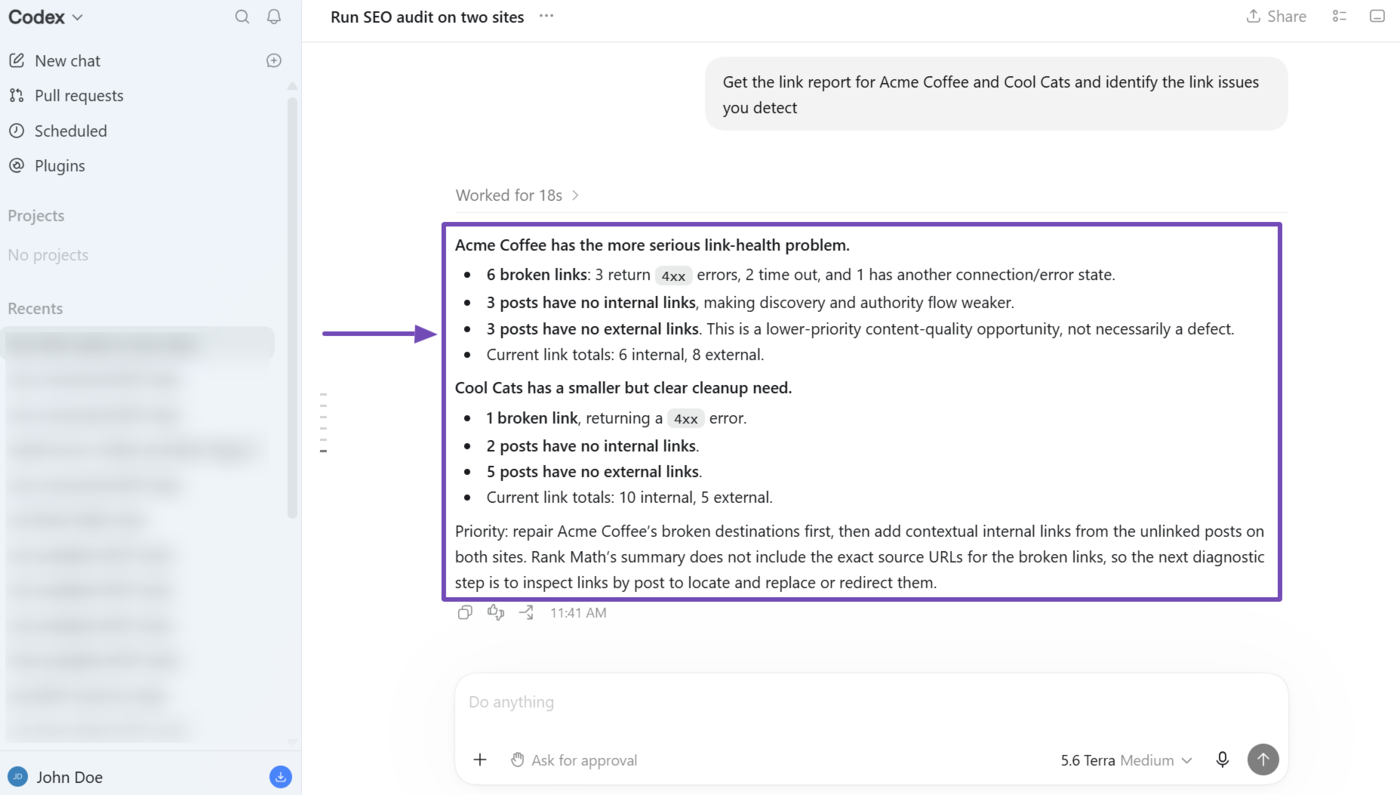
Get the link report for [site A] and [site B] and identify the link issues you detect
As you can see, our AI assistant returns with link issues it identified on our sites.
2.4 Compare Your Sites Against Competitors PRO
You can run SEO audits comparing the sites in your portfolio with their competitors. This gives you insights into the competition and shows you how your sites fare against theirs along with opportunities for improvement.
To get started, enter a prompt instructing your AI assistant to compare a specific site against a specific competitor, or compare multiple sites against a competitor.
Run a competitor audit comparing [site A] to [competitor A] and [site B] to [competitor B]
Your AI assistant will run SEO audits on all the sites and return the results to you. You can then proceed to automatically fix some of these issues by entering a relevant prompt.
3 Tracking and Optimizing AI Visibility Across Your Brands Content AI
Here are the AI Visibility tasks you can perform on your sites using Rank Math MCP.
- Track brands across your sites
- Track your competitor brands
- Retrieve your AI Visibility report
- Retrieve queries monitored for a brand
3.1 Track Brands Across Your Sites
If you want to begin tracking a brand, just enter a relevant prompt into your AI assistant. Make sure to mention the brand or product to track along with the website on which it should be tracked.
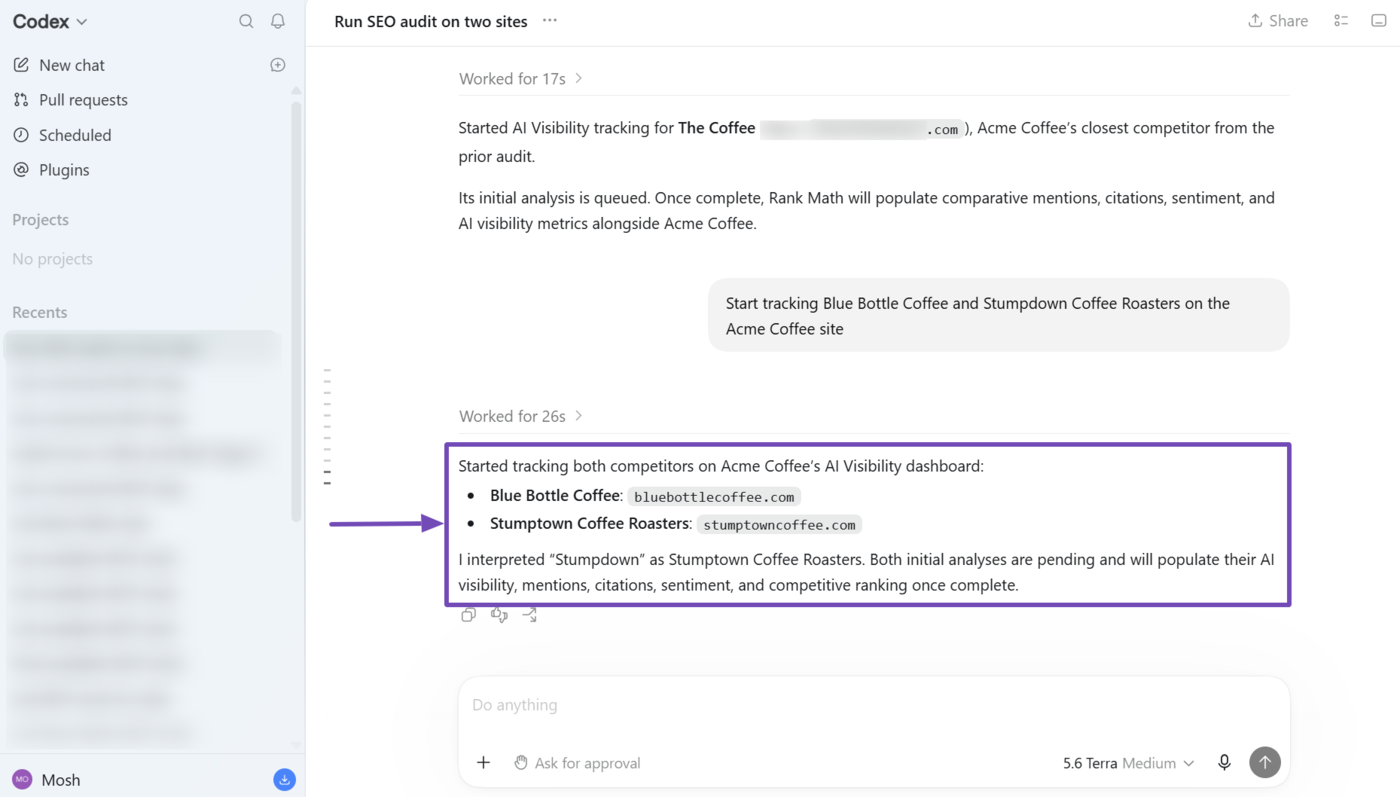
Start tracking [brand A] and [brand B] on the Acme Coffee site
For this example, we want to track two brands: Blue Bottle Coffee and Stumptown Coffee Roasters, under the Acme Coffee site. So we entered the prompt and our AI assistant confirmed it has begun tracking both brands.
3.2 Track Your Competitor Brands
You may also get your AI assistant to identify and track your competitors’ brands. This lets you identify your competitors and gives you insights into their performance on AI platforms.
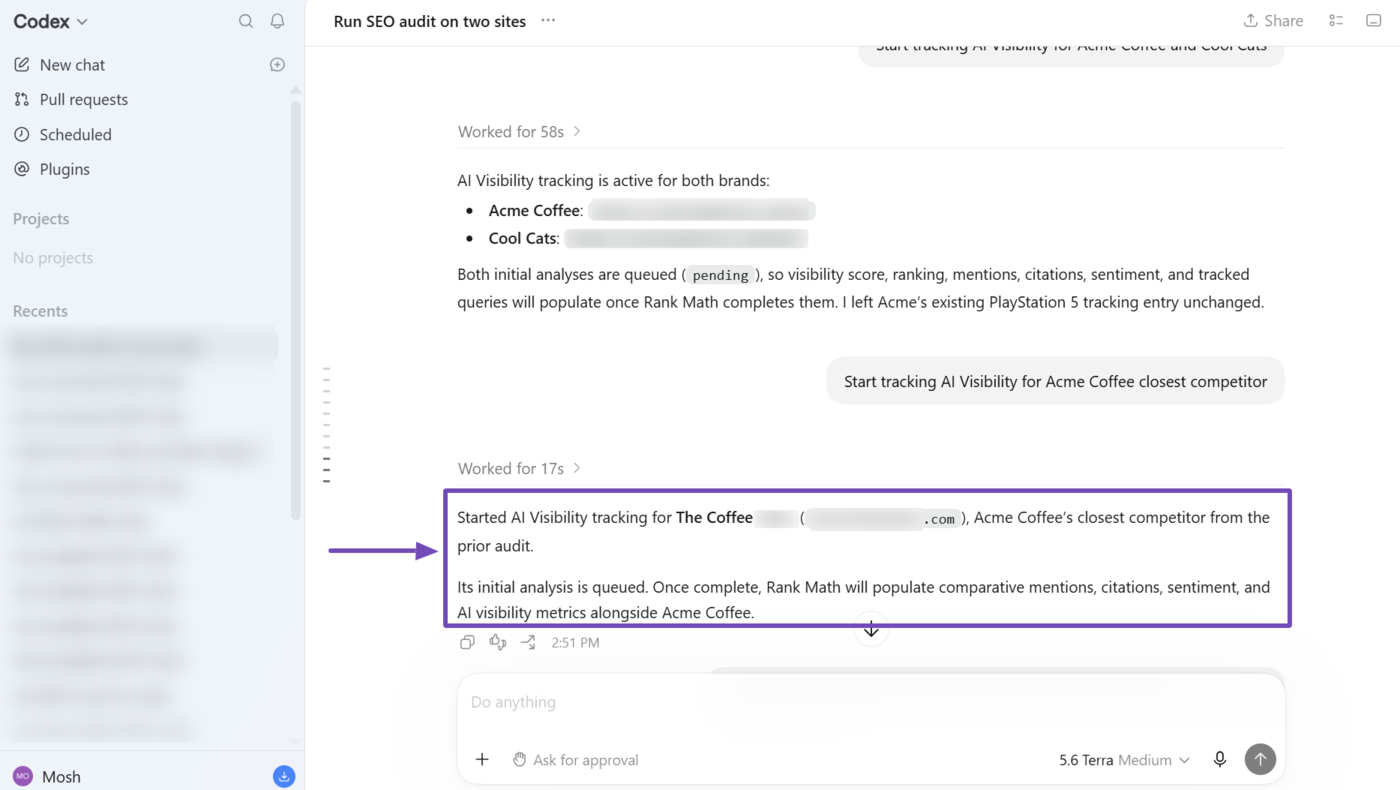
For instance, we have a brand called Acme Coffee and want our AI assistant to track our closest competitor, so we enter a relevant prompt:
Start tracking AI Visibility for [brand A] closest competitor
Your AI assistant will identify and start tracking your competitor.
3.3 Retrieve Your AI Visibility Report
If you are already tracking a brand, you can retrieve its AI Visibility report and instruct your AI assistant to analyze it. This lets you to uncover insights into the brands.
For instance, we want to retrieve the AI visibility for two brands and then find out which is getting the better visibility on AI platforms.
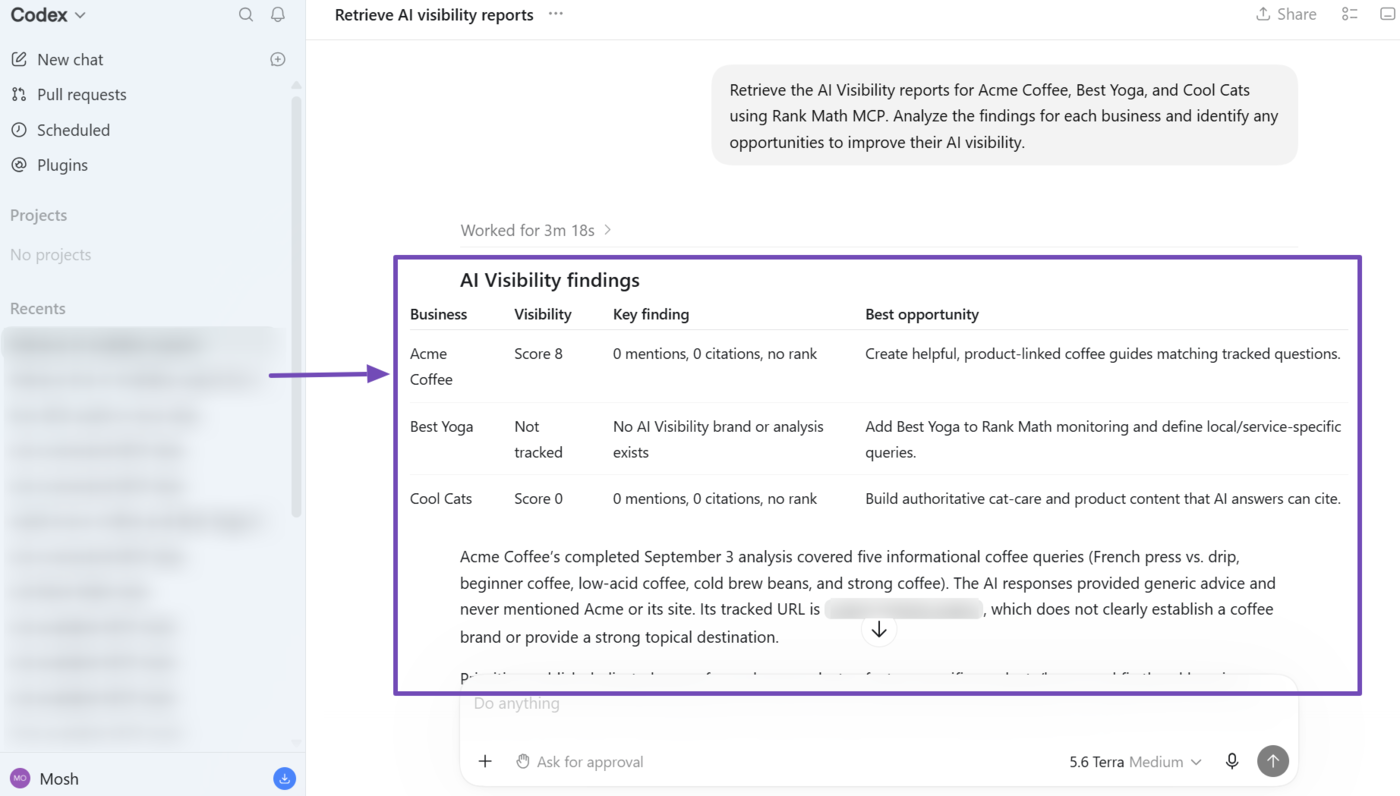
Retrieve the AI Visibility report for [brand A] and [brand B] using Rank Math MCP. Analyze the findings and determine which one has the better AI visibility
Your AI assistant will then return with its findings on the visibility of the brands, including its AI Visibility score, mentions, citations, and rankings.
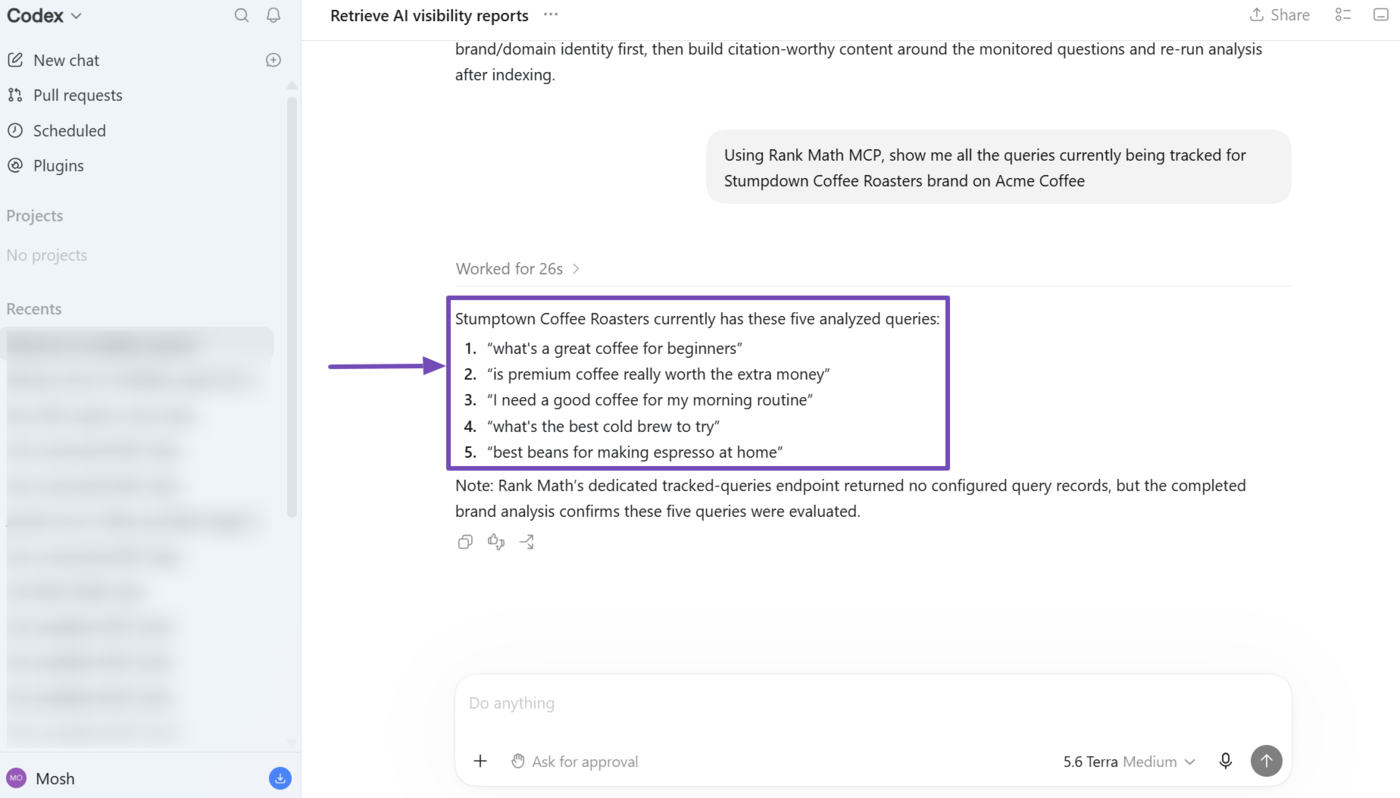
3.4 Retrieve Queries Monitored for a Brand
When you add a brand to track in AI Visibility, Rank Math automatically begins tracking the brand for a set of relevant queries. You can uncover the queries being tracked using the prompt below.
Using Rank Math MCP, show me all the queries currently being tracked for [brand A] on [site A]
Your AI assistant will return with the queries being tracked for the brand.
That’s how to automate optimization of your portfolio using Rank Math MCP. If you have any questions, you’re always more than welcome to contact our dedicated support team, who are available 24/7, 365 days a year.