
Rank Math supports MCP (Model Context Protocol), which is the standard that lets AI assistants connect directly to your site. Once connected, your AI assistant can retrieve site data, analyze content, run SEO and AI Visibility audits, and fix issues on the spot, all without you logging into WordPress.
To get started, connect Rank Math to your AI assistant using MCP. Once done, you can begin optimizing for SEO and AI Visibility. In this knowledgebase article, we will walk you through some of the site optimizations, audits, and fixes you can perform right from your AI assistant.
In this article, we’ll optimize for:
1 On-Page and Technical SEO Audits
Rank Math MCP lets you identify and fix technical and on-page SEO issues on your site. Here are some of the optimizations you can complete:
- Identify and fix site-wide SEO issues
- Identify and fix underperforming posts
- Optimize a post’s Schema for rich results
1.1 Identify and Fix Site-Wide SEO Issues
Using Rank Math MCP, you can access your SEO score and identify on-page and technical SEO issues across your site and content.
This includes site-wide issues affecting your page speed, link profile, and URL canonicalization, plus a check for the presence of a robots.txt file. It can also identify page-specific issues, such as broken links and whether your post titles contain your focus keywords.
Note: This skill uses the audit-site-seo MCP tool to run an SEO audit and the fix-site-seo MCP tools to fix the failed tests identified in the audit.
a. Run a Site-Wide SEO Audit
To get started, instruct your AI assistant to audit your site’s SEO and report on the issues it detects. You can use a prompt like:
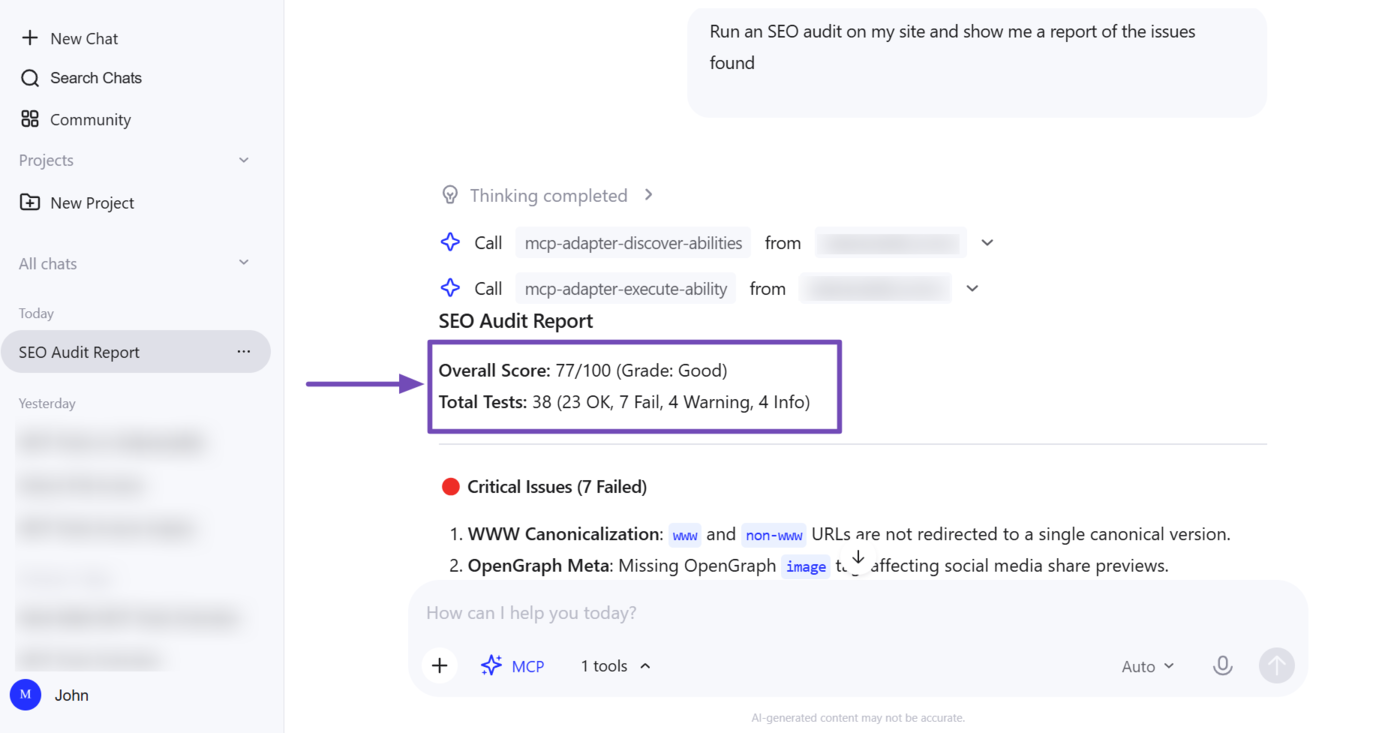
Run an SEO audit on my site and show me a report of the issues found
Rank Math will audit your site and return a detailed breakdown of its SEO health. For example, you can see our AI assistant returned a report, which includes our SEO score and the total tests Rank Math ran.
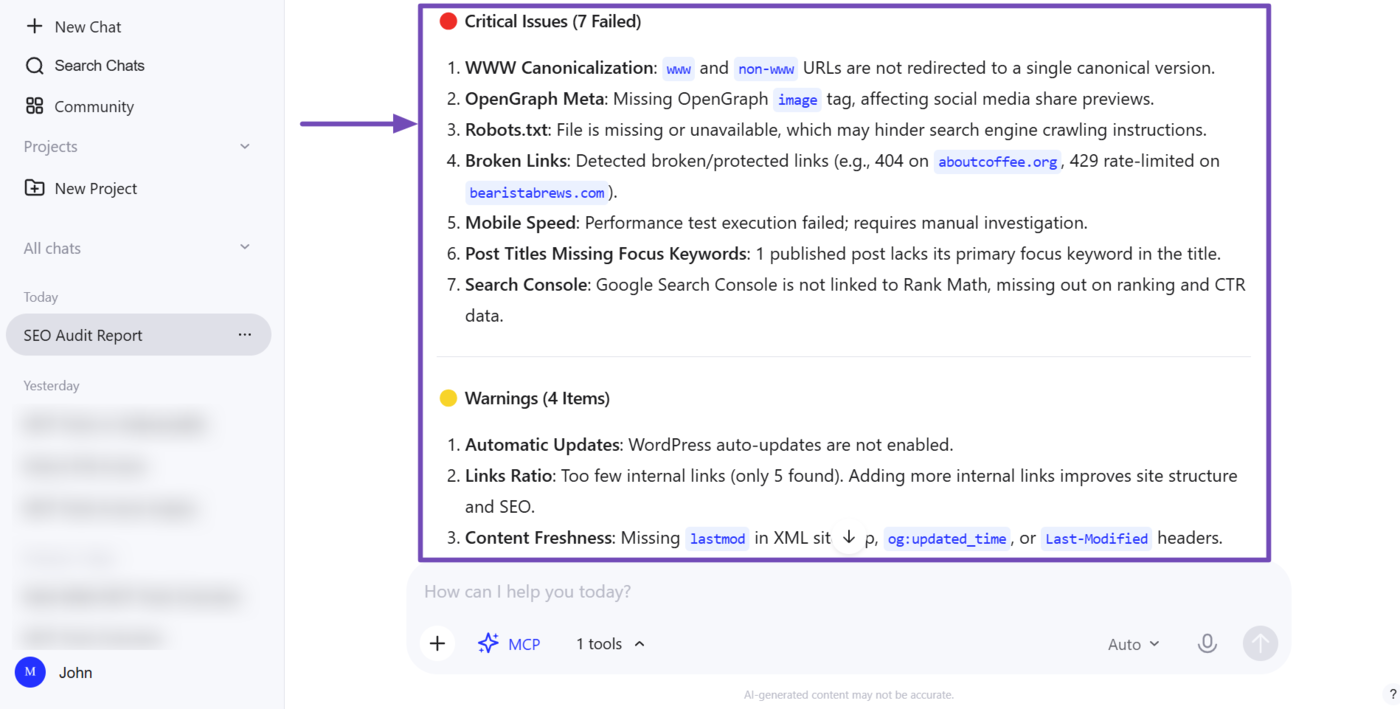
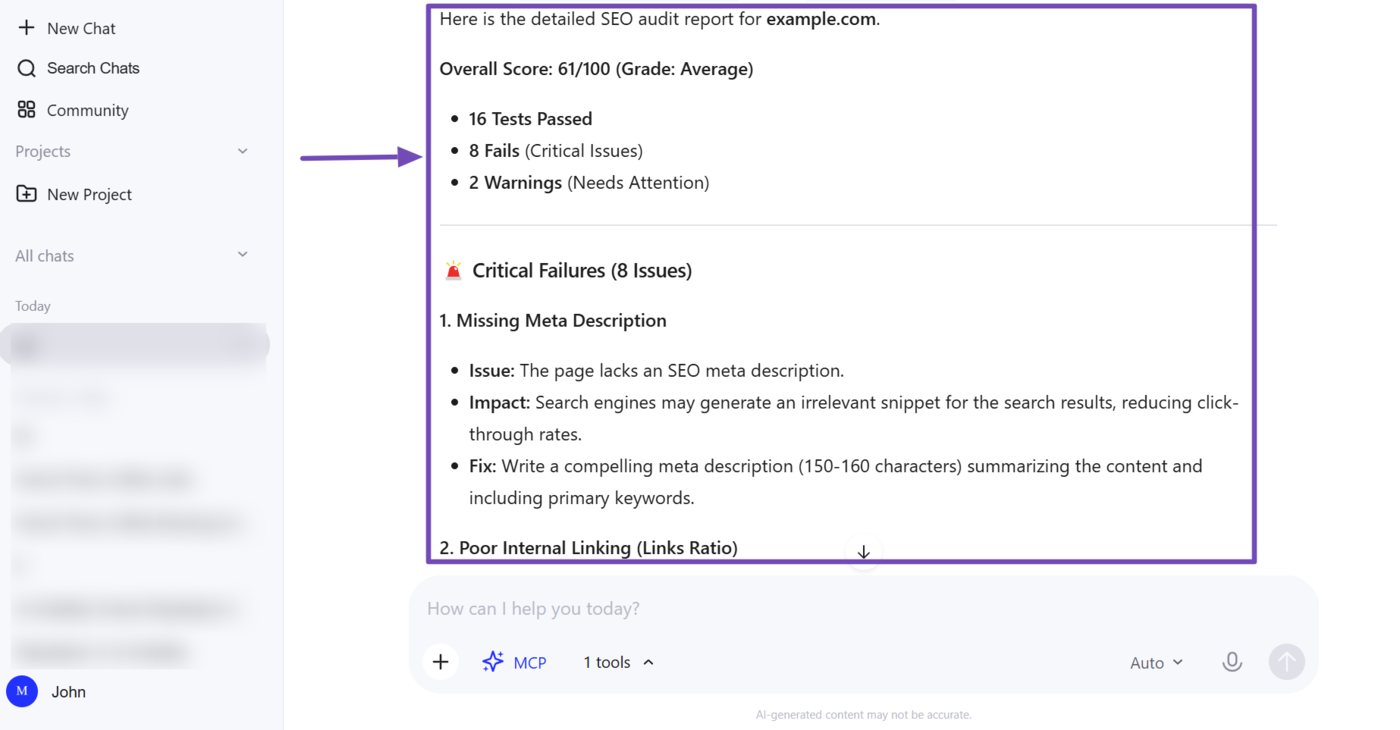
The report is split into categories, including critical SEO issues that need immediate attention and potential SEO issues (warnings) we can address across our content and site.
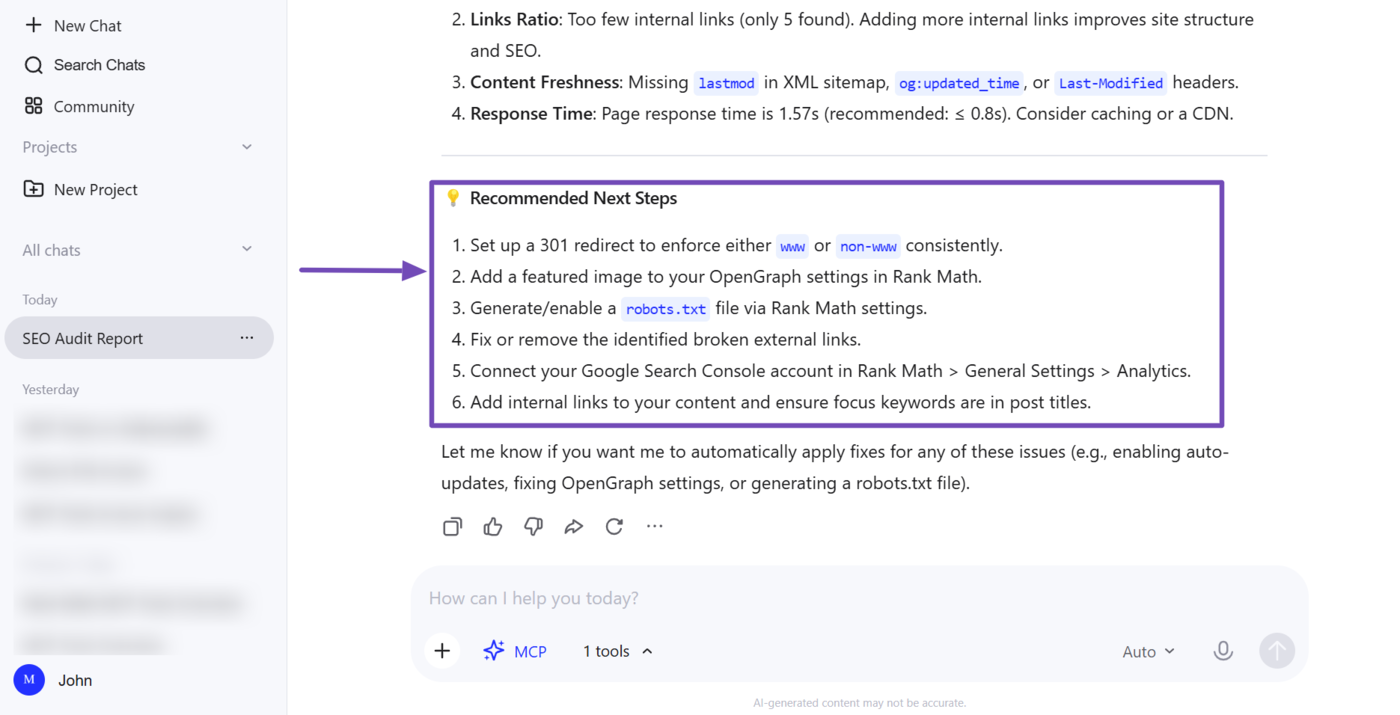
Our AI assistant also included recommendations on what we can implement to improve our SEO.
b. Fix SEO Issues Identified During the Audit
Now, let us instruct our AI assistant to fix these SEO issues. We can use a prompt such as:
Fix the failed SEO tests from that audit
It will do so and return a report on what it did. Here, we can see it created a robots.txt file for our site. It also updated one of our post titles so that it contains the focus keyword.
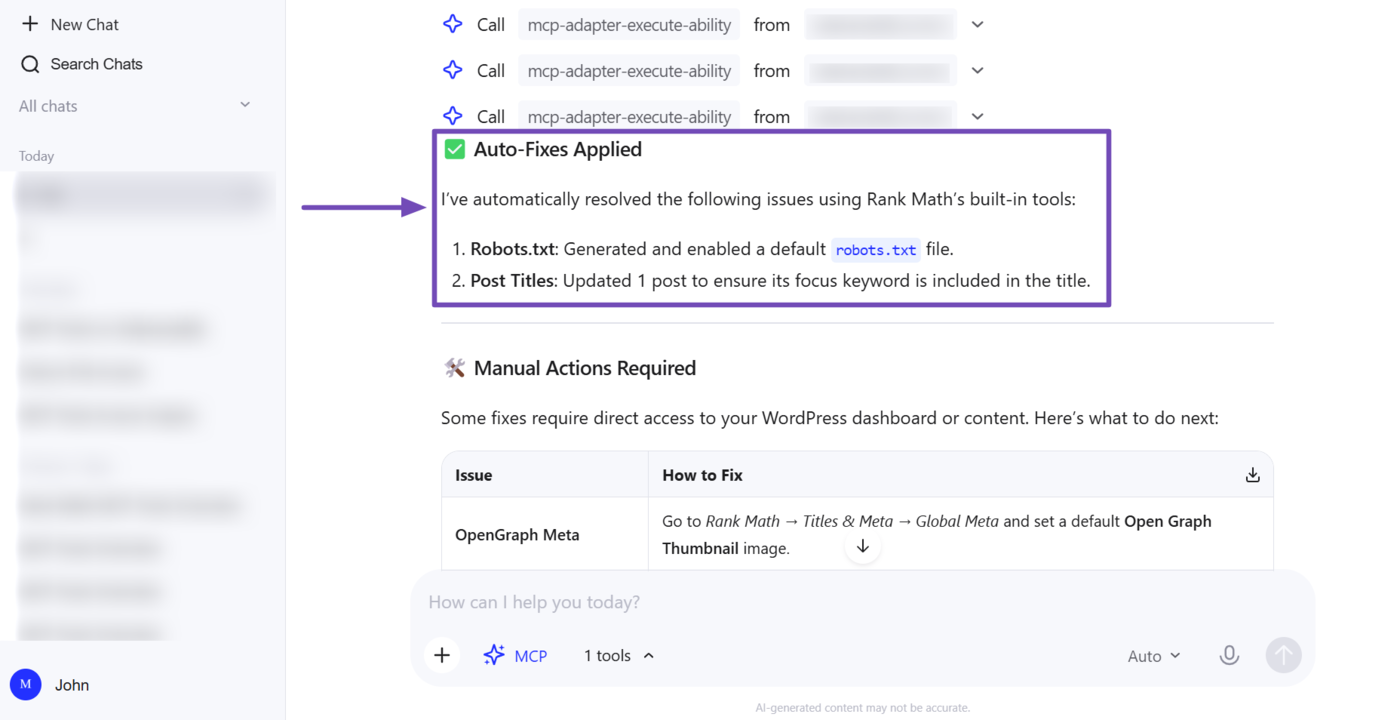
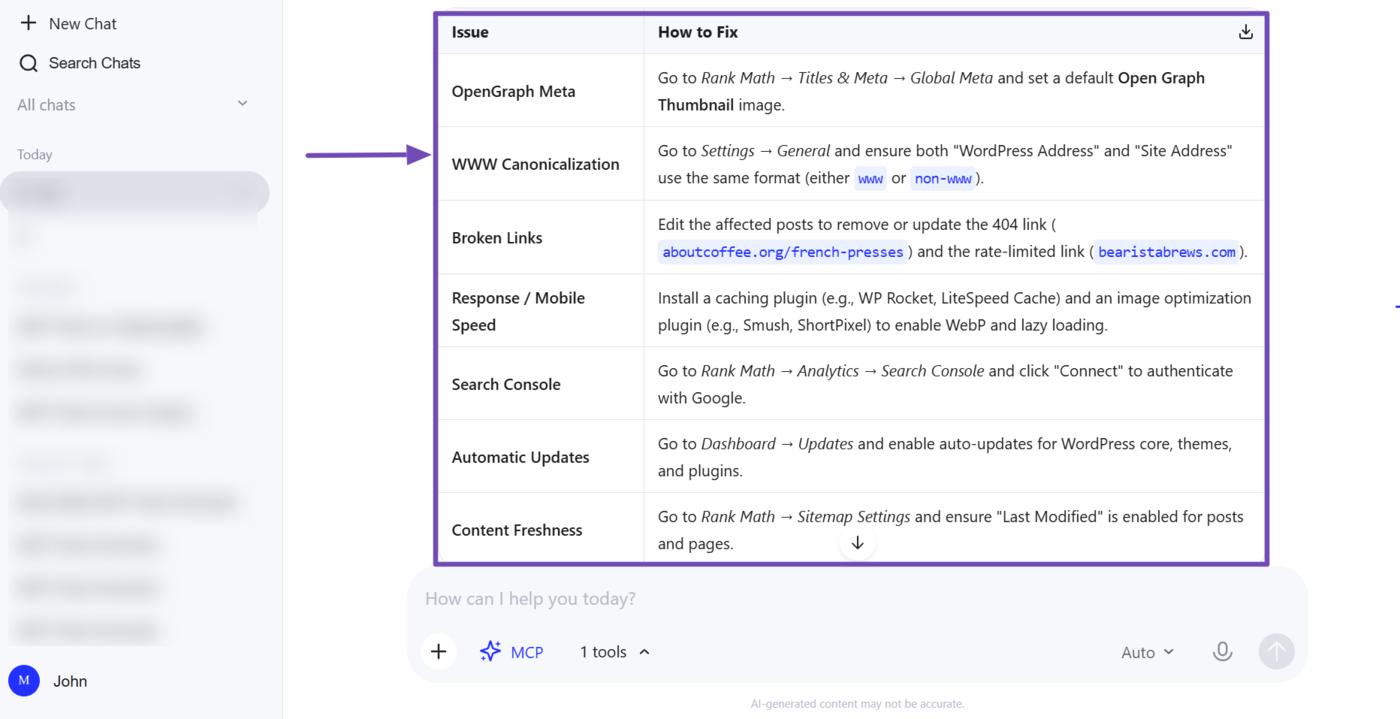
However, not all issues can be fixed automatically. In this case, you can see that our AI assistant listed those issues in its response and included instructions on fixing them.
1.2 Identify and Fix Underperforming Posts
Rank Math MCP can help you identify posts with low SEO scores and understand why they are failing.
Note: This ability uses the get-seo-scores tool to identify posts with low SEO scores, the analyze-post-content tool to run an on-page SEO analysis, the fix-site-seo tool to fix SEO issues, the get-post-seo-meta tool to retrieve SEO metadata, and the get-post-schema tool to identify the Schema applied to the post and other available Schema types.
a. Identify Underperforming Posts Across Your Site
To get started, instruct your AI assistant to pull up posts with an SEO score classified as “Needs improvement”, or posts without a focus keyword. You can use a prompt like:
Show me all posts marked as "Needs Improvement" or without a focus keyword
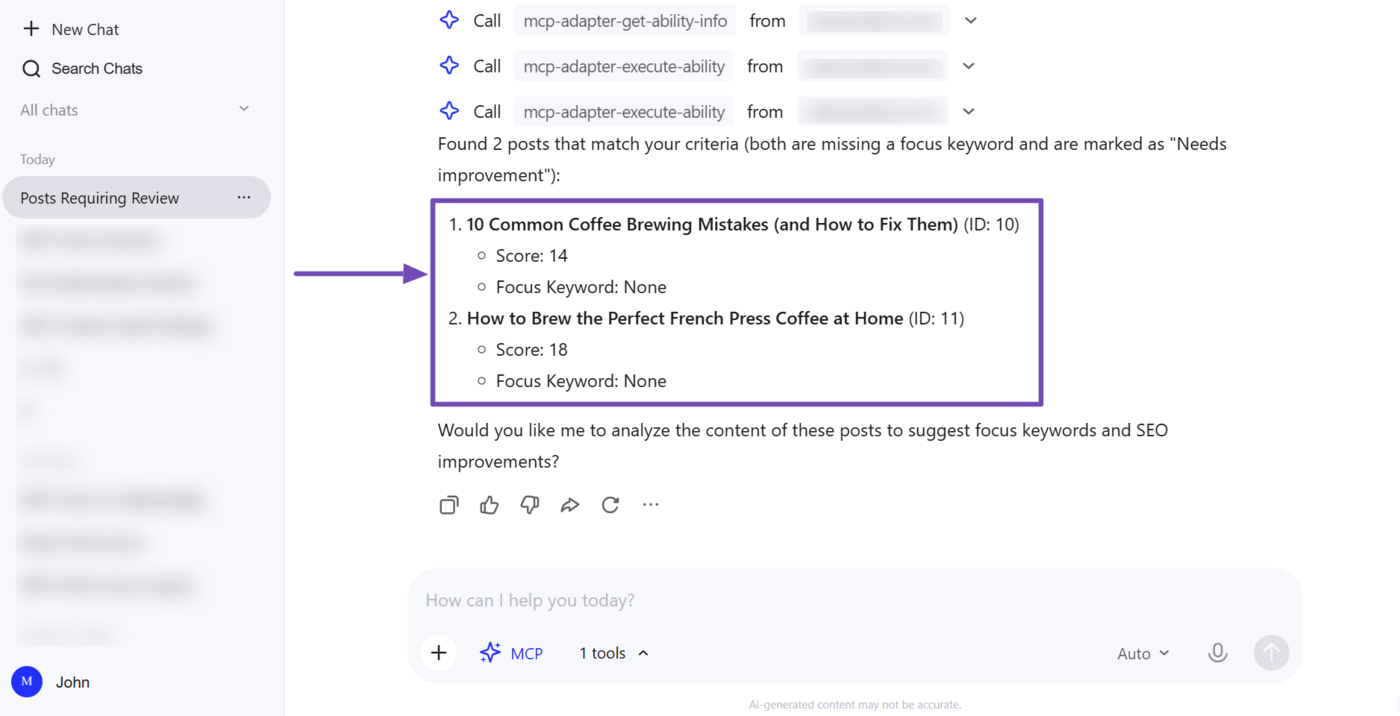
Your AI assistant will return with a list of posts that match that criteria. In our case, you can see that it returns two posts with low SEO scores and without focus keywords.
b. Diagnose SEO Issues on an Underperforming Post
Next, pick a post from that list and instruct your AI assistant to analyze it. A prompt such as “Analyze the on-page SEO for [post title]” will do the trick.
Analyze the on-page SEO for [post title]
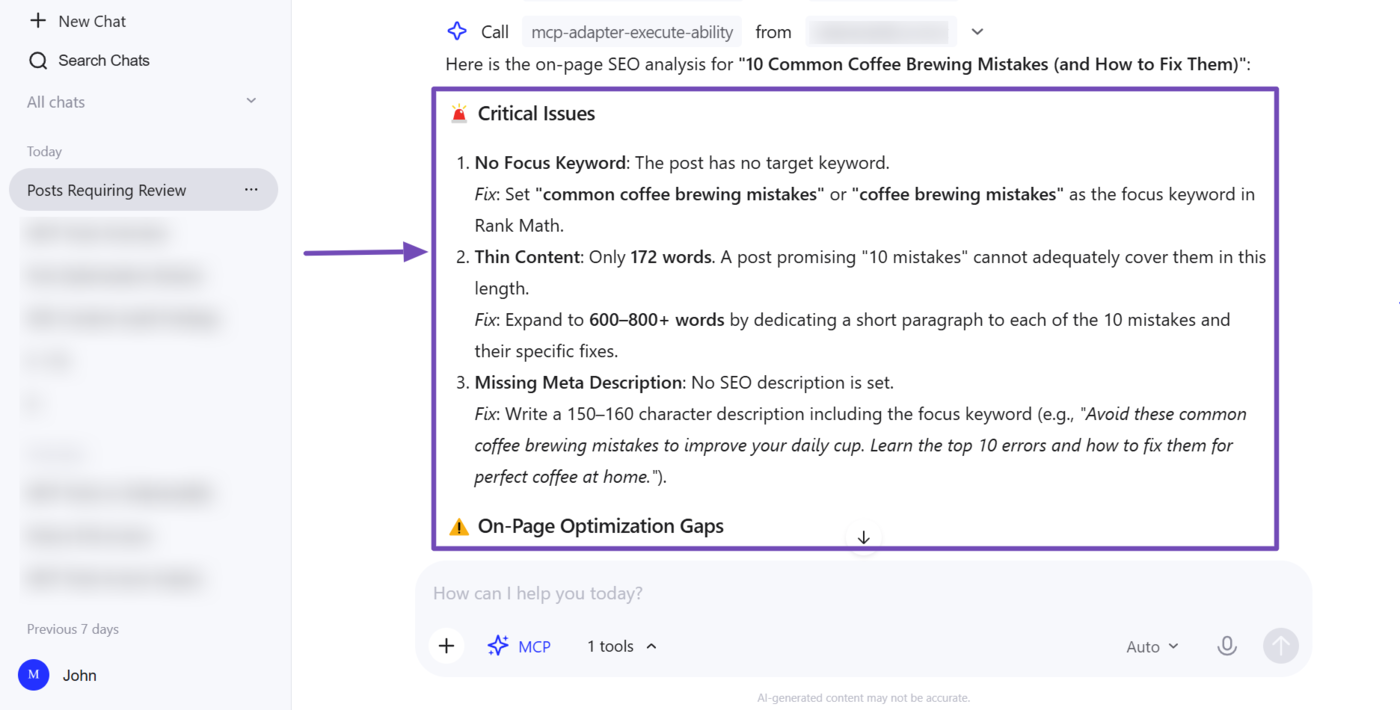
Your AI assistant will return with the specific on-page tests the post is failing. In our example, you can see our report is split across multiple categories, including critical issues, on-page optimization gaps, and what’s working well.
You can now instruct your AI assistant to fix these issues. It will fix the ones it can and provide instructions on fixing the ones that need to be fixed manually. However, we are not done yet and will continue to optimize the post using MCP.
c. Review the SEO Metadata of an Underperforming Post
Now, instruct your AI assistant to pull the post’s SEO metadata and show you what can be improved. You can use a prompt like:
Get the SEO meta for [post title] and list what can be improved
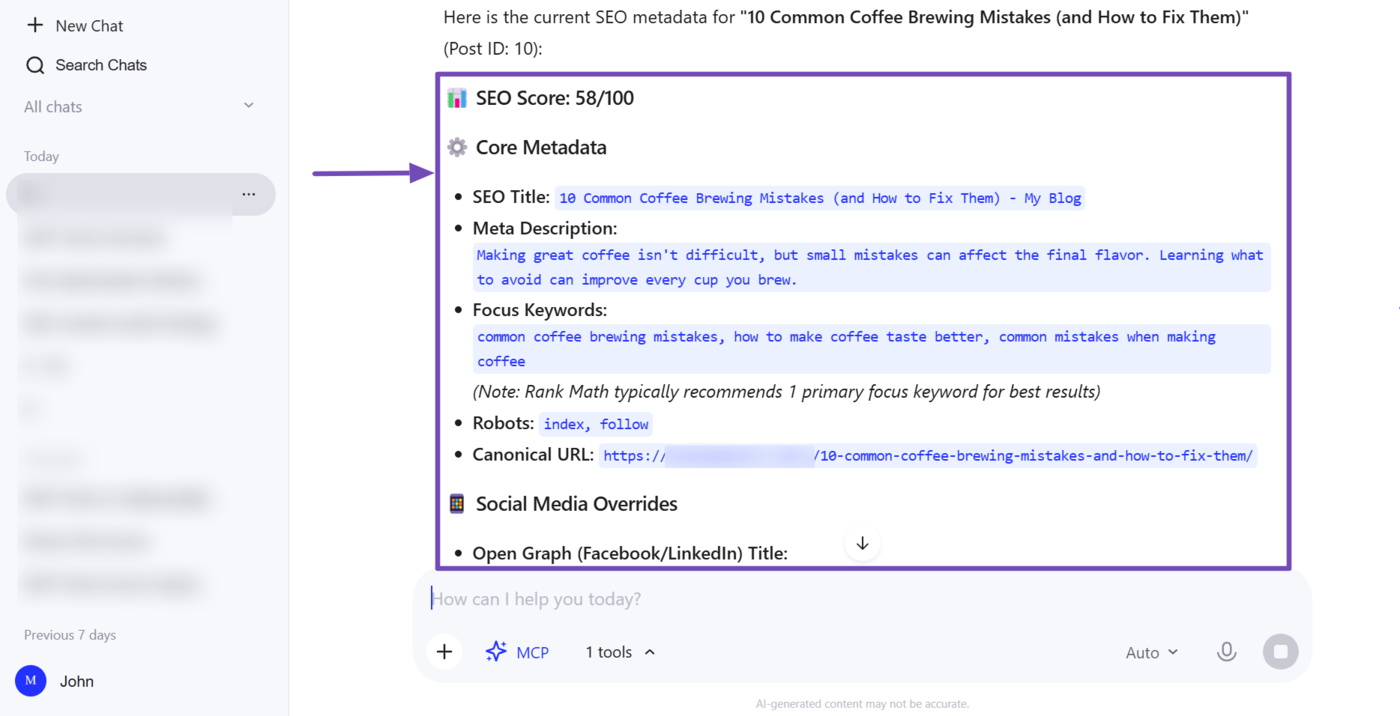
Your AI assistant will surface the SEO metadata currently applied to the post and will include recommendations on what to improve.
d. Review the Schema of an Underperforming Post
Finally, instruct your AI assistant to check the post’s Schema using a prompt like:
What Schema is applied to [post title], and what other Schema types are available?
Your AI assistant will return with the details of the Schema applied to the post, along with additional Schema markups you can include. You can then add the Schema markup to the post.
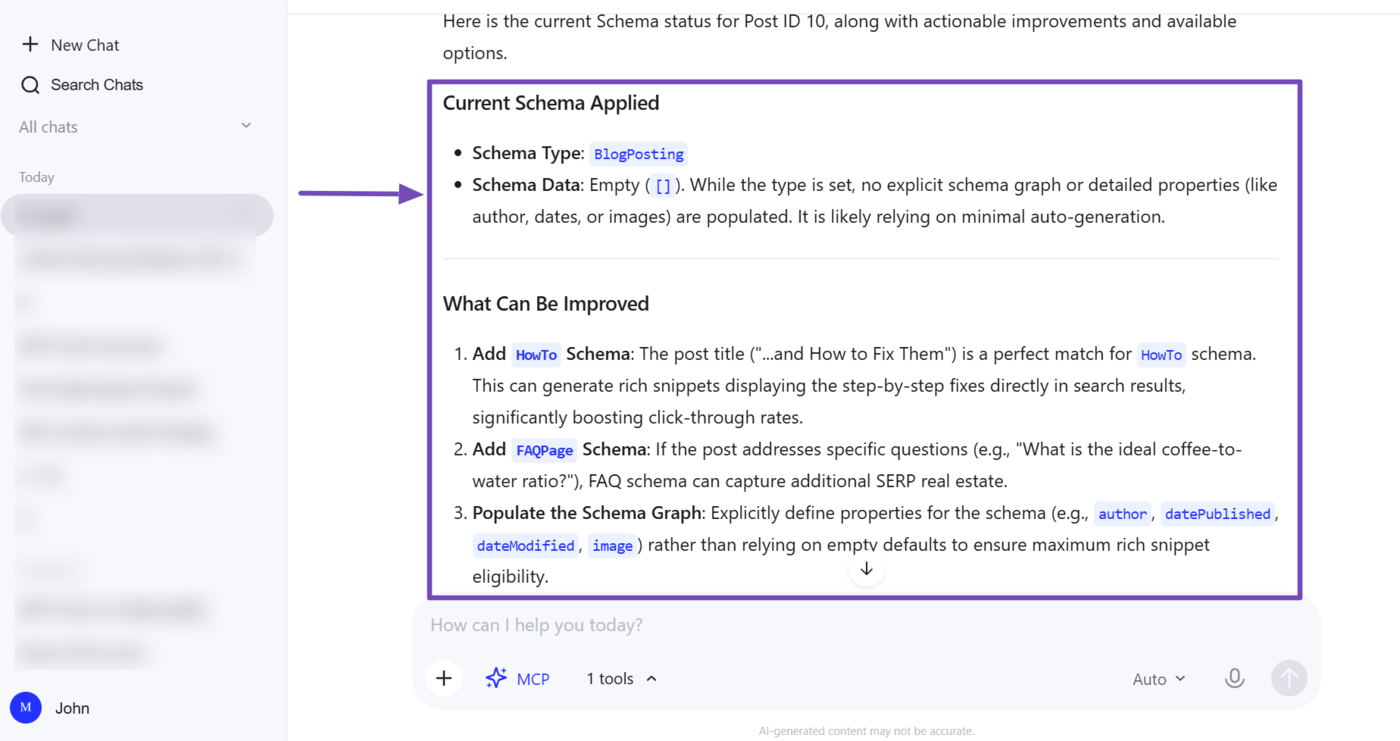
1.3 Optimize a Post’s Schema for Rich Results
Rich results let your content stand out on search engine results pages. For example, this is how a webpage with a recipe rich result appears on Google results pages.
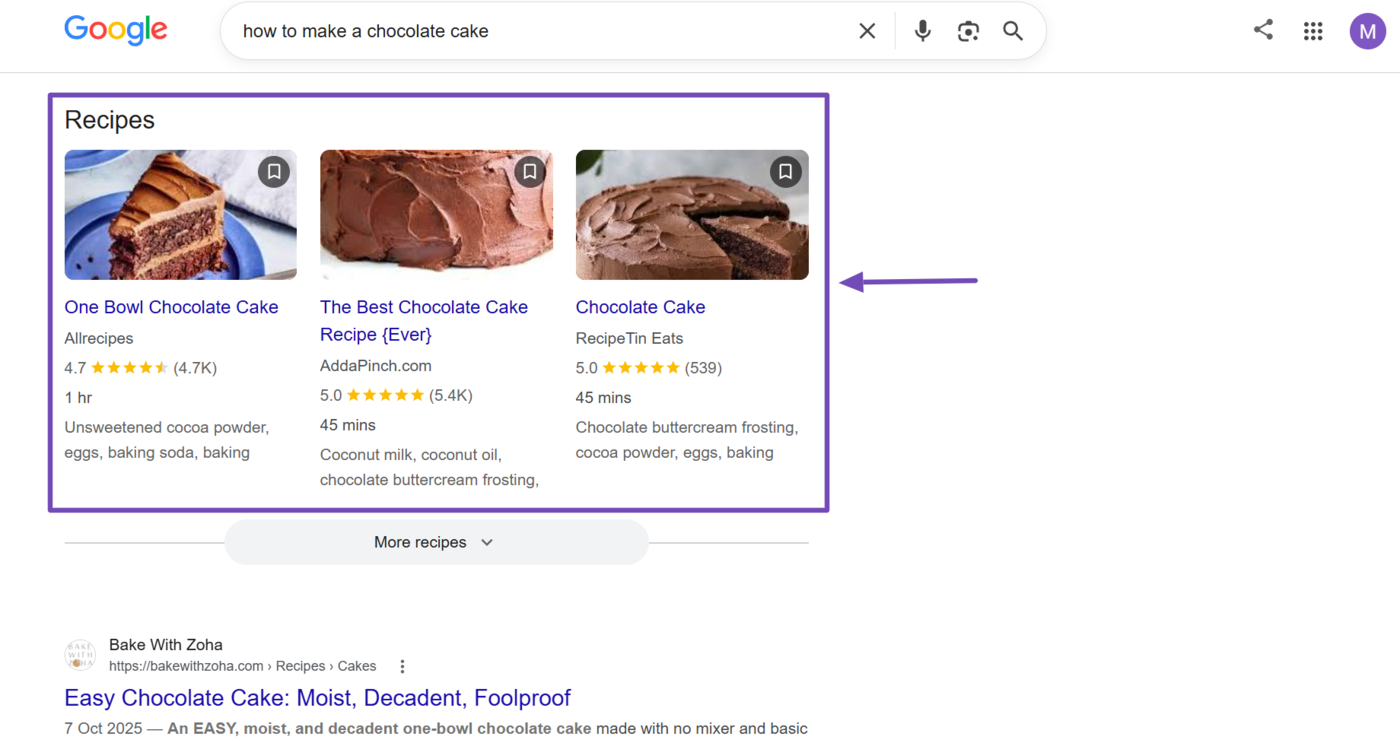
However, these rich results do not come easy, and winning them relies on having the right Schema markup applied to the right type of content. Thankfully, Rank Math MCP lets you check, diagnose, and correct your Schema setup, all from your AI assistant.
Note: This ability uses the get-seo-scores tool to retrieve the content’s SEO score, the get-post-schema tool to retrieve the Schema currently applied to a post along with other available Schema types, the get-post-seo-meta tool to retrieve that post’s SEO metadata, and the analyze-post-content tool to analyze the post’s content.
a. Review the Current Schema Applied to the Post
To get started, instruct your AI assistant to pull the Schema for a specific post. You can use a prompt like:
What Schema is applied to the "[post title or post ID]" article, and what other Schema types are available?
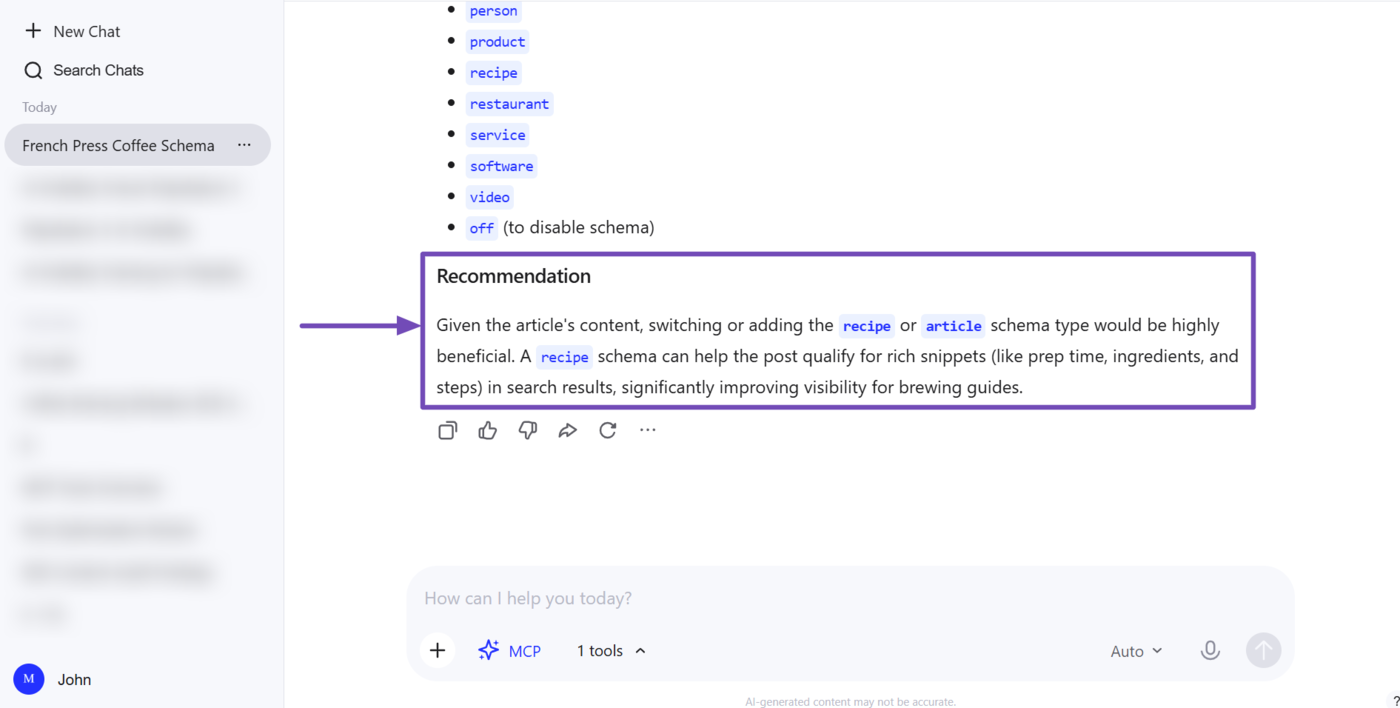
Your AI assistant will return the details of your Schema. In our example, it returns the Schema applied to the article and the other Schema markups available to us.
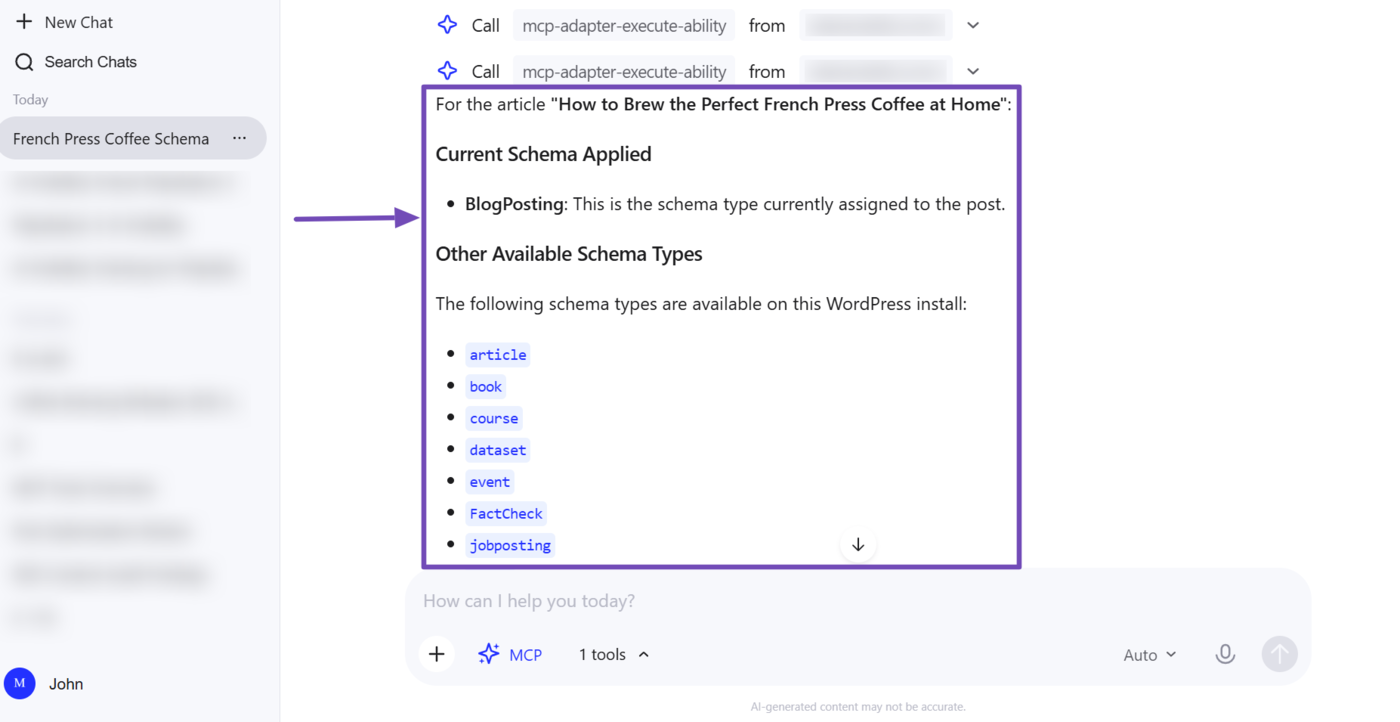
Its response also includes a recommendation to add or switch to a recipe Schema as it increases our chances of earning a rich result.
b. Run a Content Analysis Test
Next, you will review the post’s SEO metadata and analyze its content to improve its chances of appearing as a rich result. To do that, you will use a prompt like:
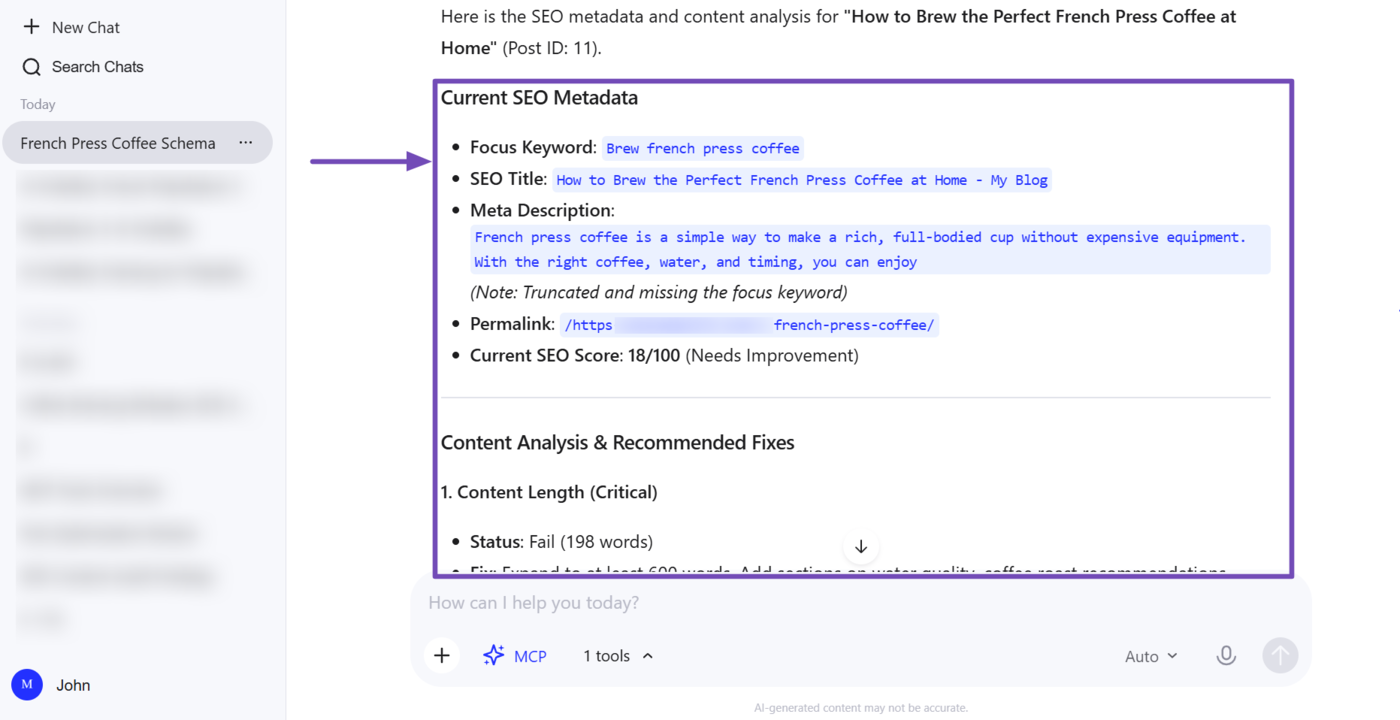
Get the SEO meta and analyze the content for [post title]
Your AI assistant will return with your SEO metadata, including your meta title and description, focus keyword, permalink, and SEO score. It will also include an analysis of your content and recommendations for improving it. You can now fix these issues.
2 Competitor Research and Audits
Using Rank Math MCP, you can audit your competitors’ SEO to identify where they are performing well, where they are falling behind, and where they need improvements. You can also compare their site to yours to uncover opportunities and refine your SEO strategy.
- Audit and compare your competitor’s site
2.1 Audit and Compare Your Competitor’s Site PRO
Rank Math MCP lets you audit your competitors’ websites, view their SEO score, and identify the SEO tests they passed or failed. This helps you spot their weaknesses and find areas where you can outperform them.
Note: This optimization uses the audit-site-seo MCP tool to audit your website and your competitor’s website.
a. Audit Your Competitor’s Site
To get started, instruct your AI assistant to audit your competitor’s site. You can use a prompt like:
Run an SEO audit on [competitor's URL] and show me a report of the issues found
In this example, the AI assistant returns with the competitor’s SEO score along with the issues detected by Rank Math. These issues are grouped into different categories based on their severity.
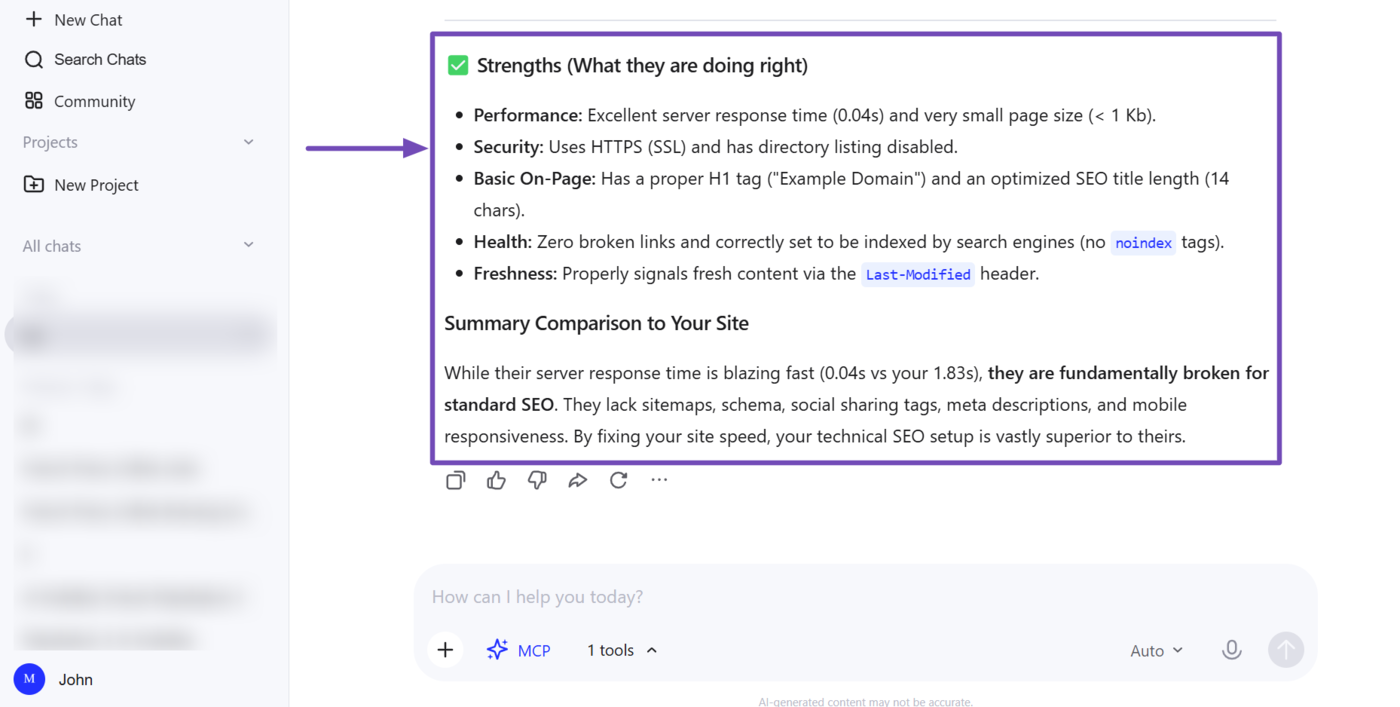
However, it doesn’t stop there. The response also details what the competitor is doing right and offers a quick comparison to your own site.
b. Compare Your Competitor’s Audit to Yours
The next step is to compare your competitor’s SEO audit to yours. You can do that using the prompt below:
Compare this competitor's SEO audit to mine and highlight where they're outperforming me: [Competitor's URL]
In this example, we are outperforming the competition in most areas. We have a better SEO score and stronger on-page and technical SEO.
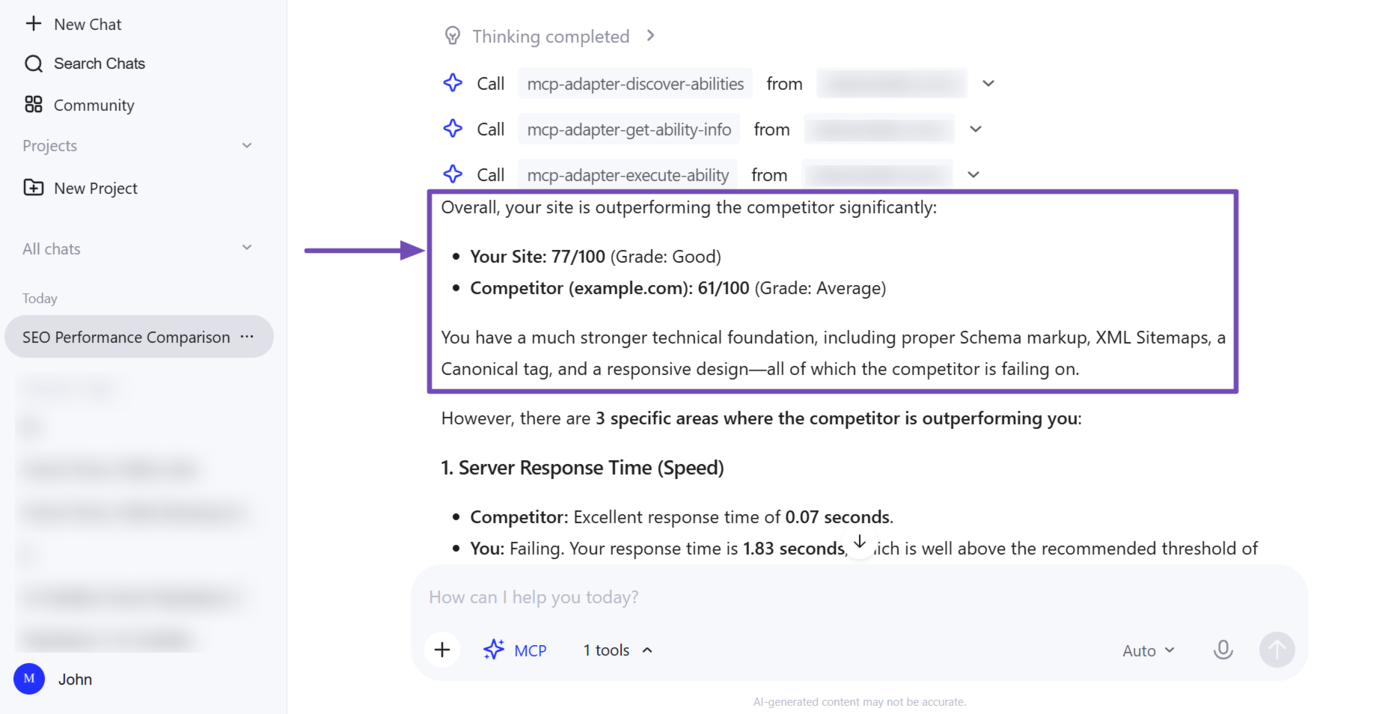
However, the audit also highlighted several areas where the competitor outperformed us. The response included insights into their strengths and recommendations on how we can improve.
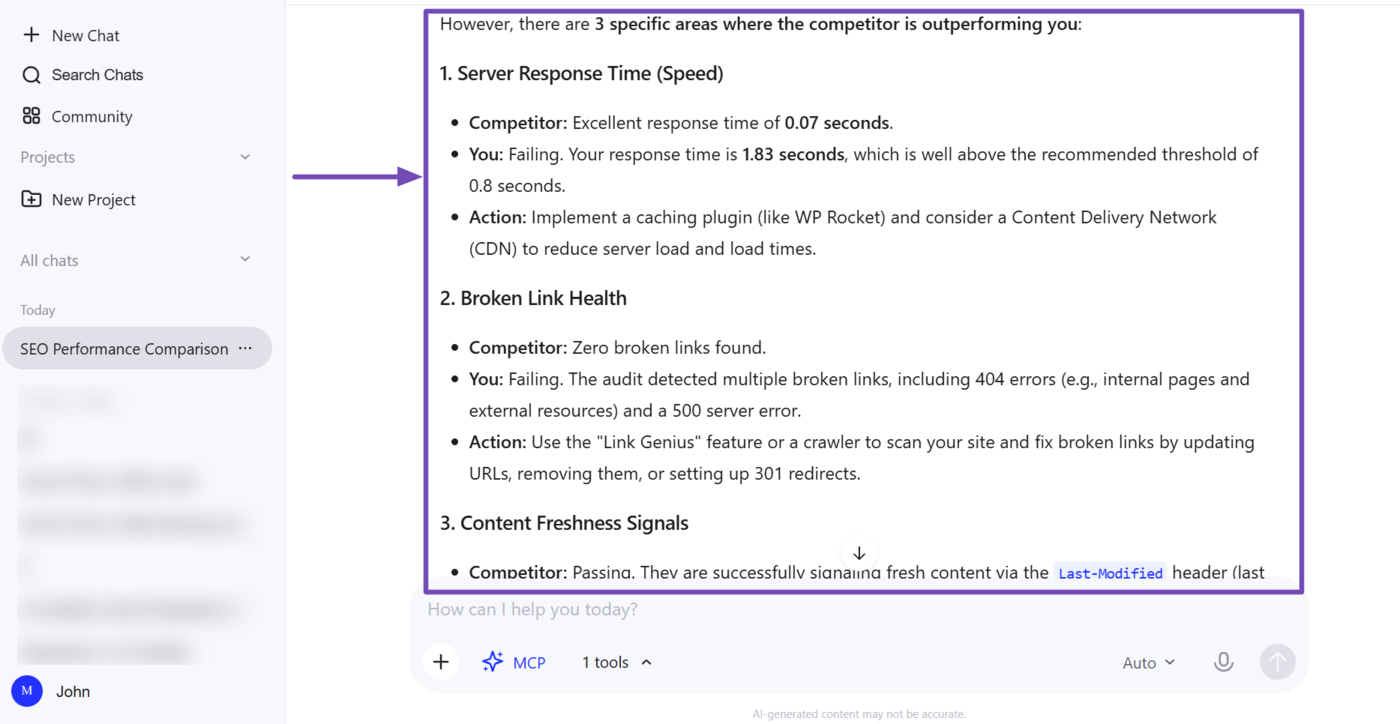
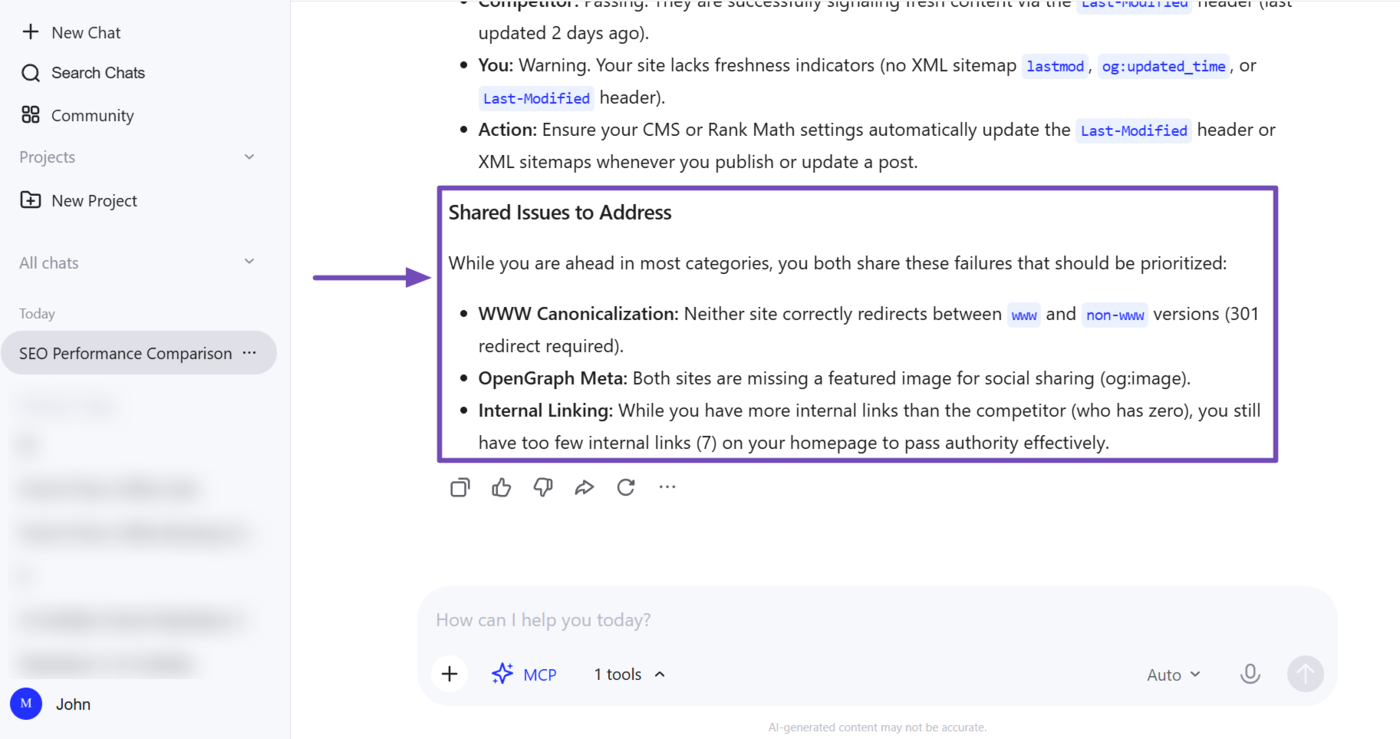
The report also highlighted areas where our site and the competitor’s site both underperformed. Be sure to review and address the issues identified in the response.
3 Internal and External Link Audits
Rank Math MCP lets you review the internal and external links in your posts. This helps you identify broken links, optimize your internal linking strategy, and make it easier for search engines to discover, crawl, and understand your content.
- Identify posts with poor internal and external links
3.1 Identify Posts With Poor Internal and External Links
This uses the get-link-report tool to return the status of links sitewide, helping you quickly spot broken links, redirects, or other issues that could be hurting user experience and crawlability.
Note: This ability uses the get-link-report tool to retrieve the status of the links across your site and the get-post-links tool to retrieve the links in a specific post. It may also use additional tools such as the audit-site-seo tool.
a. Audit Your Site’s Link Health
To get started, instruct your AI assistant to audit your site’s overall link health. You can use a prompt like:
Give me a link report for my site
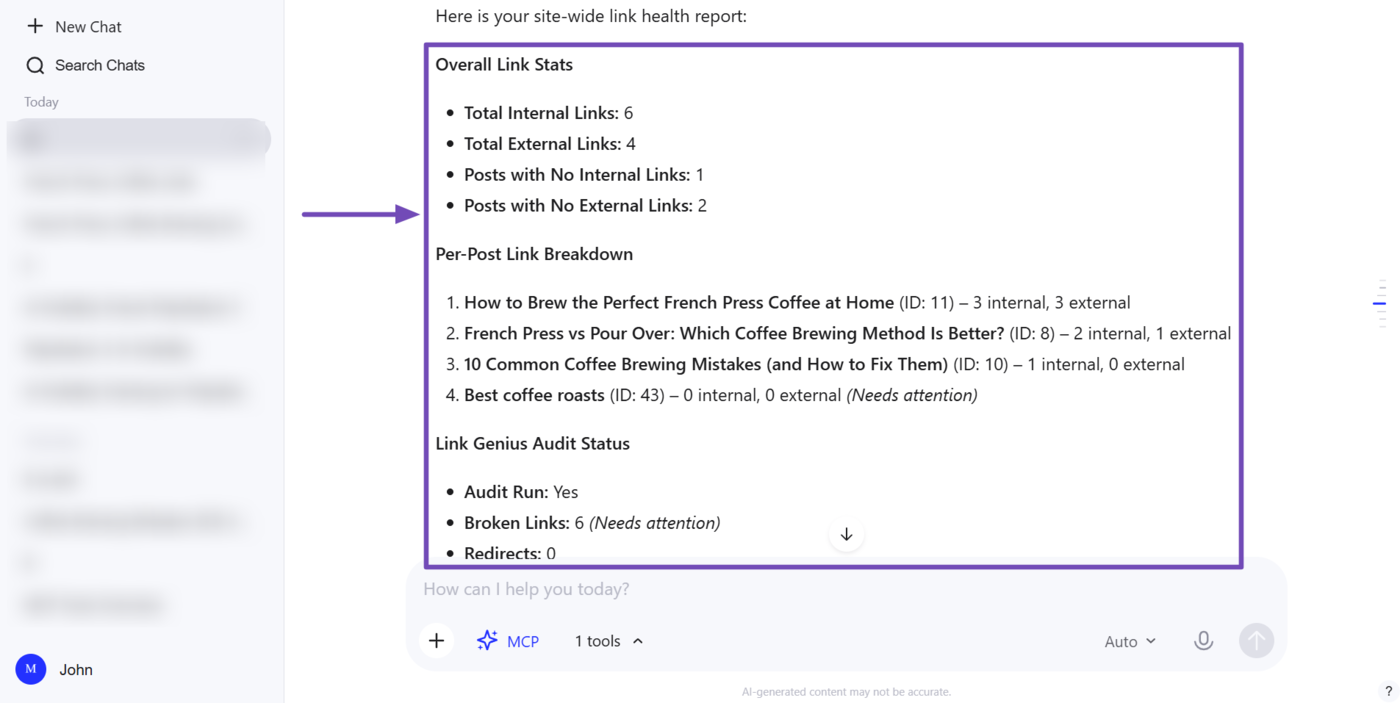
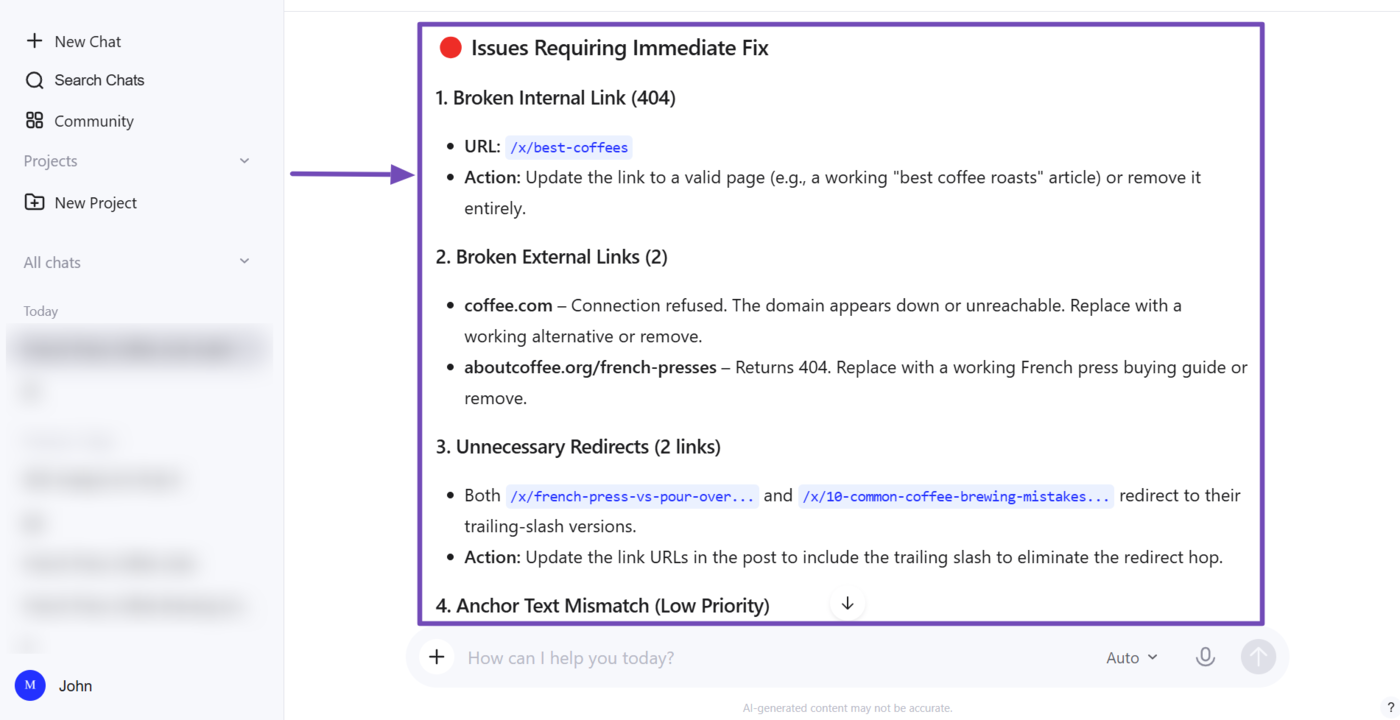
Your AI assistant will return with insights into the links on your site.
In this example, it returns the number of internal and external links on our site and specifically identifies posts that do not contain any internal or external links. It also specifies the number of internal and external links on specific pages.
Note: Posts with zero internal links need attention, as they are orphan pages. Be sure to review these posts and add relevant internal links where appropriate.
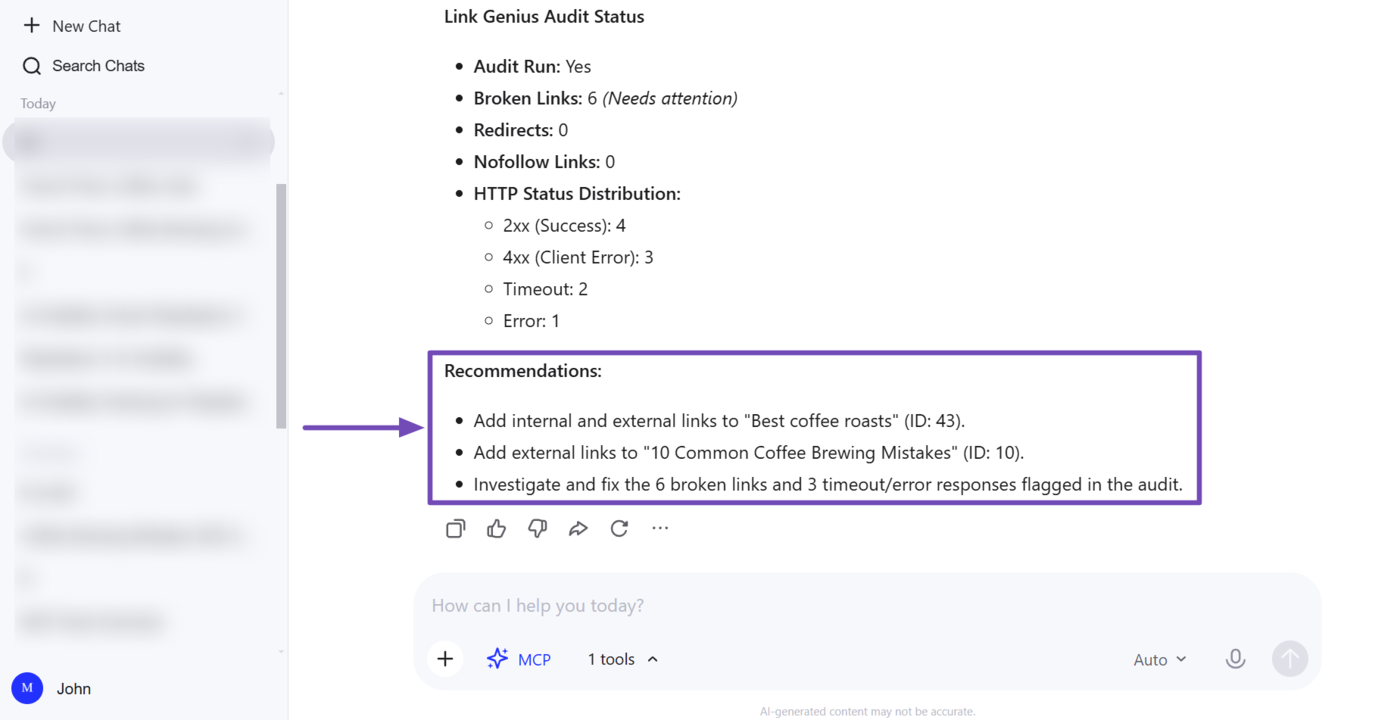
The response also reports the number of broken links on our site, along with the redirects, nofollow links, and the HTTP status codes returned by those links.
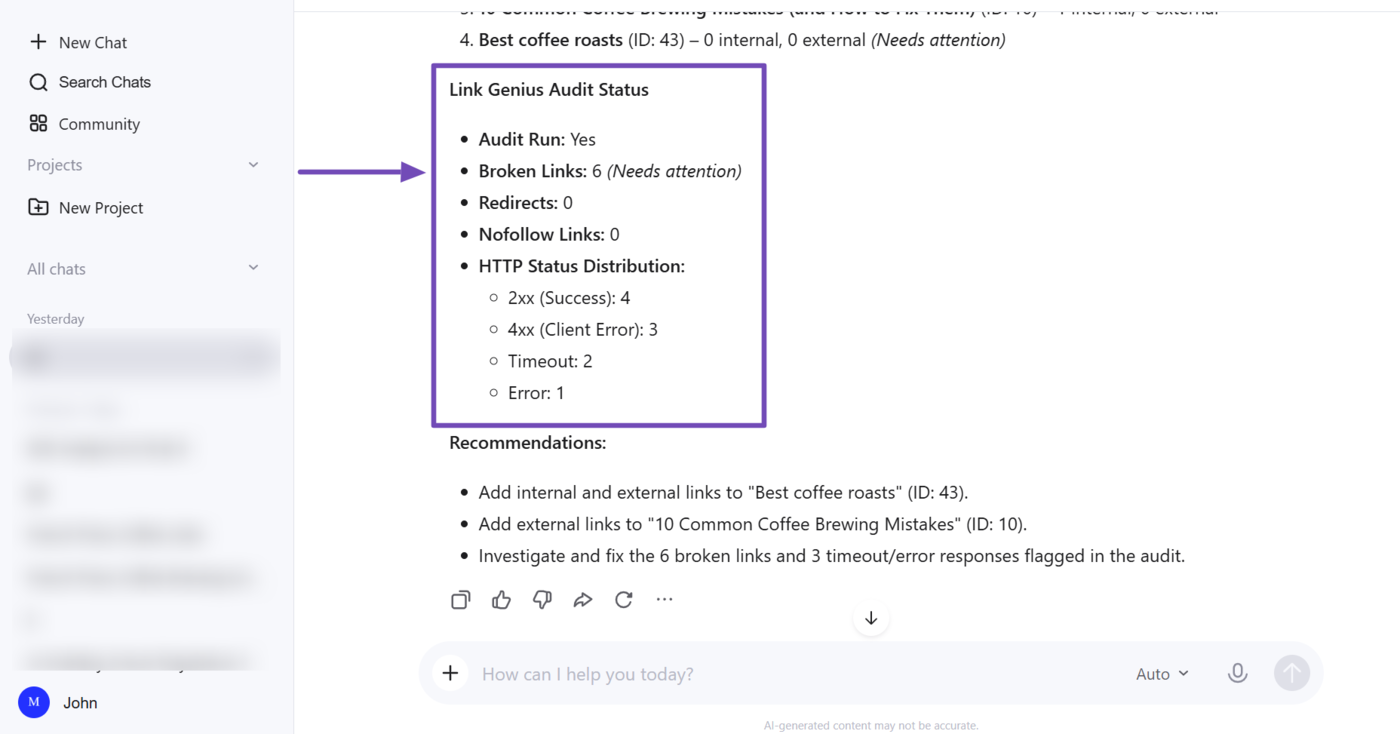
Our AI assistant also provides some recommendations on improvements we could implement on our site and posts.
b. Review Specific Link Issues in More Detail
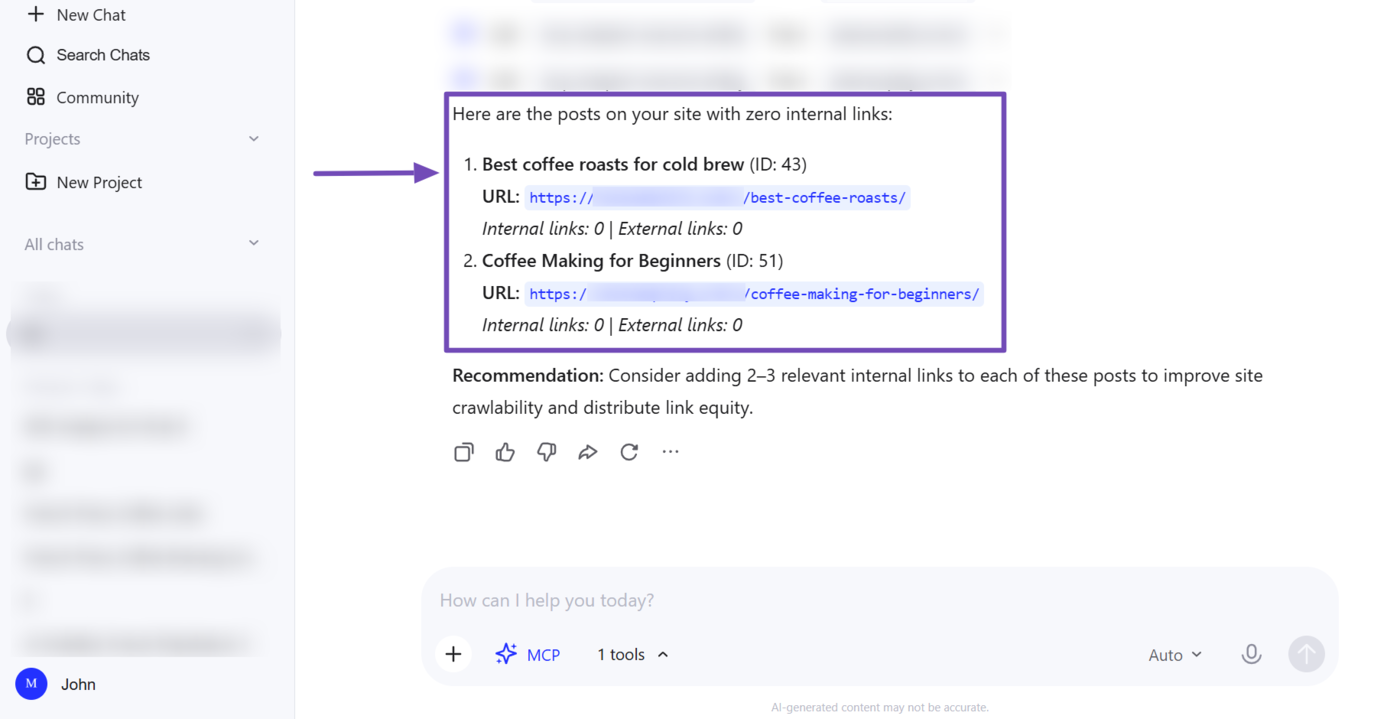
You can dive deeper into the specific link issues detected during the audit. For example, we want additional insights into the pages with zero internal links (orphan pages). So, we use the prompt below:
Show me the posts with zero internal links. Make sure to include their post title and URL
Your posts with zero internal links will be presented to you.
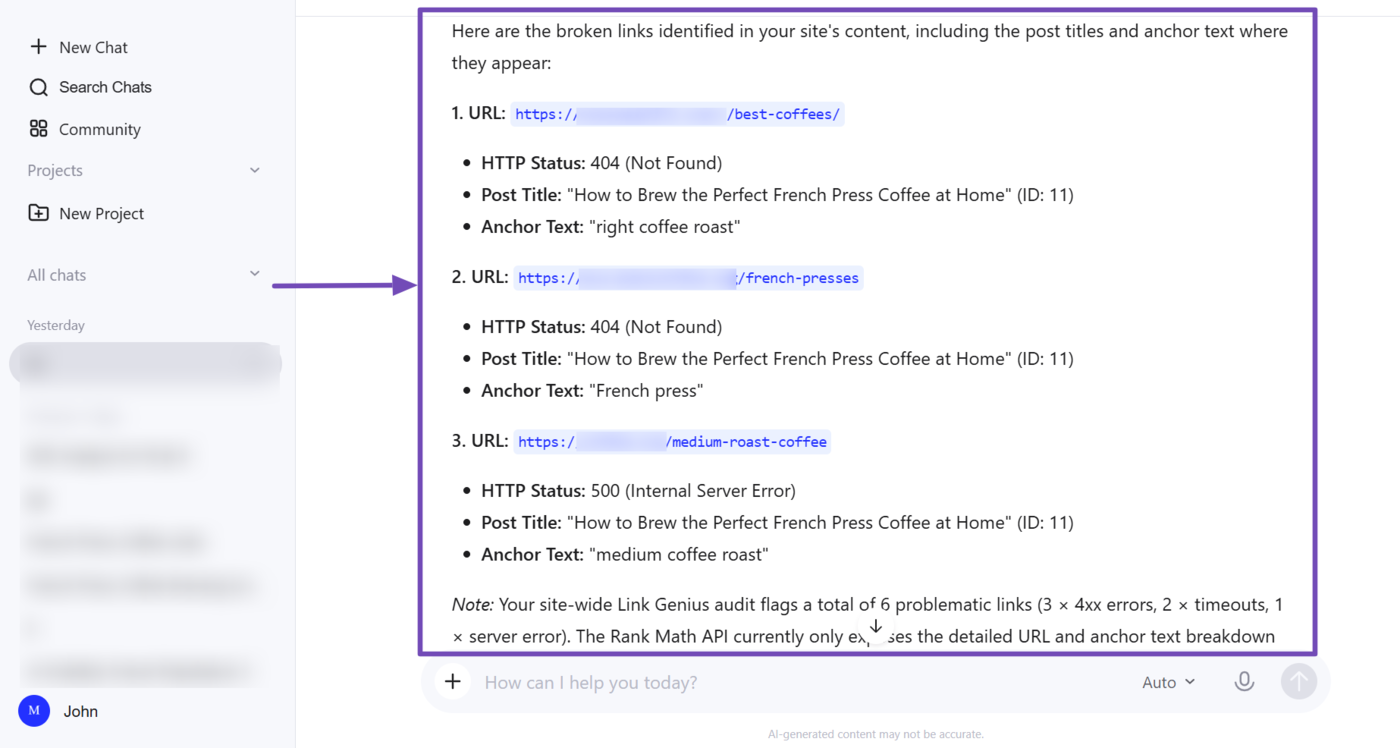
You can repeat this process for the other link issues detected during the audit. For instance, the link audit detected broken links across our site. So we will use the prompt below to garner insights into those links:
Show me the broken links and the title and URL of the posts in which they appear. Ensure to include the anchor text of the broken links
Your AI assistant will return with the insights, as shown below.
c. Audit the Links in the Affected Post
Now that you’ve uncovered the link issues, you can start fixing them post by post. However, before you start, it’s a good idea to also audit the links in each post. This way, you can catch other link-related issues and fix them all at once.
To get started, head to the post with the affected link and instruct your AI assistant to extract the links in the post.
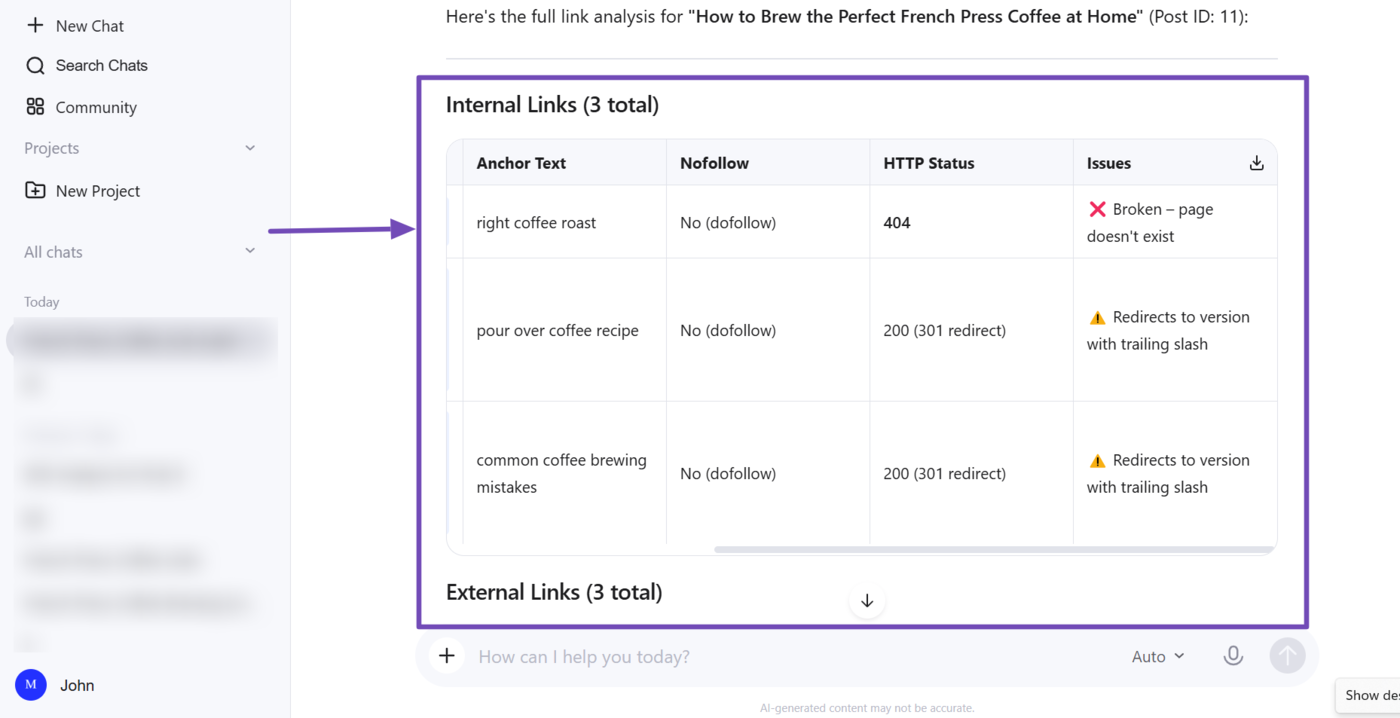
Show me all the links in [post title or post ID], including anchor text, nofollow status, and HTTP status codes, and flag any that need to be fixed or optimized
Your AI assistant will return with the internal and external links in the post, along with their associated data. Make sure to review them.
Once done, review the recommended optimizations and implement them alongside the original link issue.
4 AI Visibility Audits
Rank Math MCP lets you track your brand’s visibility and performance across AI platforms. This helps you understand how AI platforms perceive and cite your brand, so you can optimize your content accordingly.
- Track and optimize your brand for AI Visibility
4.1 Track and Optimize Your Brand for AI Visibility Content AI
Using Rank Math MCP, you can track your brand across AI platforms. This lets you uncover important ranking details, including the number of mentions you’re receiving, how AI users perceive it, and the queries for which you’re being tracked.
Note: This ability uses the create-ai-visibility-brand tool to start tracking a brand, the get-ai-visibility-overview and get-ai-visibility-brand-insights tools to retrieve your AI Visibility report, and the get-ai-visibility-brand-queries tool to retrieve the queries for which the brand is being tracked.
a. Add a Brand to AI Visibility
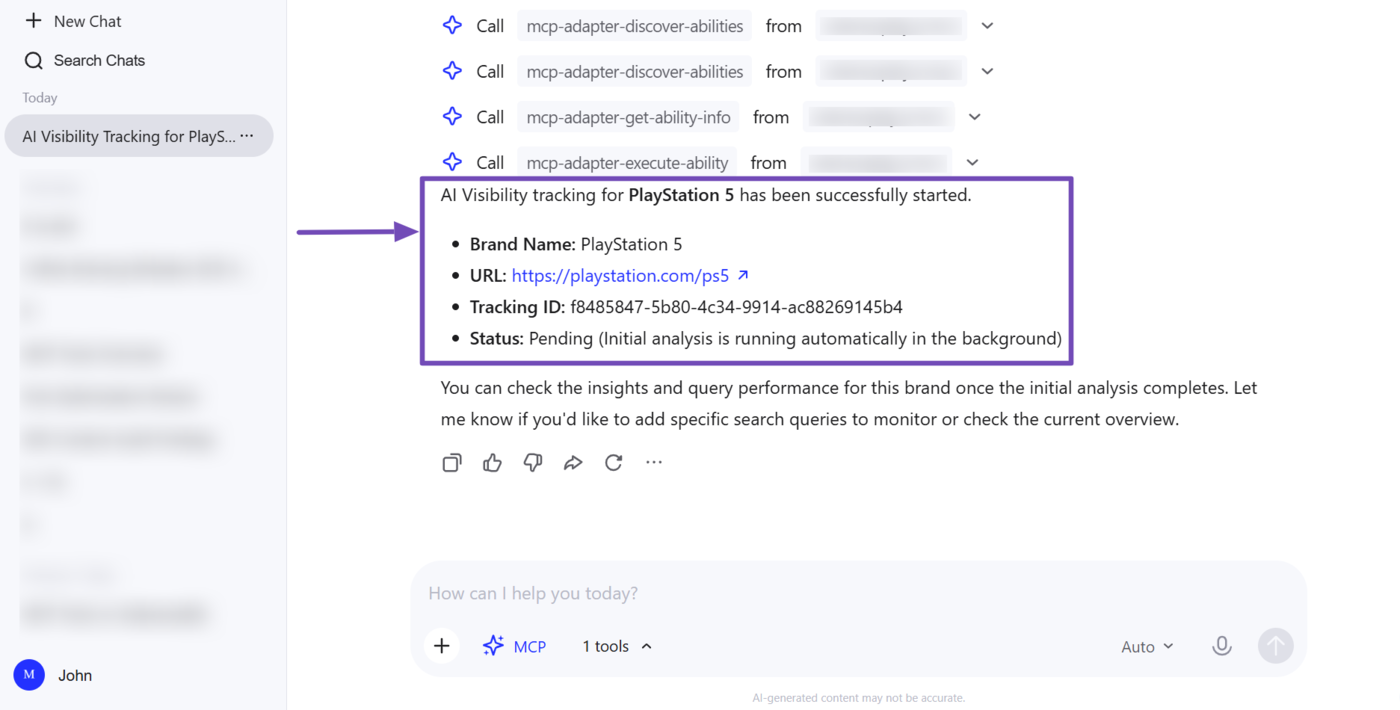
The first step is to add a brand to track. You can skip this step if you’ve previously added the brand to AI Visibility. However, if you haven’t started tracking the brand yet, enter the prompt below into your AI assistant.
Start tracking AI Visibility for [brand name]
For this example, we instructed AI Visibility to begin tracking the brand “PlayStation 5”.
b. Check Your Brand’s AI Visibility
Next, you want to see how the brand is performing on AI platforms and how it compares to your competitors. So, instruct your AI assistant to pull your overall visibility report using a prompt such as:
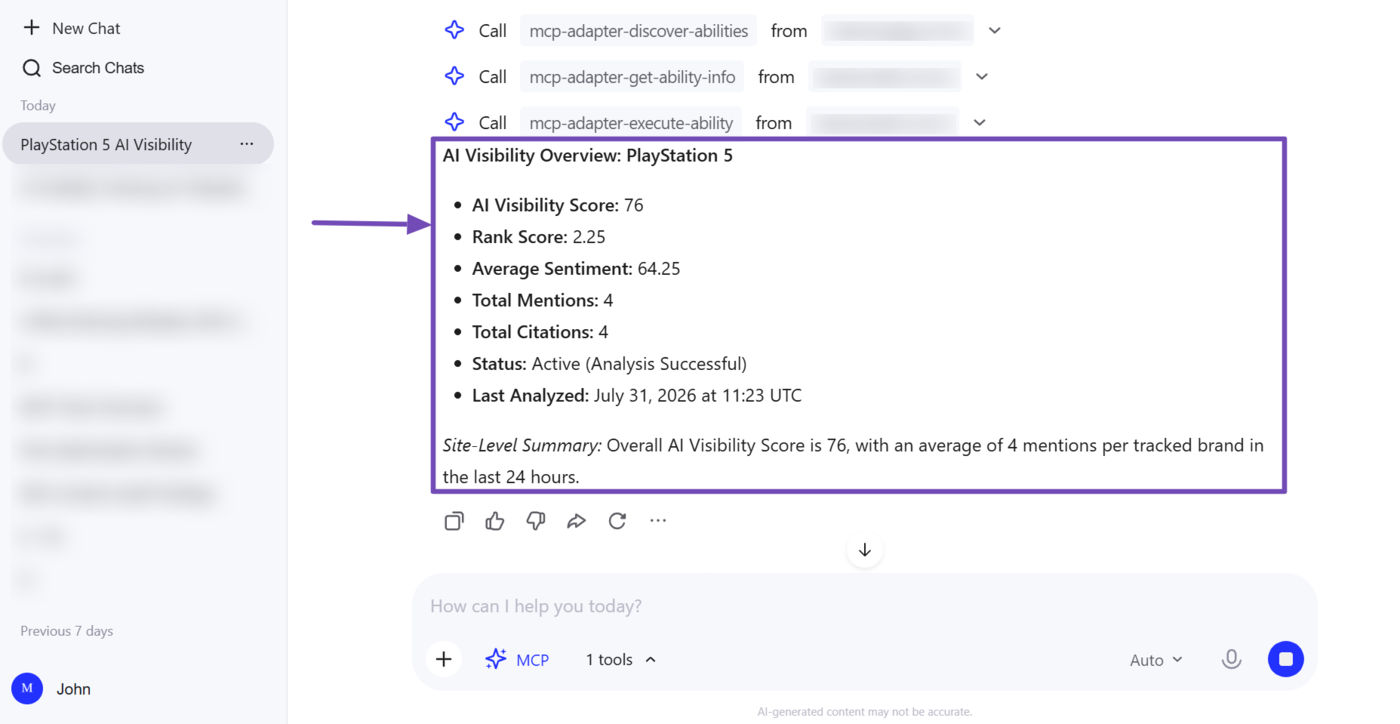
Show me the AI Visibility overview for [brand name]
Your AI assistant will return insights into your AI Visibility. Here, you can see that the report includes your AI Visibility score, rank score, average sentiment, total mentions, and total citations.
c. Uncover What AI Models Say About Your Brand
We can also dig deeper to see what AI platforms are saying about our brand. This lets us uncover various insights, including our ranking and closest competitors.
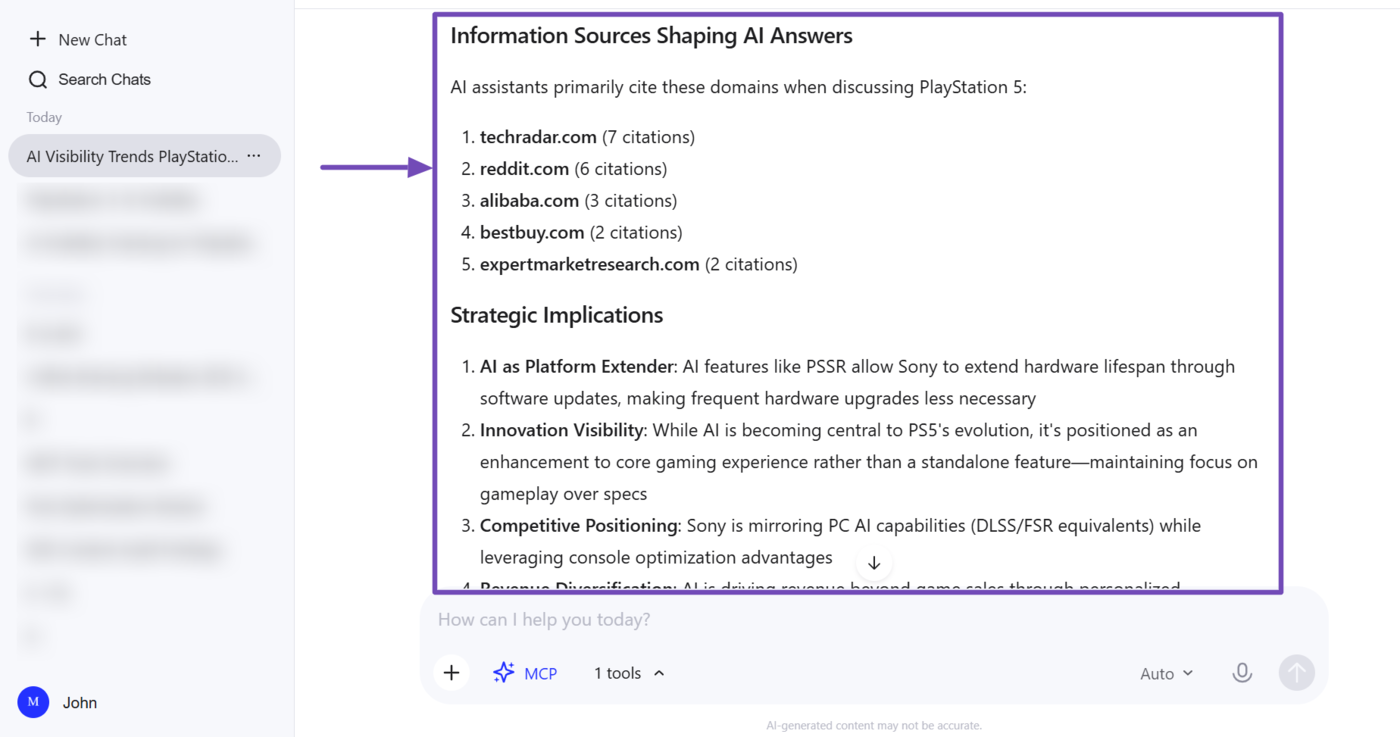
This insight also lets us identify the specific AI platforms citing us, the sentiment of their citations, and the terms they frequently use when describing us. You can get started using a prompt such as:
Give me AI visibility insights for [brand name]
In this example, you can see that our AI assistant returned various details about our brand, including its position in the market and closest competitors.
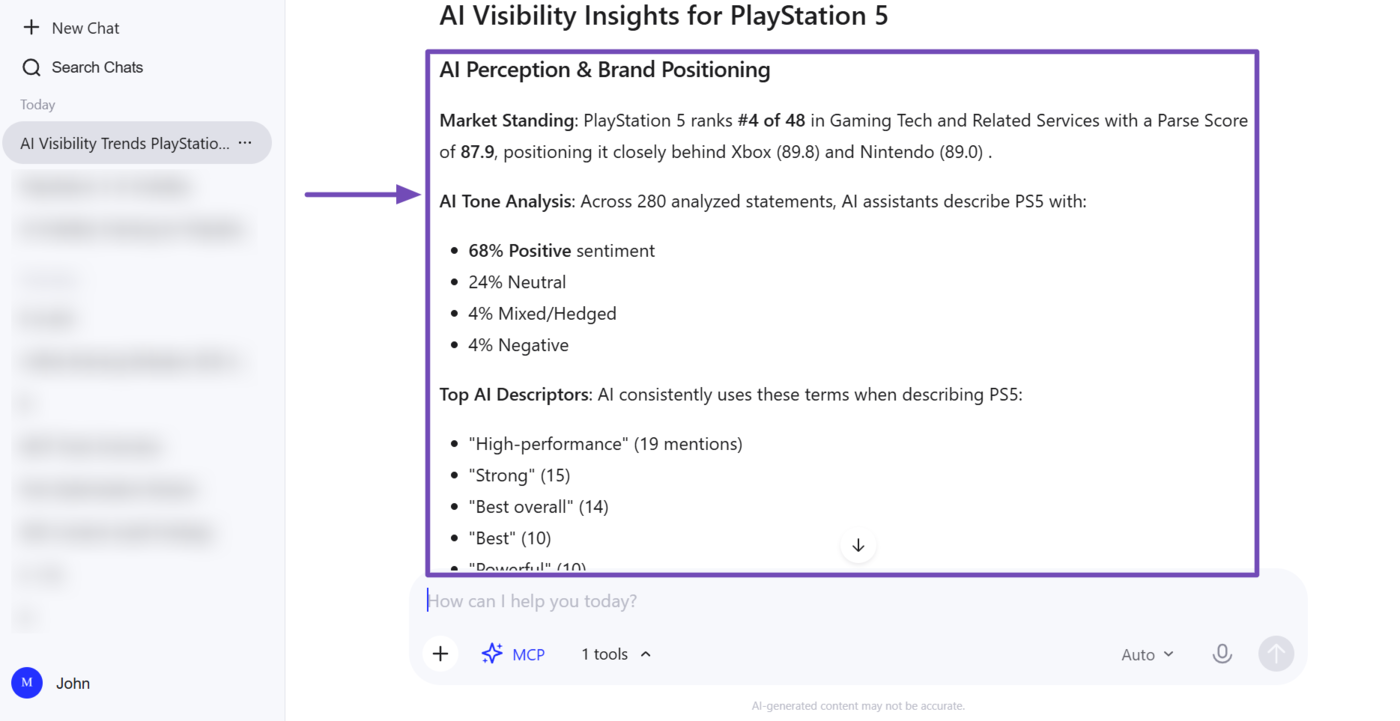
The response also includes additional insights into our brand’s mentions, including the domains frequently cited by the AI platforms.
d. Identify the Queries Driving Your AI Visibility
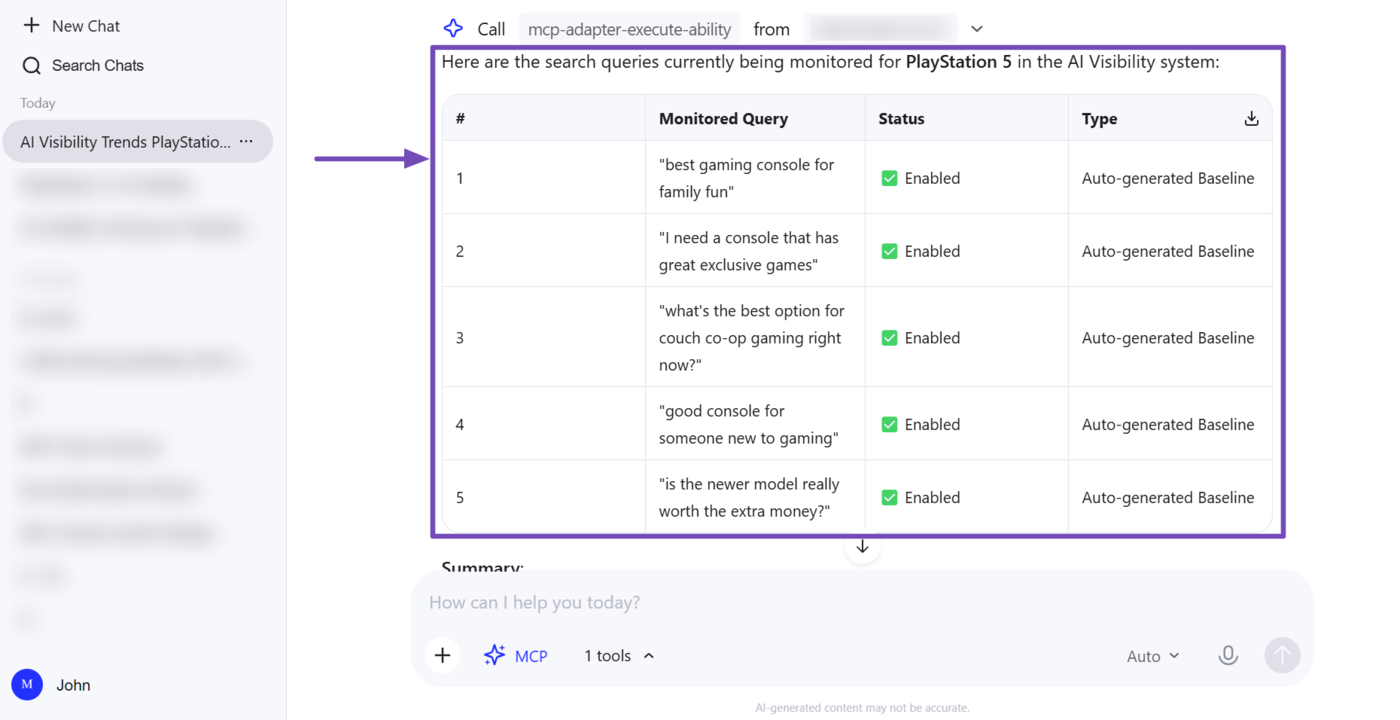
Now that we know how our brand is performing on AI platforms, we can proceed to identify the prompts and questions for which our brand appears. Once done, we can optimize our site and answer these questions to increase AI citations.
To do that, instruct your AI assistant to show you the queries for which you’re being tracked. You can do that using the prompt below:
Show me the queries being monitored for [brand name]
Your AI assistant will show the queries to you. With this in hand, you can update your website content to explicitly answer these queries, which increases your chances of being cited in future AI responses.
Those are some of the SEO and AI Visibility optimizations you can perform using Rank Math MCP. If you have any questions, you’re always more than welcome to contact our dedicated support team. They are available 24/7, 365 days a year, and are always ready to answer your questions.