

Most service pages don’t bring in leads, even when the business itself is good.
You might have a page that explains your service, lists what you offer, and even has a contact button. But it still doesn’t rank well on Google or convert visitors into customers.
That’s because a service page needs more than just basic information. It needs to clearly explain your service, match what users are searching for, and build enough trust for someone to take the next step.
In this post, you’ll learn how to perform service page SEO that not only ranks but also brings consistent leads.
Table Of Contents
1 What is the Purpose of a Service Page?
Service page SEO plays a key role in helping your business get found, build trust, and turn visitors into leads. But many users misunderstand what a service page is actually meant to do.
A service page is not mainly designed to rank on Google Maps or the local pack. Its primary goal is to rank in the regular search results, the standard listings you see when someone searches for a service.
More importantly, service pages help search engines understand your business in detail. When you create pages that clearly cover each service you offer, it becomes easier for Google to recognize your expertise.
Service pages function as detailed explanations of your business offerings, helping search engines and users understand your expertise.
If someone asks, “Are you a plumber?” and you say yes, that’s a start. But if you can also handle drain cleaning, pipe repairs, leak detection, water heater issues, and more, they start to trust your skills.
Google works in a similar way. Your homepage introduces your business, while your service pages act as proof of what you actually do.
2 Build Authority with Multiple Service Pages (and the Right Local Structure)
A strong service page strategy can make a big difference in how your website performs.
Instead of relying on a single page, the main impact comes from having multiple service pages that work together. This is what helps build the kind of authority Google looks for.
For example, if you create just one page, like “roof repair”, Google can understand what it’s about, but it doesn’t have enough context yet to fully trust your expertise in that area.
As you start creating more pages, 30, 40, even 50, each focused on a specific service, things begin to improve. Google starts noticing a clear pattern.
As you build out these related pages, Google starts recognizing what is known as topical relevance. This refers to how well your website covers a subject through multiple connected pages, helping signal your expertise to search engines. To strengthen this further, your content should also follow E-E-A-T principles (Experience, Expertise, Authority, and Trust).
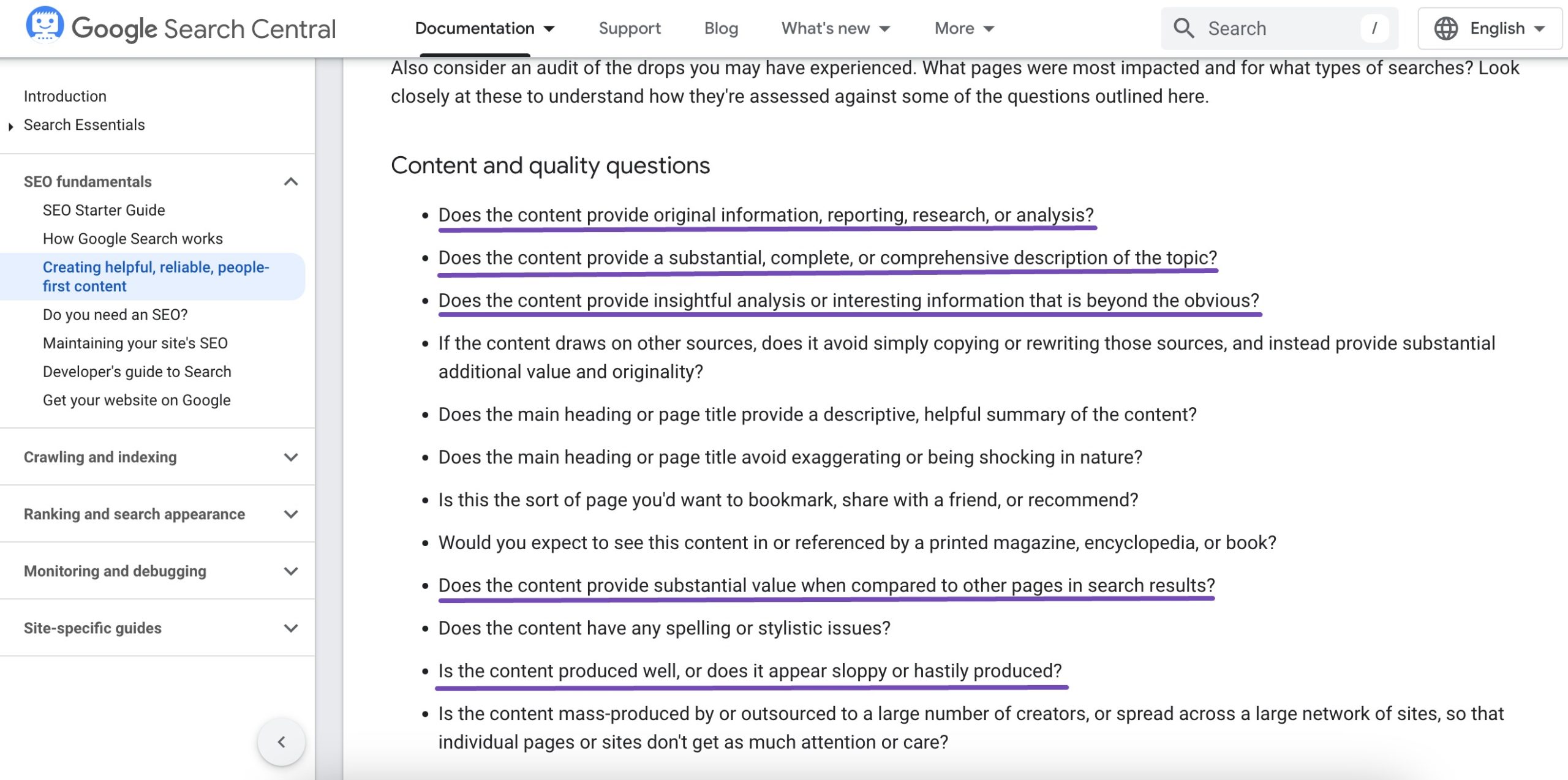
In a structured way, you’re now showcasing the full range of services your business offers. Instead of trying to cover everything on a single page, you’re giving each service the space to be explained in detail.
To understand this better, imagine you run an SEO agency.
Instead of having just one page like SEO Services, you create separate pages for:
- On-page SEO
- Technical SEO
- Local SEO
- Link building
This structure helps Google recognize your business as a specialized SEO provider with expertise across multiple areas. Over time, it becomes easier for search engines to clearly understand what you offer and the depth of your expertise.
Use Rank Math for Location Pages
If you’re using Rank Math SEO plugin, the Local SEO module can help you manage location pages more easily. To do so, enable the Local SEO module from your WordPress dashboard.
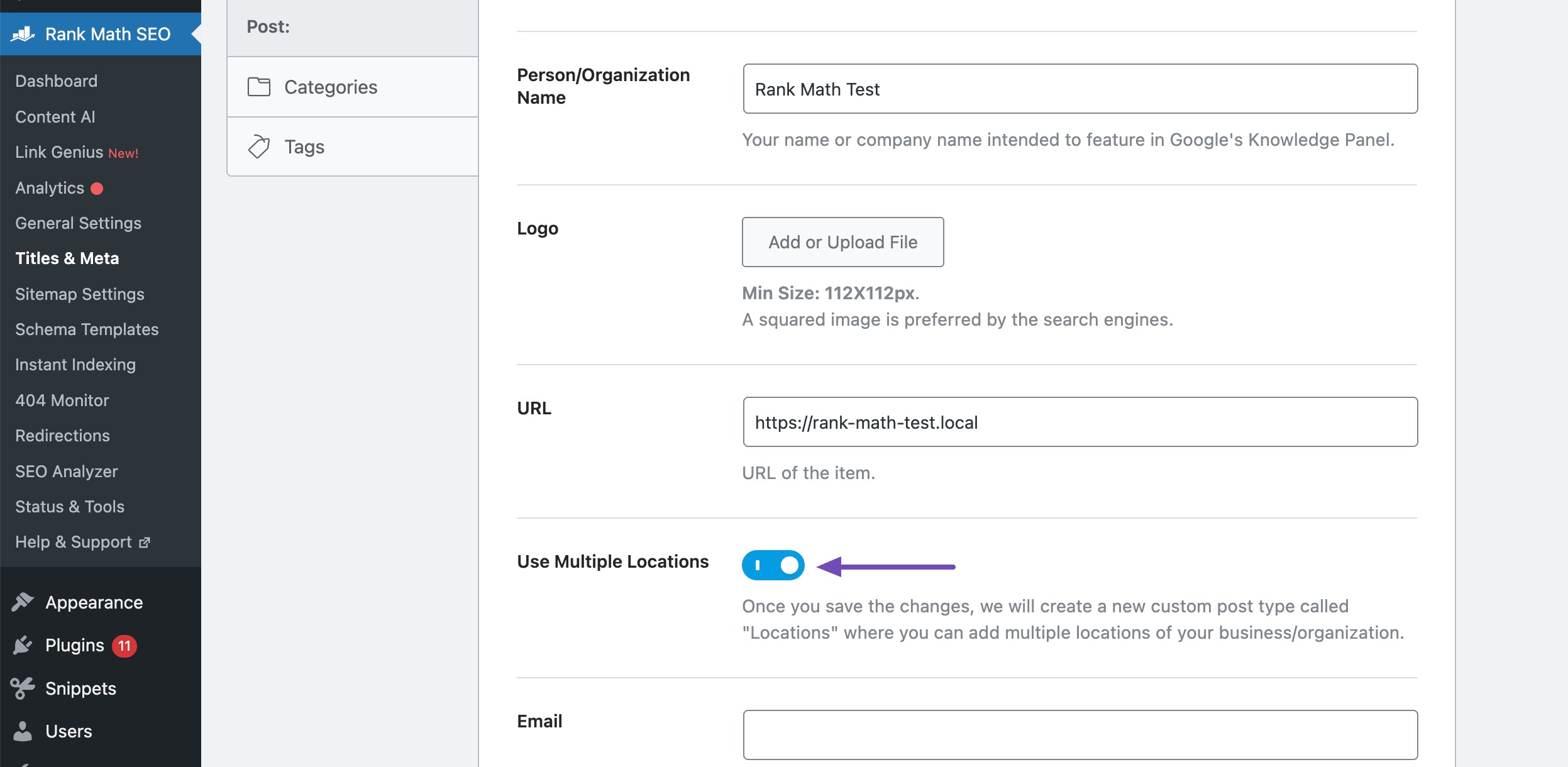
To enable the multiple locations option, navigate to Rank Math SEO → Titles & Meta and enable the Use Multiple Locations and Save your changes. Rank Math will create a new custom post type called RM Locations, where you can add multiple locations of your business or organization.
For instance, if you have offices in different cities, you can create pages like:
- SEO Services in Mumbai
- SEO Services in Delhi
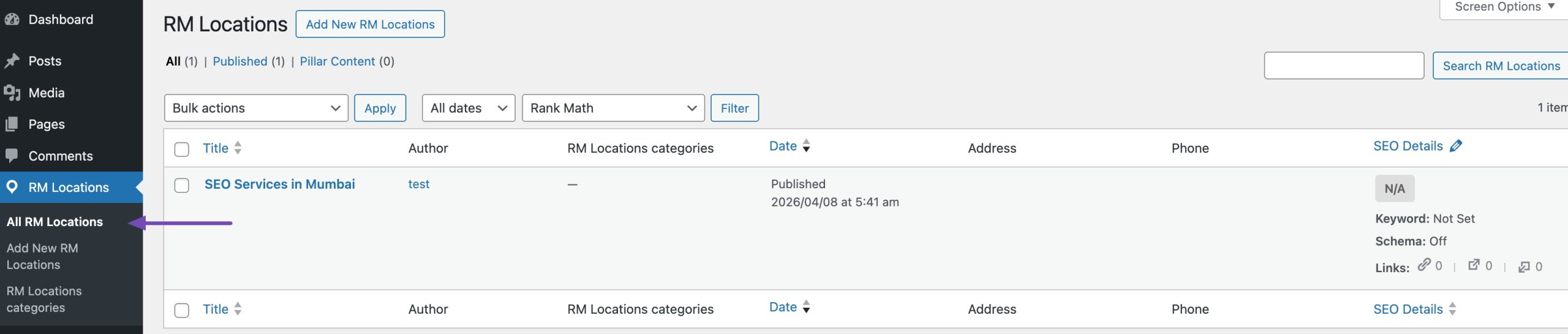
These location pages include structured data (Schema markup), which helps search engines understand your business location, services, and relevance for local search queries.
3 Location Page Structure and Service Page Structure
Creating multiple pages is important, but structure is what makes them work.
Both location pages and service pages serve different purposes, and each needs to be built in a clear and consistent way. Before diving into how to structure each one, the table below will help you clearly understand the key differences between them.
| Aspect | Service Pages | Location Pages |
| Purpose | Focus on what services you offer | Focus on where you offer services |
| Primary Keywords | Target general keywords (e.g., “SEO services”) | Target location-based keywords (e.g., “SEO services in Vadodara”) |
| Search Intent | Broad, service-based intent | High local intent with immediate need |
| Content Focus | Service details, benefits, process | Local relevance, area-specific details |
| SEO Strategy | Topic authority and in-depth content | Local SEO signals like city names and proximity |
| Use of Local Elements | Minimal or none | Includes maps, local testimonials, area references |
| Conversion Behavior | May take longer to convert | Often converts faster due to local intent |
| Duplication Risk | Low (naturally unique content) | High if content is not customized for each location |
| Best Use Case | Ranking for core services | Ranking in multiple cities or service areas |
| Optimization Tip | Use strong content and internal links | Customize each page and include local signals |
3.1 Location Page Structure
A location page focuses on a specific city or area. Its main goal is to show that your business operates there and to build local trust.
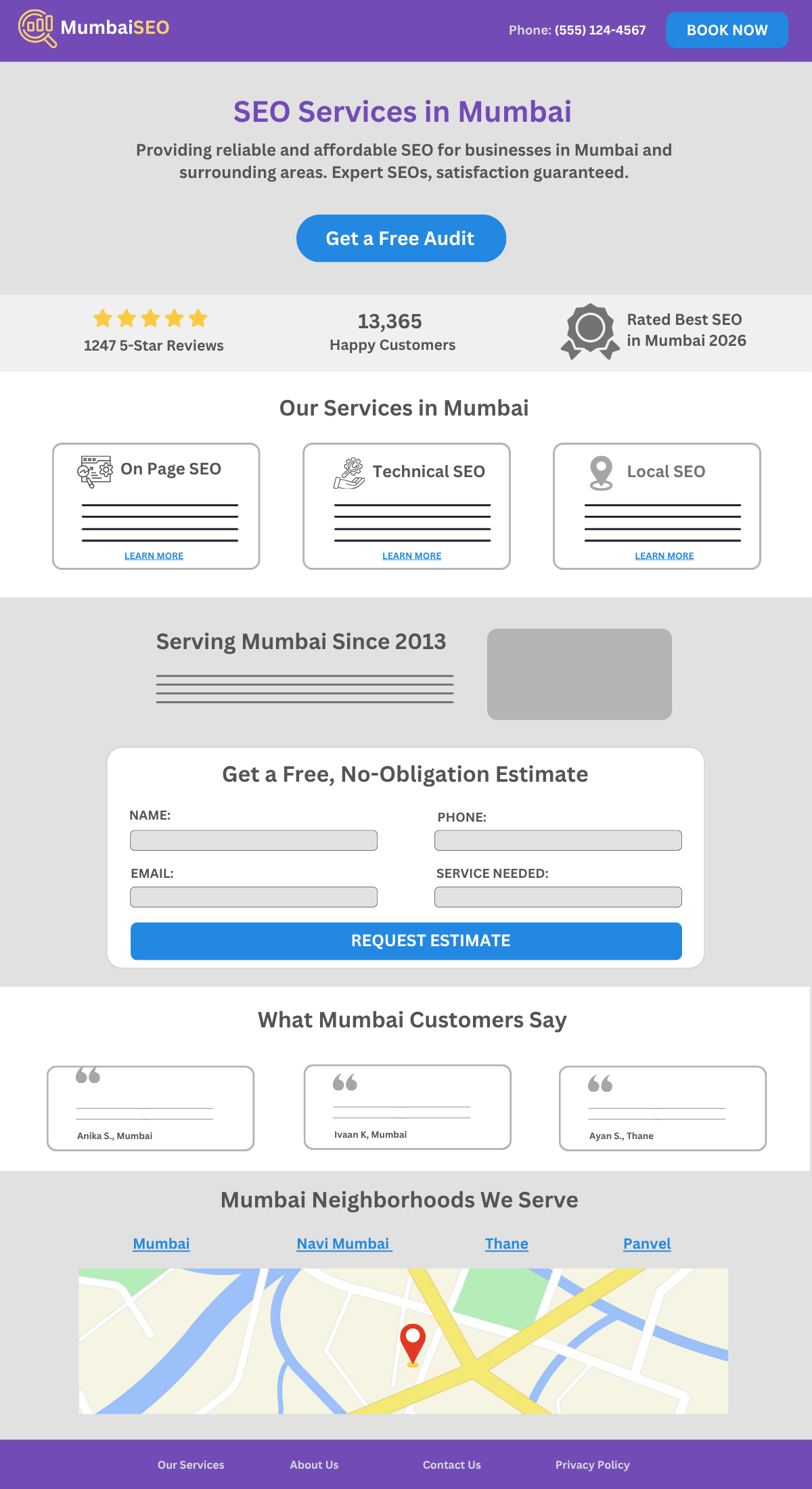
It usually starts with a strong hero section that includes your main service along with the location. For example, “SEO Services in Mumbai.” This should be followed by a short line explaining what you offer and a clear call-to-action like “Get a Free Audit” or “Request a Quote.”
Right after this, it helps to include trust signals such as:
- Ratings and reviews
- Number of clients served
- Certifications or recognitions
This section quickly reassures users that your business is reliable.
Next comes a services overview. Instead of going into deep detail, you briefly list the main services you offer, such as:
- On-page SEO
- Technical SEO
- Local SEO
- Link building
Each of these should link to a dedicated service page.
To make the page more relevant, you should include localized content. This means:
- Talking about your experience working with businesses in Mumbai
- Mentioning how long you’ve been serving the area
- Adding real examples or case studies from local clients
This helps both users and search engines trust your presence.
A simple contact form should also be included to capture leads. Keep it easy to fill out with just the essential details.
Adding testimonials from clients in Mumbai makes the page more relatable and trustworthy. It’s even better if the reviews mention the location.
You can also include a section listing the areas you serve within the city, such as nearby neighbourhoods or regions. This helps improve your local reach.
Some pages also include a map to show the service area. This is optional, but it can help users visually confirm that you operate in their location.
3.2 Service Page Structure
A service page focuses on one specific service. Its main goal is to clearly explain what you offer and encourage users to take action.
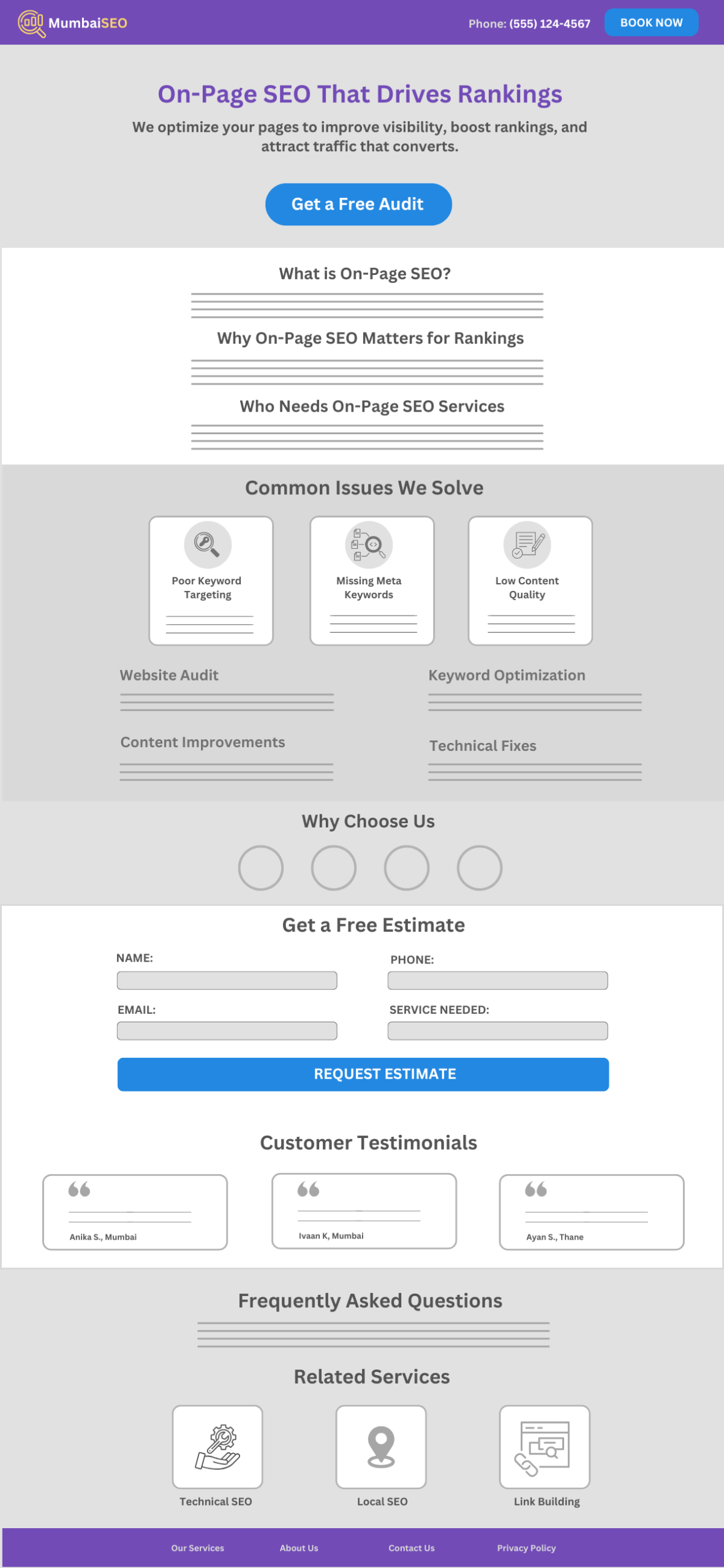
It starts with a strong hero section that highlights the exact service. For instance, “On-Page SEO Services.”
This should be followed by a short line that addresses the user’s need, such as improving rankings or fixing website issues, along with a clear call-to-action like “Get a Free Audit.”
Next comes a brief introduction where you explain:
- What on-page SEO is
- Why it matters for rankings
- Who it’s best suited for
This helps users quickly understand if the service is right for them.
After that, a problem–solution section helps build trust. You can list common issues such as:
- Poor keyword targeting
- Missing meta tags
- Low content quality
Then explain how your service solves each of these problems.
You can then move into detailed service information. This is where you explain your process, for example:
- Website audit
- Keyword optimization
- Content improvements
- Technical fixes
This section shows your expertise and helps you stand out.
A “Why Choose Us” section should follow, where you can highlight what makes your service better, such as your experience, proven results, or approach.
Like location pages, you should include a simple contact form to make it easy for users to reach out.
Adding testimonials from clients who used your on-page SEO service will make the page more convincing and relevant.
An FAQ section is also important. It helps answer common questions about:
- Pricing
- Time required to see results
- What’s included in the service
This reduces hesitation and builds trust.
Finally, you can include a related services section that links to other services like:
- Technical SEO
- Local SEO
- Link building
This helps users explore more and improves your internal linking.
4 Common Mistakes to Avoid for Service Page SEO
Before optimizing your service page, it’s important to understand what not to do. Even well-designed pages can fail if they contain these common SEO mistakes that hurt rankings and conversions.
- Keyword stuffing: Overusing keywords makes content unnatural; use keywords naturally with variations and focus on readability.
- Ignoring search intent: Not matching user needs reduces conversions; target transactional intent and address user pain points clearly.
- Weak or missing CTA: No clear next step lowers leads; use strong, visible CTAs like “Get a Free Quote” placed throughout the page.
- No trust signals: Lack of credibility reduces conversions; add testimonials, reviews, and case studies.
- Poor page structure: Hard-to-read content increases bounce rate; use headings, bullet points, and short paragraphs.
- Ignoring mobile optimization: A bad mobile experience loses users; ensure a responsive design and easy navigation on all devices.
- Slow page speed: Slow loading drives users away; optimize images, reduce scripts, and use fast hosting.
- No internal linking: Weak site structure affects SEO; link to related services and important pages.
- Ignoring local SEO: Missing local visibility reduces leads; use location keywords and optimize your business profile.
- Not using Schema markup: Search engines may not understand content well; implement structured data like service and FAQ schema.
5 Frequently Asked Questions
How do I make my service page rank higher on Google?
Focus on keyword optimization, high-quality content, fast page speed, mobile-friendliness, and strong internal linking.
Is local SEO important for service pages?
Yes, especially if you serve specific areas, using location-based keywords and optimizing your business profile is essential.
How often should I update my service pages?
You should review and update them every 3–6 months to keep content fresh and competitive
Do images help with service Page SEO?
Yes, optimized images with alt text improve user experience and can help with rankings.
How do I know if my service page is performing well?
Track metrics like traffic, rankings, bounce rate, and conversions using analytics tools.
6 Conclusion
Service page SEO isn’t complicated, but it does require attention to detail. A good service page clearly explains what you offer, answers questions, and makes it easy for someone to take the next step. That’s what really matters.
Instead of trying to do everything at once, focus on getting the basics right, use clear structure, write helpful content, and guide visitors with simple calls to action. Over time, small improvements can make a big difference.
At the end of the day, your service page should feel useful and trustworthy. If someone lands on it and quickly understands what you do and how to get started, you’re already on the right track.
If you like this post, let us know by tweeting @rankmathseo.