

AI is changing how we create content, analyze websites, and manage SEO. But there’s still a gap between what an AI assistant knows and what it can actually access on your website.
That’s where the Model Context Protocol (MCP) comes in.
Rank Math MCP lets compatible AI assistants connect directly with your WordPress website and Rank Math. Once connected, you can use natural language to retrieve SEO data, run audits, review your settings, analyze links, access Search Console data, monitor AI Visibility, and perform supported SEO actions.
Instead of switching between your AI assistant and WordPress dashboard for every task, you can bring many of these SEO workflows into the same conversation.
Key Takeaways:
- Rank Math MCP connects AI assistants directly to your WordPress SEO data using the Model Context Protocol (MCP).
- It enables AI assistants to run SEO audits, retrieve metadata, inspect Schema markup, analyze links, and fix supported SEO issues using natural language.
- Rank Math MCP reduces the need to switch between WordPress dashboards and multiple SEO tools.
- It works with AI assistants that support MCP, including Claude Desktop and GitHub Copilot.
- By combining AI with Rank Math’s SEO capabilities, users can automate repetitive SEO tasks and make faster optimization decisions.
Table Of Contents
1 What is Rank Math MCP?
MCP (Model Context Protocol) is an open standard that allows AI assistants to securely connect with external tools and services.
Rank Math MCP is the integration layer that connects your AI assistant with Rank Math’s SEO system. In simple terms, MCP acts like a bridge between your AI assistant and platforms like Rank Math. Once connected, the AI can request data or perform actions inside WordPress using structured tools.
It allows your AI assistant to:
- Run SEO audits on your website or competitor sites
- Fix common SEO issues automatically
- Retrieve SEO metadata, Schema, and link data
- Analyze on-page SEO performance in real time
- Suggest improvements based on actual site data
Rather than acting only as a content-writing assistant, your AI assistant becomes an active SEO partner capable of understanding and working with your website’s SEO data.
2 Why Rank Math MCP Matters for SEO
SEO involves more than optimizing a few titles and meta descriptions.
You may need to monitor technical SEO, review Schema, check internal links, analyze content, review Search Console data, manage redirects, and keep your Rank Math settings properly configured.
Normally, these tasks require you to open different screens in WordPress or switch between several tools.
Rank Math MCP brings many of these workflows into your AI assistant.
After connecting Rank Math through MCP, you can:
- Run SEO audits.
- Analyze individual posts.
- Review SEO metadata and scores.
- Check Schema markup.
- Review internal and external links.
- Check redirects.
- Retrieve Search Console keyword data.
- Review Rank Math settings.
- Check your site’s health information.
- Retrieve robots.txt and llms.txt.
- Update supported Rank Math settings.
- Review AI Visibility data.
- Add brands to AI Visibility tracking.
- Fix supported SEO issues.
This doesn’t replace SEO strategy or human review. Instead, it gives you a simpler way to access your site’s SEO data and work with Rank Math through an AI interface.
3 How Rank Math MCP Works
Rank Math MCP follows a simple interaction flow between you, your AI assistant, and WordPress.
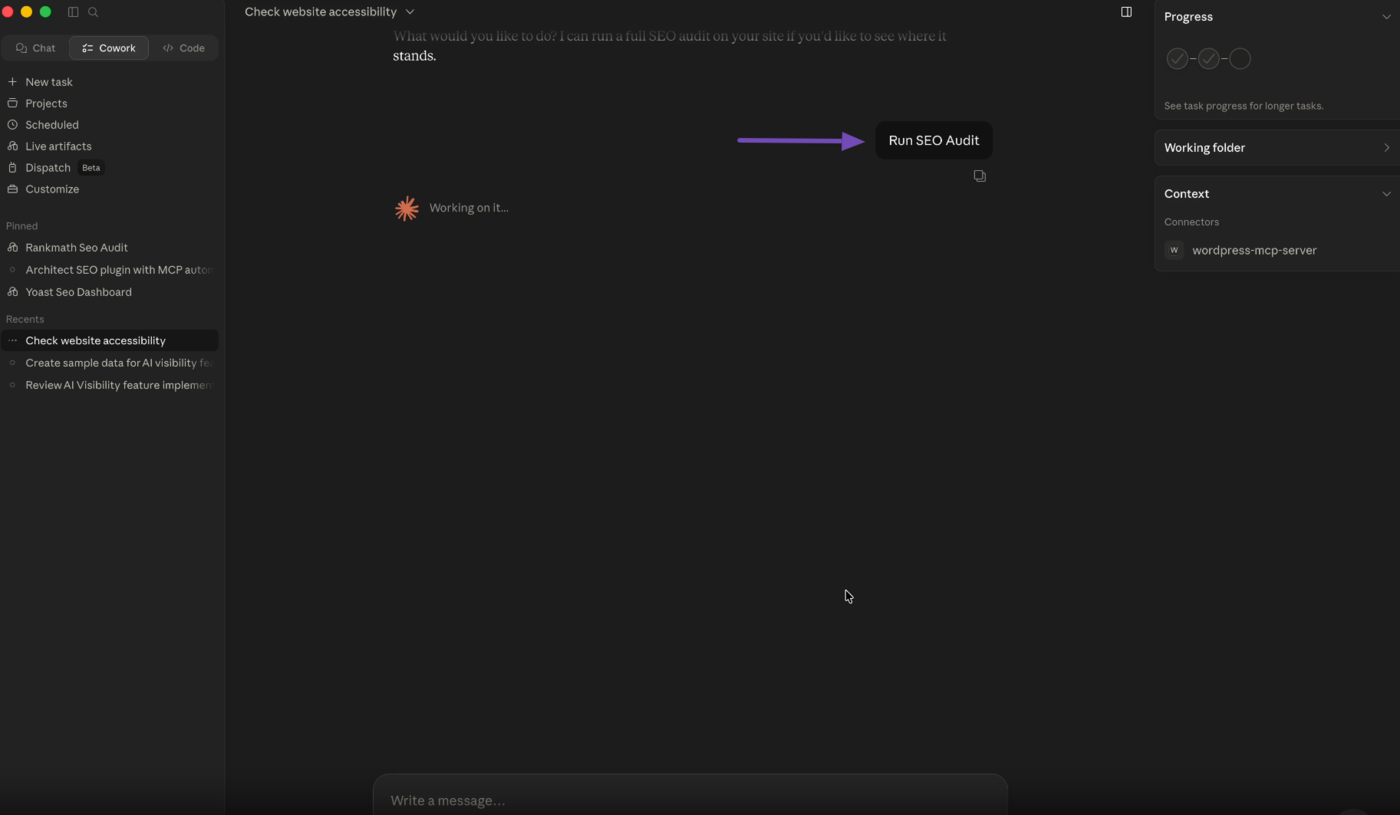
Here’s how it works step by step:
- You send a prompt to your AI assistant (e.g., run an SEO audit)
- The AI identifies the correct Rank Math MCP tool
- Rank Math executes the task inside WordPress
- Results are sent back to your AI assistant
- The AI explains and enriches the output for you
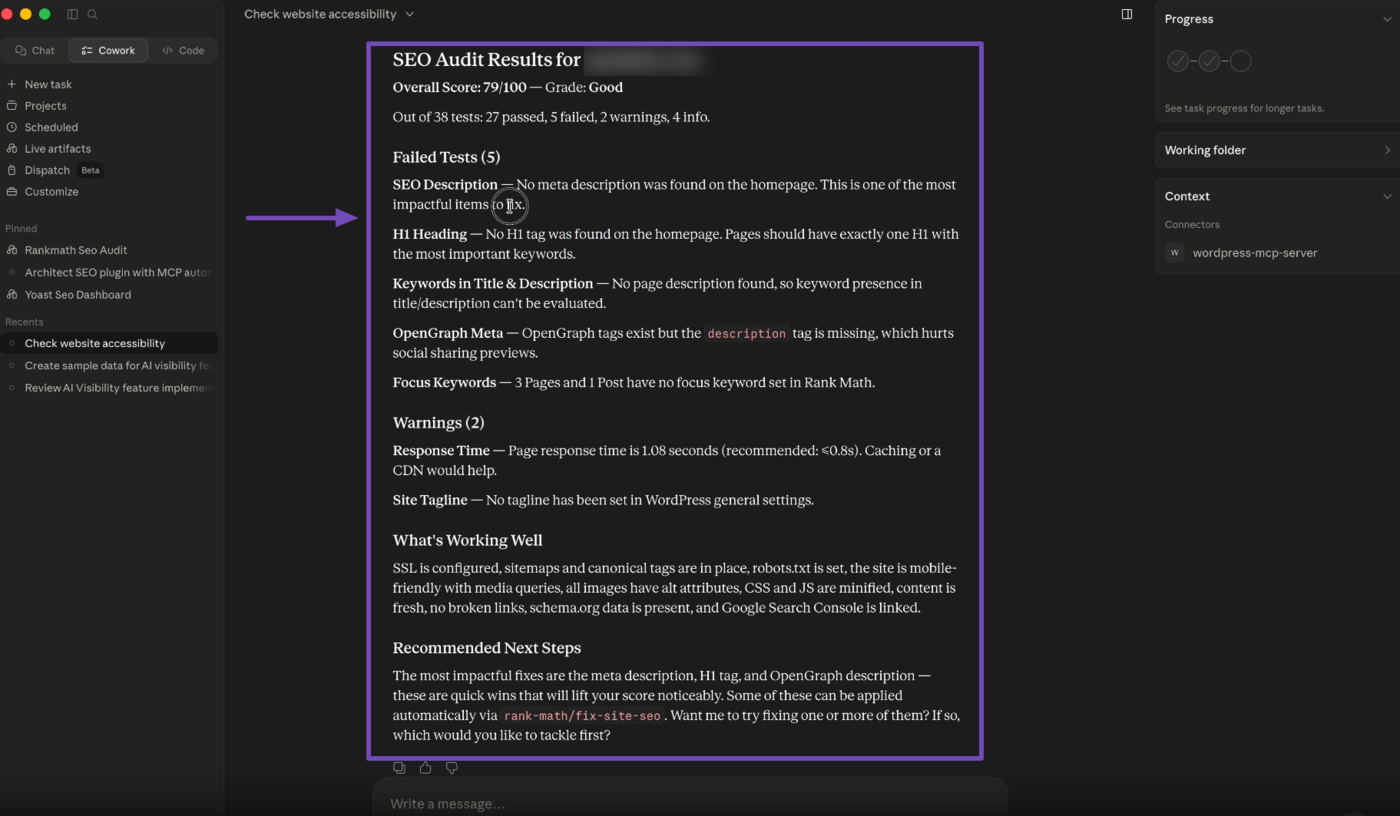
For example:
- You ask: “Run an SEO audit of my site”
- The AI uses:
rank-math/audit-site-seo - Rank Math performs the audit
- The results are returned and summarized in your chat
You don’t need to open WordPress or navigate dashboards. Everything happens inside your AI interface.
4 Key Benefits of Using Rank Math MCP
Connecting Rank Math with MCP enables AI-powered SEO workflows that are faster, more efficient, and easier to manage.
Some of the key benefits include:
- Perform SEO tasks using natural language.
- Run comprehensive SEO audits instantly.
- Retrieve metadata, Schema markup, and link information.
- Identify and resolve supported SEO issues faster.
- Analyze competitor websites more efficiently.
- Reduce the time spent navigating WordPress dashboards.
- Access structured SEO data directly from your AI assistant.
By bringing your SEO data into your AI workspace, Rank Math MCP helps you spend less time managing tools and more time improving your website.
5 Connect Rank Math MCP With Your Favourite AI Coding Assistants
Before using Rank Math MCP, you need to connect your WordPress site to an AI assistant that supports MCP.
Rank Math supports MCP connections with compatible AI assistants, including Claude Desktop, ChatGPT, and GitHub Copilot. The exact connection process varies depending on the AI assistant you use.
Connect Rank Math MCP Using OAuth
OAuth is the recommended way to connect Rank Math MCP with Claude Desktop.
With OAuth, Claude can securely access your WordPress site without you manually entering your WordPress password into Claude. The connection is authorized through your browser.
Once the authorization is complete, your WordPress site will be connected to Claude through Rank Math MCP.
Note: Make sure you are logged into Claude Desktop and claude.ai with the same account before starting the OAuth connection.
Add a Custom Connector
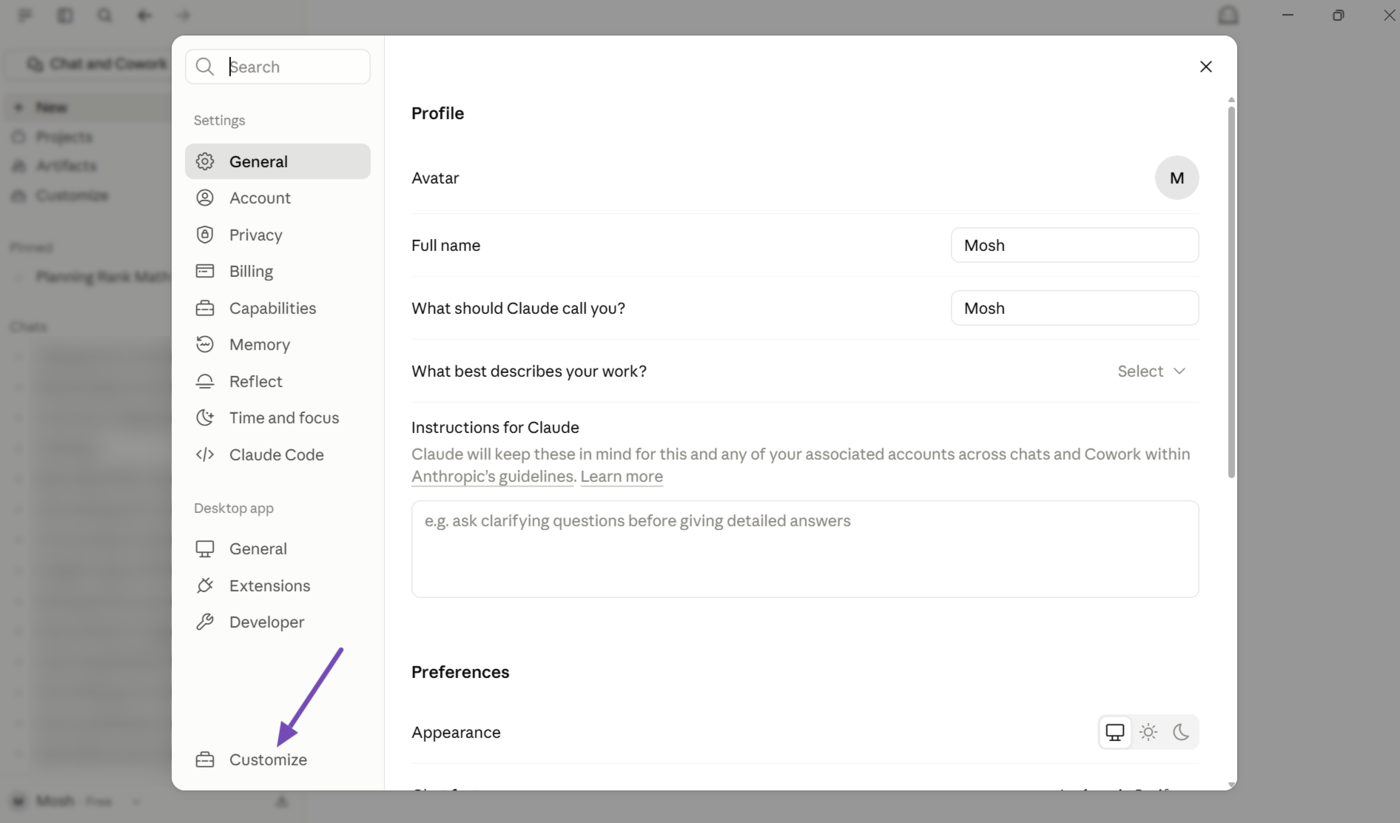
Open the Claude Desktop app. Click your username and select Settings.
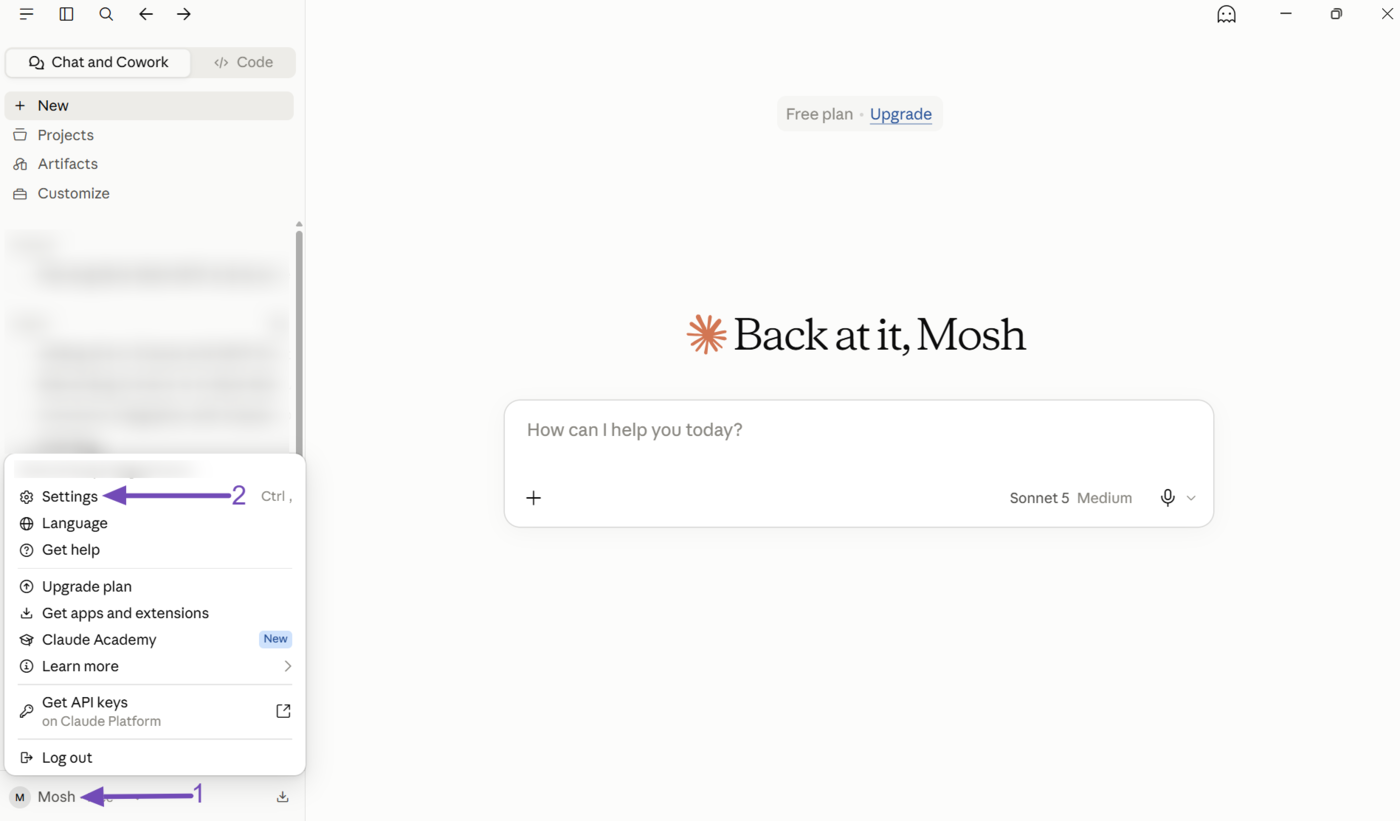
Next, open Customize.
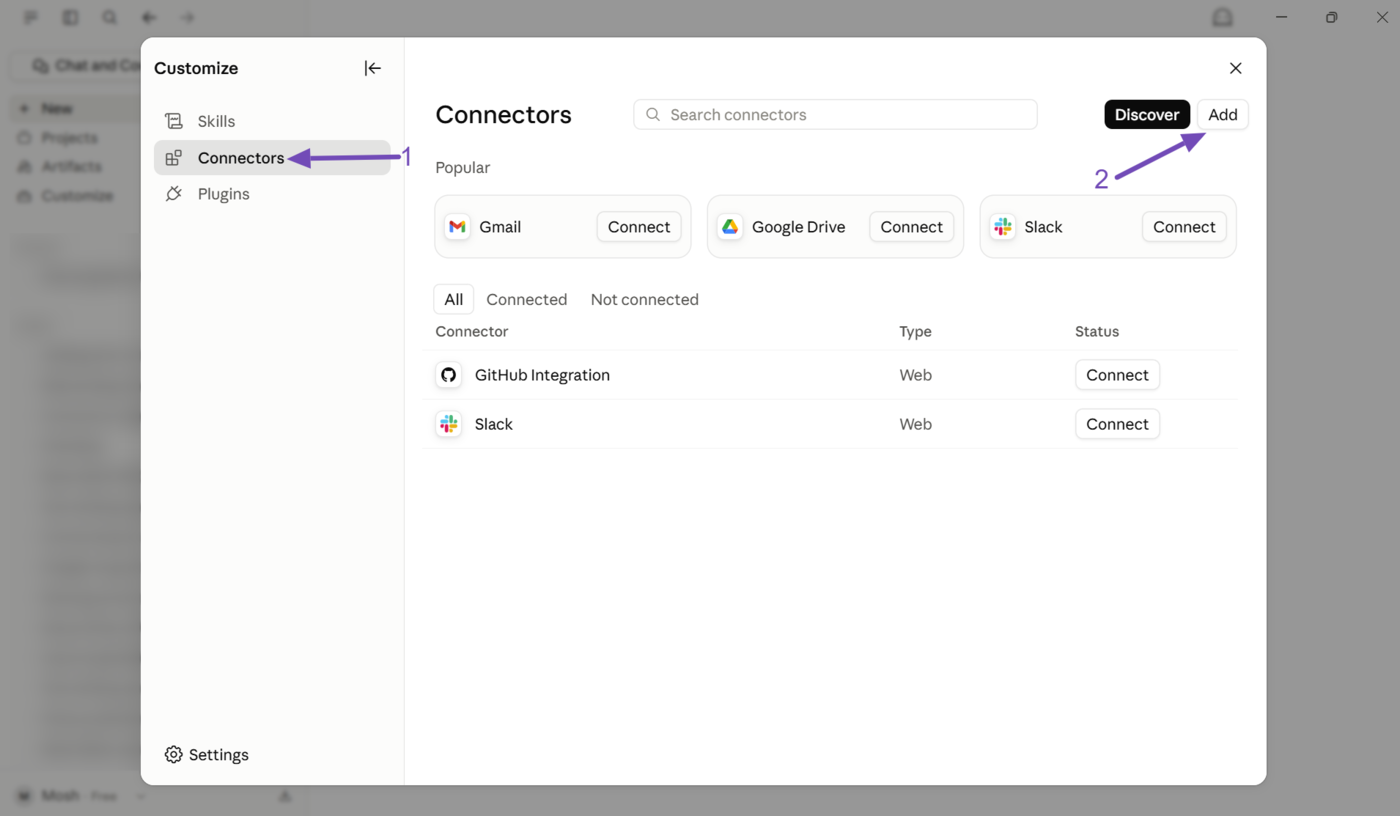
Select Connectors and click Add.
Enter the Connector Details
In the Add custom connector window, enter the following details:
- Name: Enter a name for your website.
- Remote MCP server URL: Enter the following URL, replacing
your-site-urlwith your website’s URL:
https://your-site-url/wp-json/mcp/mcp-oauth-server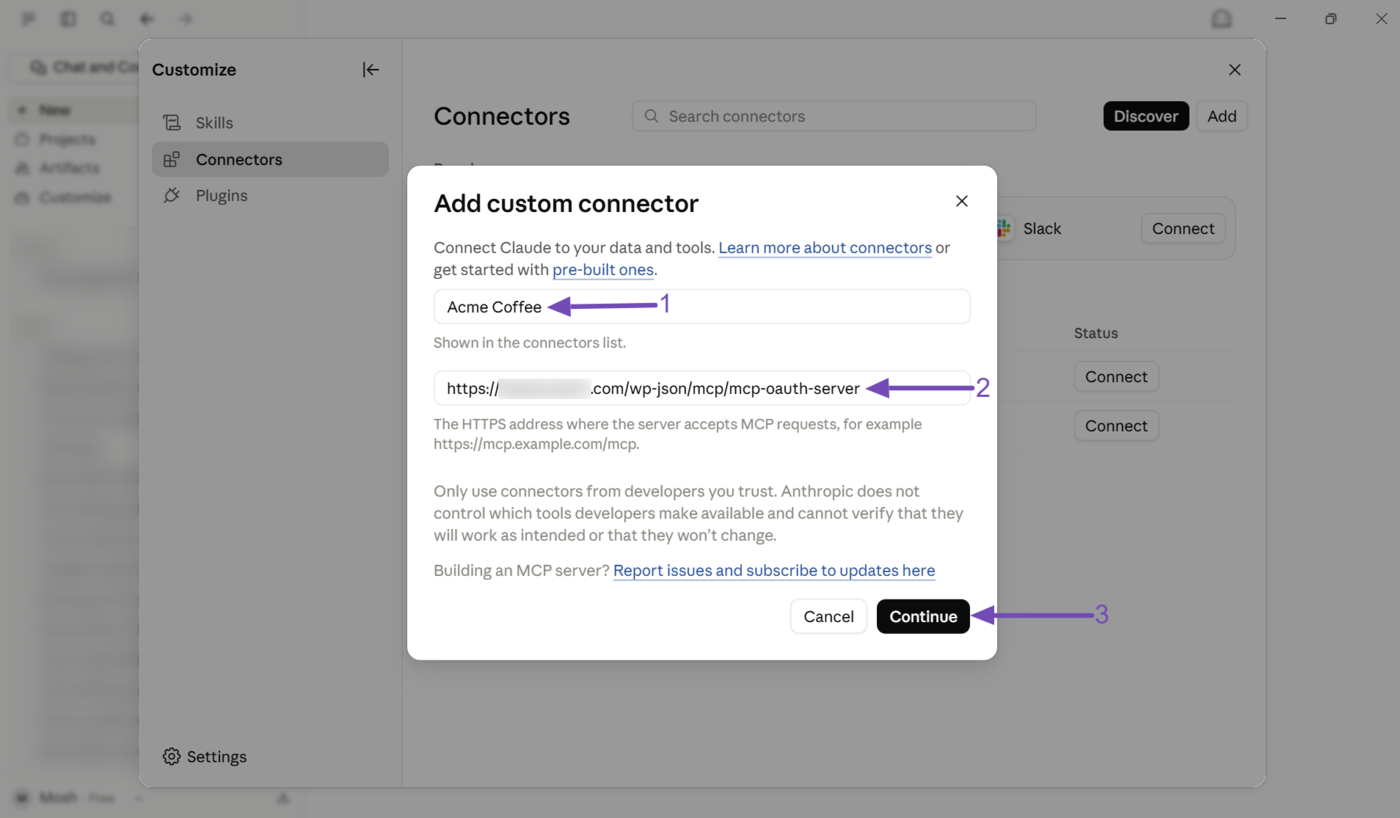
Click Continue.
Claude will check the connection and display additional settings. Make sure you select the following options:
- Authentication: Required when the server asks
- OAuth client: Use Anthropic’s hosted client metadata
Click Add, as shown below.
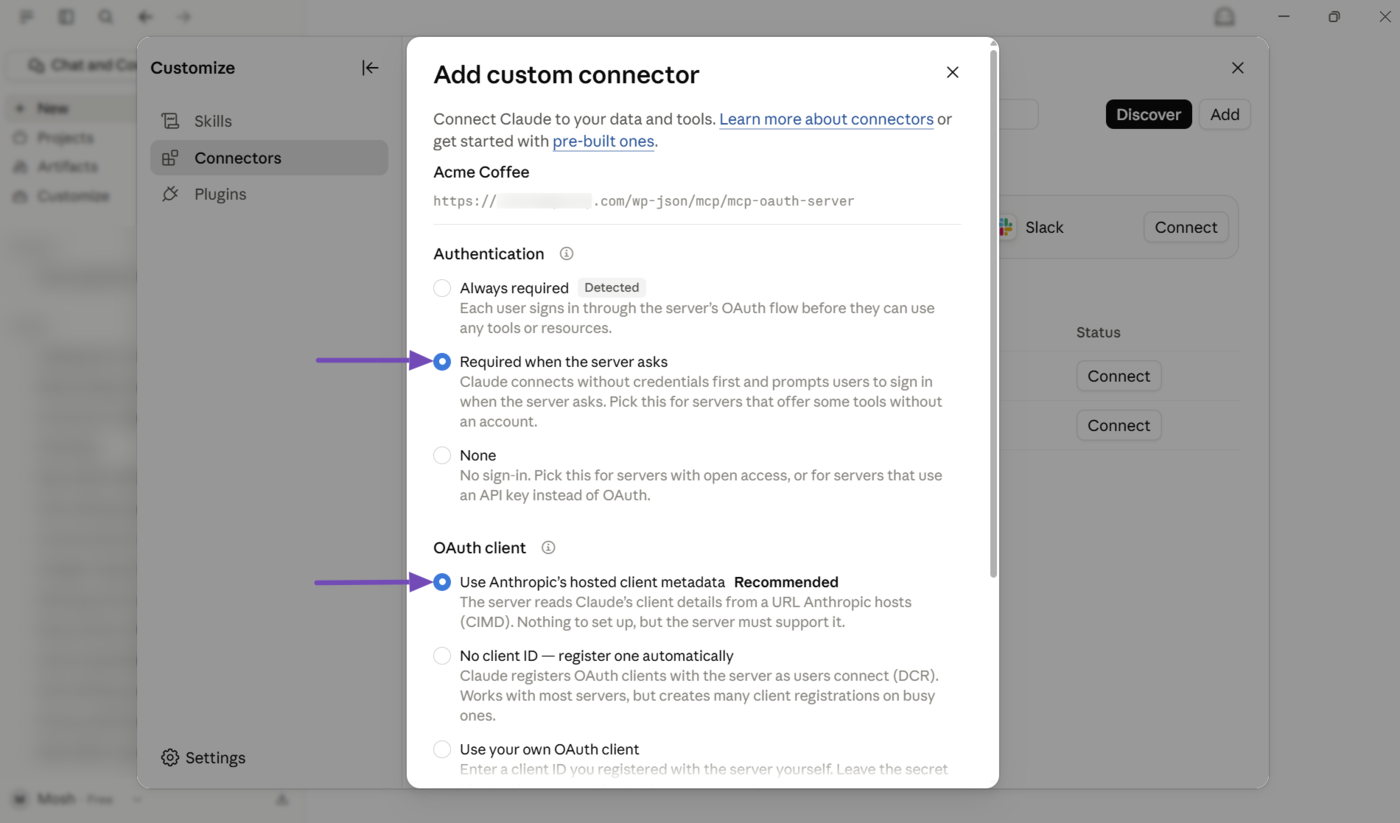
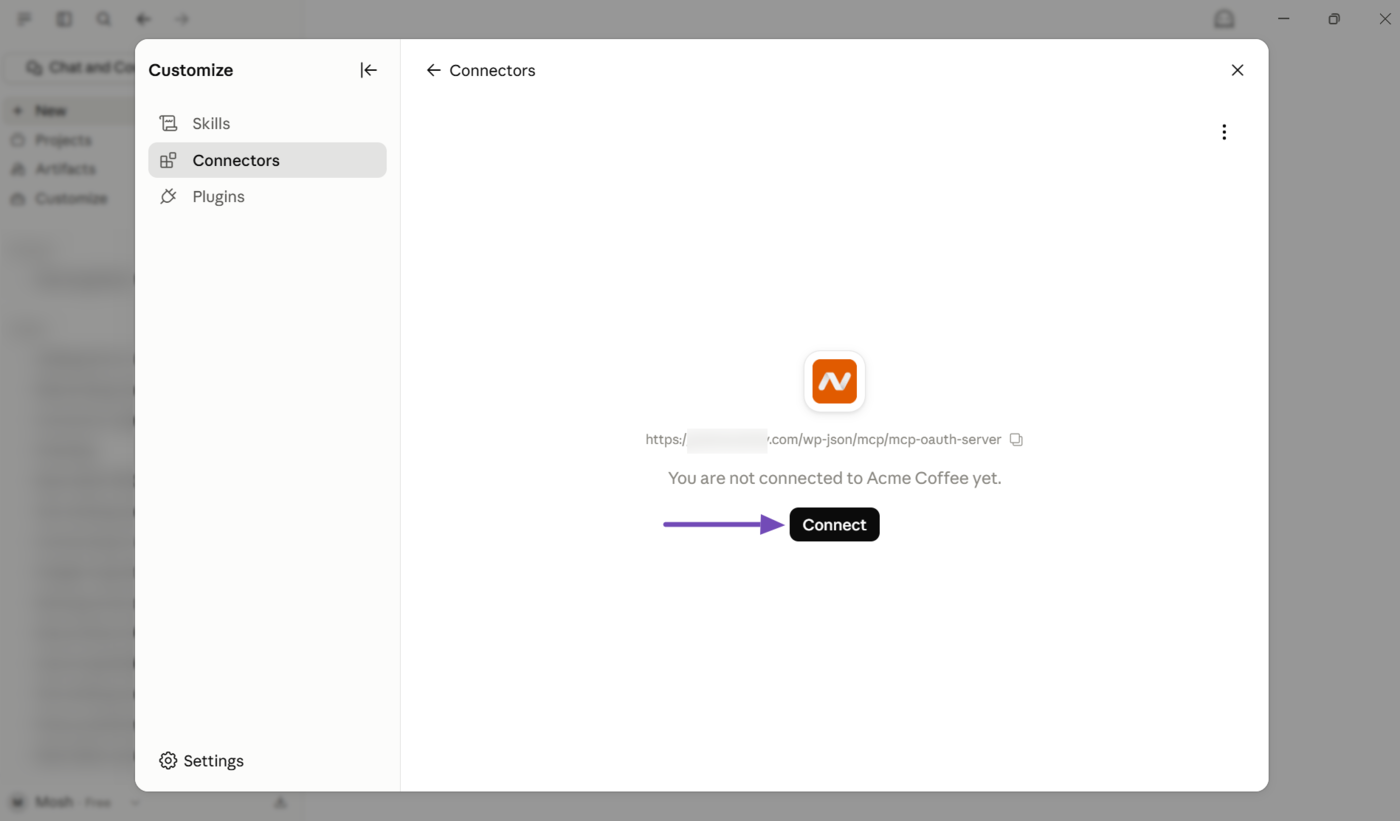
Then click Connect.
Authorize the Connection
Claude will open a new browser tab to authorize the connection to your WordPress site.
Click Allow to approve the connection.
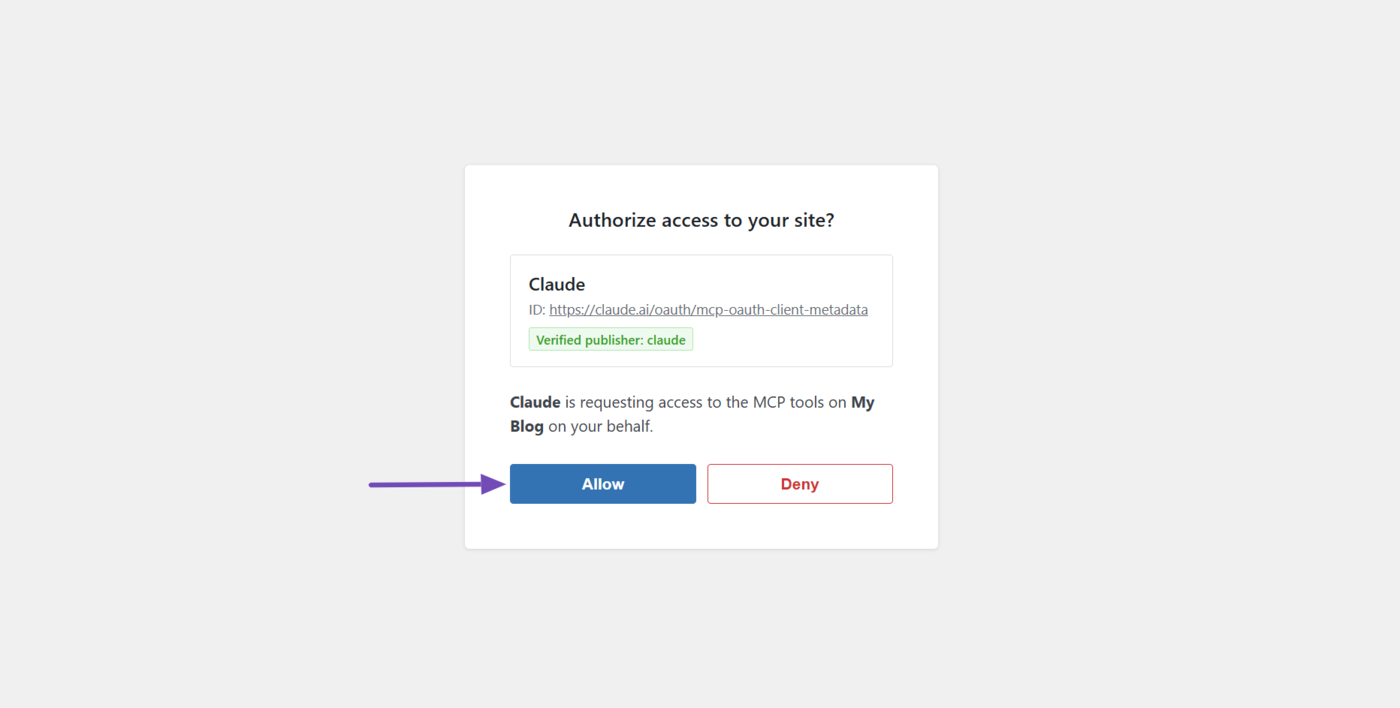
Once authorization is complete, Claude Desktop will display a confirmation message indicating that your Rank Math MCP connection is successful.
Revoke the Connection
If you no longer want Claude to access your WordPress site, you can revoke the connection from your WordPress dashboard.
- Go to Users → Profile in your WordPress dashboard.
- Scroll down to the Application Passwords section.
- Find the application password created by Claude.
- Click Revoke.
- Confirm the action by clicking OK.
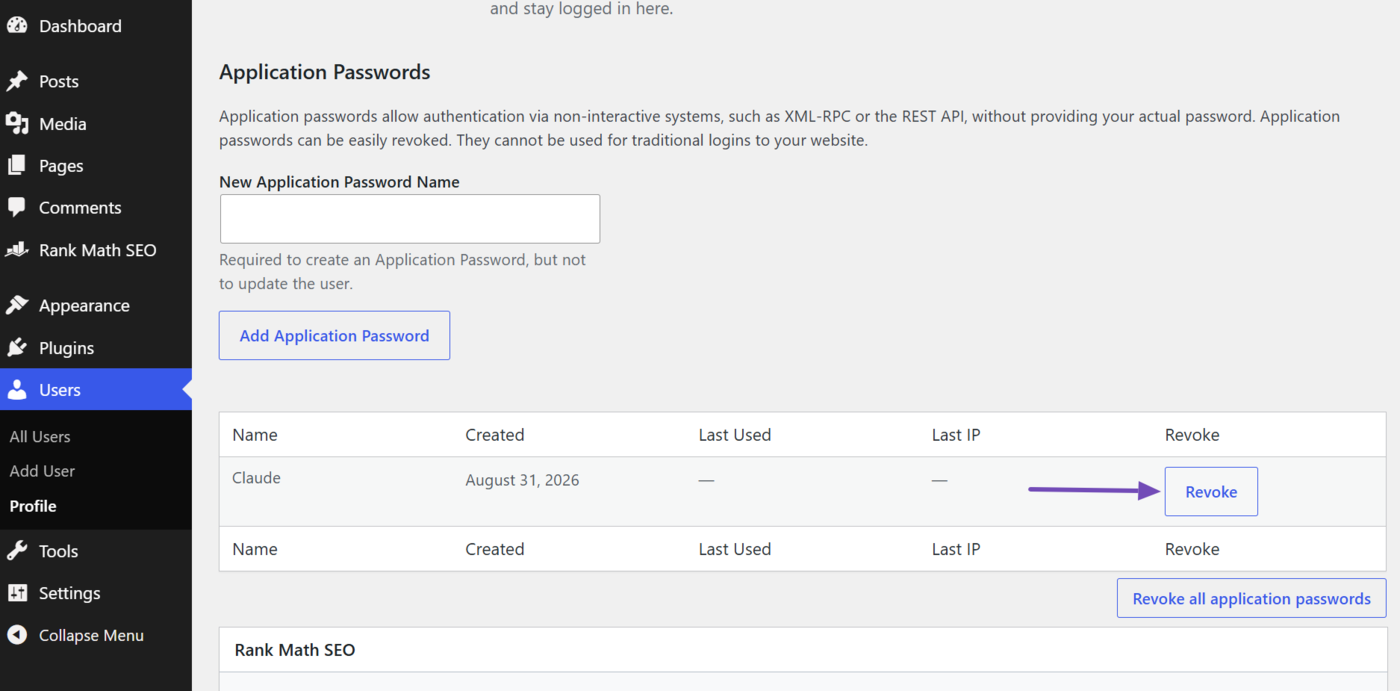
Revoking the application password removes Claude’s access to your site. This action cannot be undone. To reconnect your site, you will need to complete the OAuth connection process again.
Connect Rank Math MCP With Claude, ChatGPT, or GitHub Copilot
You can use the following guides to connect Rank Math MCP with supported AI assistants:
- How to Connect Rank Math With GitHub Copilot via MCP
- How to Connect Rank Math With Claude Desktop via MCP
- How to Connect Rank Math With ChatGPT via MCP
Once connected, you can ask your AI assistant to list the Rank Math MCP tools available on your site.
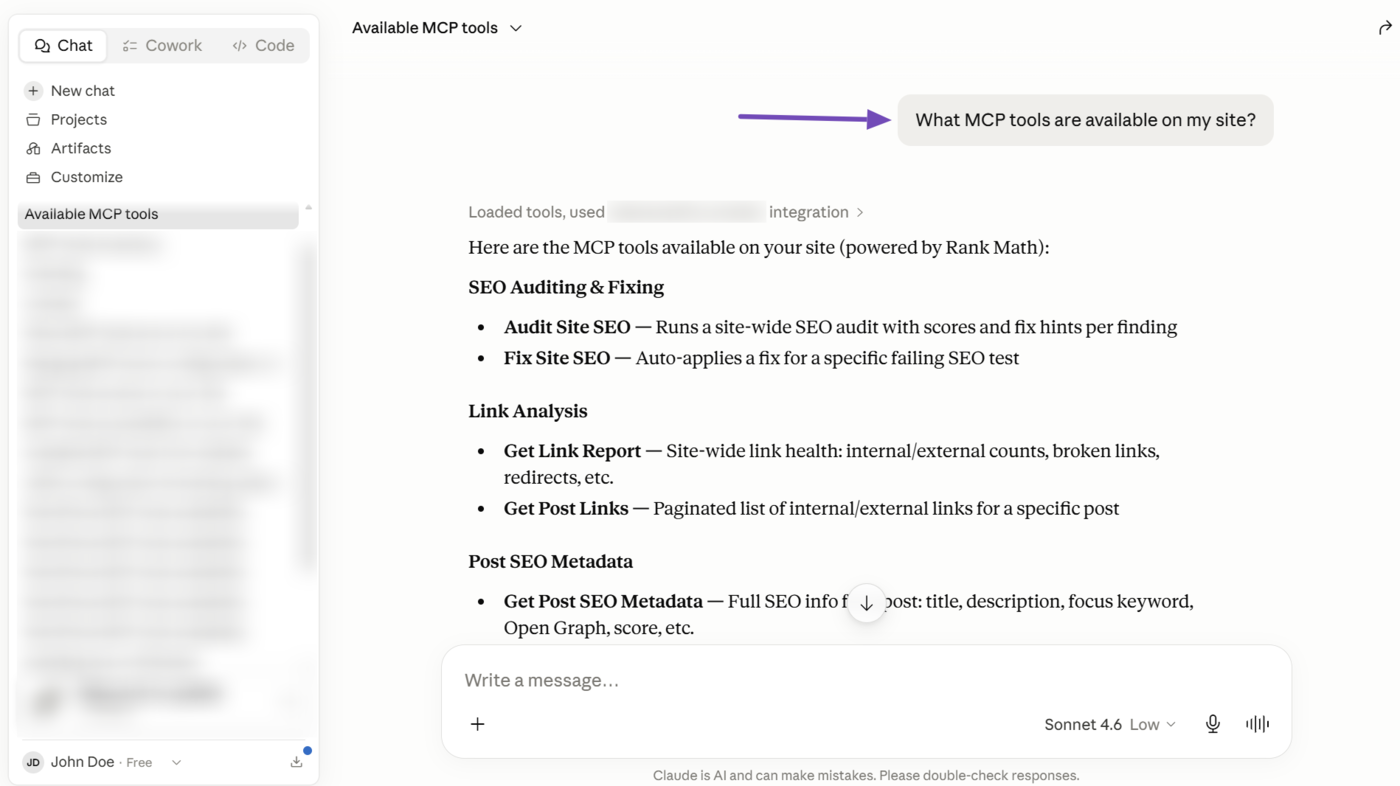
The assistant can then show you the tools it can access.
6 Available Rank Math MCP Tools
Rank Math MCP includes a set of tools that enable different SEO actions:
rank-math/audit-site-seo: Run a full SEO audit for your site or a competitor’s website.rank-math/fix-site-seo: Fix supported SEO issues identified during a site audit.rank-math/analyze-post-content: Run a complete SEO analysis for a specific post.rank-math/get-settings: Retrieve your current Rank Math settings and configuration.rank-math/get-system-status: Check your site’s system status, Rank Math installation, active modules, and connected services.rank-math/get-post-seo-meta: Retrieve SEO metadata, including the SEO title, meta description, focus keyword, robots settings, canonical URL, and social metadata.rank-math/get-post-schema: Retrieve the Schema markup configured for a post and available Schema types.rank-math/get-seo-scores: Retrieve SEO scores for your posts and filter them based on specific criteria.rank-math/get-post-links: Retrieve internal and external links from a specific post, including URLs, anchor text, and follow status.rank-math/get-link-report: Review your site’s link health, including internal links, external links, and, for PRO users, broken links and redirect chains.rank-math/get-redirections: Retrieve the redirects configured on your website, including their source, destination, status, and access information.rank-math/get-top-keywords: Retrieve your top-performing Google Search Console keywords along with impressions, average position, and CTR.rank-math/get-robots-txt: Retrieve and review your site’s current robots.txt file.rank-math/get-llms-txt: Check whether llms.txt is enabled and retrieve its URL and content when available.rank-math/set-website-identity: Update your site’s website and Knowledge Graph identity settings.rank-math/set-global-seo-settings: Update supported global SEO settings, including robots meta, title separator, and other defaults.rank-math/set-homepage-seo: Update the SEO title, meta description, and focus keyword for your homepage.rank-math/set-link-settings: Update supported link settings, including nofollow, external link, and attachment settings.rank-math/set-module-status: Enable or disable Rank Math modules.rank-math/set-sitemap-settings: Update supported XML Sitemap settings.rank-math/set-plugin-preferences: Manage Rank Math plugin preferences, including auto-update settings.rank-math/set-post-type-seo-settings: Update SEO defaults and Schema settings for a specific post type.rank-math/set-breadcrumb-settings: Update supported breadcrumb settings.rank-math/get-ai-visibility-overview: Retrieve an overview of your tracked brands and their AI Visibility performance.rank-math/get-ai-visibility-brand-insights: Retrieve detailed AI Visibility insights for a specific tracked brand.rank-math/get-ai-visibility-brand-queries: Retrieve the queries being tracked for a specific brand.rank-math/create-ai-visibility-brand: Add a new brand or product to AI Visibility tracking.
These tools provide AI assistants with comprehensive access to your website’s SEO data, enabling faster analysis and more informed optimization decisions. The available tools may vary based on your Rank Math setup and plan.
7 Final Thoughts
Rank Math MCP represents a major shift in how SEO workflows operate. Instead of manually navigating tools and reports, you can now interact with your SEO data directly through AI.
By connecting Rank Math with MCP-enabled AI assistants, you unlock a faster, smarter, and more automated way to manage SEO, from audits to optimizations.
As AI continues to evolve, MCP-based workflows are becoming a key part of the future of SEO management.
If you like this post, let us know by tweeting @rankmathseo.