

Internal linking is one of the most powerful and most neglected ranking factors in SEO.
When your site is small, managing links feels easy. But as your content grows, your internal linking structure slowly turns into chaos.
Pages get buried. Important posts lose authority. Old articles stop getting traffic. Broken links hide in plain sight. And suddenly, your internal linking structure feels more like a maze than a strategy.
So, we’ve fixed this for you. AI Link Genius is a powerful new internal linking system built directly into Rank Math PRO.

AI Link Genius cleans up messy internal links, fixes structural issues, and intelligently strengthens your website’s authority, automatically. This isn’t just link suggestions. This is a complete internal link management suite.
Meet the AI Link Genius Dashboard
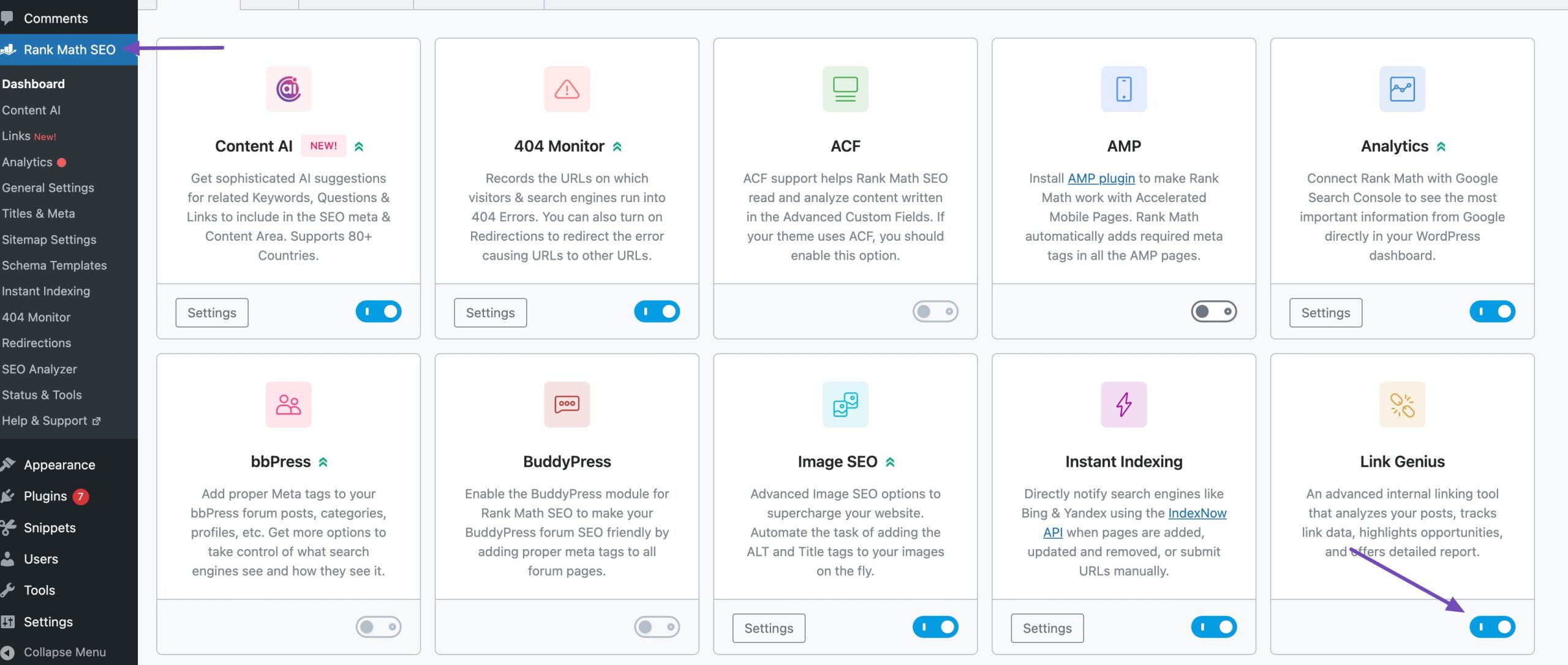
At first, you need to enable the Link Genius module from your WordPress dashboard. To do so, navigate to Rank Math SEO → Dashboard. Locate the Link Genius module and enable it, as shown below.
Once you enable the AI Link Genius module from the Rank Math dashboard, you’ll unlock a powerful centralized interface that gives you complete control over your link structure. Let’s explore the core tabs.
The Overview Tab (Centralized Links Dashboard)
The Overview tab in the AI Link Genius gives you a bird’s-eye view of your entire internal and external links. Navigate to Rank Math → Links → Overview tab. The Overview tab is the default view when you first open the Links page.
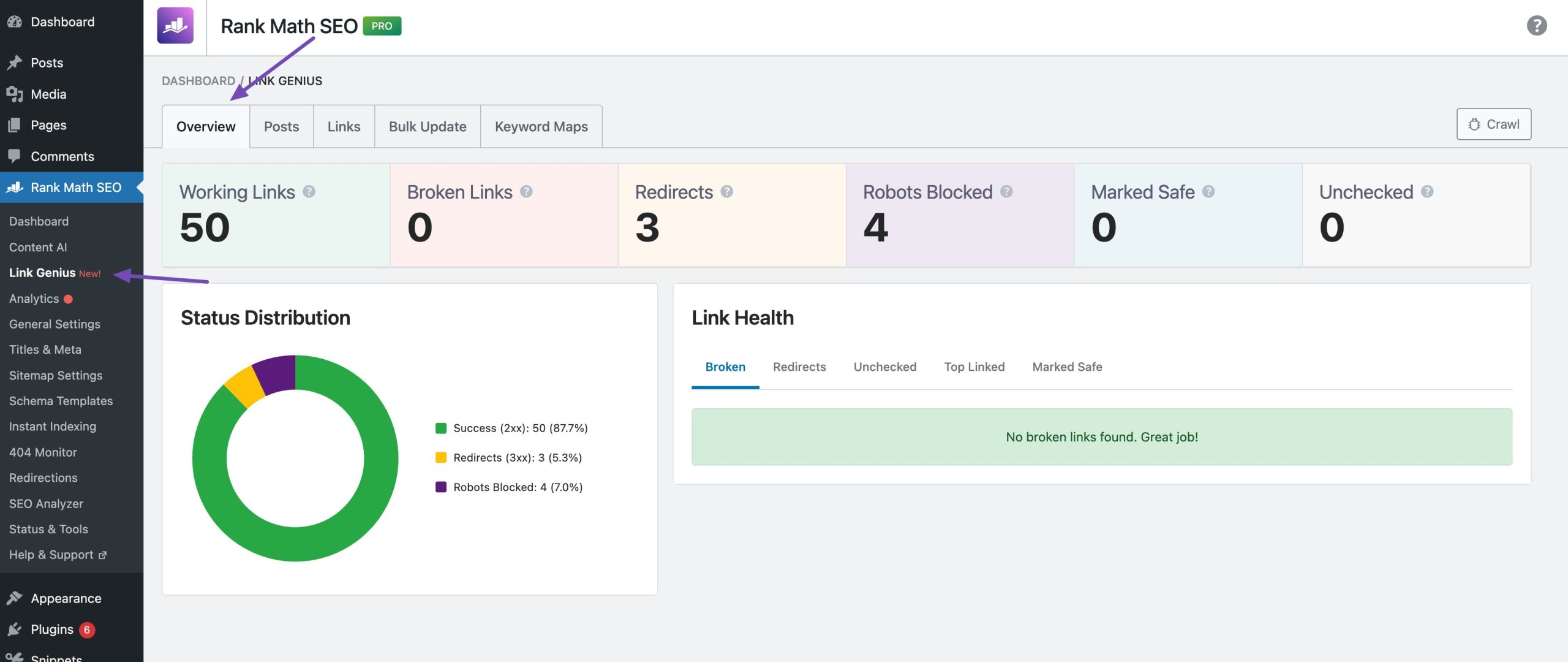
From one single interface, you can filter internal and external links, detect redirects, broken links, blocked URLs, and review link health across your site.
You can also view incoming and outgoing link counts per page and instantly identify pages with weak internal link coverage.
Instead of editing posts individually, you manage links across the site with structure and clarity.
The Posts Tab (Your Internal Linking Control Center)
The Posts tab gives you a powerful, post-level overview of your site’s internal linking health, all in one place.
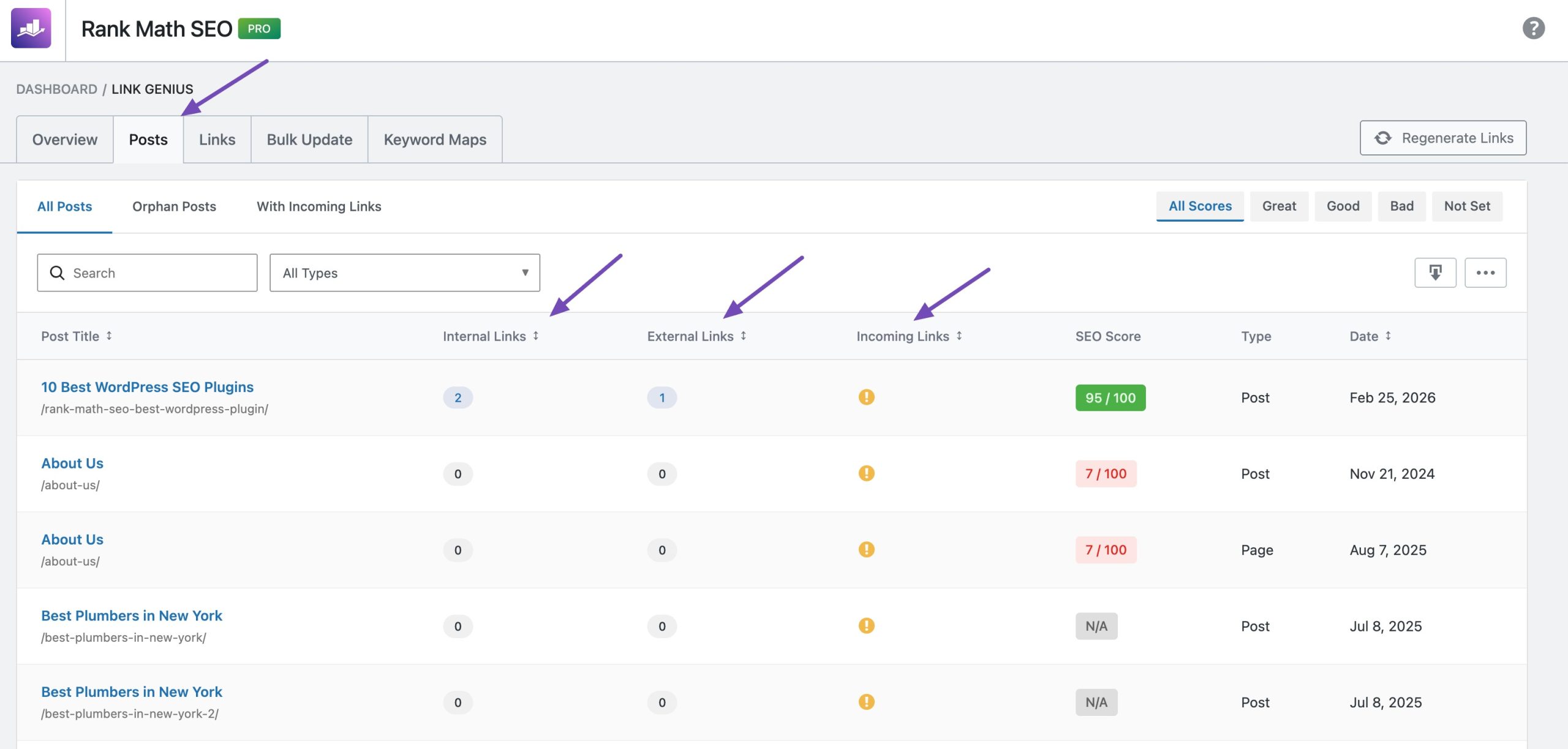
Instead of digging through individual links, you get a clear, post-centric view showing outgoing internal links, external links, incoming links, SEO score, and orphan status, instantly.
This makes it easy to spot weak areas, identify isolated content, and take action without jumping between screens.
Navigate to Rank Math → Links → Posts tab. Inside the Posts tab, you can:
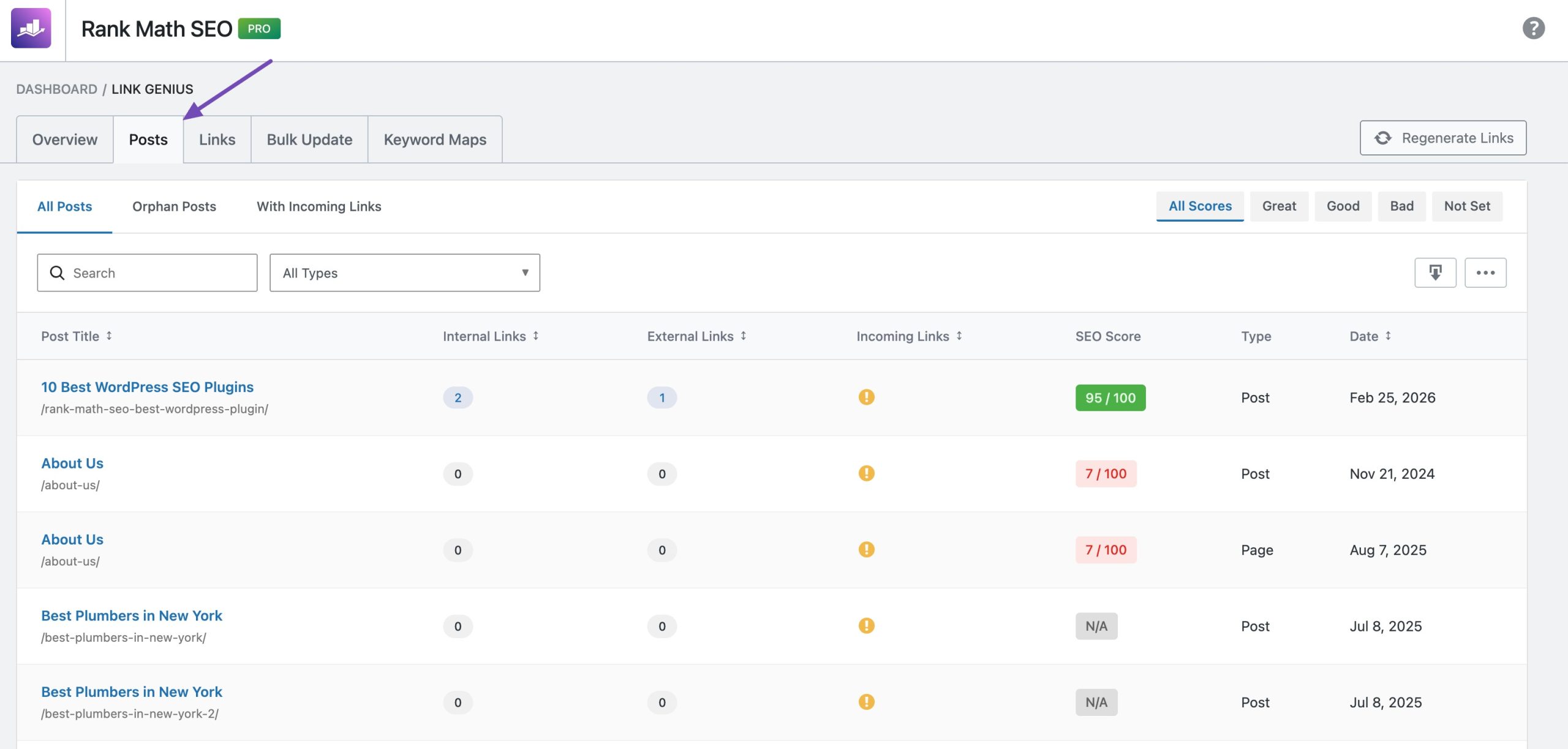
- View per-post link counts: Instantly see how many internal, external, and incoming links each post has.
- Detect orphan posts: Automatically identify posts with no incoming internal links, flagged with a warning badge.
- Monitor SEO scores: View each post’s Rank Math SEO score alongside its link data to connect content quality with linking health.
- Spot internal nofollow links: Posts containing internal nofollow links are highlighted directly in the Internal Links column.
- Jump directly to filtered links: Click any link count to open the Links tab pre-filtered for that specific post.
- Filter and search efficiently: Filter by post type, orphan status, or SEO score range, and search by post title or URL.
- Sort and paginate easily: Sort by title, link counts, or date, and navigate through large sites with pagination.
- Access summary statistics: See totals for posts, orphan posts, posts with internal links, and posts with external links based on your current filters.
- Export filtered data: Download your post list as CSV, Excel, or JSON for audits and reporting.
Links Tab (Your Complete Link Management Hub)
The Links tab is the core of the Link Genius module. It gives you a complete, real-time inventory of every internal and external link across your website, all inside a powerful, searchable, and filterable table.
You can see each link’s anchor text, link type, live HTTP status, and more, then take action instantly without ever leaving your WordPress dashboard.
Navigate to Rank Math → Links tab. This is where link auditing, cleanup, and optimization happen at scale.
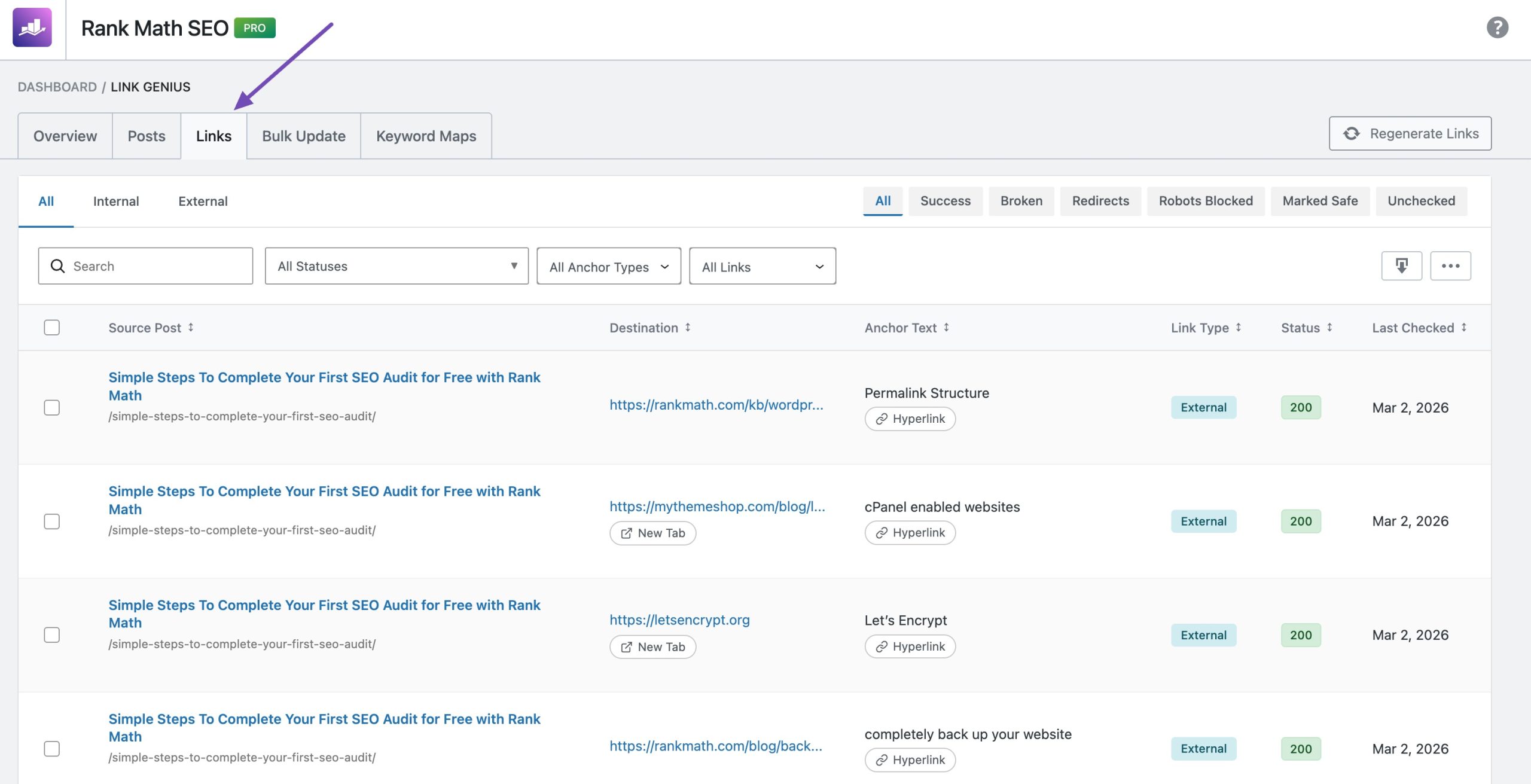
You can:
- See every link in one place: Automatically discovered across all posts and pages.
- Track live status codes: Instantly spot 404s, redirects, timeouts, and more.
- Search & filter fast: Drill down by link type, status, nofollow, anchor text, or URL.
- Edit inline: Update URLs, anchor text, nofollow, or open-in-new-tab settings directly from the table.
- Bulk fix issues: Remove, recheck, or mark multiple links safe in seconds.
- Override false alarms: Mark trusted links as “Not Broken.”
- Undo mistakes: Restore deleted links within 30 seconds.
- Export anytime: Download filtered data as CSV for audits and reports.
Advanced Bulk Update Tool (With Rollback)
Updating links manually after a site migration, domain change, or rebranding can take hours, sometimes even days. Hunting down every instance of an old URL or outdated anchor text across hundreds of posts is not only time-consuming but also risky.
AI Link Genius eliminates that manual effort. Navigate to Rank Math → Links → Bulk Update tab.
With the Advanced Bulk Update tool, you can update links across your entire website in just minutes. You can replace URLs, modify anchor text, or update both simultaneously, all from a centralized interface.
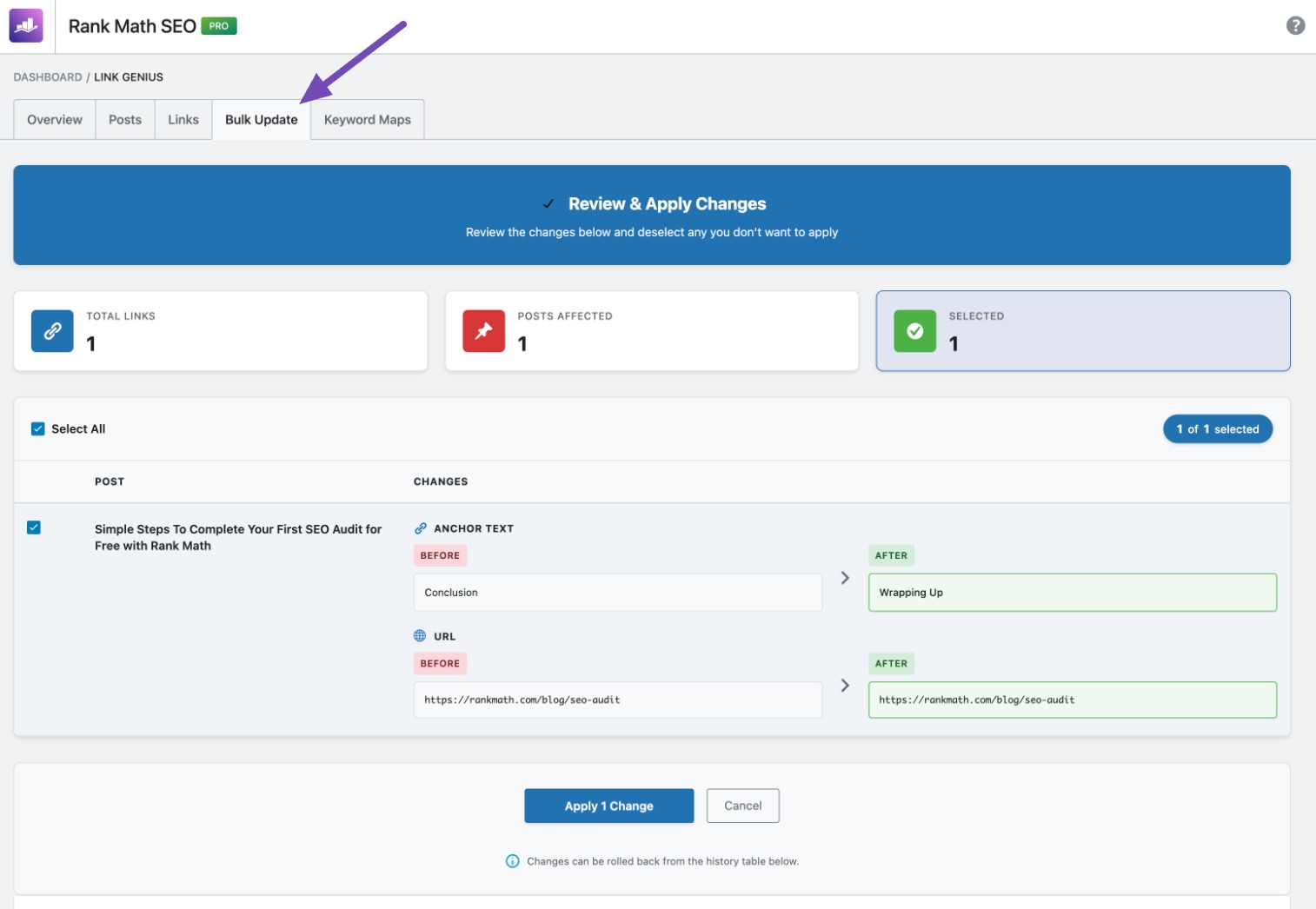
To ensure precision, you can apply advanced filters such as:
- Internal or external links
- Post/Page types
- Dofollow or nofollow links
- Selected timeframes
- Exact match, contains, or regex-based targeting
Before applying any changes, you’ll see a full preview of the updates. This allows you to verify exactly what will be modified, no surprises.
Every bulk action is logged in the update history, giving you full transparency and traceability.
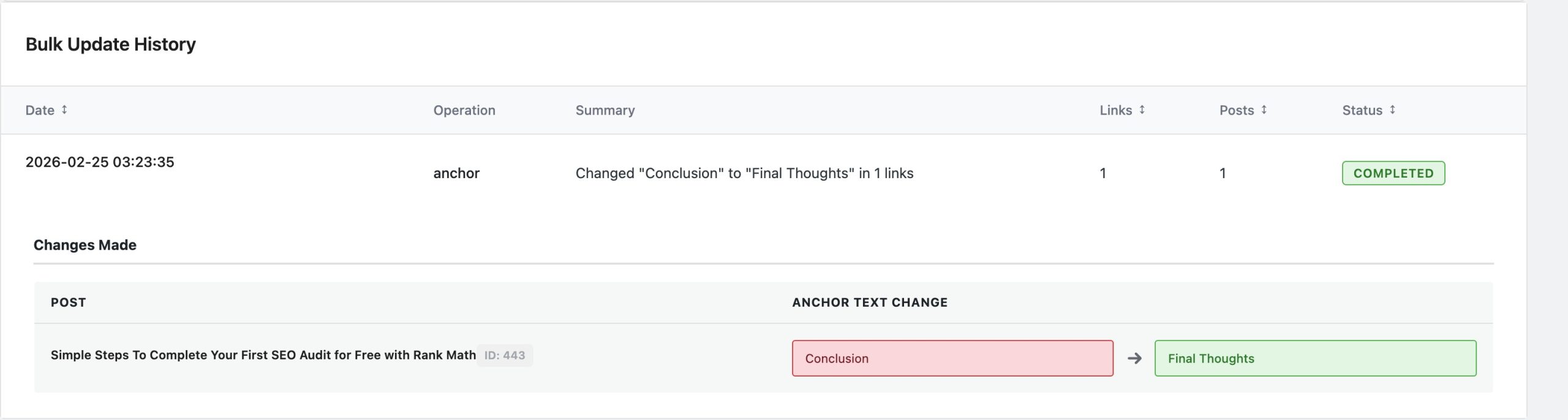
And if something doesn’t look right? Simply click Rollback, and all changes revert instantly.
→ Learn more about updating links in bulk
Keyword Mapping with AI Variations
Keyword Mapping is a powerful feature within the Link Genius module that helps you systematically strengthen your most important pages. It allows you to create structured keyword-to-URL relationships so that relevant phrases across your site automatically link to a designated page.
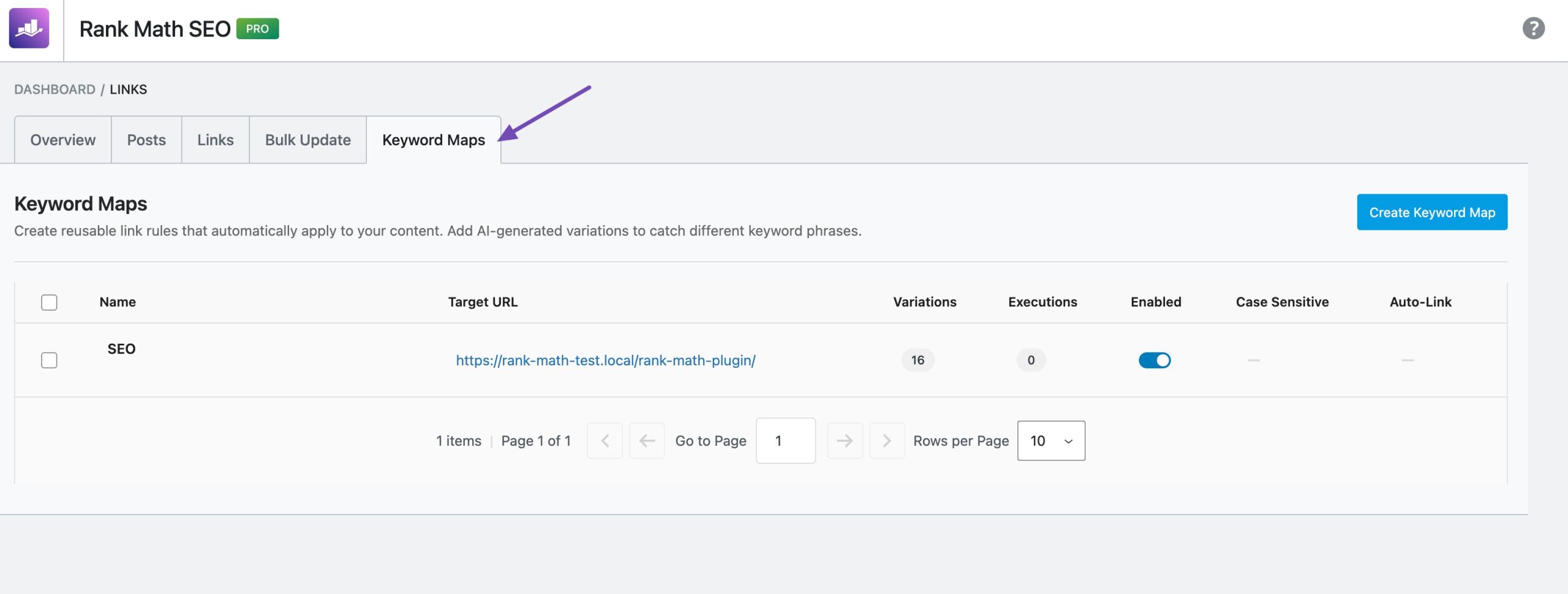
Navigate to Rank Math → Links → Keyword Maps tab and click Create Keyword Map. You start by selecting the page you want to boost, typically a pillar post, cornerstone article, or revenue-focused landing page.
Then, assign the target URL and define a primary keyword. You can add multiple variations, such as synonyms and related phrases, either manually or by generating them automatically using Rank Math’s Content AI integration.
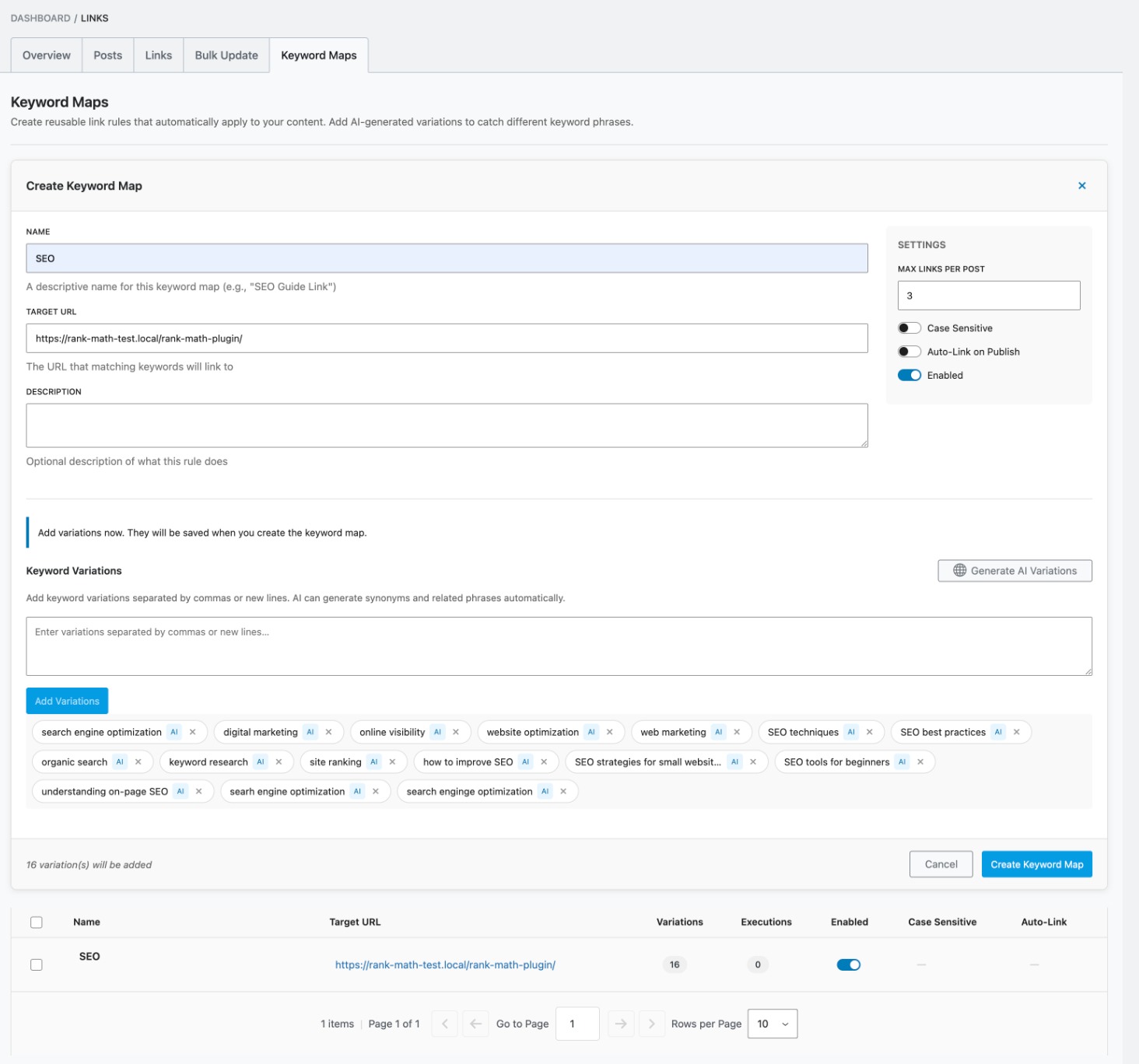
To keep your internal links natural and balanced, you can set limits on how many times a link appears within a single post. Once everything is configured, you can preview suggested placements across your site before applying them.
You have full flexibility to either approve links manually or enable automation to insert them automatically in new and existing content.
The result is a scalable, structured internal linking system that:
- Maintains consistent authority flow to key pages
- Strengthens topical relevance
- Preserves natural anchor text distribution
- Eliminates repetitive manual linking work
→ Learn more about using Keyword Mapping
AI-Powered Internal Link Suggestions (While You Write)
You don’t need to think about internal links anymore.
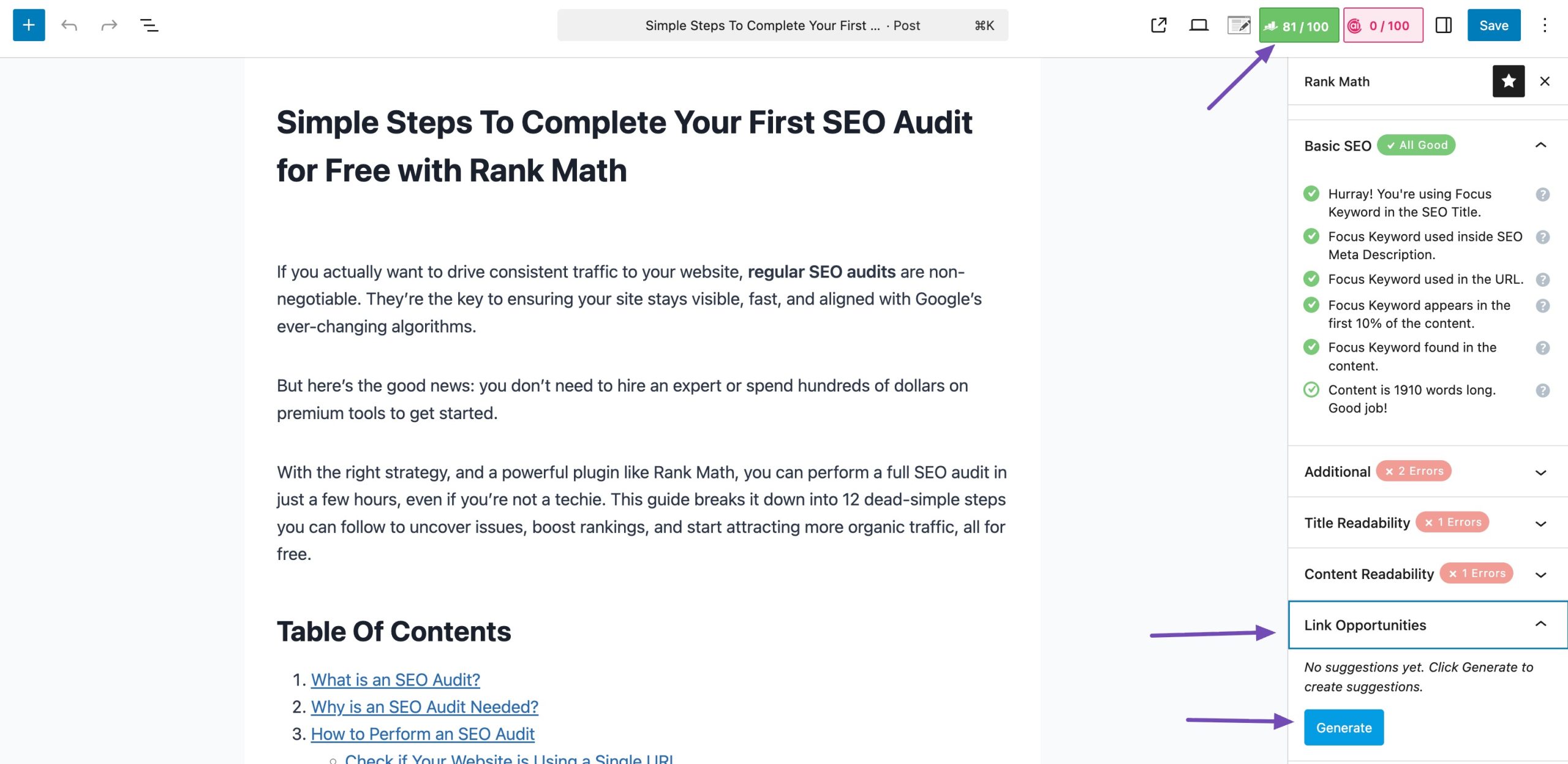
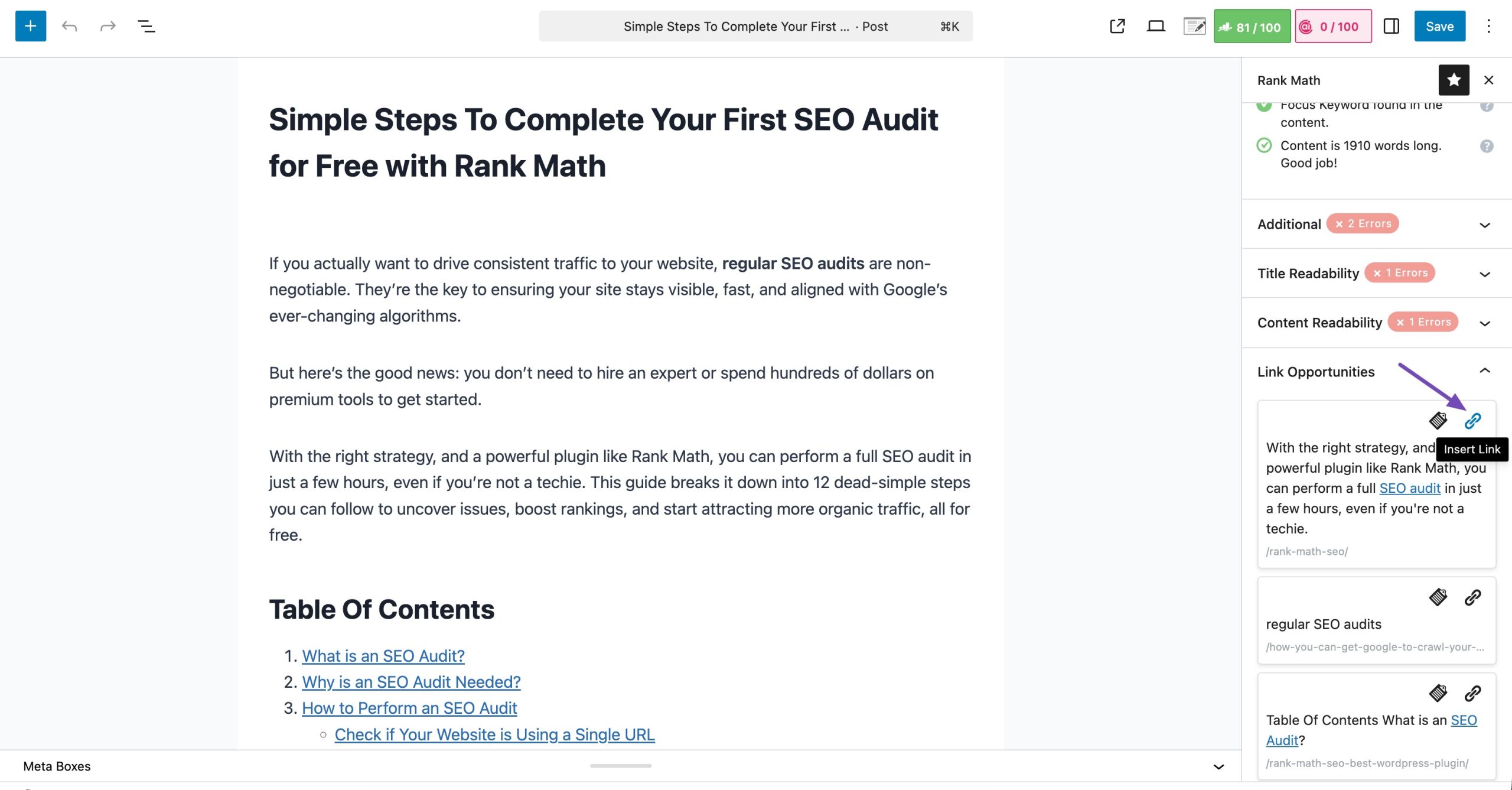
Inside the WordPress editor, AI Link Genius automatically finds contextual internal linking opportunities for you. Simply click Generate under Link Opportunities, and AI analyzes your content and suggests relevant internal pages to link to.
To insert a suggestion, click the Insert Link icon, and it’s added.
Not sure which page to link to?
Highlight text and use the AI command to generate link recommendations based on anchor context.
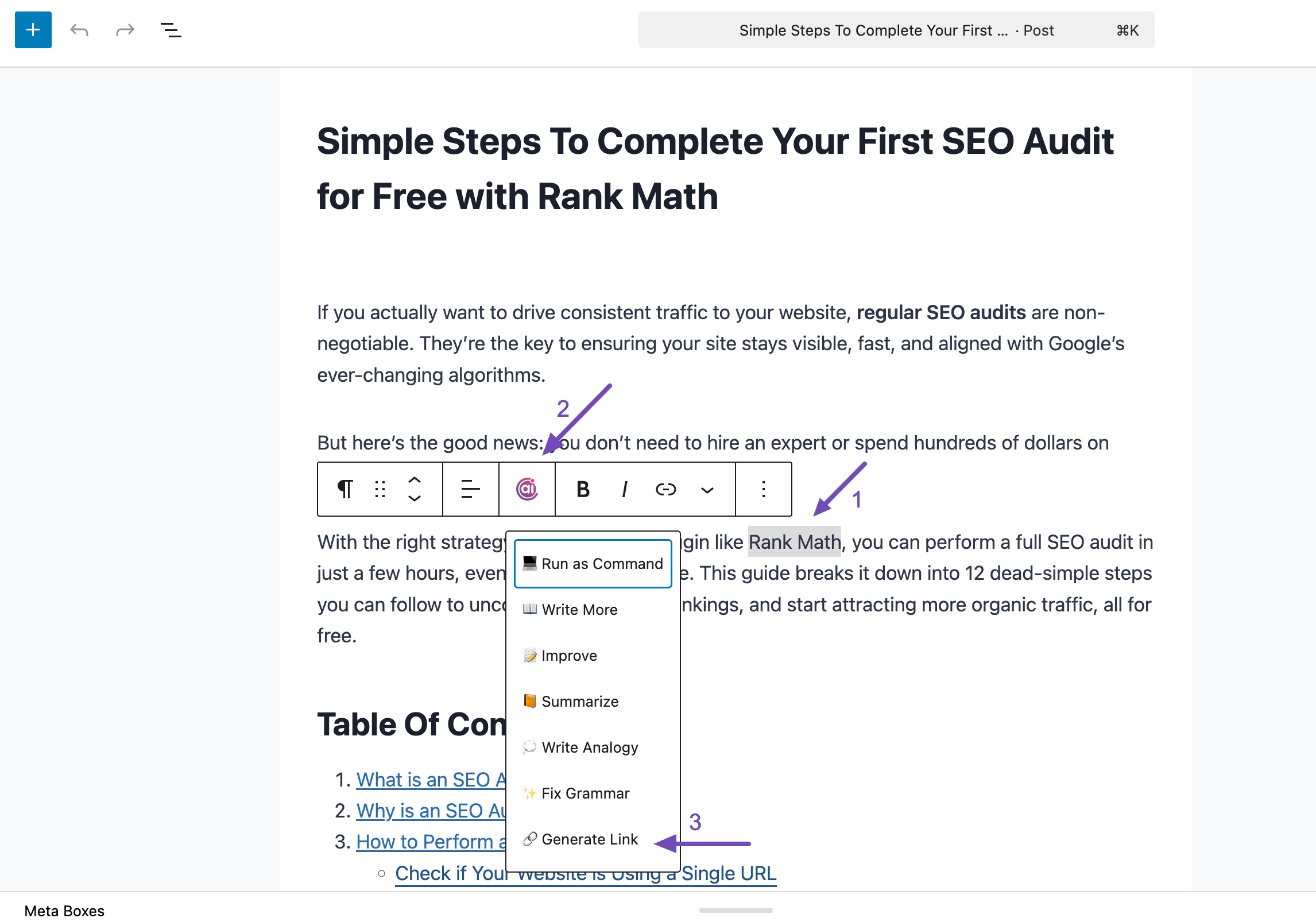
It’s fast, intelligent, and built directly into your writing workflow.
AI-Powered Related Posts (Beyond Basic Matching)
Traditional related posts plugins rely on categories, tags, or keyword matching. AI Link Genius goes further.
It uses AI to understand:
- Context
- Semantic meaning
- User intent
The result? More relevant content recommendations. To do so, click Generate in the Related Posts section, as shown below.
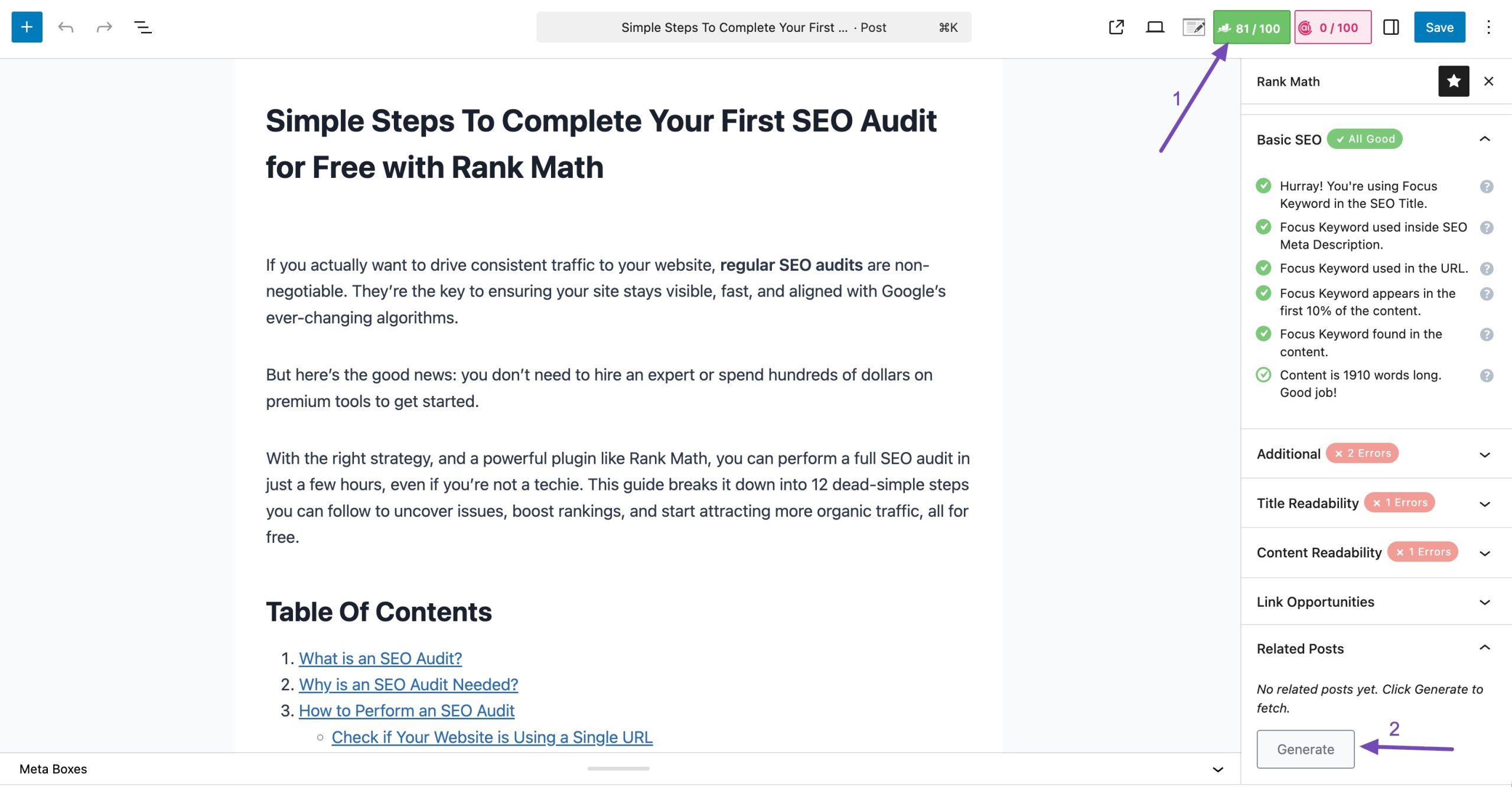
You can:
- Insert the Related Posts block
- Customize layout and design
- Control the number of posts
- Adjust featured image settings
- Modify titles and buttons
- Add custom CSS
- Save designs as reusable patterns
You can even insert it via shortcode or apply it globally using block patterns or hooks.
→ Learn more about customizing related posts block
Orphan Post Detection
An orphan page is a page with zero internal links pointing to it.
Search engines discover content through links. If a page has no internal links, it becomes harder to crawl and rank.
AI Link Genius includes a dedicated Orphan Posts tab that instantly shows all pages without incoming internal links.
Navigate to the Posts → Orphan Posts tab, as shown below.
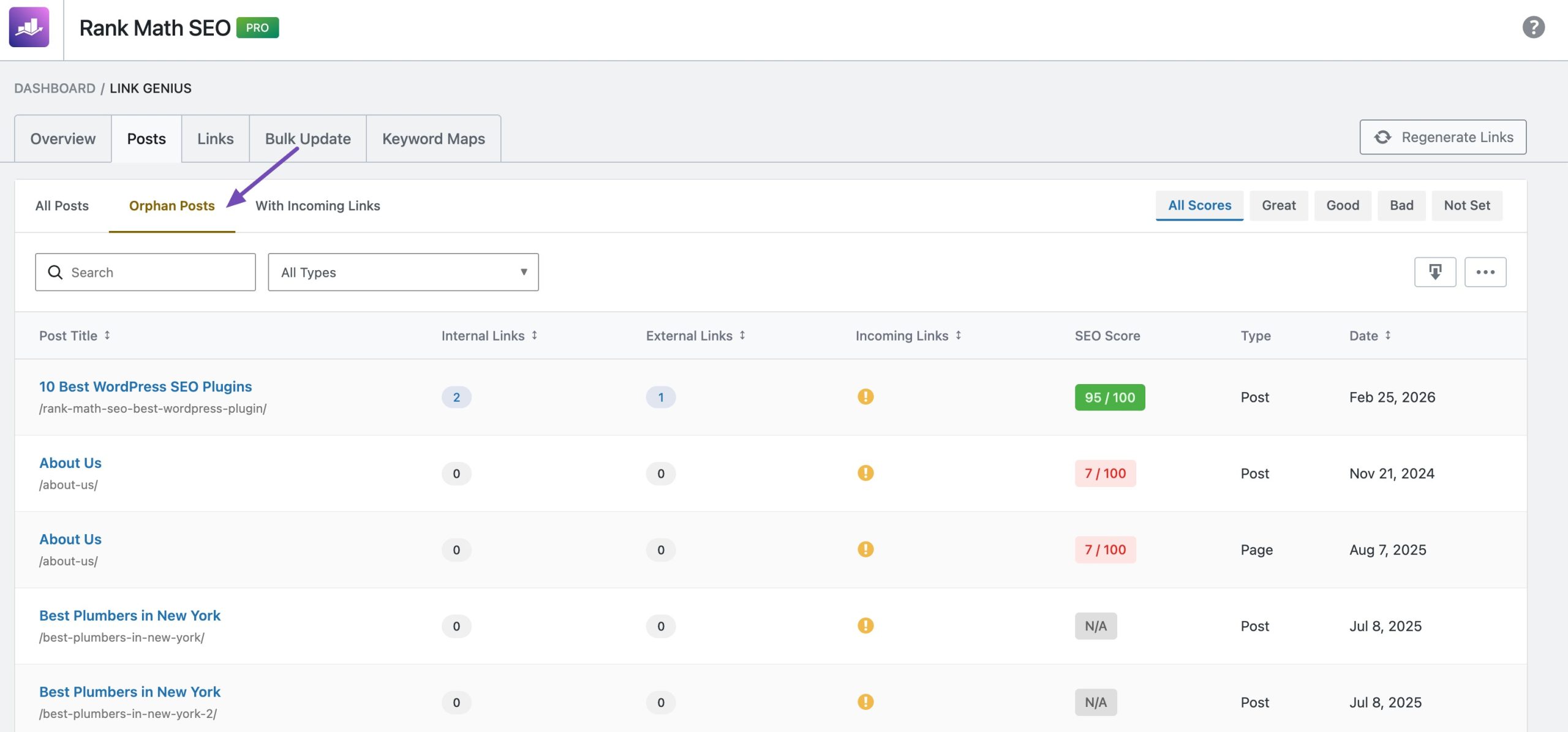
Here you can:
- Sort pages by incoming links
- Identify weak pages
- Strengthen pillar pages strategically
This gives you actionable clarity, not guesswork.
→ Learn more about fixing orphan pages
Export & Reporting (Agency-Ready)
AI Link Genius makes reporting and analysis effortless with built-in export functionality designed for agencies and large teams.
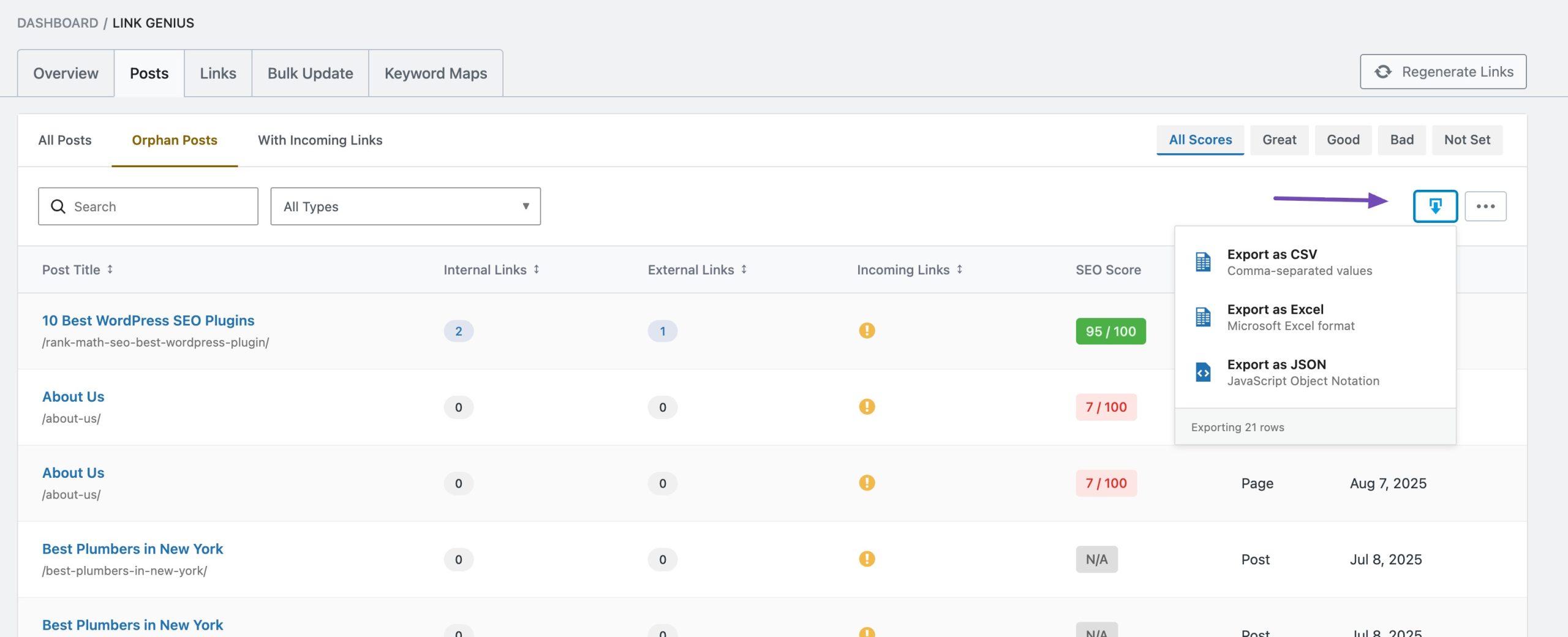
You can export:
- Comprehensive link reports: Get a full breakdown of internal and external links across your site.
- Posts data: Analyze incoming and outgoing link counts, link distribution, and authority flow.
- Bulk update history: Maintain a transparent record of all link changes, including what was updated and when.
Exports are available in multiple formats:
- CSV
- Excel
- JSON
This makes it easy to:
- Share reports with clients
- Conduct technical SEO audits
- Track optimization progress
- Present internal linking improvements in meetings
Ready to Power Up Your Internal Linking With AI Link Genius?
Internal linking should never be something you try to remember while publishing content.
With AI Link Genius, it becomes a structured, measurable system.
You can:
- Audit your entire link structure from a centralized dashboard
- Detect and fix broken URLs before they hurt rankings
- Strengthen pillar pages strategically with reverse authority insights
- Identify and reconnect orphan content instantly
- Automate authority flow using AI-powered keyword mapping
- Update links safely at scale with bulk edits and one-click rollback
Everything is managed from one powerful interface inside WordPress. So what are you waiting for?
Upgrade Rank Math PRO and start using AI Link Genius today to take full control of your internal linking strategy.
And don’t forget to share your experience with our AI Link Genius by tweeting us at @rankmathseo.