

Search is changing, and it’s happening faster than most of us expected.
For years, SEO meant ranking on search engines like Google. You’d optimize your content, track keywords, and aim for that #1 spot. But now, more audiences are turning to AI tools for answers instead of scrolling through search results.
They’re asking questions directly in tools like ChatGPT or other AI assistants, and getting instant, summarized responses.
And here’s the big shift: Those answers don’t always show links. They show brands, recommendations, and opinions.
So the question is no longer just “Do you rank on Google?” It’s now “Does AI mention your brand at all?”
This is where a new concept comes in: AI Visibility.
AI Visibility is all about understanding how your brand appears in AI-generated answers. Are you being recommended? Are you being compared to competitors? Or are you missing entirely?
The challenge is that, until now, there hasn’t been a clear way to track this. That’s exactly why we built the AI Visibility in Rank Math.
![[New Tool] Meet Rank Math AI Visibility: Track Your Brand in AI Search](https://img.youtube.com/vi/oB82NRtkrkg/maxresdefault.jpg)
Rank Math AI Visibility helps you see how your brand appears in AI-generated responses. So, let’s get started.
Setting Up AI Visibility
Getting started with AI Visibility only takes a few minutes.
Before you begin, make sure your Rank Math plugin is updated to the latest version. AI Visibility is available through Rank Math AI plans, so you’ll also need an active AI subscription.
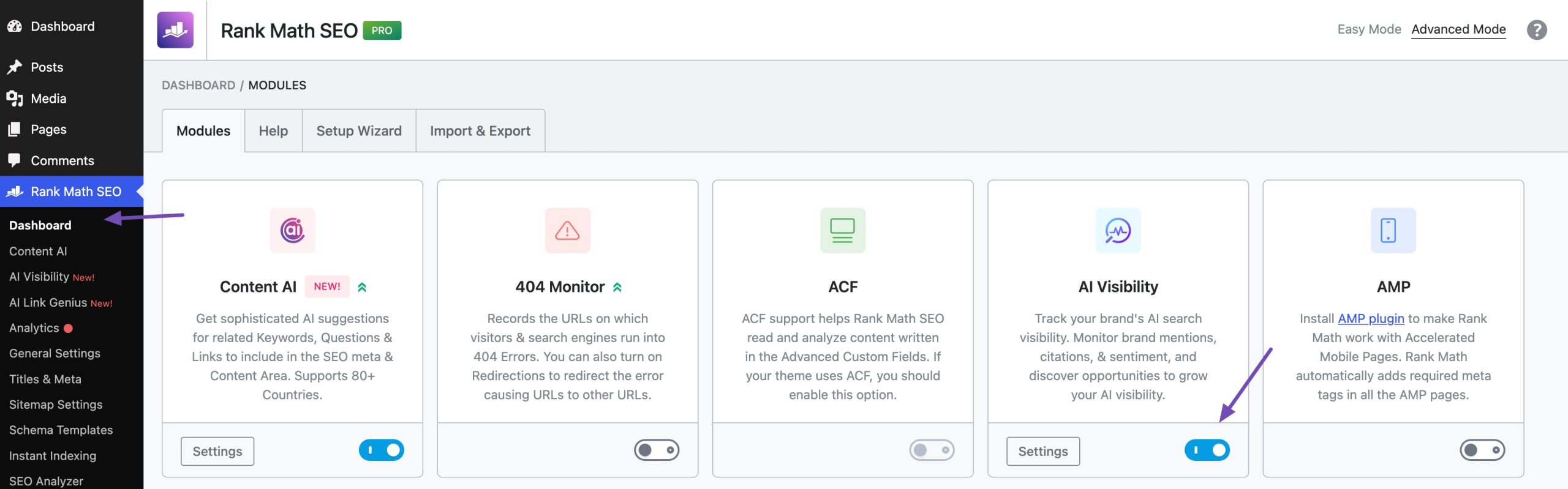
If you don’t immediately see the AI Visibility option, navigate to Rank Math SEO→ Dashboard and enable the AI Visibility module, as shown below.
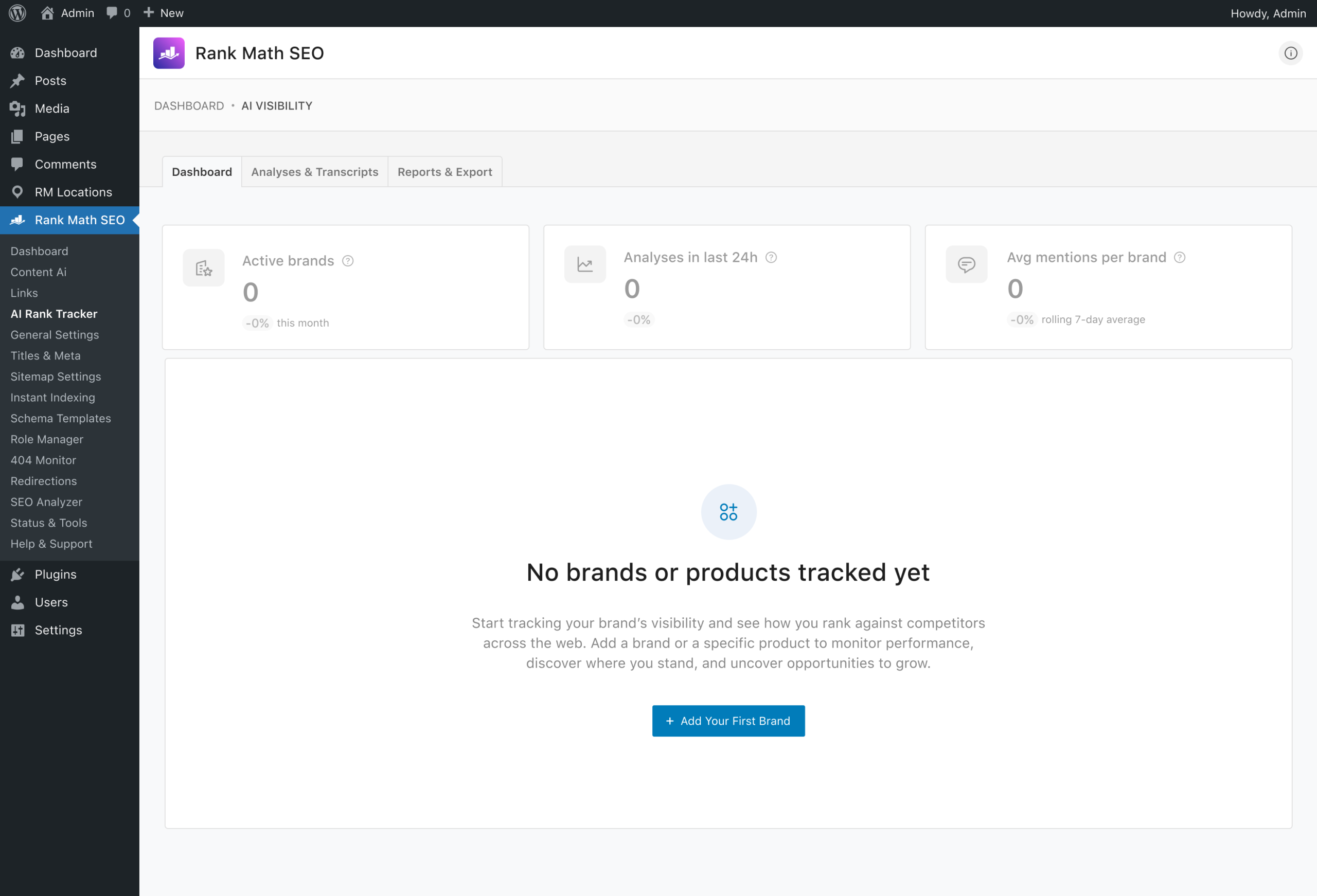
Once enabled, open the AI Visibility dashboard and add the brand you want to monitor by clicking the Add Your First Brand button, as shown below.
During setup, you’ll provide:
- Brand/Product Name: Enter the name of the brand or product you want to monitor.
- Brand/Product URL: Add the relevant website or product URL.
- Description: Add a detailed description of your brand or product.
- Target Country: Select the country you want to track. This is particularly useful for local businesses or brands targeting a specific market.
- Output Language: Select the language in which you want to monitor your brand’s AI visibility. The multilingual option is particularly useful if your audience searches for your products or services in different languages. For example, you can track the same brand using English prompts and create another tracking setup for German, French, Spanish, or another supported language.
- Frequency of Analyses: You can choose how frequently Rank Math should analyze your brand. Depending on your plan, you can select: Daily, Weekly, Monthly. More frequent tracking can help you monitor changes in AI visibility more closely, while weekly or monthly tracking can be useful for monitoring broader trends.
- AI Platforms: You can also choose which AI platforms you want to monitor. Rank Math currently supports: ChatGPT and Google Gemini. The platforms available to you depend on your plan. Starter and Creator users can select either ChatGPT or Google Gemini, while Expert users can track both.
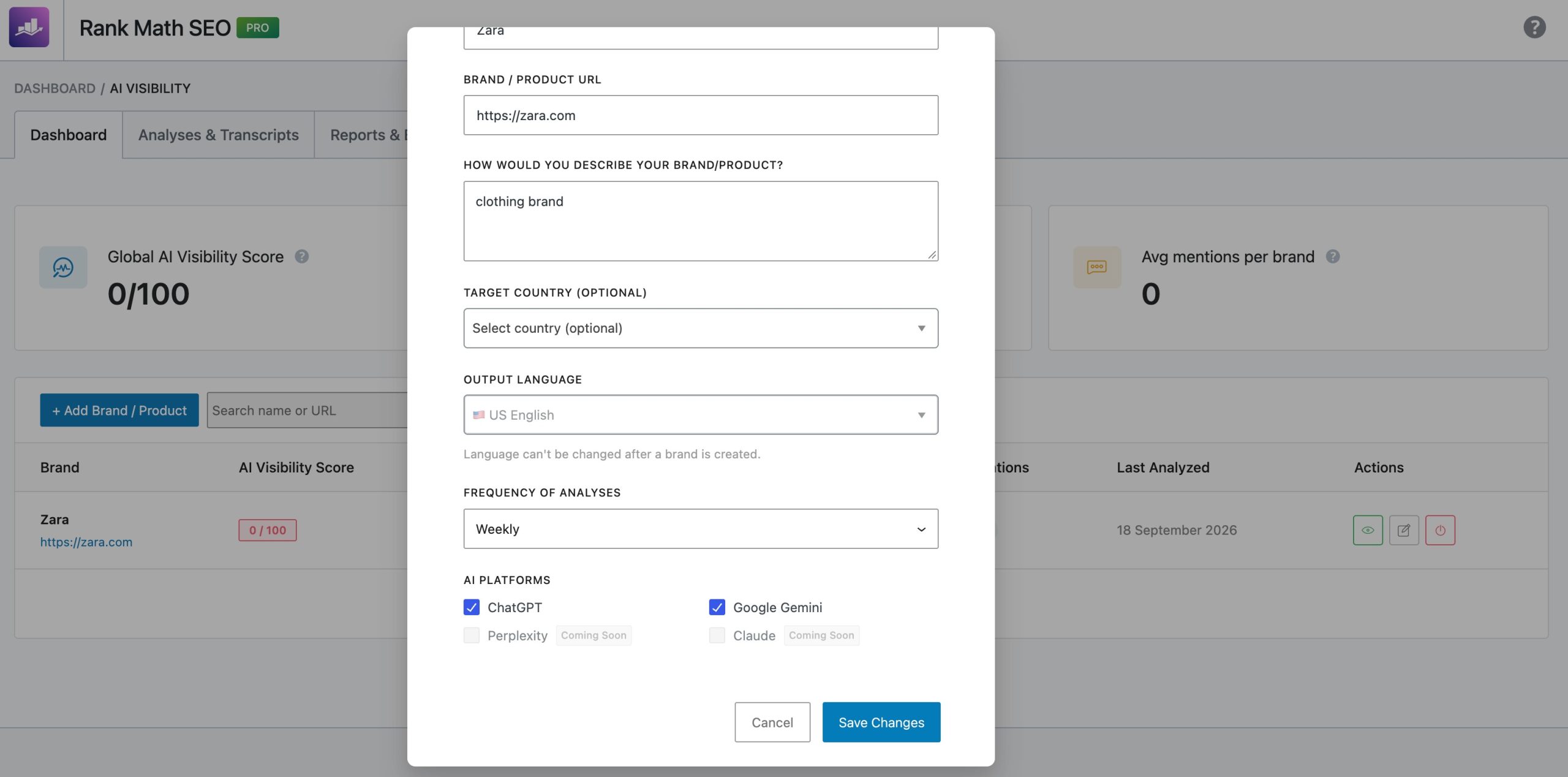
Once everything is configured, click Create Brand.
Rank Math will then analyze your business, generate relevant prompts, query supported AI models, and begin collecting data. Since this process involves multiple AI analyses, it may take a short time before your first report is available.
Meet the AI Visibility Dashboard
Once the initial analysis is complete, the AI Visibility Dashboard becomes your central hub for monitoring your brand’s performance across AI platforms.
The AI Visibility dashboard gives you a complete overview of how your brand is performing across AI-generated responses.
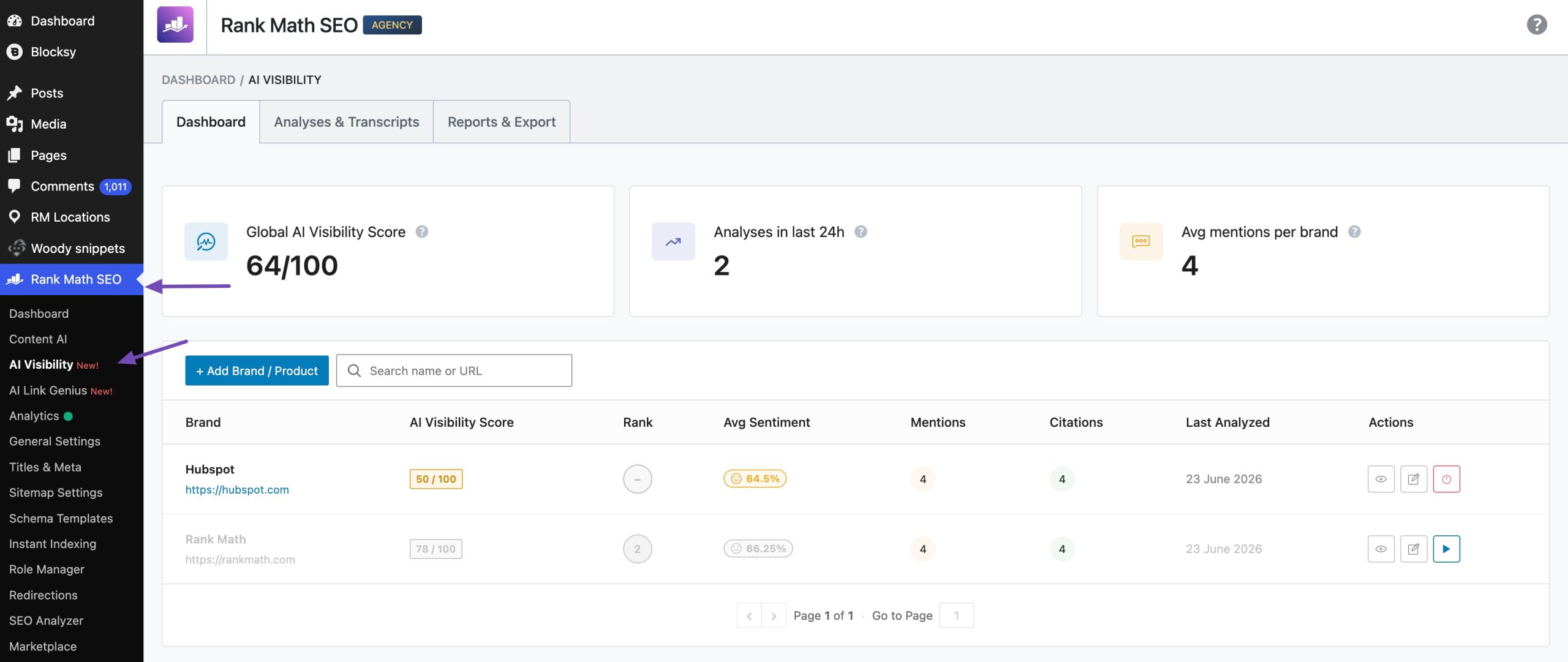
At the top, you’ll see key insights such as:
- Global AI Visibility Score: Average visibility score across all tracked brands
- Analyses in the Last 24 Hours: How frequently your data is updated
- Average Mentions per Brand: Overall trend of your AI presence
One of the most powerful capabilities of AI Visibility tracking is that it is not limited to just your own website or brand.
You can track and compare:
- Your business or website
- Individual products or services
- Direct competitors in your niche
This makes it easier to understand not just your performance, but your position in the competitive AI era.
To begin, select the brand you want to track and click the View icon, as shown below.
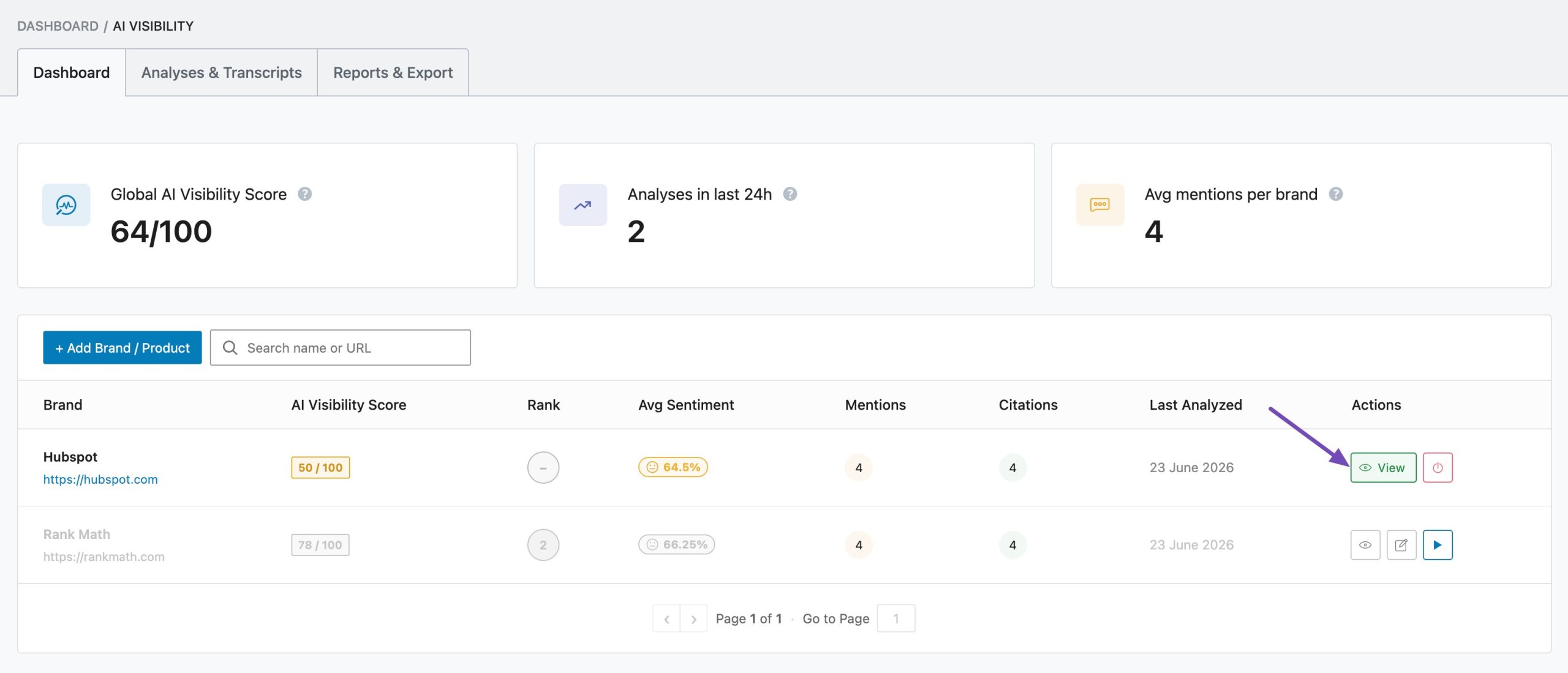
You will then be directed to the Overview tab, which serves as the main entry point for the detailed AI Visibility report.
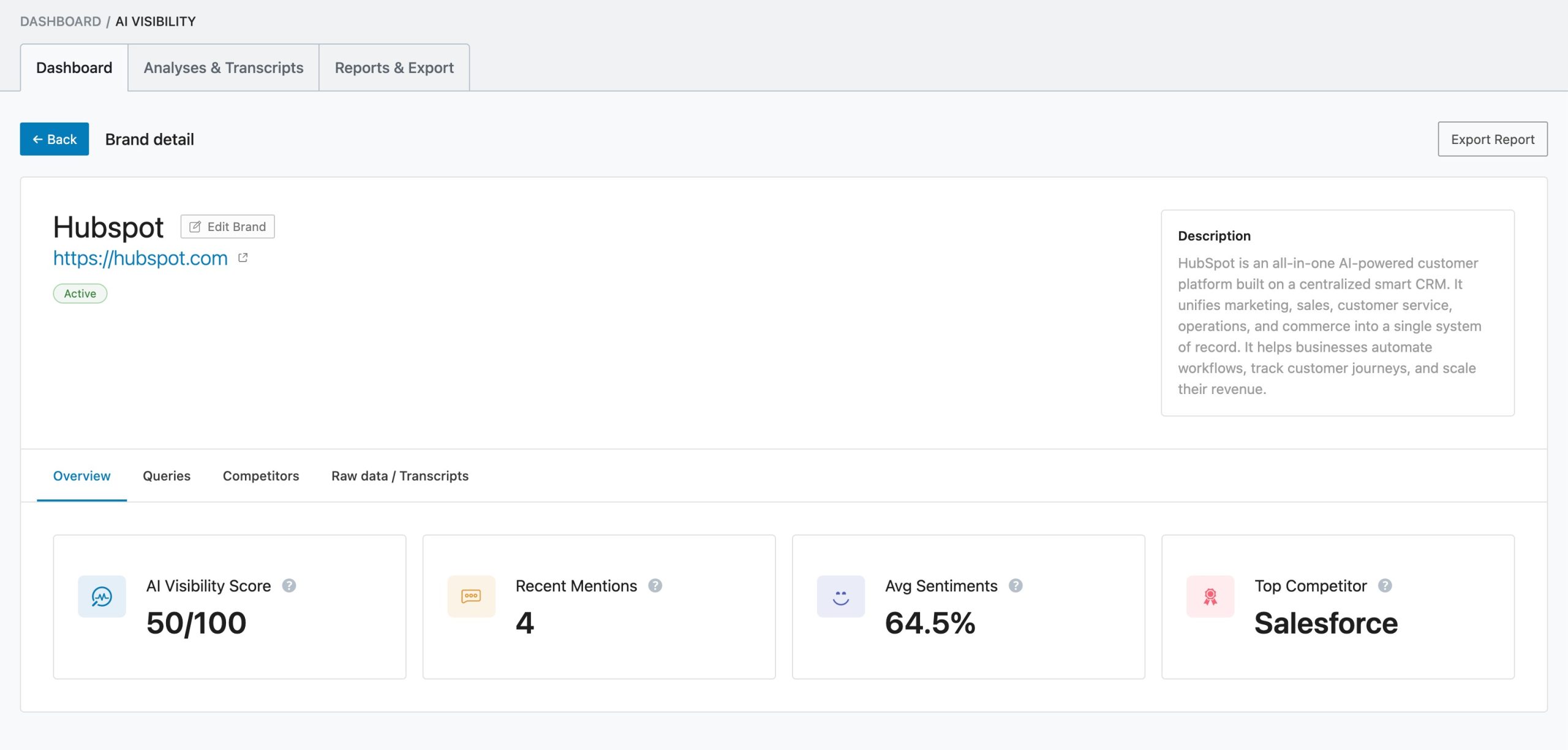
The report is further organized into four tabs:
Overview tab: Provides a snapshot of key AI visibility metrics
Queries tab: Prompts where your brand is mentioned
Competitors tab: Competing brands mentioned alongside or instead of yours
Raw Data / Transcripts tab: Exact user queries and AI-generated responses where your brand appears
This helps you track, compare, and optimize your brand presence across AI platforms.
Analyses & Transcripts Tab
The Analyses & Transcripts section is where raw data is transformed into actionable intelligence.
While the dashboard provides an aggregated overview of performance, this section allows you to dive deep into each individual analysis run that contributes to your visibility metrics.
Each entry represents a full analysis session where multiple AI queries are executed to evaluate how your brand appears across different scenarios and prompts.
At the top of this section, you’ll find filters that help you refine and explore your data more effectively. You can narrow results by brand, filter by status, search for specific entries, or analyze performance across a selected date range.
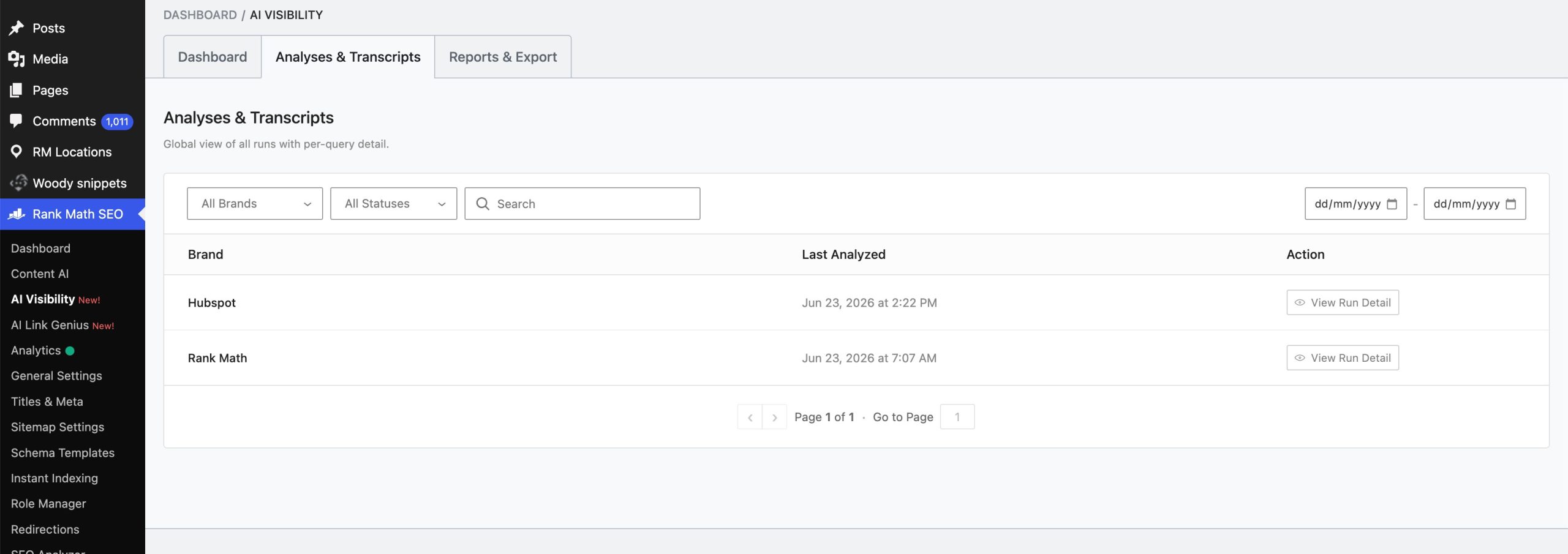
- Brand: Shows the brand or product being analyzed. This can be your own website, a specific product, or even competitors you want to track and compare.
- Last Analyzed: Indicates the analysis details of the brand, along with the time, to understand how fresh your data is and track when analyses were performed.
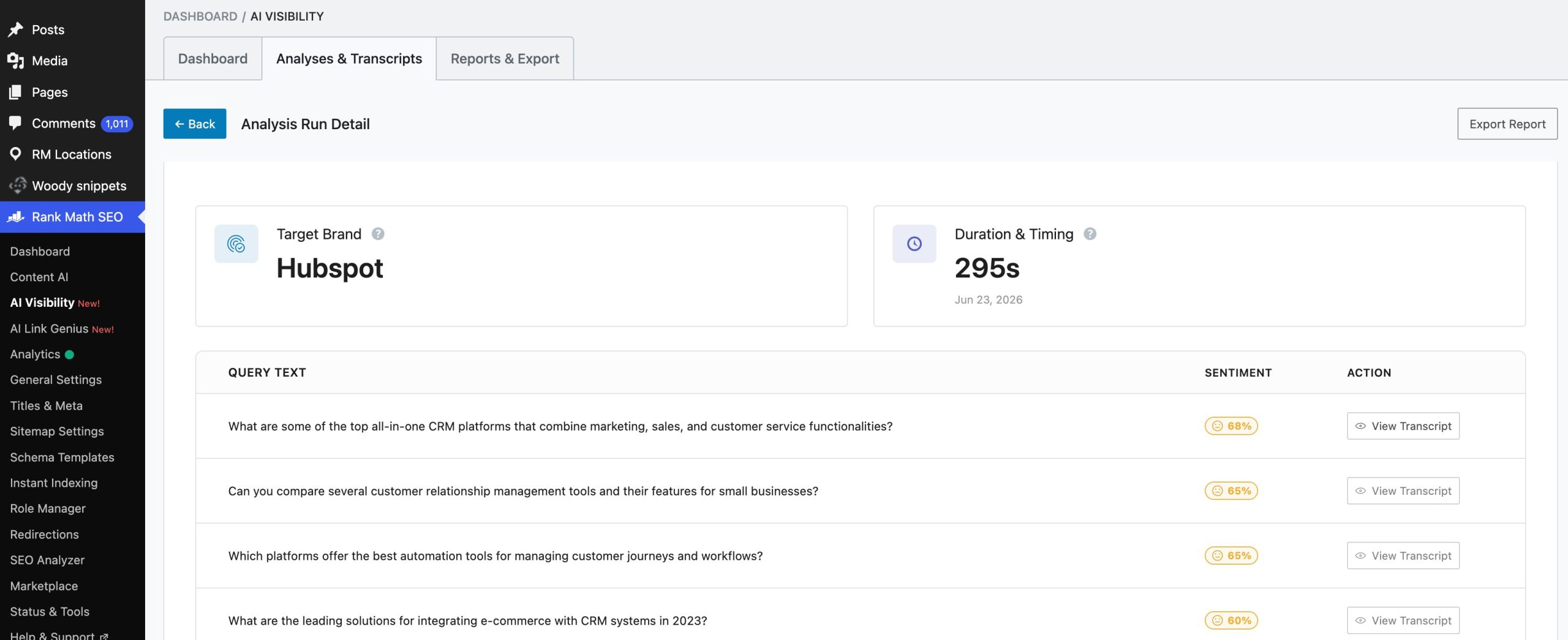
- Action (View Run Detail): Lets you open a detailed report for that specific run. Inside, you can explore the actual AI queries, responses, mentions, sentiment, and citations, giving you full visibility into how AI is interpreting and presenting your brand.
To view the detailed report, click on View Run Detail for a particular brand, as shown below.
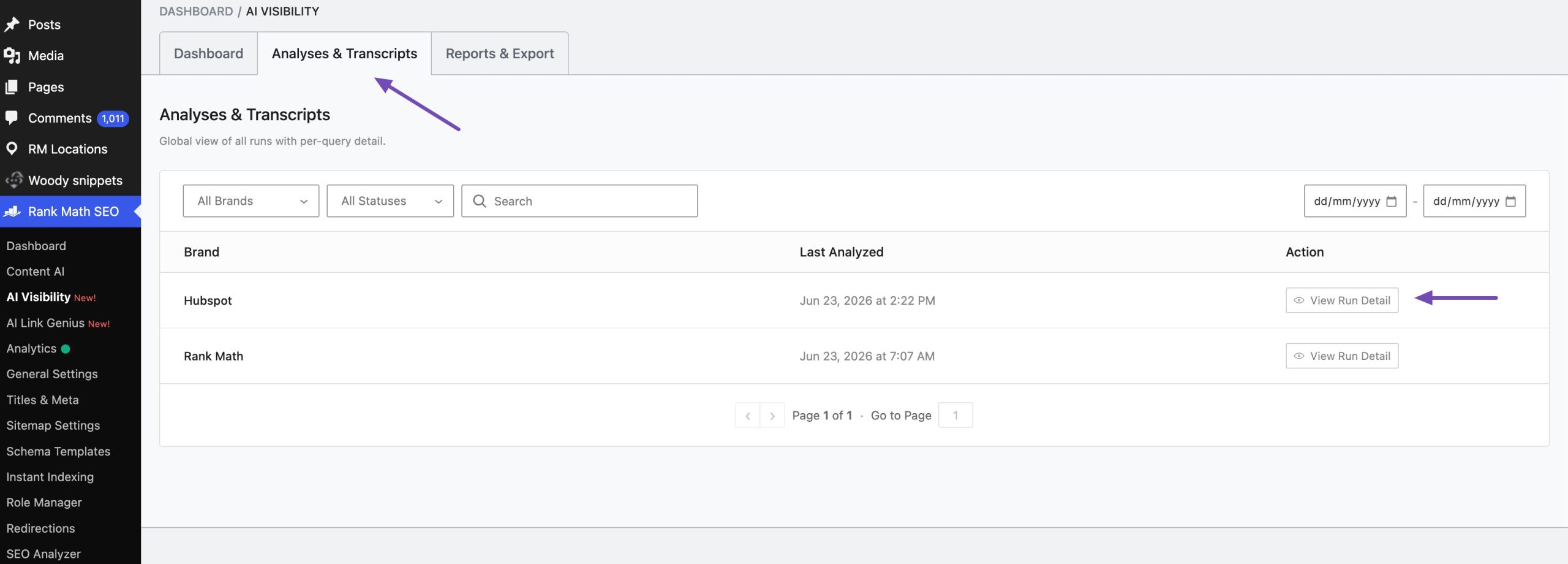
At a glance, you get a complete log of all analysis runs performed for the brands you’re tracking. Each entry represents a session where multiple AI queries were executed to evaluate how often (and how well) a brand appears in AI-generated responses.
Reports & Export Tab
The Reports & Export section in Rank Math’s AI Visibility Tracker is where all your tracked data comes together in a structured, shareable format.
This is especially useful for agencies, marketers, and teams who need to share insights or integrate AI visibility data into broader SEO workflows.
To generate a report, first select the brand or product you want to analyze, as shown below.
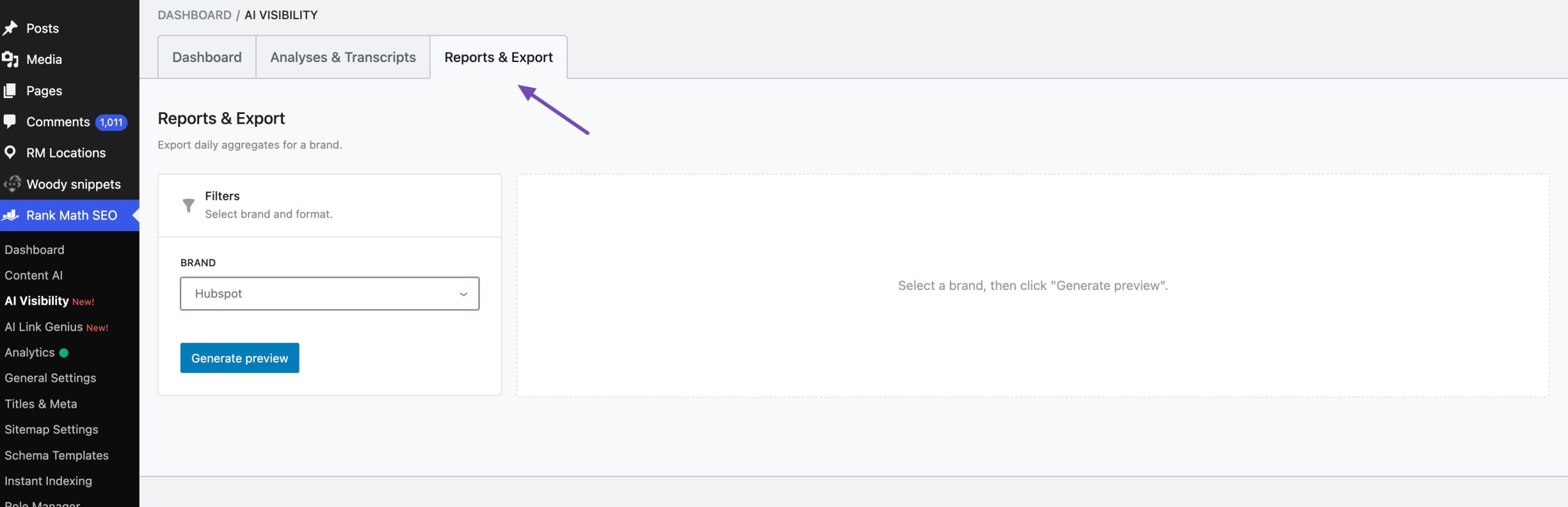
Once selected, click on the Generate Preview button. A preview of the full report will be displayed, allowing you to carefully review all included data before exporting.
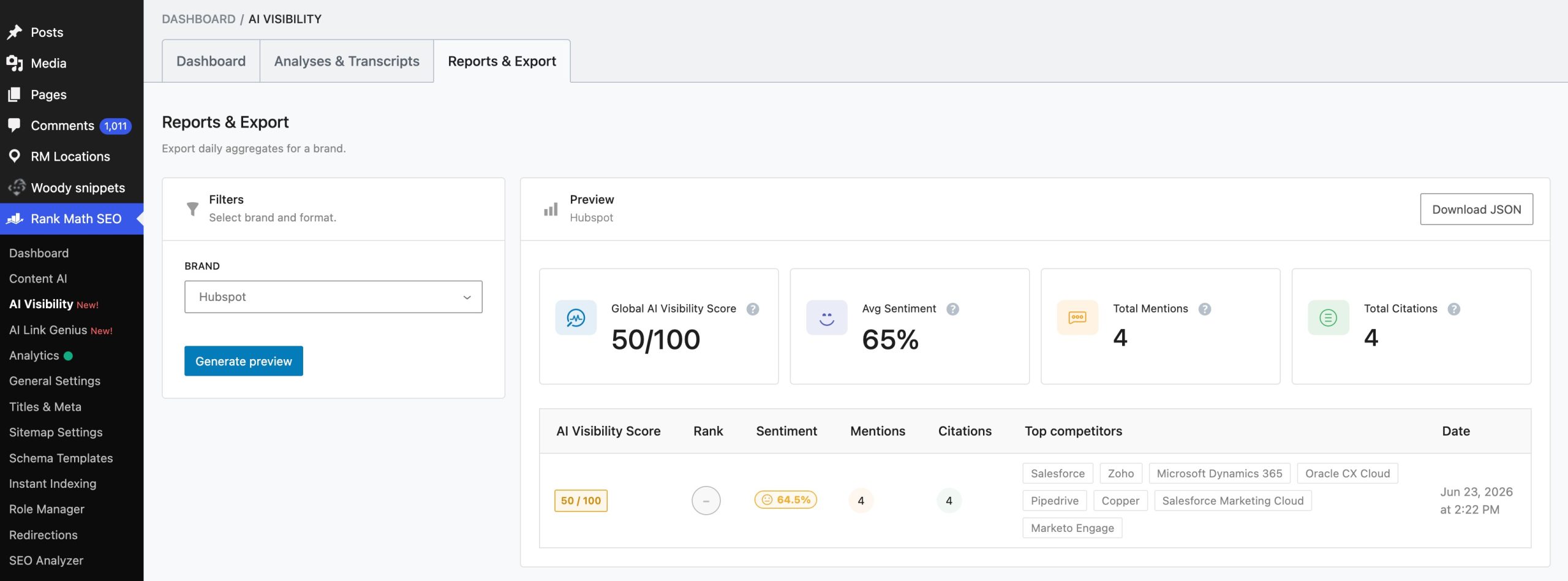
After reviewing the report, click Download JSON to export the final version.
The exported report can then be used for multiple purposes, including:
- Sharing detailed AI visibility insights with clients or stakeholders
- Performing deeper analysis using external tools or platforms
- Integrating data into GEO (Generative Engine Optimization) workflows
- Enhancing SEO strategy based on AI-driven visibility trends
- Tracking historical performance and improvements over time
This ensures that your AI visibility data is not just visible inside WordPress, but fully actionable across your entire marketing system.
Ready to Take Control of Your Brand’s Future?
AI search is becoming another important way people discover products, services, and brands.
Traditional rankings can tell you how your website performs in search results, but they don’t show the complete picture of how your brand appears in AI-generated answers.
Rank Math AI Visibility gives you a way to monitor that presence across different AI platforms, track multiple languages, analyze competitors and sentiment, and review the actual AI responses behind your data.
Start using Rank Math AI Visibility today and make sure your brand is part of the conversations that matter.
And don’t forget to share your experience with our AI Link Visibility by tweeting us at @rankmathseo.