

Schema markup has become one of the most valuable technical SEO features for WordPress websites. While it doesn’t directly improve rankings, it helps search engines understand your content better, making your pages eligible for rich results such as FAQs, product listings, recipes, reviews, events, courses, and more.
Today, Schema is also becoming increasingly important for AI-powered search engines. Platforms like Google AI Overviews, ChatGPT, Perplexity, and Microsoft Copilot rely on structured information to better interpret web content and identify entities.
Adding Schema manually can be difficult, especially if you’re unfamiliar with JSON-LD or Schema.org vocabulary. Fortunately, WordPress offers several plugins that generate structured data automatically, allowing you to implement Schema without writing code.
In this post, we’ll compare the best Schema markup plugins for WordPress, and help you choose the right one for your website.
Key Takeaways:
If you’re looking for a quick summary before reading the full comparison, here are the main points:
- Schema markup helps search engines understand your content and improves eligibility for rich search results.
- JSON-LD is the recommended schema format because it is supported by Google and easier to maintain.
- Rank Math offers one of the most complete Schema implementations, including 25+ predefined Schema types, custom schema generation, Schema Templates, Schema Generator, and automatic Schema configuration.
- Some plugins focus exclusively on structured data, while others combine Schema with complete SEO functionality.
- The best plugin depends on your website type, technical experience, and long-term SEO requirements.
- Choosing an SEO plugin with built-in Schema is usually more efficient than installing multiple plugins for separate SEO tasks.
Table Of Contents
1 What is Schema Markup?
Schema markup is a type of structured data that helps search engines understand the meaning and context of your content.
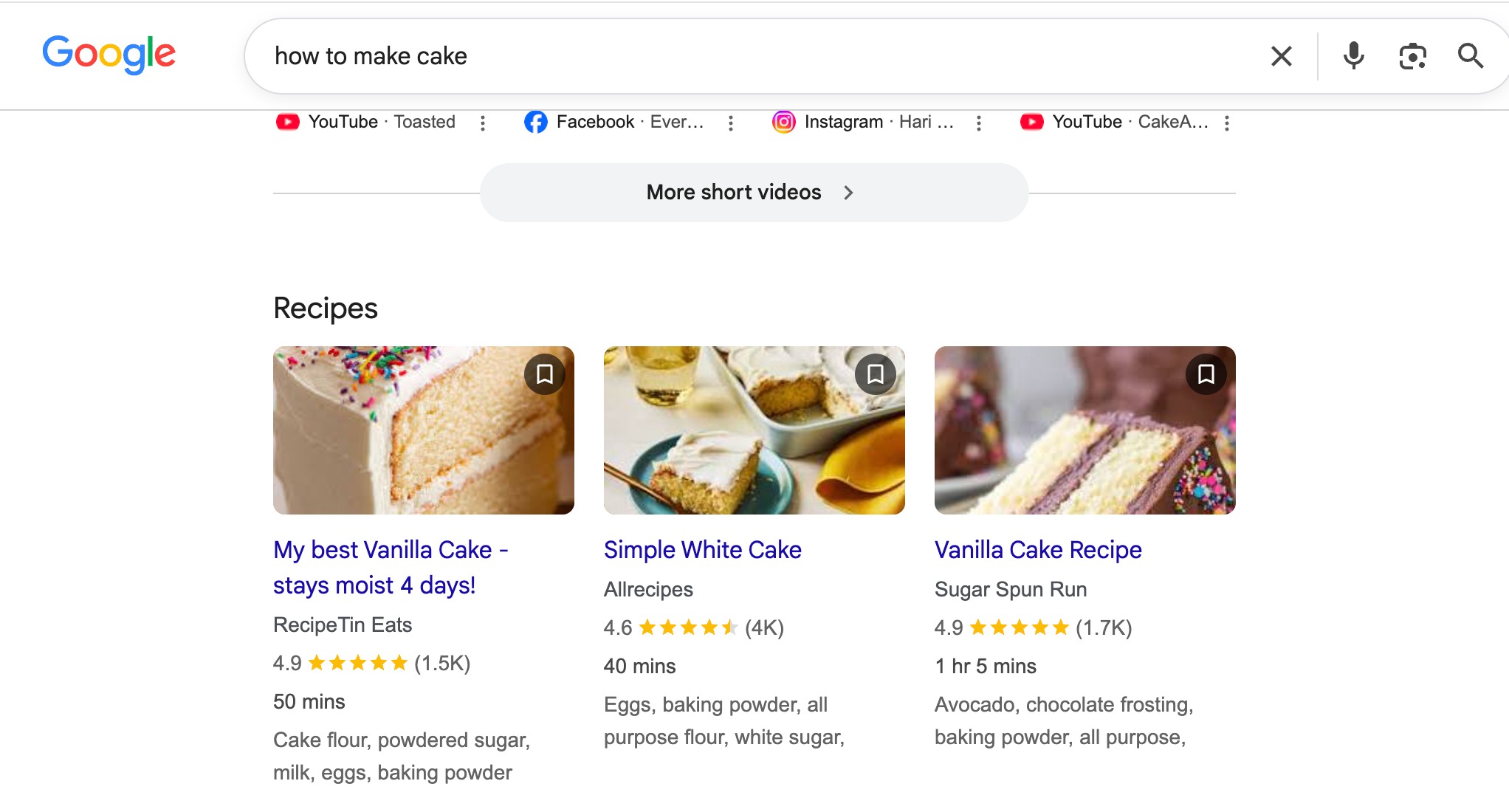
It provides additional information about your page in a machine-readable format, making it easier for search engines to identify what your content is about.
Let’s say you own an online electronics store and create a product page for the Apple iPhone 17 Pro.
Without Schema markup, your page might contain information like this:
Apple iPhone 17 Pro
$999
In Stock
4.8/5 (2,150 Reviews)
Free Shipping
A visitor can immediately understand this information. However, a search engine has to determine whether $999 is the product price, whether 4.8 is a customer rating, and whether In Stock refers to product availability.
When you add Product Schema, you explicitly tell search engines that:
- Product Name: Apple iPhone 17 Pro
- Brand: Apple
- Price: $999
- Availability: In Stock
- Customer Rating: 4.8 out of 5
- Number of Reviews: 2,150
Because every detail is clearly labelled, search engines can understand your product much more accurately. If your page meets Google’s eligibility requirements, this information may appear directly in search results as a rich snippet, showing details like the price, star rating, and availability before someone even visits your website.
In simple terms, Schema markup doesn’t change what your visitors see; it changes how search engines and AI systems understand your website.
2 Why Schema Markup Matters for SEO?
Schema markup is not a direct ranking factor, but it supports several aspects of search visibility that can improve your overall SEO performance.
First, it helps search engines understand your content more accurately. By identifying entities such as products, organizations, authors, and events, Schema reduces ambiguity and improves content interpretation.
Second, structured data makes your pages eligible for rich results. Rich snippets often provide more useful information to users before they click, making search listings more informative and visually appealing.
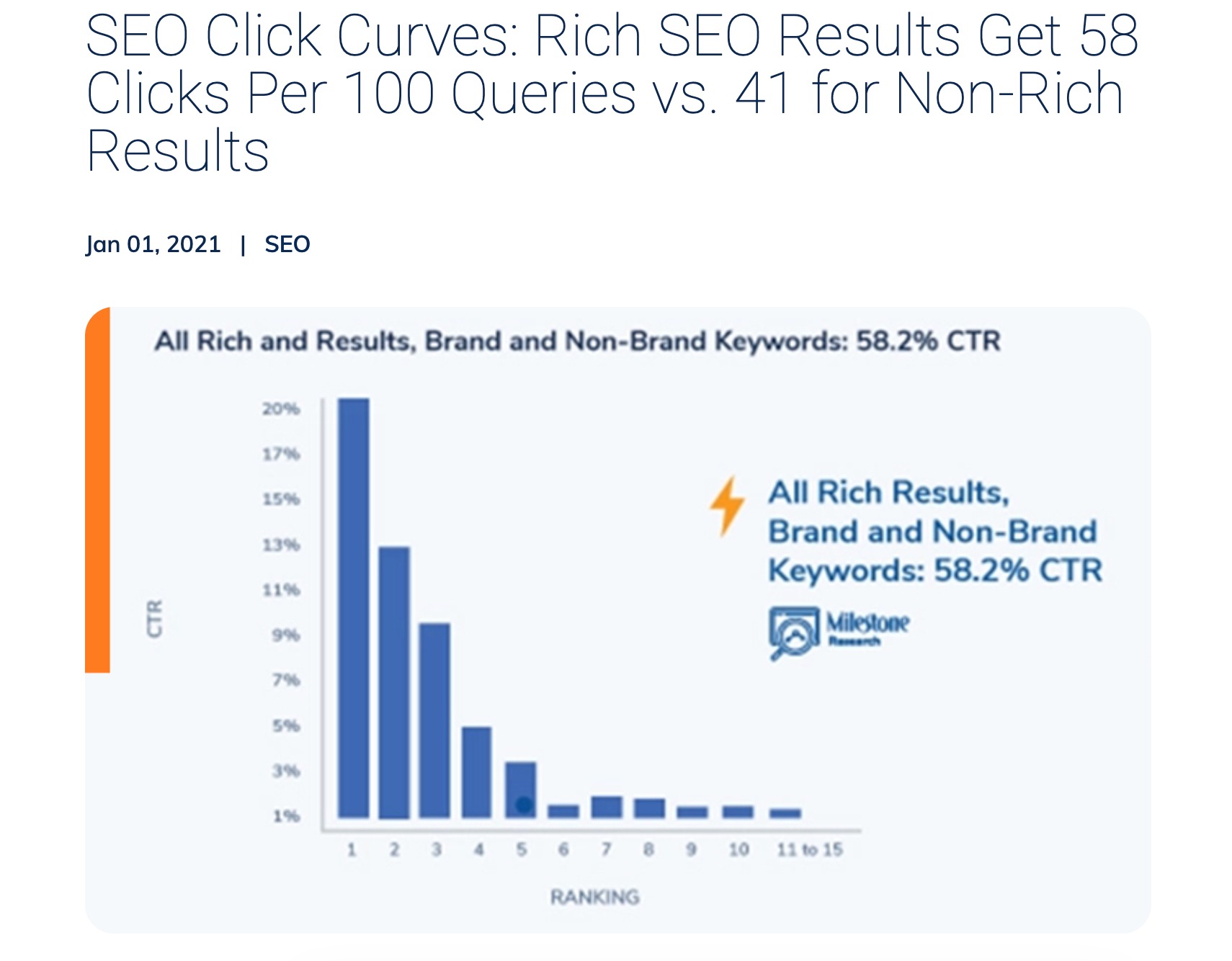
Research by Milestone Inc. found that websites implementing structured data experienced an average 20–30% increase in click-through rates after earning rich results. While results vary depending on the industry and search intent, enhanced listings often attract more attention than standard search results.
Schema markup also supports several other SEO benefits:
- Improves content understanding
- Clarifies relationships between entities
- Supports Google’s Knowledge Graph
- Enhances search result appearance
- Helps search engines classify page content more accurately
- Improves consistency across large websites
For websites with hundreds or thousands of pages, automatically generating accurate structured data also reduces implementation errors and simplifies long-term maintenance.
3 Top Schema Markup Plugins for WordPress
Here’s a quick overview of the Schema markup plugins:
| Plugin | Free Version | Schema Types | Schema Templates | Price | Best For |
| Rank Math SEO | Yes | Yes. 25+ | Yes | Free (PRO available) | Bloggers, businesses, agencies, and WooCommerce stores |
| Yoast SEO | Yes | Limited | No | Free (Premium available) | Beginners and existing Yoast users |
| All In One SEO | Yes | Yes. 19+ | No | Free (Premium available) | Small businesses and WooCommerce websites |
| Schema App Structured Data | Yes | Yes | No | Free (Premium available) | Large websites and local businesses |
| Schema PRO | No | 20+ | Yes | Premium only | Users who need advanced Schema functionality |
3.1 Rank Math SEO
If you’re looking for a plugin that combines powerful Schema markup features with a complete SEO toolkit, Rank Math is our top recommendation.
With over 3 million active installations, Rank Math has become one of the most widely used SEO plugins for WordPress. It is trusted by bloggers, businesses, agencies, and eCommerce stores because it balances beginner-friendly automation with advanced customization for experienced users.
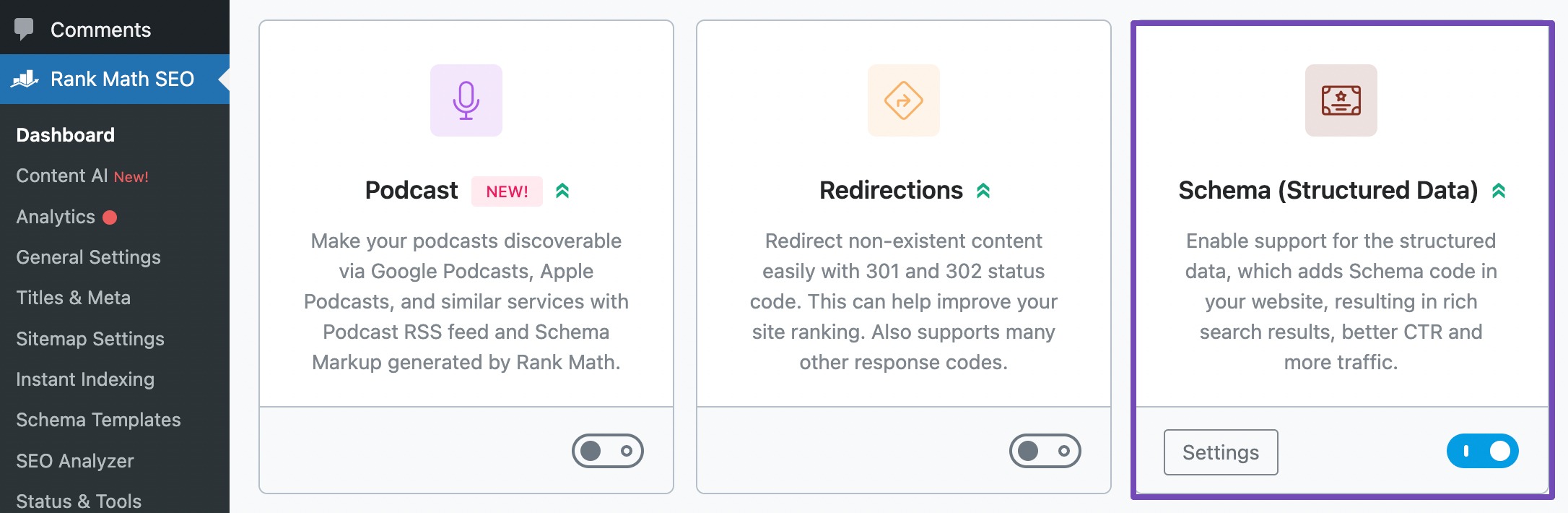
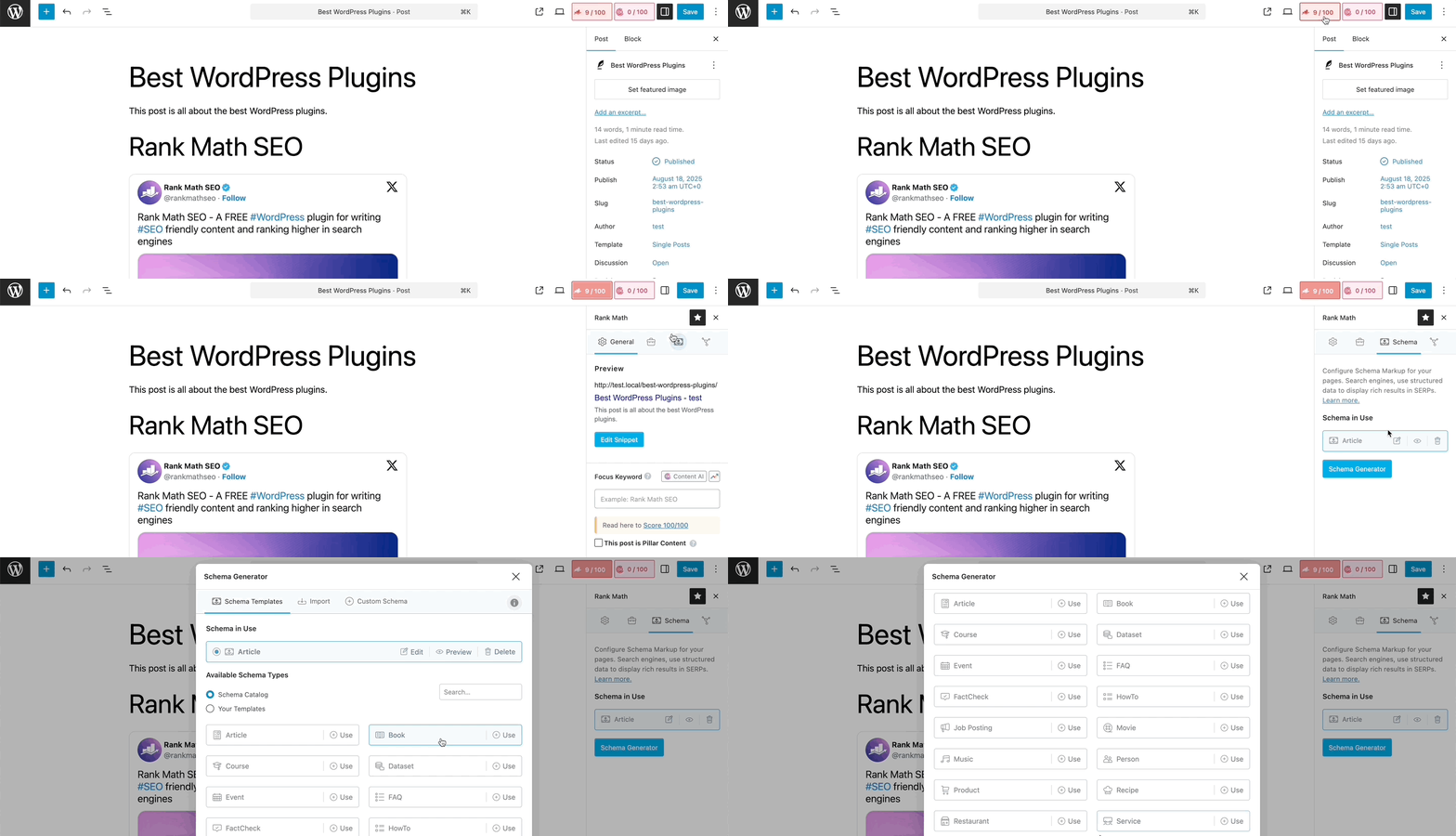
Rank Math includes a comprehensive set of Schema features that make it easy to add, manage, and customize structured data without writing code. Ensure that you’ve enabled the Schema module from your WordPress dashboard, as shown below.
You can then easily add the Schema markup to your post/pages without leaving your WordPress editor, as shown below.
Key Features:
- 25+ Schema Types: Choose from a wide range of Schema types, including Article, Product, Recipe, FAQ, HowTo, Course, Event, Local Business, Video, and more.
- Automatic Schema Generation: Automatically adds the appropriate Schema to your posts, pages, and custom post types based on predefined settings.
- Schema Generator: Create or customize Schema using an intuitive interface without editing JSON-LD code.
- Custom Schema Builder: Build custom structured data for unique content and advanced use cases.
- Schema Templates: Save reusable Schema templates and automatically apply them to similar content.
- WooCommerce Schema: Automatically generates Product Schema with details like price, availability, ratings, SKU, and brand.
- Local Business Schema: Add business information such as address, opening hours, contact details, and multiple locations.
- Import Schema: Import Schema markup from other websites or existing JSON-LD code to save time.
- Schema Validation: Generate Schema that follows Schema.org standards and can be tested using Google’s Rich Results Test.
- Easy Integration: Works easily with WooCommerce, Elementor, Divi, Gutenberg, and other popular WordPress themes and plugins.
This means you don’t have to install and manage multiple plugins for different SEO tasks, making your WordPress setup simpler and easier to maintain.
Pricing: Free version available, and the premium plans start at €7.99/month.
Refer to our dedicated tutorial on Schema Markup and manage your WordPress with ease.
3.2 Yoast SEO
Yoast SEO includes built-in Schema markup to help search engines understand your website. Instead of requiring users to configure Schema for every page, Yoast automatically generates structured data based on your site’s content and settings.
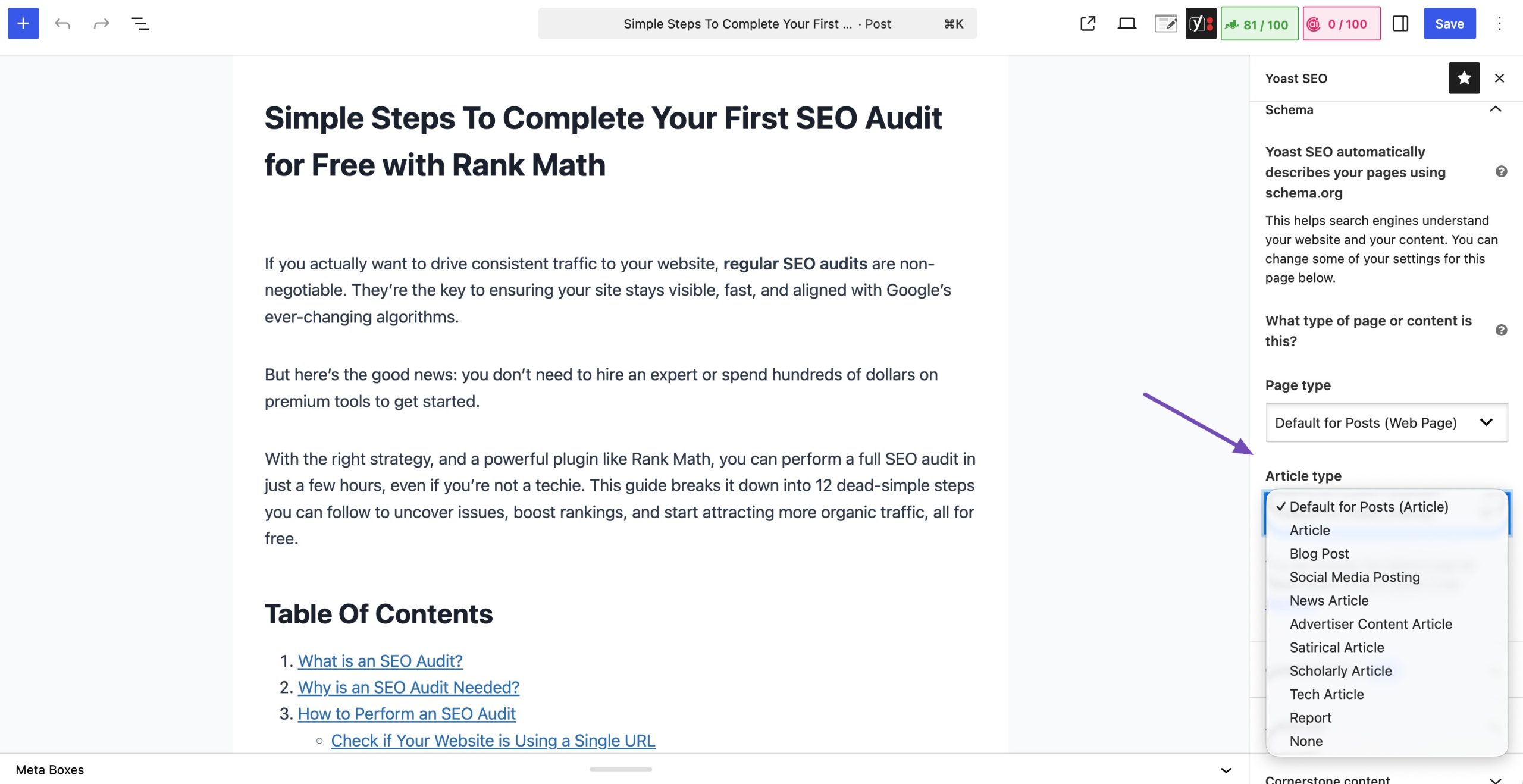
The plugin focuses on creating a connected Schema Graph, which links different Schema entities, such as your website, organization, author, webpages, and articles, to help search engines better understand the relationships between them.
Key Features:
- Automatic Schema Generation: Adds structured data to your pages and posts without requiring manual configuration.
- Schema Graph: Connects entities such as your website, organization, authors, and articles to create a structured representation of your content.
- Article Schema: Automatically applies Article Schema to blog posts.
- Organization & Person Schema: Lets you define whether your website represents a business or an individual.
- Breadcrumb Schema: Automatically generates Breadcrumb Schema when breadcrumbs are enabled.
- WooCommerce Integration: Supports Product Schema when used with the Yoast WooCommerce SEO extension.
- SEO Integration: Combines Schema markup with on-page SEO analysis, XML sitemaps, and metadata optimization.
While Yoast’s automatic approach is ideal for beginners, it offers fewer customization options than plugins like Rank Math. If you need advanced Schema types or want to create custom structured data, you may find its capabilities more limited.
Pricing: Free version available and the premium plans start at $9.90/month.
3.3 All in One SEO
The plugin automatically generates Schema for your content and provides a user-friendly Schema Generator for adding structured data to individual posts and pages.
It supports a variety of Schema types and allows you to customize Schema based on your content, making it a good option for users who want more flexibility than basic automatic Schema.
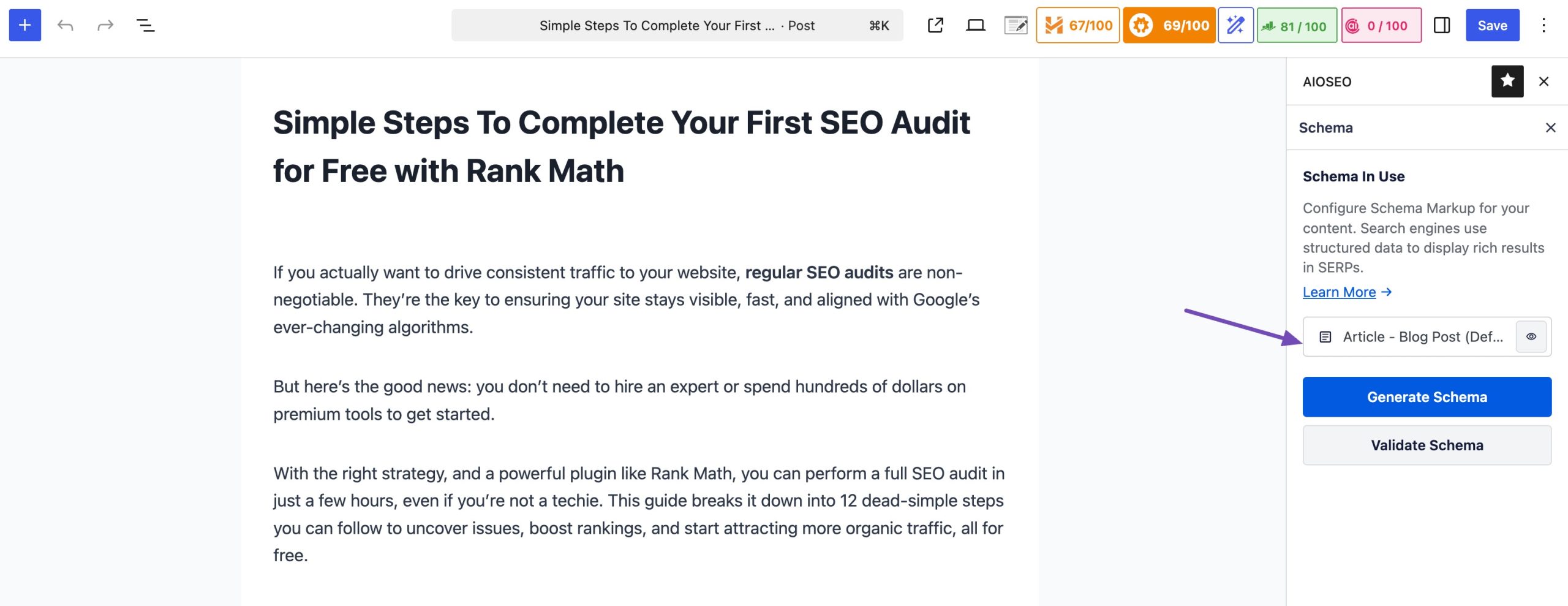
While AIOSEO offers good Schema capabilities, some advanced Schema features are only available in its premium plans.
Key Features:
- Built-in Schema Generator: Add or customize Schema for posts and pages without writing JSON-LD code.
- Multiple Schema Types: Supports Article, Product, FAQ, Recipe, Course, Event, Software, Local Business, Organization, Person, Video, and more.
- Automatic Schema Markup: Automatically adds the appropriate Schema to your content based on the selected Schema type.
- WooCommerce Schema: Generates Product Schema for WooCommerce stores, including product details such as price, availability, ratings, and reviews.
- Local Business Schema: Add important business information like your address, phone number, business hours, and location.
- Knowledge Graph Support: Configure your website as an Organization or Person to help search engines understand your brand.
- Easy Schema Customization: Edit or override the default Schema for individual posts and pages through an intuitive interface.
Pricing: Free version available, and the premium plans start at $1000/month.
3.4 Schema App Structured Data
Schema App Structured Data is a dedicated Schema markup solution designed to help websites implement and manage structured data at scale.
The plugin automatically generates schema markup for your website while allowing you to build advanced entity relationships using Schema.org vocabulary. It also offers tools for customizing Schema, validating markup, and managing structured data across large websites.
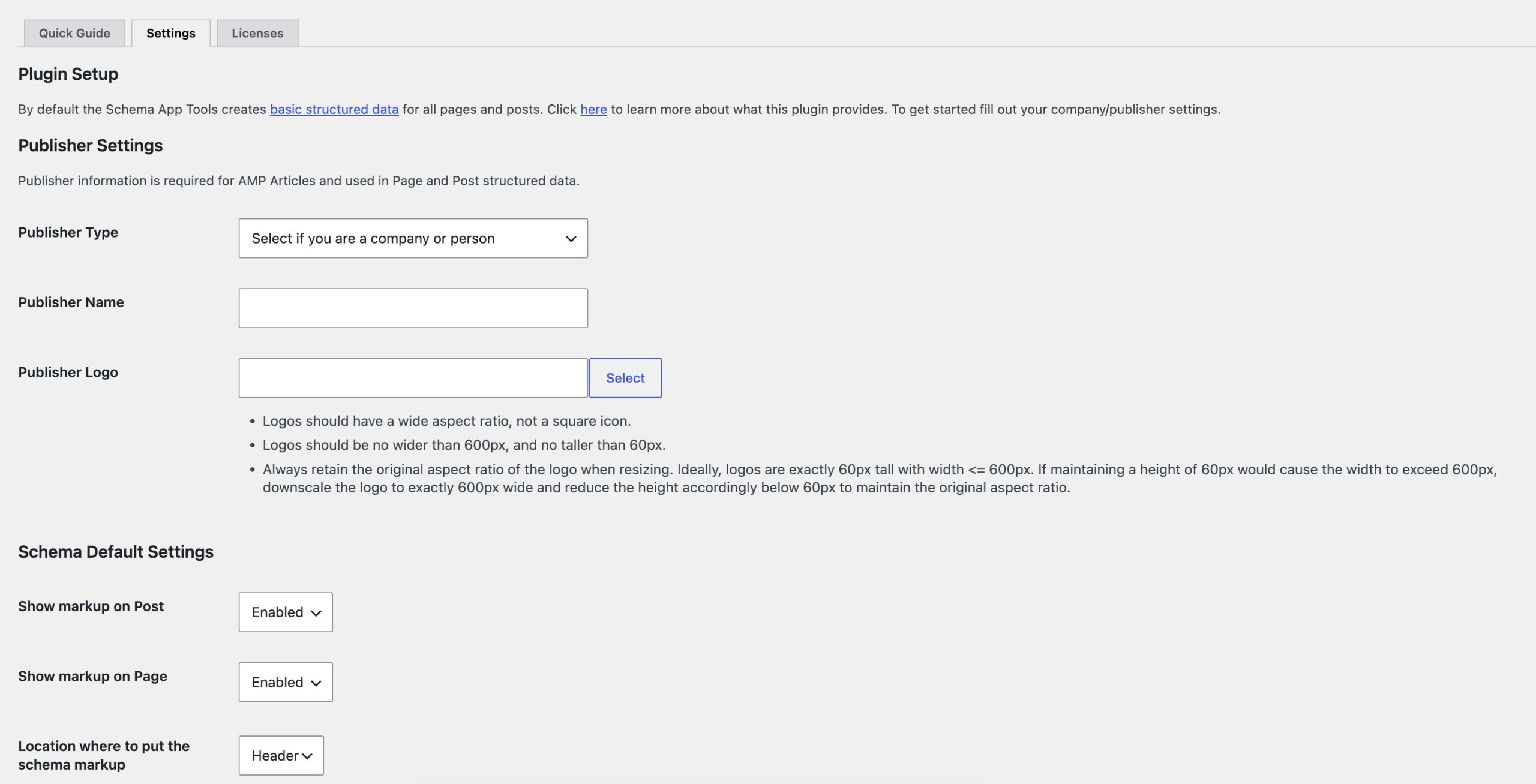
Because Schema App is designed for advanced use cases, it has a steeper learning curve and is better suited for businesses with complex SEO requirements rather than beginners looking for a simple Schema solution.
Key Features:
- Automatic Schema Generation: Automatically adds structured data to your website based on your content.
- Extensive Schema Support: Supports a wide range of Schema.org types for articles, products, organizations, local businesses, events, recipes, videos, and more.
- Advanced Schema Builder: Create and customize structured data without manually writing JSON-LD.
- Entity Relationship Management: Build connections between entities to improve semantic understanding and support Knowledge Graph optimization.
- Dynamic Schema Markup: Automatically updates Schema when your website content changes.
- Schema Validation: Helps identify errors and ensures your structured data follows Schema.org standards.
- Scalable Implementation: Designed to manage structured data across large websites with thousands of pages.
Pricing: Freely available. Premium plans available depending on the scope and complexity of the website.
3.5 Schema Pro
Schema Pro is a premium WordPress plugin built specifically for adding structured data to websites. It focuses exclusively on schema markup rather than offering a complete suite of SEO tools.
The plugin makes it easy to add Schema markup without writing JSON-LD code. Using an intuitive interface, you can choose a Schema type, map it to your content, and automatically apply it across your website.

This makes Schema Pro a good choice for websites with large amounts of content that require consistent Schema implementation.
Key Features:
- 20+ Schema Types: Supports popular Schema types, including Article, Blog Posting, Product, Review, Recipe, Course, Event, Job Posting, Local Business, Organization, Person, Video, Service, Book, and more.
- Automatic Schema Mapping: Automatically applies Schema to posts, pages, custom post types, and taxonomies using predefined rules.
- Schema Automation: Configure Schema once and automatically apply it to similar content across your website.
- Flexible Targeting Rules: Assign different Schema types based on categories, post types, tags, or specific pages.
- WooCommerce Support: Automatically generates Product Schema for WooCommerce products.
- Custom Schema Configuration: Modify Schema properties without editing JSON-LD manually.
Pricing: The plugin price starts at $69/year.
4 Frequently Asked Questions
Do I need a Schema markup plugin for WordPress?
No, but it makes implementation much easier.
You can add Schema markup manually by writing JSON-LD code, but this requires technical knowledge and ongoing maintenance. A Schema markup plugin automatically generates and updates structured data, reducing the risk of errors and saving time.
Does Schema markup improve SEO?
Schema markup is not a direct Google ranking factor.
However, it helps search engines better understand your content and can make your pages eligible for rich results. These enhanced search listings often attract more attention, which can improve click-through rates and increase organic traffic.
Can Schema markup help AI search engines?
Yes. AI-powered search platforms such as Google AI Overviews, ChatGPT, Gemini, and Perplexity rely on understanding entities and relationships within content.
Can I use more than one Schema plugin?
It’s generally not recommended.
Using multiple Schema plugins can generate duplicate or conflicting structured data, making it harder for search engines to interpret your content correctly. In most cases, you should use a single plugin to manage your website’s Schema markup.
5 Conclusion
Schema markup is no longer just a technical SEO enhancement; it’s an important way to help search engines and AI-powered search platforms better understand your content.
Choose the plugin that best fits your needs, implement Schema correctly, and validate your markup regularly. It’s a small investment that can make a big difference in how both search engines and AI understand your website.
If you liked this post, let us know by tweeting @rankmathseo.