
Starting with Rank Math SEO v1.0.269 and Rank Math PRO v3.0.112, Content AI has officially transitioned from an AI credits system to a feature-based usage model.
This means that AI-powered features, such as Content AI and AI Link Genius, are no longer charged based on word count/credits. Instead, they are now billed based on how often you use each feature. AI Visibility also skipped the credit system entirely and is billed on a per-feature-usage model.
This new approach is simpler, offers multiple benefits, and gives you access to a wider range of AI-powered tools without the confusion of tracking credits.
In this knowledge base article, we’ll walk you through everything you need to know about the change and how to get your site ready.

What You Need to Know:
- Understanding the Old AI Credits System
- Introducing the Feature-Based Usage System
- Why We Switched to the Feature-Based System
- How Do You Migrate to the New System?
- Content AI Plans and Usage Limits
- How to Check Your Feature Usage?
- Usage Allocation for Business & Agency Users
- Frequently Asked Questions (FAQs)
1 Understanding the Old AI Credits System
The AI credits system was our previous pricing model, where you received a fixed number of credits based on your Content AI plan:
- Starter – 5,000 monthly credits
- Creator – 12,000 monthly credits
- Expert – 30,000 monthly credits
Rank Math Free users also received 750 credits a month at no cost. These credits were used to access AI features across the platform.
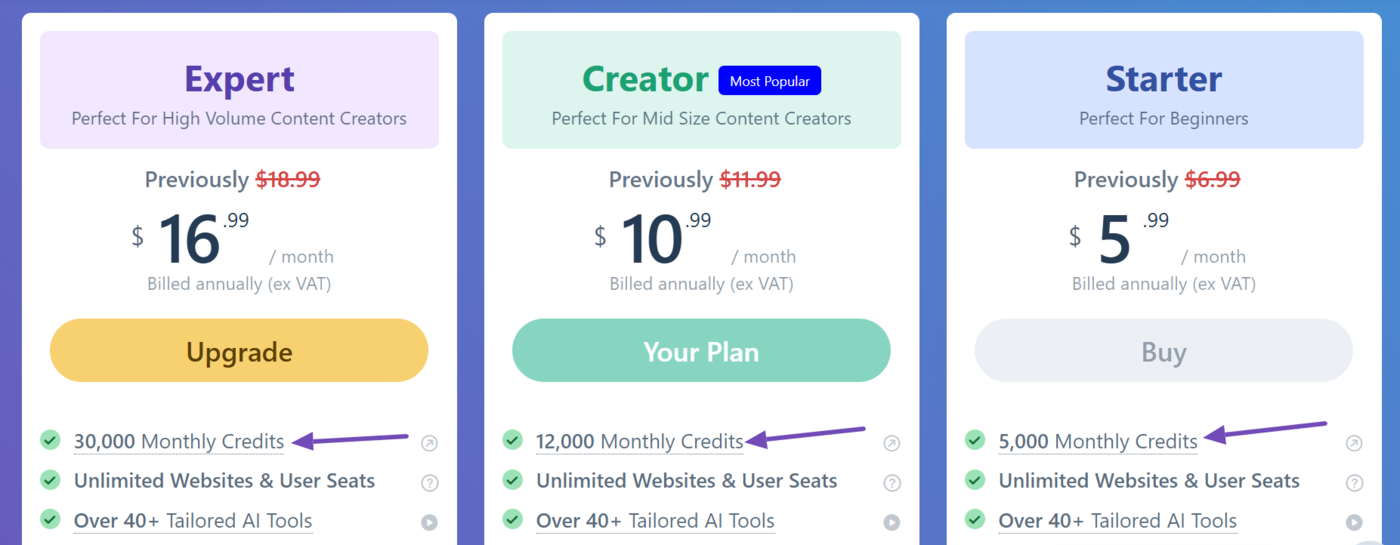
In most cases, 1 credit = 1 word generated. For example, features like the RankBot chatbot, AI Command tool, Fix with AI, and other Content AI tools consumed credits based on the number of words generated.
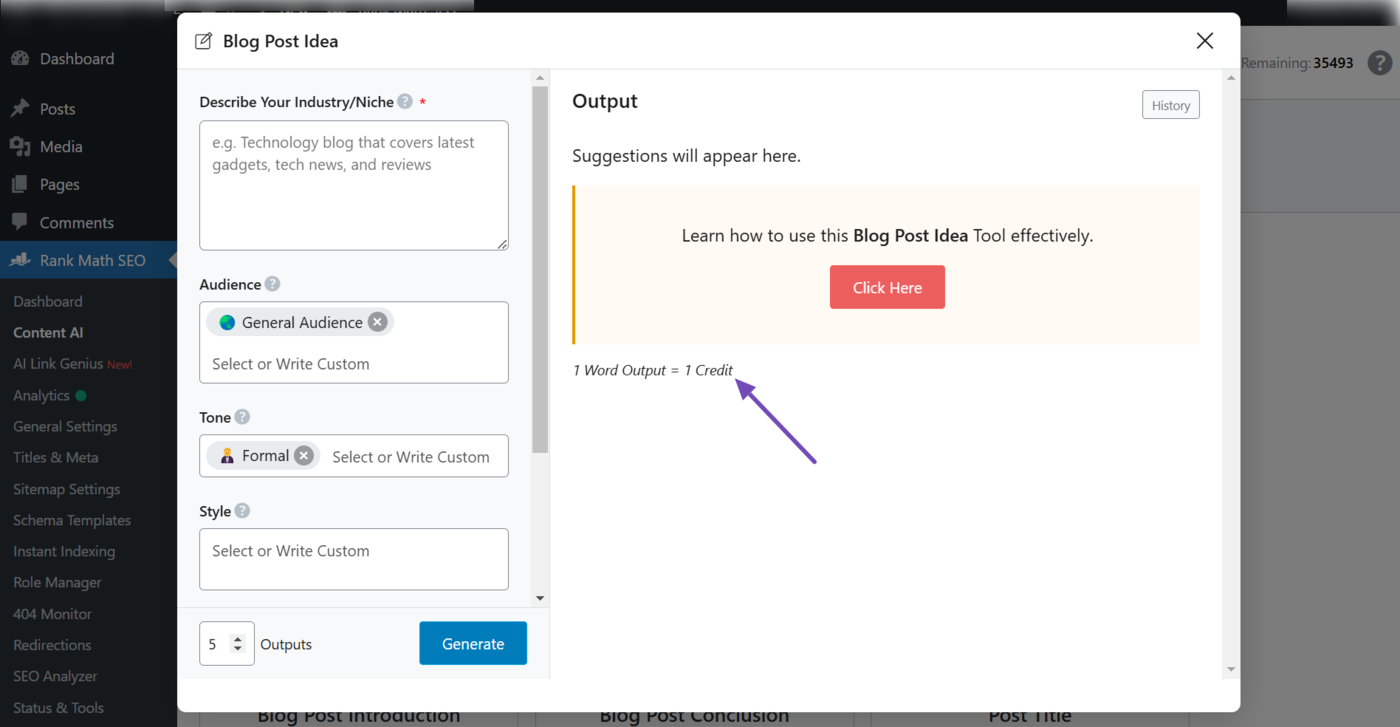
Some features, however, used fixed credit amounts; for instance, Content AI research consumed 500 credits, a link suggestion cost 100 credits, and generating an image alt text consumed 50 credits.
While flexible, this system often made it difficult to estimate usage and manage credits effectively. That’s exactly why we’re moving away from it and replacing it with a much simpler, feature-based model.
2 Introducing the Feature-Based Usage System
The feature-based usage system gives you a predefined number of uses for each AI tool included in your Content AI plan.
Instead of tracking credits, you simply use the features you need; each time you run a tool, it counts as one use.
For example, the Content AI Creator plan includes 30 Content AI research runs per month. Each time you run a research task, one use is deducted. So after your first run, you’ll have 29 remaining.
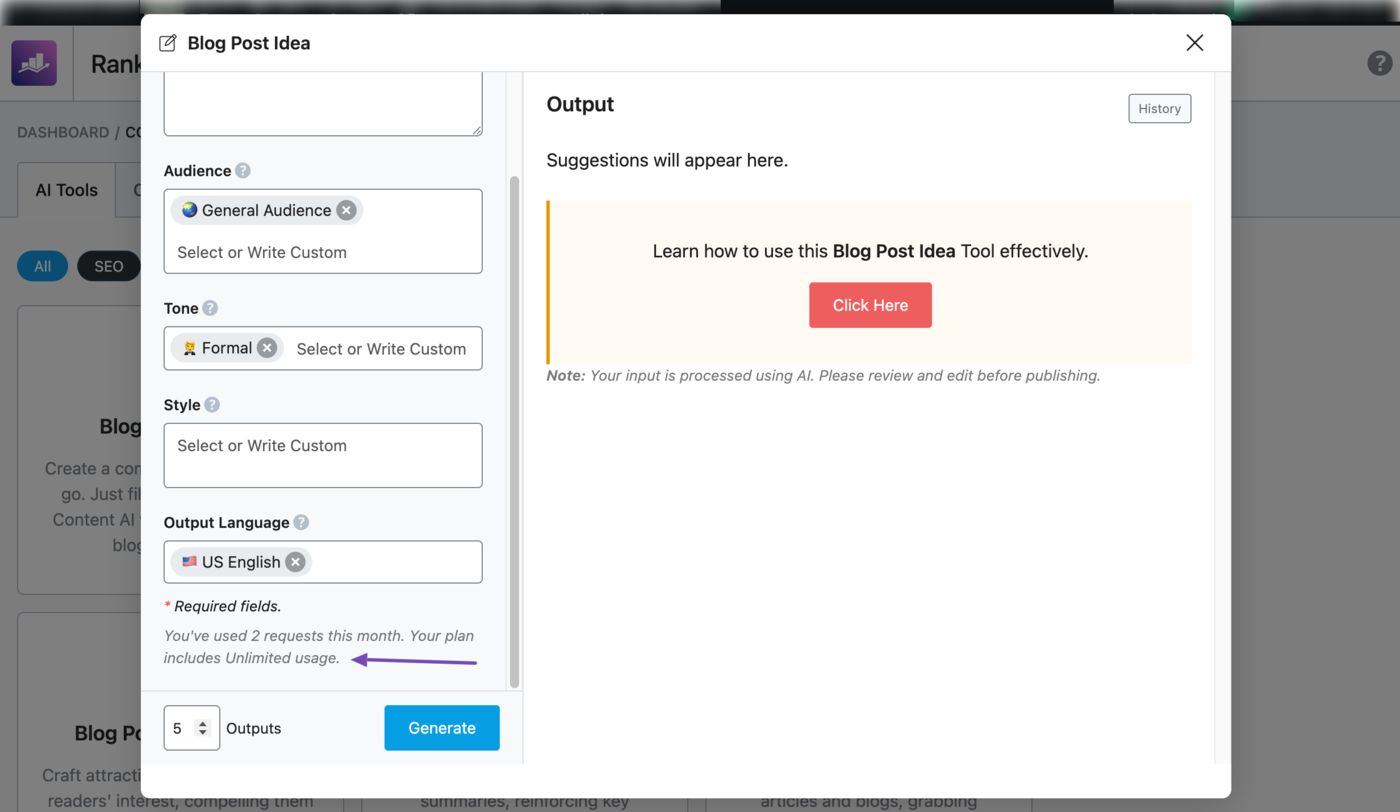
Some features also come with no usage limits. For instance, the Expert plan offers unlimited access to tools like the Blog Post Idea generator, allowing you to create as many ideas as you want without any restrictions.
Overall, this system replaces per-word credit tracking with a simpler and more predictable model. You always know how many uses you have left, making it easier to plan your workflow and focus on what matters most: creating great content.
3 Why We Switched to the Feature-Based System
We introduced the feature-based system to make Content AI simpler, more transparent, and easier to use, especially as we continue expanding with advanced tools like AI Link Genius.
The previous credits-based model often made it difficult to understand usage and fully take advantage of all available features. Estimating costs based on word count or varying credit consumption could quickly become confusing.
3.1 Do More Without Hitting Limits Too Soon
With the old credits system, your usage was shared across all features, limiting how much you could actually accomplish.
For example, the Content AI Starter plan included 5,000 credits, and a single content research task could consume 500 credits. This meant that just 10 research runs could use up your entire balance, leaving no room for other AI tools.
With the feature-based system, the same plan includes 10 content research runs, but that’s just one part of it. You also get access to other AI tools, each with its own separate usage limits.
Instead of one task consuming everything, every feature now has its own dedicated allowance. This gives you more flexibility, more freedom to experiment, and more capacity to scale your content efforts.
3.2 A More Predictable and Transparent Experience
The credits system often involved a lot of guesswork. Since usage was tied to word count or variable credit costs, it wasn’t always clear how many credits a task would consume.
You had to estimate usage constantly, deciding whether you could afford to run a task or save credits for something else. In many cases, this led to hesitation and underutilization of Content AI.
The feature-based system removes that uncertainty.
Each tool comes with a clear, predictable and predefined usage limit, so you always know what’s available. More importantly, using one feature no longer affects another, giving you the confidence to use every tool without holding back.
4 How Do You Migrate to the New System?
The transition to the feature-based system is a one-time update and is already in effect.
To start using it, simply update your plugins to the required versions:
- Rank Math SEO: v1.0.269 or later
- Rank Math PRO: v3.0.112 or later (for PRO users)
Once updated, the new system will be automatically enabled. You’ll be able to view your feature usage, track limits, and start using all AI tools under the new model right away.
If you’re still using an older version, the new interface and usage details won’t be available. Updating your plugins is essential to accessing the feature-based system and its benefits.
5 Content AI Plans and Usage Limits
Content AI is available across three plans: Starter, Creator, and Expert, each offering different usage limits based on your needs.
Rank Math free users also get access to a free Content AI tier, which includes most features with a limit of one to five uses per feature.
| AI Feature or Tool | Starter Plan | Creator Plan | Expert Plan |
| Fix SEO Tests | 500 | 1000 | Unlimited |
| Keyword Research | 10 | 30 | 100 |
| AI-Powered Image Alt Text | 50 | 100 | 500 |
| SEO Meta AI Tool | 100 | 500 | Unlimited |
| Write Inside WordPress | 100 | 500 | Unlimited |
| Bulk Edit SEO Meta | 100 | 500 | Unlimited |
| Create Long Form Content with 1-Click | 15 | 60 | Unlimited |
| Link Suggestions | 100 | 500 | 1000 |
| Link Opportunities | 50 | 200 | 1000 |
| Related Posts | 50 | 200 | 1000 |
| Semantic Keyword Variations | 100 | 500 | Unlimited |
| Open Graph AI Tool | 100 | 500 | Unlimited |
| Sentence Expander AI Tool | 100 | 500 | Unlimited |
| Topic Research AI Tool | 100 | 500 | Unlimited |
| RankBot AI Chatbot | 100 | 500 | Unlimited |
| Product Description AI Tool | 100 | 500 | Unlimited |
| Paragraph Rewriter AI Tool | 100 | 500 | Unlimited |
| Blog Post Idea AI Tool | 100 | 500 | Unlimited |
| Blog Post Outline AI Tool | 100 | 500 | Unlimited |
| Text Summarizer AI Tool | 100 | 500 | Unlimited |
| SEO Description AI Tool | 100 | 500 | Unlimited |
| Frequently Asked Questions AI Tool | 100 | 500 | Unlimited |
| Paragraph AI Tool | 100 | 500 | Unlimited |
| AI Command Tool | 100 | 500 | Unlimited |
| SEO Title AI Tool | 100 | 500 | Unlimited |
| Blog Post Introduction AI Tool | 100 | 500 | Unlimited |
| Facebook Post AI Tool | 100 | 500 | Unlimited |
| Post Title AI Tool | 100 | 500 | Unlimited |
| YouTube Video Script AI Tool | 100 | 500 | Unlimited |
| Fix Grammar AI Tool | 100 | 500 | Unlimited |
| Tweet AI Tool | 100 | 500 | Unlimited |
| Blog Post Conclusion AI Tool | 100 | 500 | Unlimited |
| Company Bio AI Tool | 100 | 500 | Unlimited |
| Product Review AI Tool | 100 | 500 | Unlimited |
| Recipe AI Tool | 100 | 500 | Unlimited |
| Freeform Writing AI Tool | 100 | 500 | Unlimited |
| SPIN Copywriting AI Tool | 100 | 500 | Unlimited |
| Analogy AI Tool | 100 | 500 | Unlimited |
| YouTube Video Description AI Tool | 100 | 500 | Unlimited |
| Product Pros and Cons AI Tool | 100 | 500 | Unlimited |
| Testimonial AI Tool | 100 | 500 | Unlimited |
| Instagram Caption AI Tool | 100 | 500 | Unlimited |
| Email AI Tool | 100 | 500 | Unlimited |
| HERO Copywriting AI Tool | 100 | 500 | Unlimited |
| AIDA Copywriting AI Tool | 100 | 500 | Unlimited |
| Comment Reply AI Tool | 100 | 500 | Unlimited |
| Personal Bio AI Tool | 100 | 500 | Unlimited |
| Tweet Reply AI Tool | 100 | 500 | Unlimited |
| IDCA Copywriting AI Tool | 100 | 500 | Unlimited |
| BAB Copywriting AI Tool | 100 | 500 | Unlimited |
| Podcast Episode Outline AI Tool | 100 | 500 | Unlimited |
| Email Reply AI Tool | 100 | 500 | Unlimited |
| PAS Copywriting AI Tool | 100 | 500 | Unlimited |
| Job Description AI Tool | 100 | 500 | Unlimited |
| Facebook Comment Reply AI Tool | 100 | 500 | Unlimited |
It’s important to note that unused feature limits do not roll over to the next month.
To get the most out of the feature limits, make sure to use your available limits within the billing cycle and plan your usage accordingly to maximize your content output.
6 How to Check Your Feature Usage?
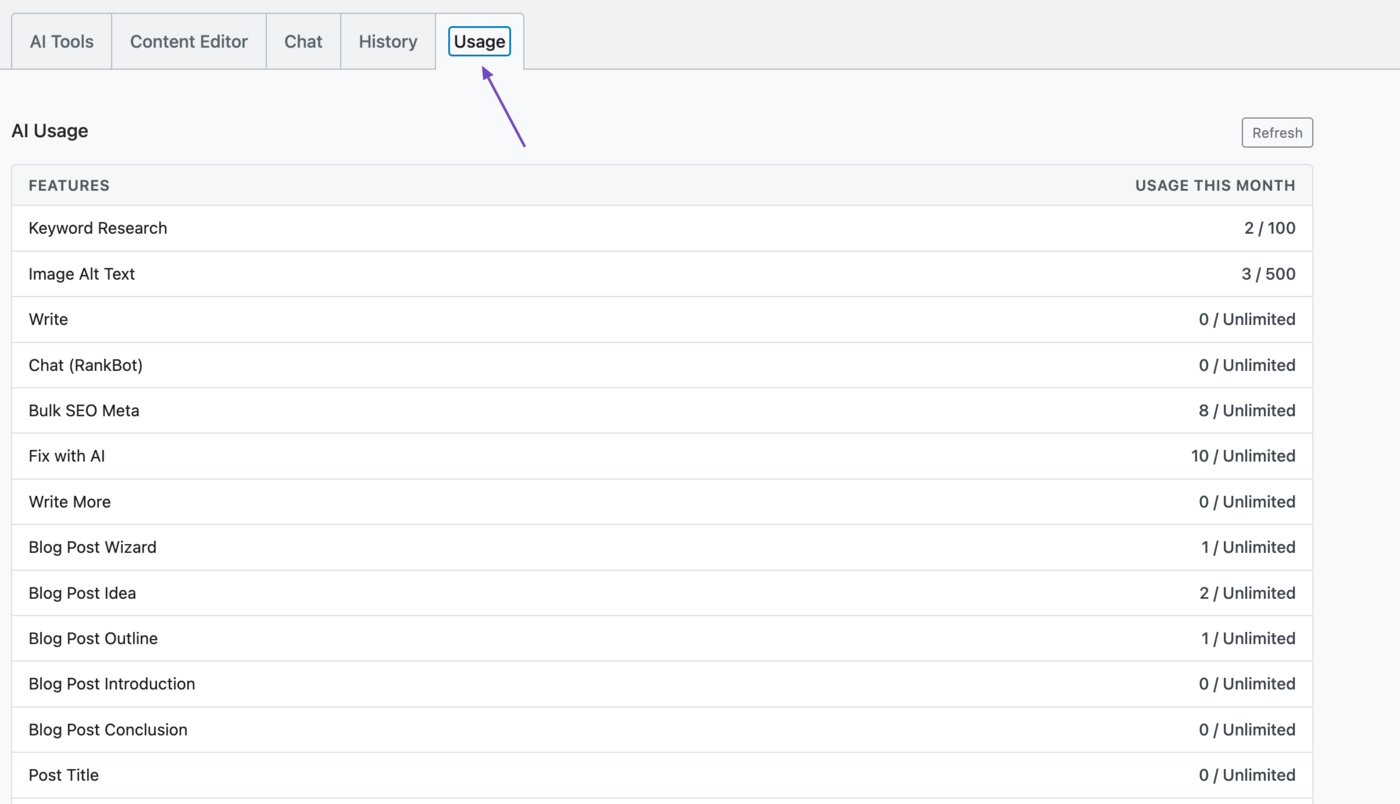
You can view your monthly feature usage by heading to Rank Math SEO → Content AI → Usage from your WordPress dashboard.
7 Usage Allocation for Business & Agency Users
Rank Math Business and Agency users can distribute Content AI usage across the client sites they manage.
Previously, it was done by assigning a fixed number of credits to each site.
With the feature-based system, Content AI usage is now allocated using a percentage-based model. This allows you to decide how much of your total plan each site can use, making it easier to manage multiple projects without tracking individual credit limits.
If you had already assigned credit limits under the previous system, there’s nothing you need to do. We’ve automatically converted those allocations into the new percentage-based system.
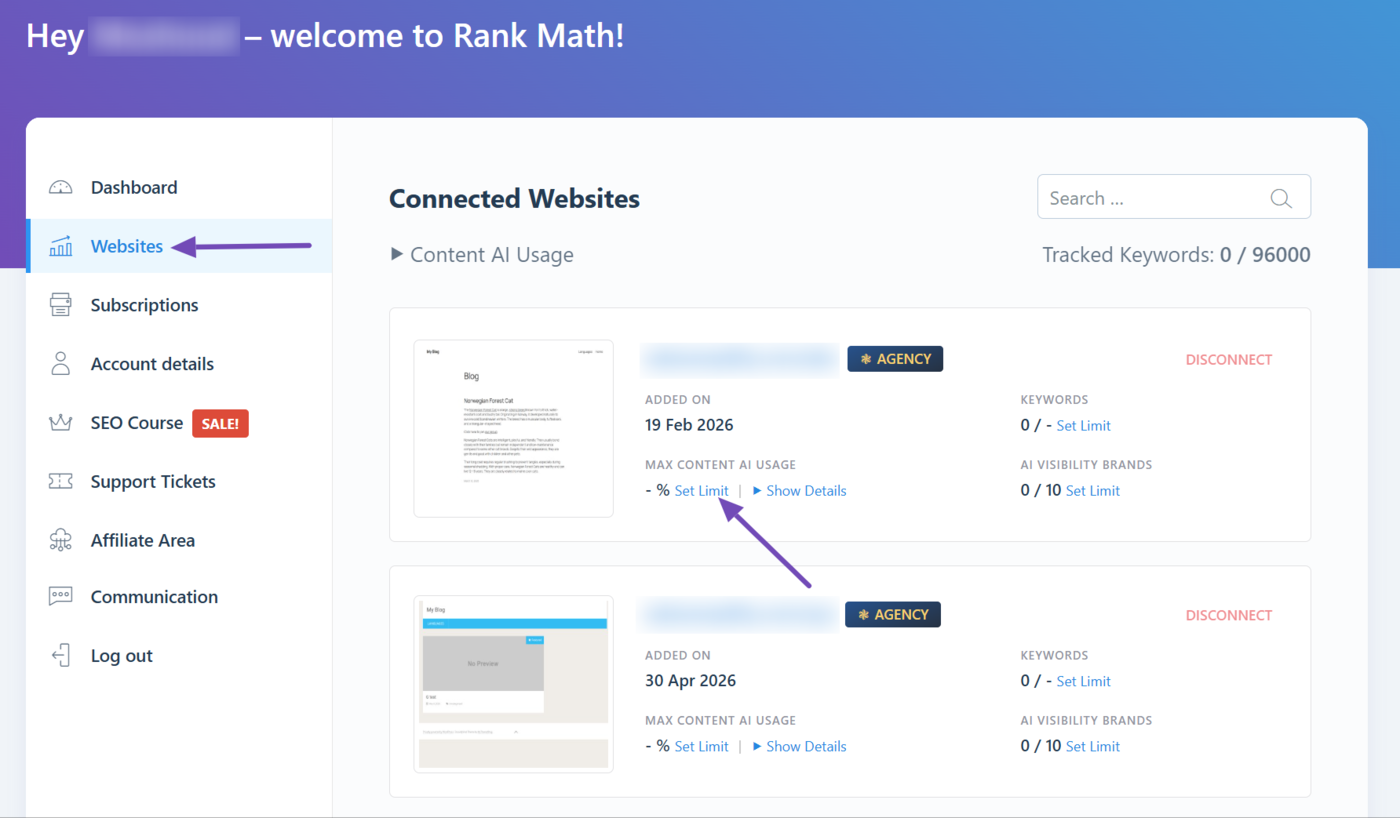
However, if you haven’t, or want to set specific usage limits, head to your Rank Math account. Once done, click Websites. You will be presented with every site connected to your account.
Now, head to the site you want to set a limit for, and click Set Limit.
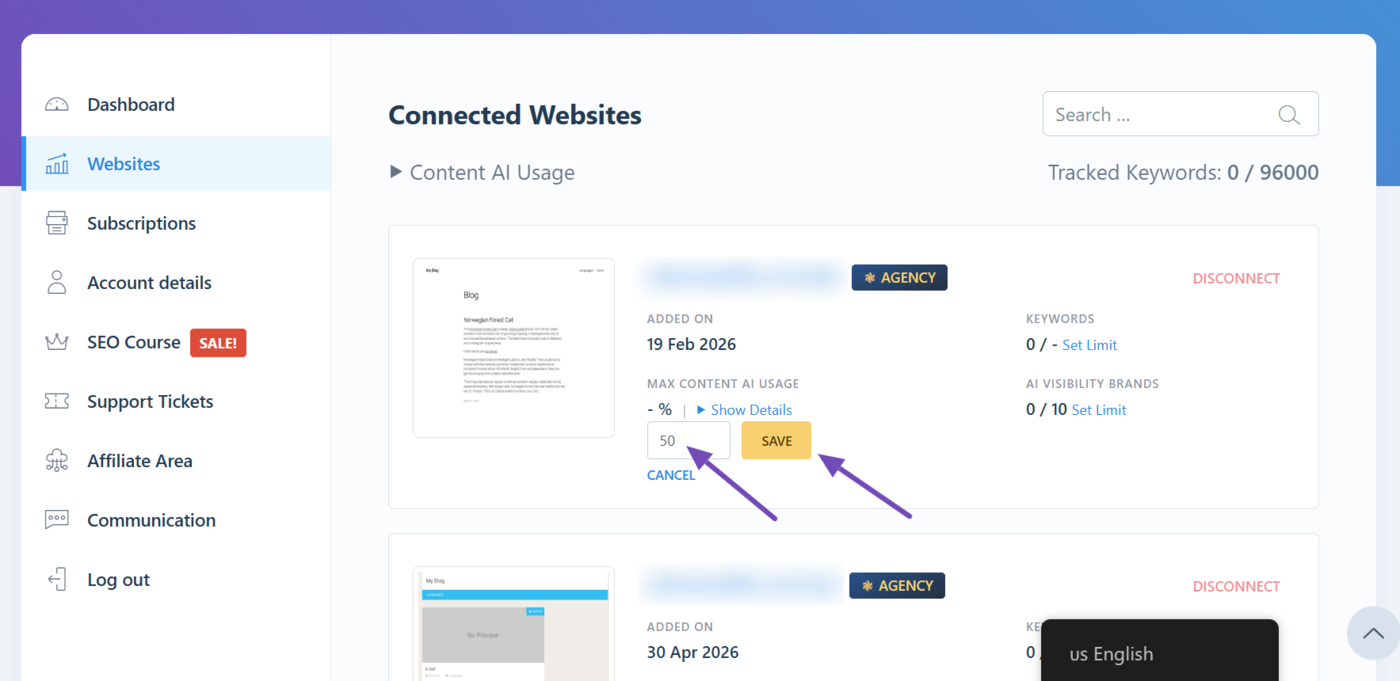
Enter a value between 0 and 100 to set the usage limit. Once done, click Save to apply your changes.
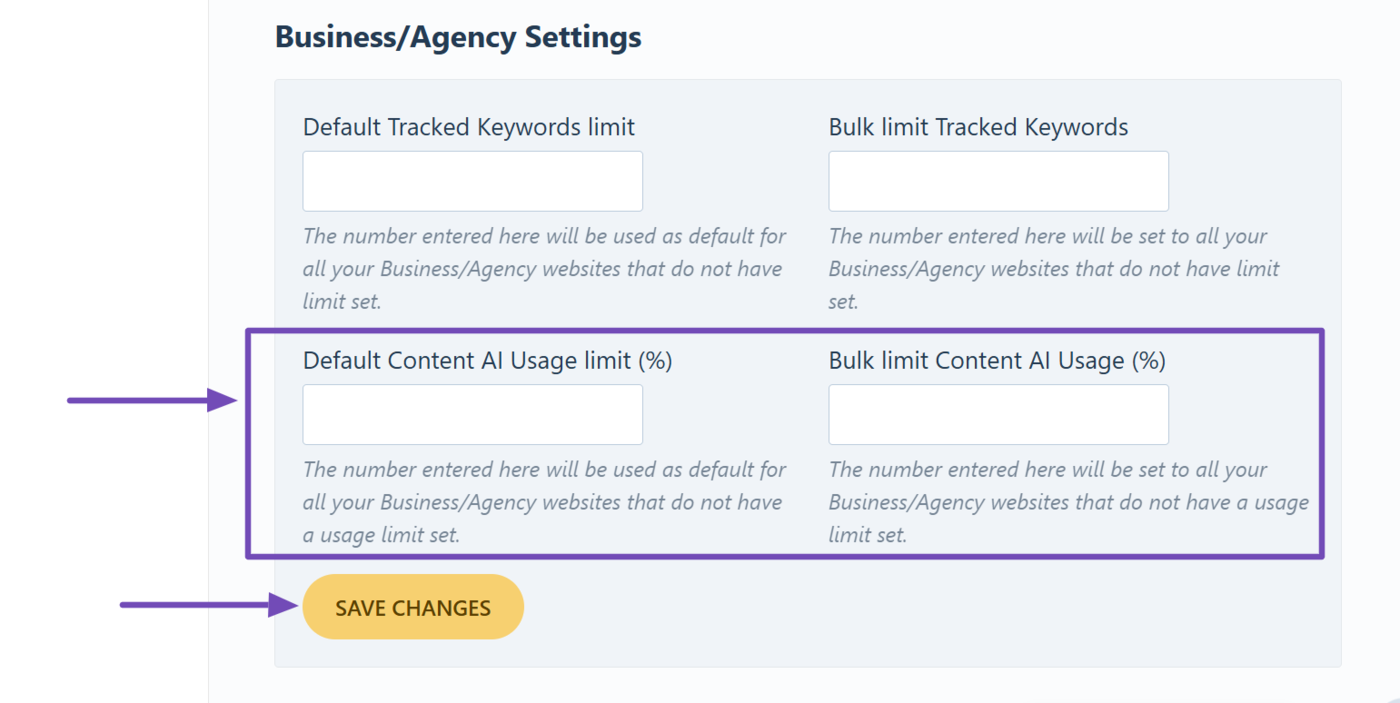
You can also set a default Content AI usage limit for your existing sites and any new site you add to your license in the future.
To do that, scroll down to the Business/Agency Settings section. Here, you will be presented with two fields:
- Default Content AI Usage limit (%): Lets you set a Content AI usage limit for sites you add to your license in the future
- Bulk limit Content AI Usage (%): Lets you set a Content AI usage limit for sites that are already connected to your license, but do not have a usage limit
Enter a number between one and 100 into the relevant field. Once done, click Save Changes.
8 Frequently Asked Questions (FAQs)
Am I Charged for Failed Runs?
No, you’re only charged when an AI feature successfully completes a task or generates an output. If a run fails or doesn’t produce a result, it does not count toward your usage, and you won’t be charged for it.
What Happens When I Run Out of Usage?
Once you’ve used up your available runs, you can upgrade to a higher Content AI plan to continue.
When Does My AI Usage Reset?
Your AI usage resets on a fixed date every month. This will be visible to you from your Rank Math account and WordPress dashboard.
That is all you need to know about the switch from AI credits to a feature-based system. If you have any questions, you’re always more than welcome to contact our dedicated support team, who are available 24/7, 365 days a year.