
Rank Math Assistant helps you troubleshoot issues, create content, and soon, set up Rank Math, directly from your WordPress dashboard.
To help you with these tasks, our assistant needs a way to access your site. WordPress already has a purpose-built, native feature for exactly this situation: Application passwords.
This article explains when these passwords are created, how access is restricted, and how you can review or revoke them at any time.
Note: If you’re using Rank Math v1.0.277, we recommend updating to the latest version to use the Rank Math assistant with the updated access safeguards.
TL;DR
- Rank Math Assistant uses AI agents, each designed with a specific purpose and defined permissions to assist you with SEO tasks.
- The Assistant asks for your consent before creating an application password, separate from your WordPress login password.
- The application password is shared across its agents.
- Access is restricted to your site’s MCP endpoint, the connection WordPress provides for AI tools. Requests to any other part of your site are rejected.
- Each password is valid for 1 hour. During an active session, it’s renewed automatically, so you won’t be interrupted.
- The agents can only do what your WordPress user role allows, and you can revoke the application password at any time from your profile. It’s also automatically revoked when you uninstall Rank Math SEO.
In this article, we’ll cover:
- What Is a WordPress Application Password?
- Why Does Rank Math Assistant Need Access
- What Happens When You First Use Rank Math Assistant?
- Which Agents Can Create an Application Password
- How Rank Math Restricts Application Password Access
- How to View or Revoke an Application Password
- Frequently Asked Questions (FAQs)
1 What Is a WordPress Application Password?
A WordPress application password is a unique, randomly generated password that lets external tools connect to a WordPress site. It is created and managed by WordPress and is securely stored on your site.
An application password is:
- Separate from your WordPress login password. Your main password is never shared with, used by, or stored by our assistant.
- Visible to you. Every application password appears on your WordPress profile, with its name, when it was created, when it was last used, and the last IP address from which it accessed your site.
- Tied to your user account. It inherits the permissions you have and cannot do anything that you cannot do.
- Individually revocable. You can revoke a WordPress application password whenever you want, without needing to change your original password.
- HTTPS-only. WordPress only enables application passwords on sites served over HTTPS.
2 Why Does Rank Math Assistant Need Access
Rank Math Assistant needs access to your current Rank Math settings to help you complete tasks in WordPress.
- Support Agent: Checks your Rank Math setup to help troubleshoot issues and provide relevant solutions
- Setup Wizard Agent [Coming soon]: Retrieves your site details, fills in the setup wizard, and applies the settings you confirm
- SEO Agent: Answers your content and SEO questions and helps you create, optimize, and improve your content
Reading your site details and updating settings requires deeper access to your site than a regular visitor or plugin has, which is why the agents need an application password.
3 What Happens When You First Use Rank Math Assistant?
The first time you open an agent in Rank Math, a pop-up will appear asking for your consent to create an application password.
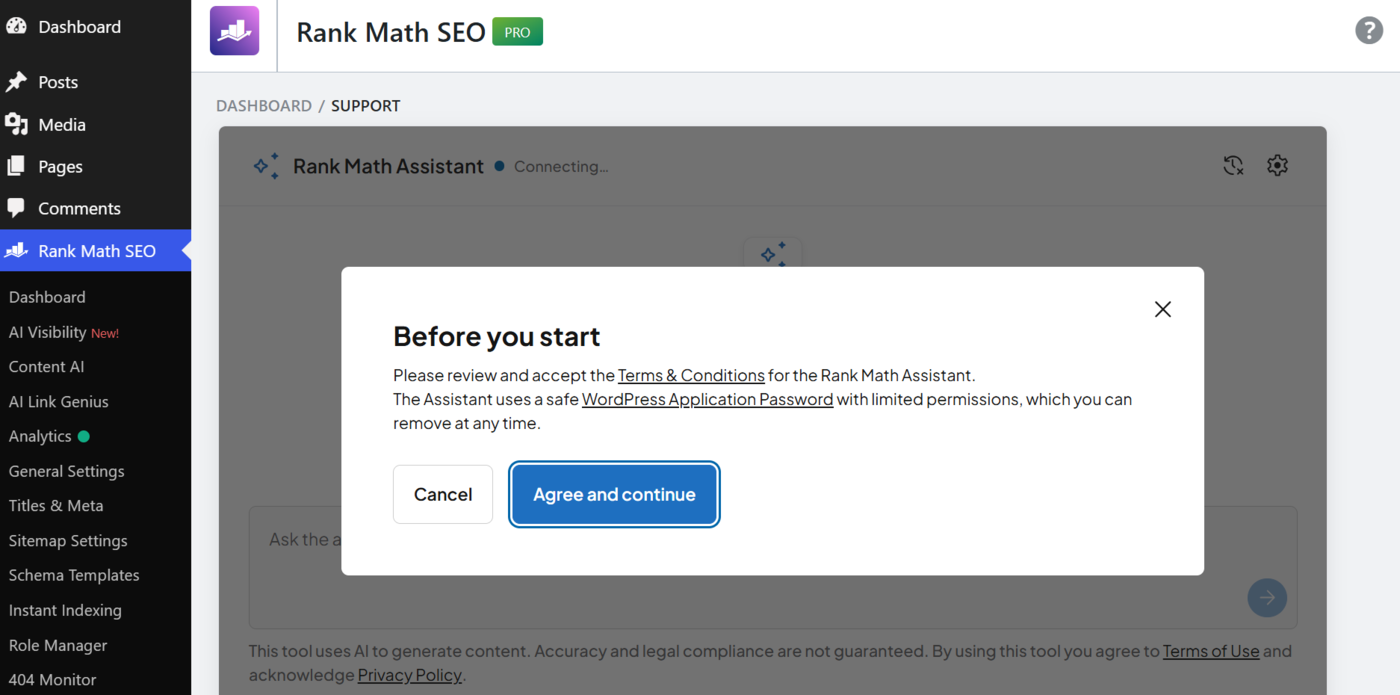
Once you agree, Rank Math creates an application password.
Note: No password is created if you click Cancel or close the pop-up.
4 Which Agents Can Create an Application Password
The application password created by Rank Math Assistant is shared across its agents, so you don’t need a separate one every time you switch agents.
The password is named after the agent, which is active when it’s created or renewed. This name does not mean the password is exclusive to that agent.
| Agent | Application password name | What it needs access for |
| Support Agent (Help & Support) | WAP – Rank Math Support Agent | To troubleshoot and resolve issues relating to your Rank Math setup |
| Setup Wizard Agent (Dashboard → Setup Wizard) [Coming Soon] | WAP – Rank Math Setup Wizard | To read your site and apply the onboarding settings you confirm |
| SEO Agent (Content AI → Chat) | WAP – Rank Math Content AI Chat | To read your site’s content and keywords and help with content and SEO tasks across Rank Math |
5 How Rank Math Restricts Application Password Access
Out of the box, a standard WordPress application password works on any part of the WordPress API and keeps working until someone revokes it. Rank Math adds the following restrictions to the application password our assistant creates:
| Safeguard | How it works |
| Limited to Rank Math Assistant | The agent can use the password only to access a specific endpoint of Rank Math on your website. It cannot use this password to access other parts of your WordPress website. |
| Valid for up to 60 minutes | Each application password is valid for up to 60 minutes. During an active session, it is renewed automatically, so your session won’t be interrupted. Each renewal deletes the previous password, so only one entry exists per user at a time. Its name may change between sessions, depending on which agent last renewed it. |
| Expired passwords can’t access your site | When you close the agent, no new password is created, and the last one stops working after 60 minutes. An expired password will still appear under Users → Profile → Application Passwords, but it no longer works and can’t be used to access your site. You can safely delete it. |
| Encrypted on your server, never exposed to your browser | The application password is encrypted on the WordPress side before it leaves your server. Your browser receives a temporary signed token that carries the password in encrypted form, which only the assistant can unlock. Your browser can never read the password. |
| No persistent storage on Rank Math’s site | We don’t keep a persistent copy of your application password. Instead, it lives in your WordPress database, and the current one is used only when an agent session is active. This is why it is sent with each request and renewed periodically. |
| Your permissions still apply | The application password carries the permissions of your WordPress user account, so it can’t do more than you can. Even with a valid application password, an action you haven’t allowed is refused before it ever reaches your site. |
6 How to View or Revoke an Application Password
The password created by our assistant is visible to you in WordPress. To view or revoke it, head to Users → Profile from your WordPress dashboard.
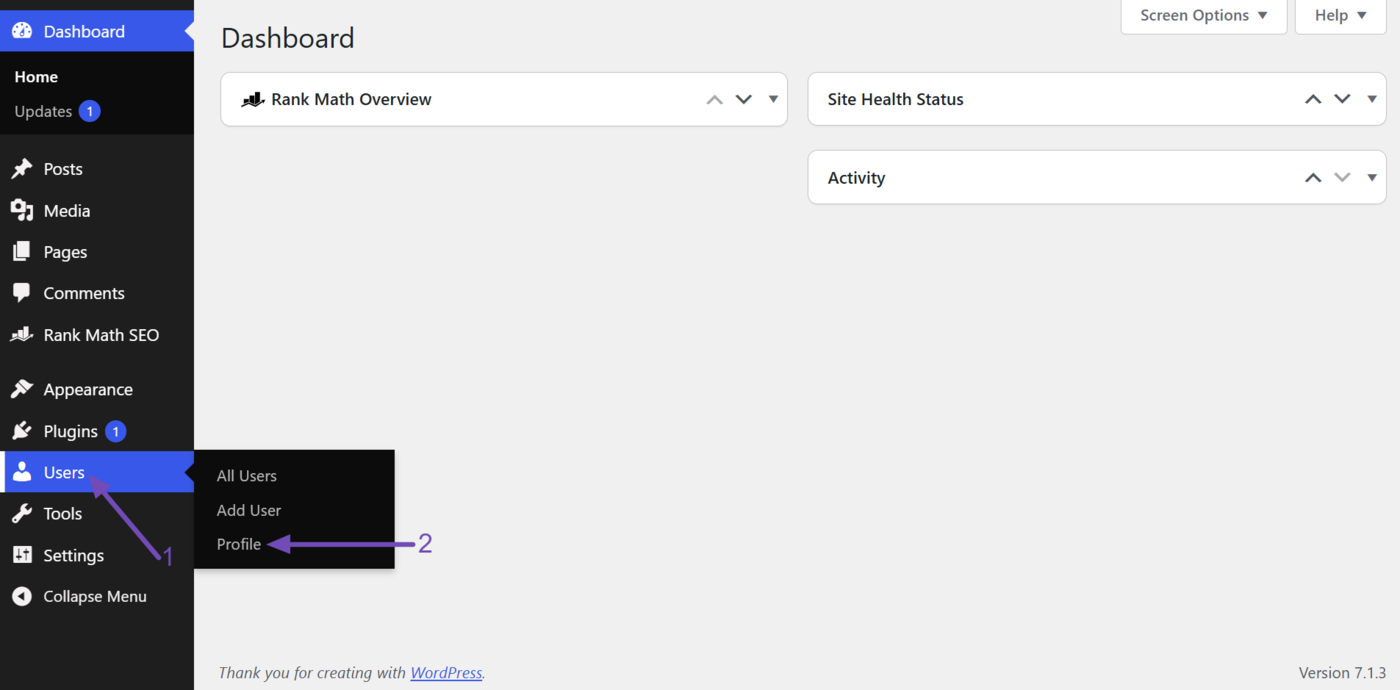
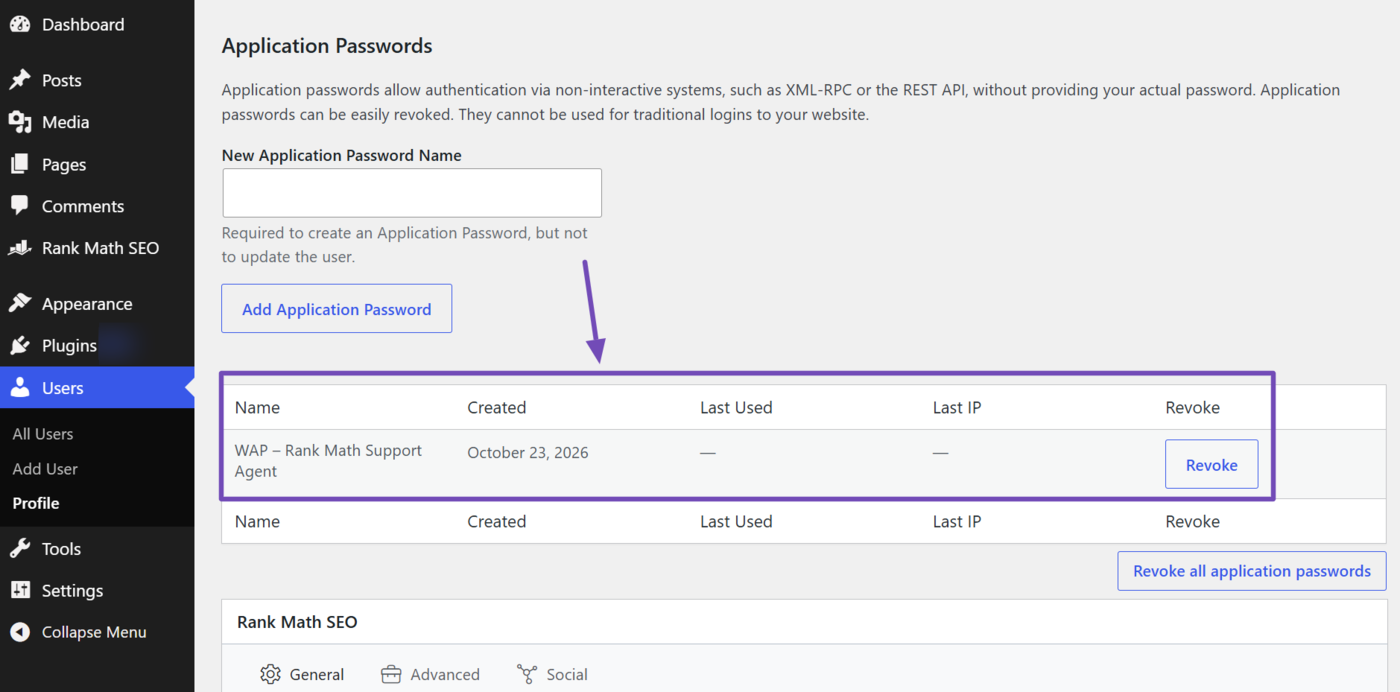
Once done, scroll down to the Application Passwords section. Now, look for our application password names such as:
- WAP – Rank Math Setup Wizard
- WAP – Rank Math Support Agent
- WAP – Rank Math Content AI Chat
Note: The entry shows when the password was created, when it was last used, and the IP address it was last used from, which is our WAP server IP.
To revoke an application password, click Revoke.
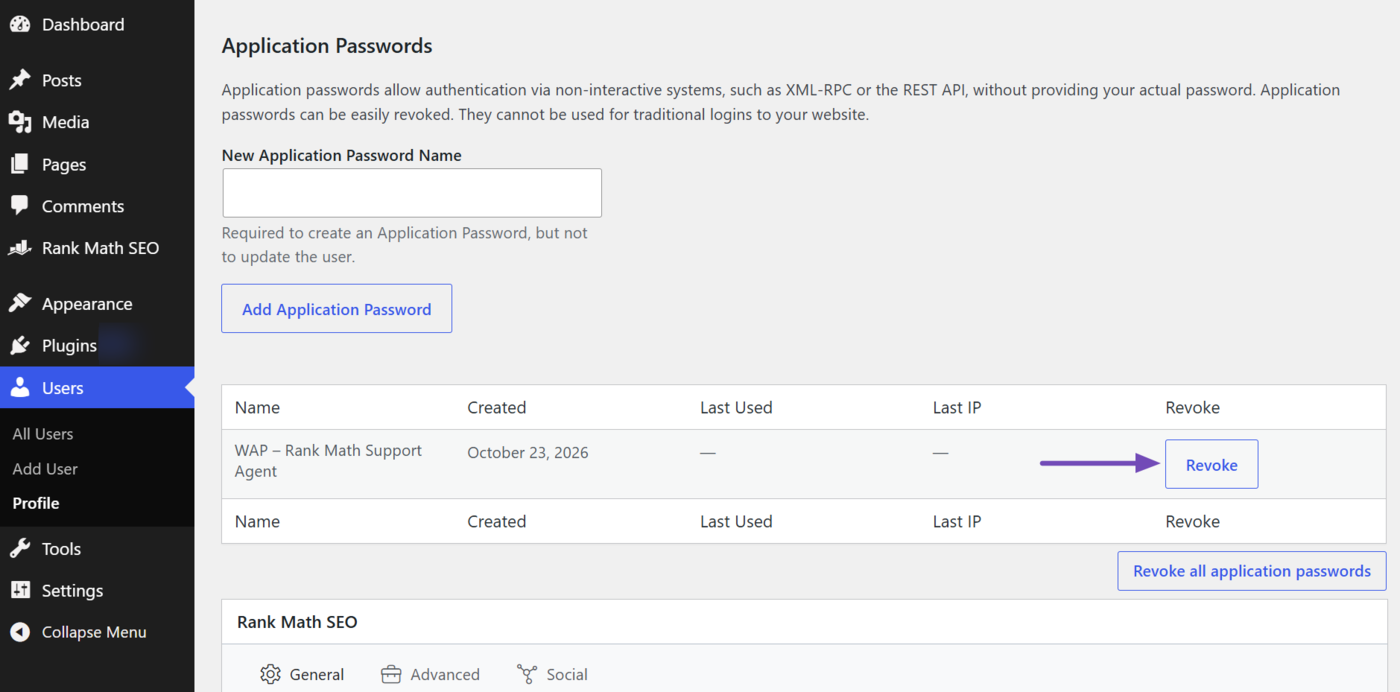
Once revoked, Rank Math Assistant immediately loses access to your site. The next time you open it, you’ll be asked to agree to the terms and conditions again before a new password is created.
Note: If you uninstall Rank Math SEO, any application password created by Rank Math Assistant is automatically revoked and removed from your profile.
7 Frequently Asked Questions (FAQs)
Is an application password the same as my WordPress password?
No. WordPress generates an application password that is separate from your WordPress login password. Your WordPress login password is never shared with the agents.
Can the agents make changes to my site?
They can only interact with Rank Math features. They cannot change anything else on your site, and they cannot exceed your WordPress user’s permissions.
Do I have to provide consent to use Rank Math Assistant?
Yes. You must give consent before a supported agent can access your site. If you do not give consent, no agent can access your site, and no application password is created.
Where can I read the Terms and Conditions?
You can read the Rank Math Terms and Conditions here. It covers the use of our plugin and services, including the Rank Math Assistant.
Does Rank Math store my application password?
No. The application password is stored in your WordPress database, and Rank Math does not keep a persistent copy of it.
How long does an application password remain active?
Each password expires 60 minutes after creation. During an active agent session, it is renewed automatically. When you stop using the agent, the last password expires on schedule.
Can I revoke the application password?
Yes. From your WordPress dashboard, go to Users → Profile → Application Passwords, find the application password, and click Revoke. Once revoked, the assistant immediately loses access to your site.
What happens to the application password if I uninstall Rank Math?
It’s automatically revoked. When you uninstall Rank Math SEO, the application password that Rank Math Assistant created is removed from your WordPress site, and the assistant can no longer access it.
Can I delete my Assistant conversations?
Yes. You can clear previous conversations using the option in the interface. You can also contact the Rank Math support team to request conversation deletion.
That’s it. If you have any questions, you’re always more than welcome to contact our dedicated support team, who are available 24/7, 365 days a year.