
What Is Not Provided?
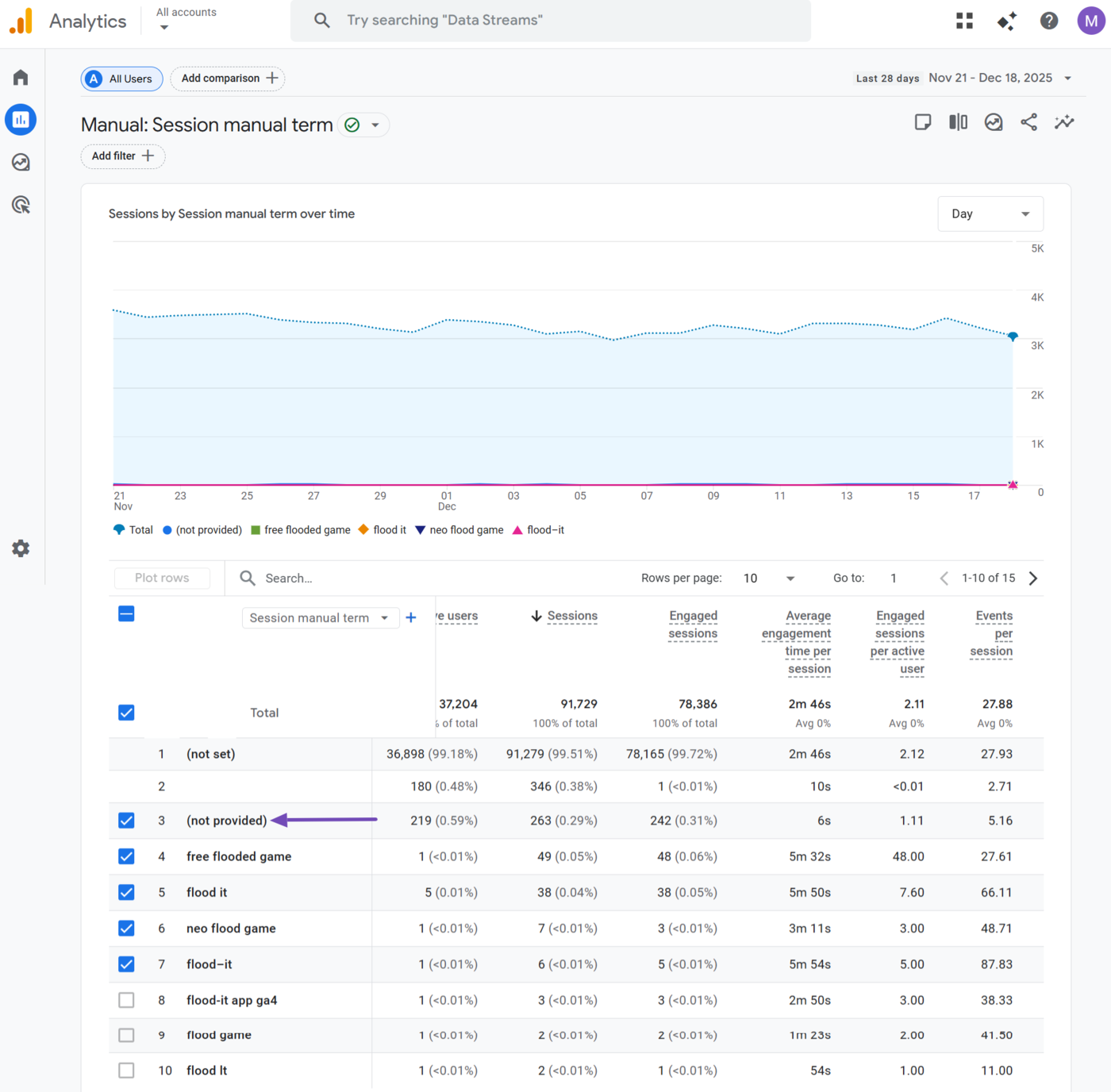
Within the context of Google Analytics, “Not Provided” (not provided) is the text Google Analytics displays when Google does not want to reveal the search term that led visitors to your site.
Google analitico is a free Google service that lets bloggers track and analyze how users arrive at their site and what they do while on it.
Google Analytics reports multiple information about the user, including the search term that brought them to your site. However, Google hides the search term in certain situations and displays not provided instead.
In this article, we’ll cover:
Why Google Analytics Displays Not Provided
Google displays (not provided) instead of a search term to protect the privacy of the searcher and ensure that sensitive user information is not shared with the blogger or other third parties.
Google started displaying Not Provided in 2011. Back then, Google initially showed Not Provided in specific situations, such as when the visitor is logged into their Google account at the time of the search.
However, Google now displays it in other situations, such as when a user searches over a secure HTTPS connection, regardless of their login status.
Importance of Not Provided
Not Provided has had a profound impact on how bloggers approach SEO. Specifically, it has made keyword-level optimization much more difficult and complex than it used to be.
Before the 2011 introduction of Not Provided, bloggers could view the exact search terms that brought users to their sites. This allowed bloggers to easily:
- Evaluate the performance of their palabras clave
- Optimize their content for the search terms driving traffic
- Improve their ranking on search engine results pages (SERPs)
- Refine their SEO techniques
However, this is no longer possible as Google Analytics now hides most search terms under (not provided).
The issue worsened further when Google began returning “Not Provided” for HTTPS searches, even when the user is logged out. Considering Google Search uses HTTPS by default, bloggers now receive “Not Provided” for most of their search traffic.
As a result, the search term reports in Google Analytics have become far less useful for SEO and keyword optimization, as bloggers can no longer directly tie specific search terms to their engagements and conversions.
How to Work Around (Not Provided) in Google Analytics
As Google Analytics continues to return “Not Provided” for most searches, bloggers have adopted several workarounds to gain insights into the search terms that drive traffic to their sites. Here are some of the common techniques they use.
1 Utilice la consola de búsqueda de Google
Consola de búsqueda de Google (GSC) shows you the actual search queries users entered before clicking your site in Google Search results. You can access it by clicking Performance → Queries from your Google Search Console dashboard.
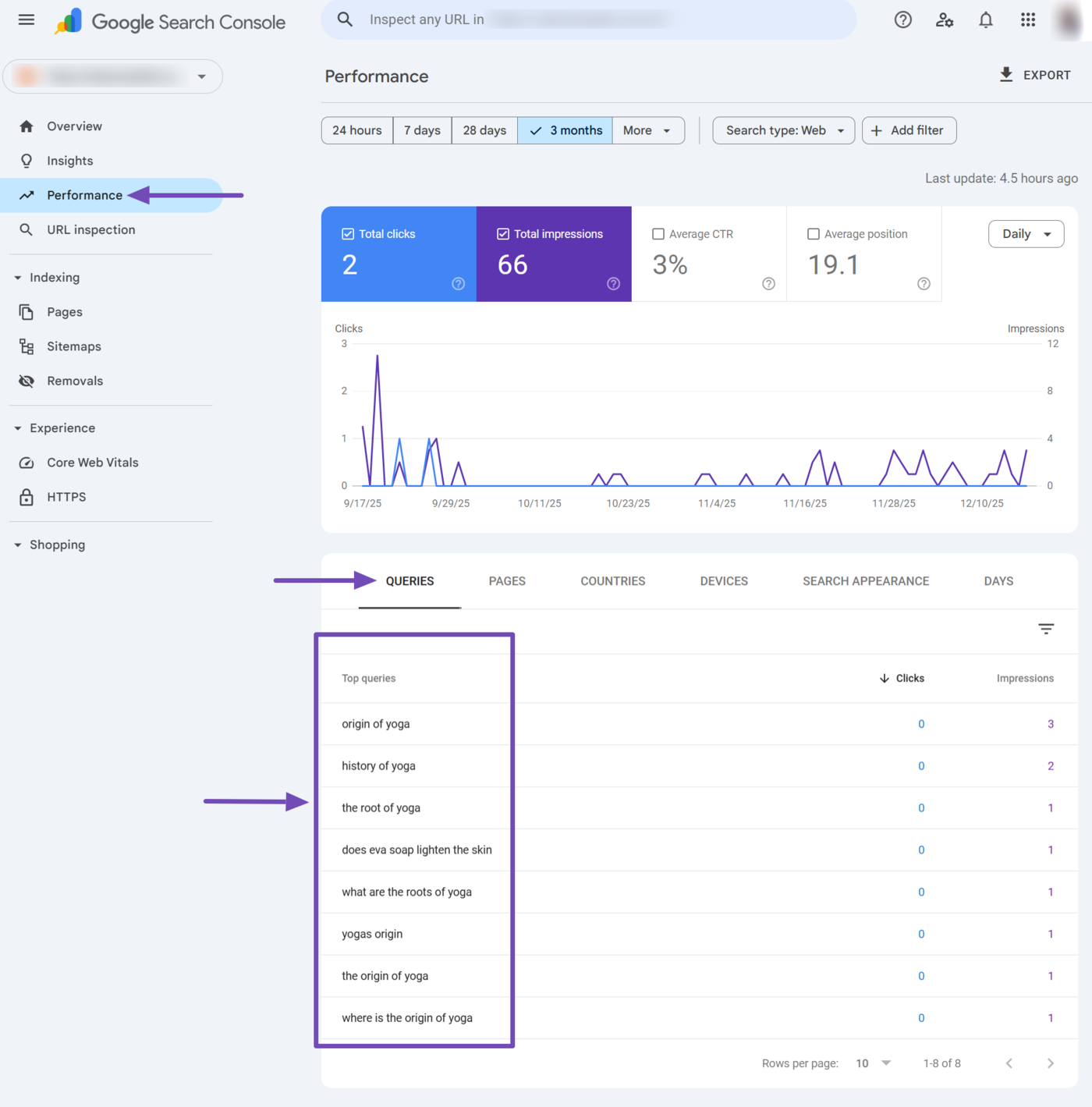
This is very helpful for discovering the keywords that drive impressions and clicks to your content. It is also helpful for uncovering your high-performing keywords, analyzing your click through rate (CTR), and generally identifying opportunities for improvement.
However, the data displayed in Google Search Console is generally limited to the search results pages. It does not provide page-specific and behavioral metrics, such as tasas de rebote or conversion rates.
Nonetheless, Google Search Console remains the most reliable and direct way to regain some of the keyword insights lost due to Not Provided returned in Google Analytics.
2 Use Third-Party SEO Tools
Third-party SEO tools like Ahrefs, SEMrush, and Moz can help uncover the keywords that drive traffic to your website. They typically provide crucial data such as keywords, keyword difficulty, search rankings, search volume, and potential traffic.
This is significant, as these tools provide multiple data points that are missing in Google Search Console. However, you should know that the data is not Google’s official data and is more or less an estimate based on their own systems.
3 Focus on Topic Clusters Instead of Keywords
With (not provided) hiding keyword data, it is more effective to build content around topic clusters and keyword clusters rather than targeting single keywords.
A topic cluster groups related articles around a central page called a pillar page. These pillar pages then link out to subpages called cluster pages. Keyword clusters, on the other hand, group multiple keywords and target them within a single piece of content.
Together, topic and keyword clusters allow you to cover an entire subject in depth. They can also improve internal linking, enhance topical and website authority, and signal to search engines that your site is a trusted resource on the topic.
4 Focus on Webpages Instead of Keywords
Instead of relying on keyword-level data in Google Analytics, some bloggers prefer to measure success through how each page performs in terms of engagement and conversions.
This is crucial as each page typically targets a specific topic or keyword set. This provides strong clues about the search terms visitors may have used.
For instance, if your “Best Yoga Poses” post drives organic visits, it’s safe to infer that users searched for related phrases like “best yoga poses,” “beginner yoga poses,” and “top yoga positions.”
Now, bloggers will review the metrics for those pages to understand how well visitors interacted with them and how well they satisfied their intención de búsqueda.
The specific metrics vary depending on the intent and structure of the page, but can include time on page, bounce rate, average session duration, and other conversion rate metrics, such as purchases and form completions.
For instance, pages with high bounce rates might suggest a mismatch between the assumed search intent and the content provided. Similarly, if a page attracts traffic but shows poor engagement, it may indicate a misalignment between user expectations and content quality.