
Hinzufügen von Filtern und Hooks in rank-math.php
1 Flexibilität beim Themenwechsel
2 Code läuft nur mit dem Plugin
3 Stellt sicher, dass alle Rank Math-Funktionen funktionieren
Wie füge ich Codefragmente zu rank-math.php hinzu?
1 Erstellen Sie die Datei rank-math.php
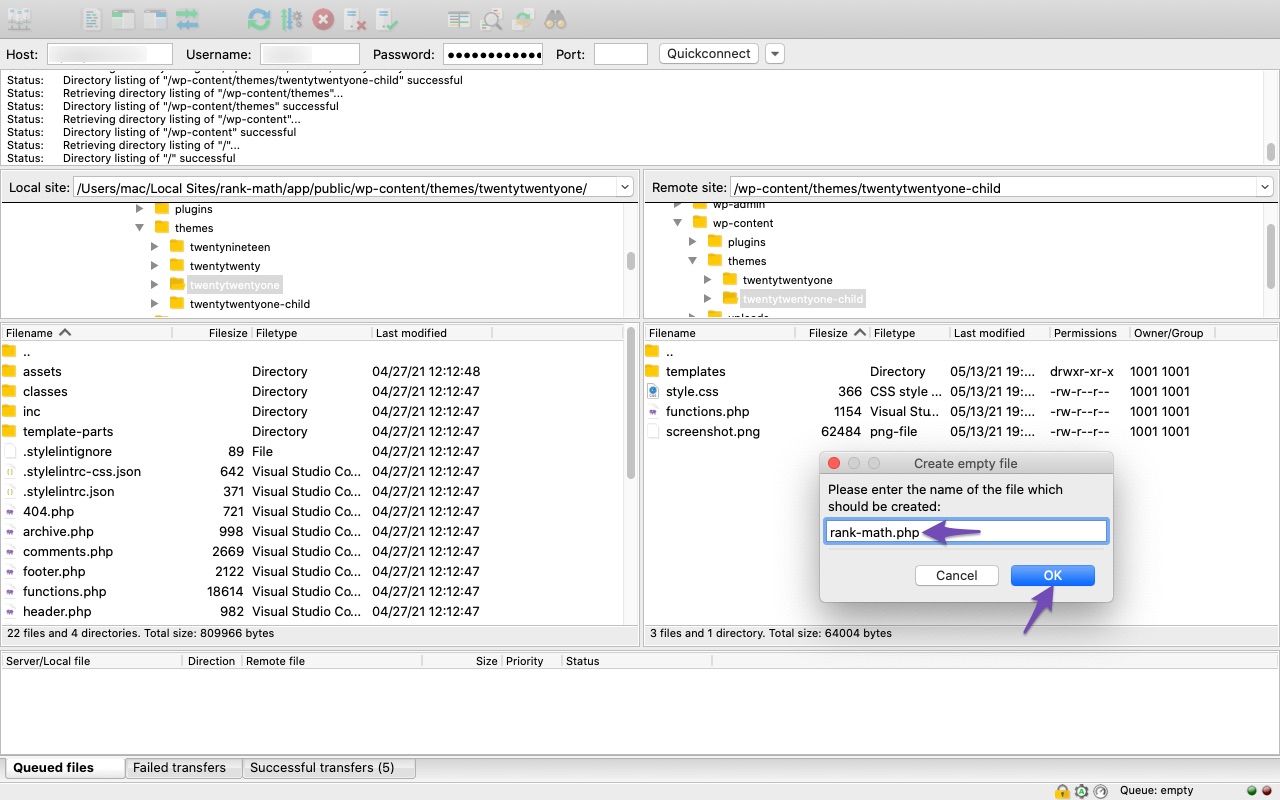
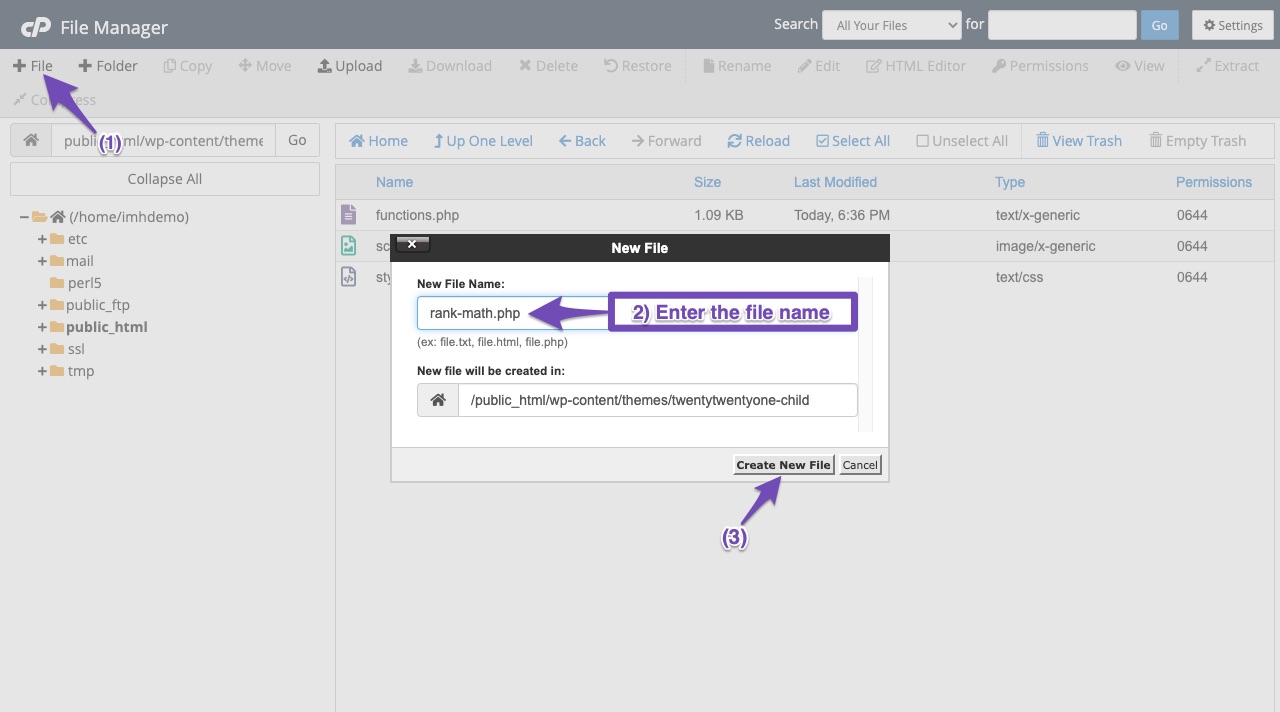
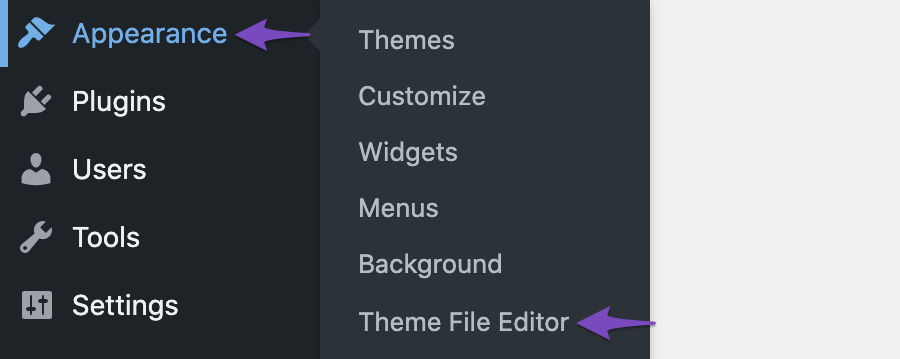
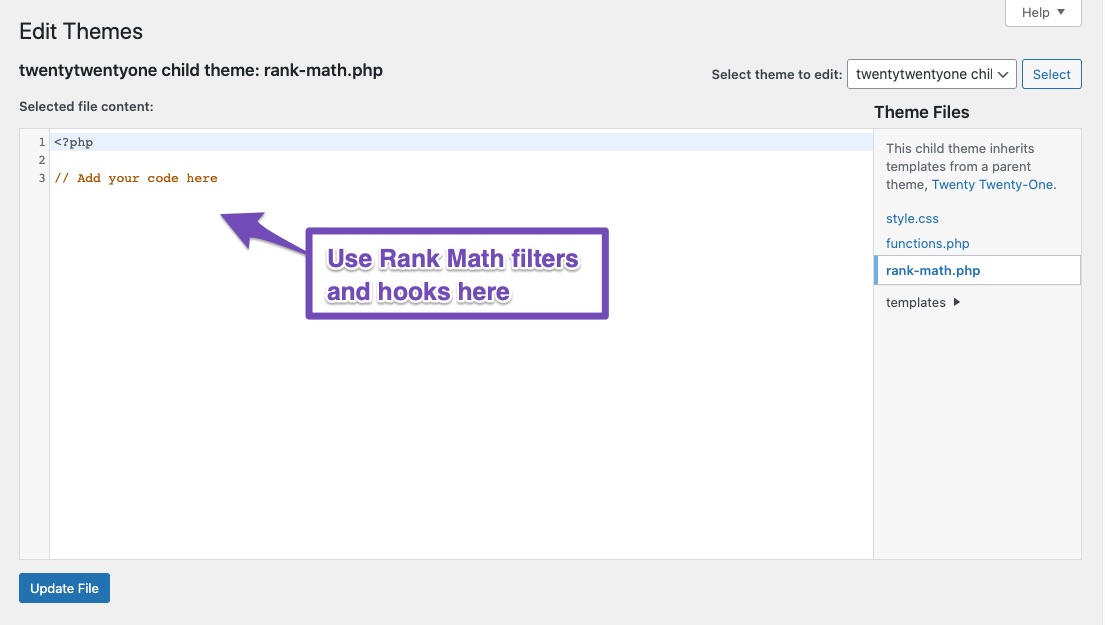
2 Navigieren Sie zum Theme-Datei-Editor
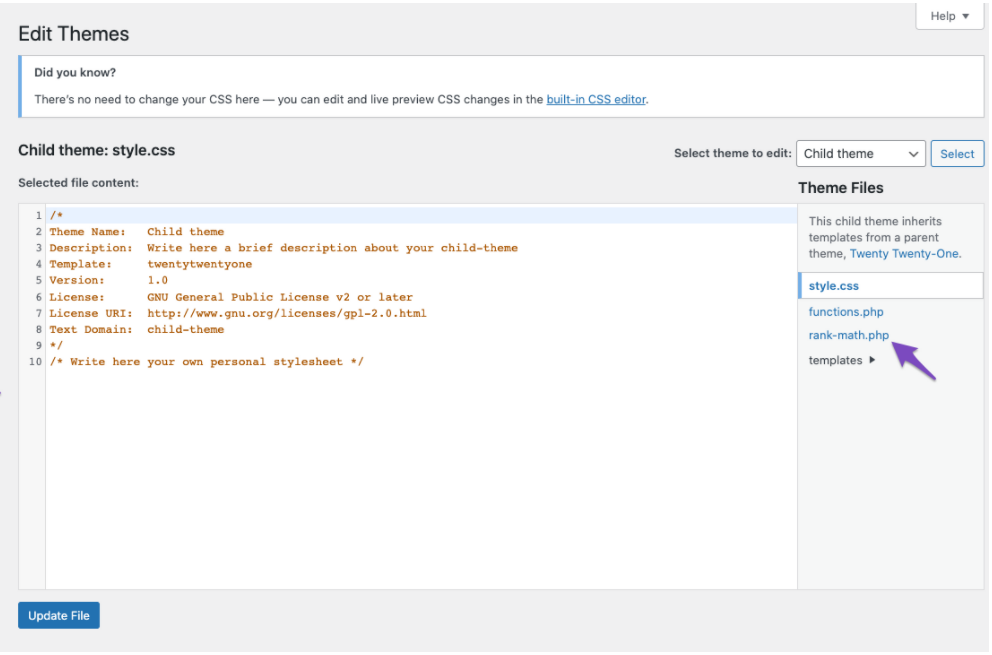
3 Hinzufügen Ihres Codes
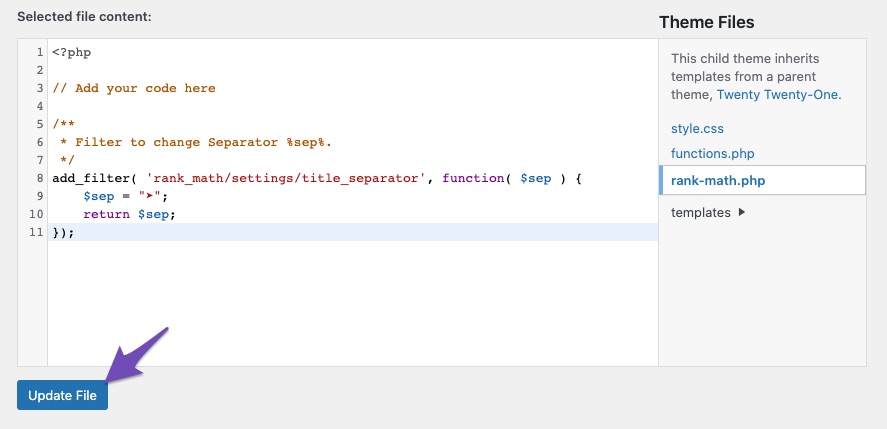
4 Änderungen speichern
Inhaltsverzeichnis
Einstellungen
1. Filtern Sie, um die Rank Math-Metabox-Priorität zu ändern.
/** * Ändere die Rank Math-Metabox-Priorität * * @param array $priority Metabox-Priorität. */ add_filter( 'rank_math/metabox/priority', function( $priority ) { return 'low'; }); 2. Filtern Sie, um das Fokus-Keyword-Limit zu ändern
/** * Fokus-Keyword-Limit ändern */ add_filter( 'rank_math/focus_keyword/maxtags', function() { return 10; // Anzahl der Fokus-Keywords. }); 3. Filtern Sie, um den Abschnitt im Optionsfeld „Allgemeine Einstellungen“ hinzuzufügen/zu entfernen.
/** * Entwicklern erlauben, einen neuen Abschnitt zum Optionsfeld für allgemeine Einstellungen hinzuzufügen. * * @param array $tabs */ add_filter( 'rank_math/settings/general', function( $tabs) { unset( $tabs['htaccess'] ); // Setzt Edit .htaccess tab zurück. return $tabs; }); 4. Filtern Sie, um einen Abschnitt im Optionsfeld „Titeleinstellungen“ hinzuzufügen/zu entfernen.
/** * Entwicklern erlauben, einen neuen Abschnitt zum Optionsfeld für allgemeine Einstellungen hinzuzufügen. * * @param array $tabs */ add_filter( 'rank_math/settings/title', function( $tabs) { return $tabs; }); 5. Filtern Sie, um Entwicklern das Hinzufügen von Optionsfeldern zur Prüfung auf Aktualisierung zu ermöglichen. Und wenn es aktualisiert wird, löschen Sie die Umschreiberegeln
/** * Entwicklern erlauben, Optionsfelder hinzuzufügen, um sie gegen Aktualisierungen zu prüfen. * Und wenn aktualisiert, löschen Sie die Umschreiberegeln. * * @param array $flush_fields Array der Feld-IDs, die geleert werden müssen. */ add_filter( 'rank_math/flush_fields', function( $fields) { return $fields; }); 6. Filtern Sie, um Entwicklern das Hinzufügen neuer Registerkarten zum Optionsfeld zu ermöglichen.
/** * Entwicklern erlauben, neue Registerkarten zum Optionsfeld hinzuzufügen. * * Der dynamische Teil des Hooks ist der Seitenname ohne das Präfix „rank-math-“. * * @param array $tabs */ add_filter( "rank_math/admin/options/{$filter}_tabs", function( $tabs ) { return $tabs; }); 7. Filter zum Hinzufügen/Aktualisieren/Entfernen eines Inhaltsanalysetests.
/**
 * Allow developers to modify the test.
 *
 * @param array  $tests Array of tests
 * @param string $type  Object type. Can be post, user or term.
 */
add_filter( 'rank_math/researches/tests', function( $tests, $type ) {
 return $tests;
}, 10, 2 ); /**
* Allow developers to modify the Content AI tests.
*
* @param array $tests Array of tests
*/
add_filter( 'rank_math/content_ai/research_tests', function( $tests) {
return $tests;
}); 8. Filtern Sie, um die Anzahl der pro Lauf zu importierenden Elemente zu ändern. Wird beim Importieren von Daten aus anderen Plugins verwendet
/** * Anzahl der pro Lauf zu importierenden Elemente. * * @param int $items_per_page Standard 100. */ add_filter( 'rank_math/importers/items_per_page', function( $items_per_page ) { return $items_per_page; }); 9. Filtern Sie, um das Element zum Admin-Leistenknoten hinzuzufügen bzw. daraus zu entfernen.
/** * Element zum Rank Math-Administratorleistenknoten hinzufügen. * * @param array $items Array von Knoten für das Rank Math-Menü. */ add_filter( 'rank_math/admin_bar/items', function( $items ) { return $items; }); 10. Fügen Sie während der Plugin-Installation den Standardwert für „Allgemeine Einstellungen“ hinzu.
/** * Standardwerte für allgemeine Optionen hinzufügen. * * @param array $settings Array von Einstellungen und ihren Werten. */ add_filter( 'rank_math/settings/defaults/general', function( $settings ) { return $settings; }); 11. Fügen Sie während der Plugin-Installation einen Standardwert für die Titeleinstellungen hinzu.
/** * Standardeinstellungen für Titeloptionen hinzufügen. * * @param array $settings Array von Einstellungen und ihren Werten. */ add_filter( 'rank_math/settings/defaults/titles', function( $settings ) { return $settings; }); 12. Fügen Sie während der Plugin-Installation den Standardwert für Sitemap-Einstellungen hinzu.
/** * Standardeinstellungen für Sitemap-Optionen hinzufügen. * * @param array $settings Array von Einstellungen und ihren Werten. */ add_filter( 'rank_math/settings/defaults/sitemap', function( $settings ) { return $settings; }); 13. Ermöglichen Sie Entwicklern das Hinzufügen/Entfernen/Ändern von Modulen.
/** * Filtert das Array der zur Aktivierung verfügbaren Module. * * @param array $modules Array der verfügbaren Module. */ add_filter( 'rank_math/modules', function( $modules ) { return $modules; }); 14. Filtern Sie, um die Autorenbasis zu ändern.
/** * Entwicklern erlauben, die Autorenbasis zu ändern. * * @param string $base Die Autorenbasis. */ add_filter( 'rank_math/author_base', function( $base ) { return $base; }); 15. Filter zum Ändern des Adressteilformats.
/** * Erlaube dem Entwickler, das Adressteilformat zu ändern. * * @param string $parts_format Stringformat, wie der Adressteil ausgegeben wird. */ add_filter( 'rank_math/shortcode/contact/address_parts_format', function( $format ) { return $format; }); 16. Filtern Sie, um die Argumente in der Standortabfrage zu ändern
/** * Filter zum Ändern der Standort-Abfrageargumente. * * @param array $args Argumente zum Abrufen von Standorten. * @return-Array $args. */ add_filter( 'rank_math/location_args', function( $args) { // Fügen Sie hier Ihren Code hinzu, um die Argumente zu ändern. return $args; } ); 17. Filtern Sie, um die Beitragstypsymbole im Optionsfeld zu ändern.
/** * Erlaube dem Entwickler, die Symbole für Beitragstypen zu ändern. * * @param array $icons Array der verfügbaren Symbole. */ add_filter( 'rank_math/post_type_icons', function( $icons ) { return $icons; }); 18. Filtern Sie, um die Taxonomiesymbole im Optionsfeld zu ändern.
/** * Entwicklern erlauben, Taxonomiesymbole zu ändern. * * @param array $icons Array der verfügbaren Symbole. */ add_filter( 'rank_math/taxonomy_icons', function( $icons ) { return $icons; }); 19. Filtern Sie, um die Overlay-Symboloption im Tab „Soziale Netzwerke“ in den Beitragseinstellungen zu aktivieren/deaktivieren.
/** * Entwicklern erlauben, die Overlay-Symboloption in den Beitragseinstellungen zu aktivieren/deaktivieren. * * @param string $value Standardmäßig ist „Off“ eingestellt. * @param string $service Kann Faceboo oder Twitter sein. * */ add_filter( 'rank_math/metabox/social/overlay_icon', function( $value, $service ) { return $value; }, 10, 2 ); 20. Filtern Sie, um die Metabox für Linkvorschläge für den jeweiligen Beitragstyp zu aktivieren/deaktivieren.
/** * Entwicklern erlauben, die Metabox für Linkvorschläge für einen bestimmten Beitragstyp zu aktivieren/deaktivieren. * * @param string $default Die Standardeinstellung ist aktiviert. * @param string $post_type Name des Beitragstyps. * */ add_filter( 'rank_math/settings/titles/link_suggestions', function( $default, $post_type ) { return $default; }, 10, 2 ); 21. Filtern Sie, um den Standard-Snippet-Typ für den Beitragstyp festzulegen.
/** * Entwicklern erlauben, den Snippet-Typ standardmäßig nach Beitragstyp festzulegen. * * @param string $type Snippet-Typ. * @param string $post_type Name des Beitragstyps. * */ add_filter( 'rank_math/settings/snippet/type', function( $type, $post_type ) { return $default; }, 10, 2 ); 22. Filtern Sie, um den Standard-Snippet-Artikeltyp für den Beitragstyp festzulegen.
/**
 * Allow developer to default Snippet Article type by post type.
 *
 * @param string $type      Article Type.
 * @param string $post_type Post type name.
 *
 */
add_filter( 'rank_math/settings/snippet/article_type', function( $type, $post_type ) {
 return $type;
}, 10, 2 );
23. Filtern Sie, um benutzerdefinierte Variablenersetzungen hinzuzufügen.
/** * Filter zum Hinzufügen benutzerdefinierter Variablen */ add_filter( 'rank_math/vars/replacements', function( $vars ) { return $vars; }); 24. Fügen Sie zusätzliche Variablen zum Rank Math-Dropdown in den Titel- und Metaeinstellungen hinzu
/** * Aktion: 'rank_math/vars/register_extra_replacements' – Ermöglicht das Hinzufügen zusätzlicher Variablen. */add_action( 'rank_math/vars/register_extra_replacements', function(){ rank_math_register_var_replacement( 'custom_variable_slug', [ 'name' => esc_html__( 'Benutzerdefinierter Variablenname.', 'rank-math' ), 'description' => esc_html__ ( 'Benutzerdefinierte Variablenbeschreibung.', 'rank-math' ), 'variable' => 'custom_variable_slug', 'example' => 'custom_variable_callback()', ], 'custom_variable_callback' ); }); 25. Filter zum Ein-/Ausblenden der SEO-Metabox.
/** * Filter zum Ein-/Ausblenden der SEO-Metabox. */ add_filter( 'rank_math/metabox/add_seo_metabox', function( $default ) { return $default; }); 26. Filter zum Wechseln des Separators %sep%.
/** * Filter zum Ändern des Trennzeichens %sep%. */ add_filter( 'rank_math/settings/title_separator', function( $sep ) { return $sep; }); 27. Filtern Sie, um Benachrichtigungs-E-Mails zur automatischen Aktualisierung zu deaktivieren.
/** * Filter zum Deaktivieren von Benachrichtigungs-E-Mails zur automatischen Aktualisierung. */ add_filter( 'rank_math/auto_update_send_email', '__return_false' ); 28. Filtern Sie, um die Benachrichtigungs-E-Mails für automatische Updates zu bearbeiten.
/** * Filter zum Bearbeiten der Benachrichtigungs-E-Mails für automatische Updates. */ add_filter( 'rank_math/auto_update_email', function( $email, $version, $plugin_upgrader_obj ) { $email['to_address'] = '[email protected]'; $email['body'] = "Rank Math wurde auf Version {$version aktualisiert }."; return $email; }); 29. Add Custom Power Words for Analysis
/**
 * Filter to add custom Power Words
 */
add_filter( 'rank_math/metabox/power_words', function( $words ){
	$new_words = [
		'test-word1',
		'test-word2',
		'test-word3',
	];
	return array_merge( $words, $new_words );
});
30. Filter to change default Settings Mode(Easy or Advanced)
/**
 * Filter to change default Settings Mode(Easy or Advanced)
 */
add_filter( 'rank_math/setup_mode', function( $mode ) {
    return $mode;
});
31. Filters to change the CSV separator character in the CSV Importer file
/**
 * Filter to change the CSV separator character in the CSV Importer file
 */
add_filter( 'rank_math/csv_import/separator', function( $separator ) {
    return ';';
} );
32. Hide the Email Reporting Options
/**
 * Filter to hide the Email Reporting Options
 */
add_filter( 'rank_math/analytics/hide_email_report_options', '__return_true' );
33. Use the admin email ID for Email Reporting
add_filter( 'rank_math/analytics/email_report_parameters', function( $data ) {
    $data['to'] = get_option( 'admin_email' );
	return $data;
} );
34. Change the Email SEO Report Button URL
add_filter( 'rank_math/analytics/email_report_variables', function( $vars ) {
	$vars['report_url'] = "https:://newlogin-url.com";
	return $vars;
} );
35. Google Analytics – Track certain user role even if Exclude Logged-In users option is ON
add_filter(
	'rank_math/analytics/gtag_exclude_loggedin_roles',
	function( $roles ) {
		unset( $roles['customer'] ); // Track logged in customers.
		return $roles;
	}
);
36. Filter to change the Post Meta Table limit
/**
 * Filter to change the Post Meta Table Limit
 */
add_filter('rank_math/seo_analysis/postmeta_table_limit', function ( $limit ) {
		return 500000;
	}
);
37. Filter to allow line breaks in FAQ and HowTo Schema blocks
/**
 * Filter: Allow developers to preserve line breaks.
 *
 * @param bool   $return If set, this will convert all remaining line breaks after paragraphing.
 * @param string $block  Block name.
 */
add_filter( 'rank_math/block/preserve_line_breaks', '__return_false' );
38. Filter to Disable Domain Checking functionality
/**
 * Filter whether we need to check for URL mismatch or not.
 */
add_filter( 'rank_math/registration/do_url_check', '__return_false' );
39. Filter to Disable Sensitive Data Encryption
/**
 * Filter to disable sensitive data encryption
 */
add_filter( 'rank_math/admin/sensitive_data_encryption', '__return_false' );
40. Filter to Disable Focus Keyword Suggestions from Google
/**
 * Filter to Disable Keyword Suggestions from Google
 */
add_filter( 'rank_math/metabox/values', function( $args = [] ) {
    $args['autoSuggestKeywords'] = false;
    return $args;
} );
41. Filter to Modify the Redirection data before updating a Redirection
/**
 * Filter to modify the redirection data before updating a redirection.
 * Pass a false value to skip the update and create a new redirection instead.
 *
 * @param array|false $data Redirection data.
 */
add_filter('rank_math/admin/csv_import_redirection_update', function ($exist, $data) {
    return $data;
}, 10, 2);
42. Filter to exclude post types from Analytics Index
/**
 * Filter to exclude post types from Analytics Index.
 */
add_filter( 'rank_math/analytics/post_types', function( $post_types = [] ) {
    $excludes = [
        'page',
    ];

    return array_diff_key( $post_types, array_flip( $excludes ) );
});
43. Filter to change IndexNow API Key location
/**
 * Filter to change the location of the IndexNow key file.
 *
 * @param string $location Location.
 */
add_filter( 'rank_math/instant_indexing/indexnow_key_location', function($location) {
	$location = 'https://yourdomain.com/' . \RankMath\Helper::get_settings( 'instant_indexing.indexnow_api_key' ) . '.txt'; //change your API Key location
	return $location;
} );
44. Filter to change the IndexNow API Key
/**
 * Filter to change the API key.
 *
 * @param string $api_key API key.
 */
add_filter( 'rank_math/instant_indexing/indexnow_key', function($api_key) {
	return $api_key;
} );
45. Filter to disable restrictions on updating PRO version before Free version
/**
 * Filter to remove restrictions in updating PRO version before the Free version
 */
add_filter( 'rank_math/updates/remove_restrictions', '__return_true' );
46. Filter to disable Rich Text Editor in a specific taxonomy
/**
 * Filter to disable Rich Text editor in specific taxonomy.
 *
 * @param string $disable      Whether to disable the Rich Text editor.
 * @param string $taxonomy Taxonomy name.
 */
add_filter( 'rank_math/admin/disable_rich_editor', function( $disable, $taxonomy ) {
	return true;
}, 10, 2 );
47. Filter to change Local SEO shortcode content
/**
 * Filter to change the Local SEO shortcode output.
 *
 * @param string $html The HTML output of the shortcode.
 */
add_filter('rank_math/contact_info/html', function($html){
	return $html;
});
48. Filter to disable rewriting Front base for Locations CPT
/**
 * Filter to disable rewriting Front base for Locations CPT.
 */
add_filter( 'rank_math/locations/front', '__return_false'  );
49. Filter to remove SEO filters from posts
/**
 * Filter to remove SEO Filters from Posts.
 *
 * @param array $options    SEO Filter options.
 * @param string $post_type Post type.
 *
 * @param array/bool Filtered options
 */
add_filter( 'rank_math/manage_posts/seo_filter_options', '__return_false' );
50. Filter to Remove Lock Modified Date option
/**
 * Filter to remove the lock modified date option
 */
add_filter( 'rank_math/lock_modified_date', '__return_false' );
51. Filter to Enable Rank Math GTIN Field
/**
 * Filter to enable Rank Math GTIN field.
 */
add_filter( 'rank_math/woocommerce/add_gtin_field', '__return_true' );
52. Filter to Disable Search Intent Analysis Feature
/**
 * Filter to disable Search Intent Analysis feature.
 */
add_filter( 'rank_math/determine_search_intent', '__return_false' );
Sitemap
1. Filter to change the Sitemap URL Base
/**
 * Filter to change the Sitemap URL Base
 *
 * @param string $base New URL Base
 */
add_filter( 'rank_math/sitemap/base_url', function( $base ){
	return 'search-sitemaps/';
}, 10, 1 );
2. Filter to change the Sitemap Cache directory.
/**
 * Filter XML sitemap cache directory.
 *
 * @param string $unsigned Default cache directory
 */
add_filter( 'rank_math/sitemap/cache_directory', function( $directory) {
	return $directory;
});
3. Filter to enable/disable Sitemap caching.
/**
 * Filter if XML sitemap transient cache is enabled.
 *
 * @param boolean $unsigned Enable cache or not, defaults to true
 */
add_filter( 'rank_math/sitemap/enable_caching', '__return_true');
4. Filter to change Sitemap caching mode.
/**
 * Filter to change sitemap caching mode
 *
 * @param string $mode  Cache mode "file" or "db".
 */
add_filter( 'rank_math/sitemap/cache_mode', function( $mode ) {
	return $mode;
} );
5. Filter to exclude post type from the Sitemap.
/**
 * Filter decision if post type is excluded from the XML sitemap.
 *
 * @param bool   $exclude Default false.
 * @param string $type    Post type name.
 */
add_filter( 'rank_math/sitemap/exclude_post_type', function( $exclude, $type ){
	return $exclude;
}, 10, 2 );
6. Filter sitemap item before it gets added to the sitemap.
/**
 * Filter URL entry before it gets added to the sitemap.
 *
 * @param array  $url  Array of URL parts.
 * @param string $type URL type. Can be user, post or term.
 * @param object $object Data object for the URL.
 */
add_filter( 'rank_math/sitemap/entry', function( $url, $type, $object ){
	return $url;
}, 10, 3 );
7. Filter to change/remove archive url, plugin uses in the XML Sitemap.
/**
 * Filter the URL Rank Math SEO uses in the XML sitemap for this post type archive.
 *
 * @param string $archive_url The URL of this archive
 * @param string $post_type   The post type this archive is for.
 */
add_filter( 'rank_math/sitemap/post_type_archive_link', function( $archive_url, $post_type ){
	return $archive_url;
}, 10, 2 );
8. Filter to change/remove Post URL, plugin uses in the sitemap.
/**
 * Filter the URL Rank Math SEO uses in the XML sitemap.
 *
 * Note that only absolute local URLs are allowed as the check after this removes external URLs.
 *
 * @param string $url  URL to use in the XML sitemap
 * @param object $post Post object for the URL.
 */
add_filter( 'rank_math/sitemap/xml_post_url', function( $url, $post){
	return $url;
}, 10, 2 );
9. Filter to exclude taxonomy from Sitemap.
/**
 * Filter decision if taxonomy is excluded from the XML sitemap.
 *
 * @param bool   $exclude Default false.
 * @param string $type    Taxonomy name.
 */
add_filter( 'rank_math/sitemap/exclude_taxonomy', function( $exclude, $type ){
	return $exclude;
}, 10, 2 );
10. Filter to exclude empty terms from Sitemap.
/**
 * Filter the setting of excluding empty terms from the XML sitemap.
 *
 * @param boolean $exclude        Defaults to true.
 * @param array   $taxonomy_names Array of names for the taxonomies being processed.
 */
add_filter( 'rank_math/sitemap/exclude_empty_terms', function( $exclude , $taxonomy_names ){
	return $exclude;
}, 10, 2 );
11. Filter to remove/change images included for the post in XML sitemap.
/**
 * Filter images to be included for the post in XML sitemap.
 *
 * @param array $images  Array of image items.
 * @param int   $post_id ID of the post.
 */
add_filter( 'rank_math/sitemap/urlimages', function( $images, $post_id ){
	return $images;
}, 10, 2);
12. Filter to Remove Sitemap credit.
/**
 * Filter to remove sitemap credit.
 *
 * @param boolean Defaults to false.
 */
add_filter( 'rank_math/sitemap/remove_credit', '__return_true');
13. Filter to Add Extra URLs in the Sitemap
/**
 Filter to add extra URLs to the XML sitemap by type.
 *
 Only runs for the first page, not on all.
 *
 @param string $content String content to add, defaults to empty.
 */
add_action( 'rank_math/sitemap/{$type}_content', function() {
return '<url>
<loc>https://rankmath.com/some-custom-url/</loc>
<lastmod>2020-06-10T20:20:20+00:00</lastmod>
</url>';
}); 14. Filter to add Locations KML file in the Sitemap
/**
 * Filter to add Locations KML file in the sitemap
 */
add_filter( 'rank_math/sitemap/locations', '__return_true' );
15. Filter to Add CDN Image URLs in the Sitemap
/**
 * Filter to Add CDN Image URLs in the Sitemap
 *
 * @param string $src  Image URL.
 * @param object $post Post object.
 */
add_filter( 'rank_math/sitemap/xml_img_src', function( $src, $post ){
	$src = str_replace( 'http://domain.com', 'https://cdn.domain.com', $src );
	return $src;
}, 10, 2);
16. Filter to detect third party sitemap URL in the Search Console
/**
 * Filter to detect Sitemap URL in the Search Console if you are using different plugin for sitemap.
 */
add_filter( 'rank_math/sitemap/sitemap_index_uri', function() { return 'sitemap.xml'; } );
17. Filter to change user query arguments for the sitemap listing
/**
 * Filter to change user query arguments for the sitemap listing
 */
add_filter( 'rank_math/sitemap/author/query', function( $args ) {
	$args['role__not_in'] = 'subscriber'; return $args;
} );
18. Filter to add `noindex` URLs in the Sitemap
/**
* Filter to add `noindex` URLs in the Sitemap
*
* @param bool $value Whether to include noindex terms in Sitemap.
* @param string $type Object Type.
*
* @return boolean
*/
add_filter( 'rank_math/sitemap/include_noindex', function( $value, $type ) {
	return true;
}, 10, 2 );
19. Filter to add external Sitemap to the Rank Math Sitemap
add_filter( 'rank_math/sitemap/index', function( $xml ) {
	$xml .= '
		<sitemap>
			<loc>http://example.com/new-sitemap.xml</loc>
			<lastmod>2020-09-14T20:34:15+00:00</lastmod>
		</sitemap>';
		return $xml;
}, 11 );
20. Filter to add content in the new sitemap
/**
 * Filter to add links in the new Sitemap.
 */
add_filter( 'rank_math/sitemap/{$type}/content', function() {
	return '
		<urlset xmlns="http://www.sitemaps.org/schemas/sitemap/0.9">
			<url>
				<loc>http://example.com/new-sitemap-post/</loc>
				<lastmod>2020-09-14T20:34:15+00:00</lastmod>
			</url>
		</urlset>';
} );
21. Filter the sitemap HTTP headers
/**
 * Filter the sitemap HTTP headers.
 *
 * @param array $headers HTTP headers.
 * @param bool  $is_xsl Whether these headers are for XSL.
 */
add_filter( 'rank_math/sitemap/http_headers', function( $headers ) {
	if ( '/locations.kml' !== $_SERVER['REQUEST_URI'] ) {
		return $headers;
	}
	unset( $headers['X-Robots-Tag'] );
	return $headers;
} );
22. Change the post content before passing it to the Image Parser
/**
 * Filter: 'rank_math/sitemap/content_before_parse_html_images' - Filters the post content
 * before it is parsed for images.
 *
 * @param string $content The raw/unprocessed post content.
 * @param int    $post_id The current Post ID.
 */
add_filter( 'rank_math/sitemap/content_before_parse_html_images', function( $content, $post_id ) {
    // Process content..
    return $content;
}, 10, 2 );
23. Filter to change the sort order in the HTML Sitemap
/**
 * Filter: 'rank_math/sitemap/html_sitemap/sort_items' - Allow changing the sort order of the HTML sitemap.
 *
 * @var array $sort {
 *    @type string $field The field to sort by.
 *    @type string $order The sort order.
 * }
 * @var string $type     The item type.
 * @var string $name     The post type/taxonomy name.
 */
add_filter('rank_math/sitemap/html_sitemap/sort_items', function ($sort, $type, $name) {
    return $sort;
}, 10, 3);
24. Filter to change the post statuses to be included in the HTML Sitemap
/**
 * Filter: 'rank_math/sitemap/html_sitemap_post_statuses' - Allow changing the post statuses that should be included in the HTML sitemap.
 *
 * @var array  $statuses Post statuses.
 * @var string $post_type Post type name.
 */
add_filter('rank_math/sitemap/html_sitemap_post_statuses', function ($statuses, $post_type) {
    return $statuses;
}, 10, 2);
25. Filter to change the post types to be included in the HTML Sitemap
/**
 * Filter: 'rank_math/sitemap/html_sitemap_post_types' - Allow changing the post types to be included in the HTML sitemap.
 *
 * @var array $post_types The post types to be included in the HTML sitemap.
 */
add_filter('rank_math/sitemap/html_sitemap_post_types', function ($post_types) {
    return $post_types;
}, 10, 1);
26. Filter to change the taxonomies to be included in the HTML Sitemap
/**
 * Filter: 'rank_math/sitemap/html_sitemap_taxonomies' - Allow changing the taxonomies to be included in the HTML sitemap.
 *
 * @var array $taxonomies The taxonomies to be included in the HTML sitemap.
 */
add_filter('rank_math/sitemap/html_sitemap_taxonomies', function ($taxonomies) {
    return $taxonomies;
}, 10, 1);
27. Filter to remove the HTML Sitemap tab from Sitemap Settings
/**
 * Filter to remove HTML sitemap tab from the Sitemap settings.
 *
 * @param array $tabs
 */
add_filter( 'rank_math/settings/sitemap', function( $tabs) {
	if ( isset( $tabs['html_sitemap'] ) ) {
		unset( $tabs['html_sitemap'] );
	}

	return $tabs;
});
28. Filter to change video content and thumbnail location
/**
 * Filter the video content and thumbnail location:
 * - rank_math/sitemap/video/thumbnail_loc
 * - rank_math/sitemap/video/content_loc
 */
add_filter("rank_math/sitemap/video/{$prop}", function ($loc) {
	return $loc;
});
29. Filter to remove the Last Modified Column from Sitemap Index
/**
 * Filter to remove lastmod from sitemap index
 */
add_filter( 'rank_math/sitemap/index/entry', function( $index, $type ) {
    if ( isset( $index['lastmod'] ) ) {
		unset( $index['lastmod'] );
	}
	return $index;
}, 10, 2 ); /**
* Filter to remove lastmod from sitemap
*/
add_filter( 'rank_math/sitemap/index/entry', function( $index, $type ) {
if ( 'term' === $type ) {
return $index;
}
if ( isset( $index['lastmod'] ) ) {
unset( $index['lastmod'] );
}
return $index;
}, 10, 2 );30. Filter to modify the post object added to the Sitemap
/**
 * Filter the post object before it gets added to the sitemap.
 * This allows you to add custom properties to the post object,
 * or replace it entirely.
 *
 * @param object $post Post object.
 */
add_filter('rank_math/sitemap/post_object', function($post){
    return $post;
});
31. Filter to modify the Sitemap Index slug
/**
 * Filter: 'rank_math/sitemap/index_slug' - Modify the sitemap index slug.
 *
 * @param string $slug Sitemap index slug.
 *
 * @return string
 */
add_filter( 'rank_math/sitemap/index/slug', function($slug) {
	return $slug;
}); 32. Filter to change Sitemap Slug
/**
 * Filter the slug of the author sitemap.
 *
 * @param string $slug Slug of the author sitemap.
 */
add_filter( 'rank_math/sitemap/author/slug', function($slug){
	return 'author'; //Change this to your preferred slug.
}); add_filter( 'rank_math/sitemap/video/slug', function( $slug ) {
return 'video'; //Change this slug.
});
add_filter( 'rank_math/sitemap/news/slug', function( $slug ) {
return 'news'; //Change this slug.
}); 33. Filter to modify the value of <news:language> in News Sitemap
/**
 * Filter: 'rank_math/sitemap/news/language' - Allow changing the news language based on the entity.
 *
 * @param string $lang   Language code.
 * @param array  $entity Array of parts that make up this entry.
 */
add_filter( 'rank_math/sitemap/news/language', function( $lang, $entity ) {
	return $lang;
}, 10, 2 );
34. Filter to change the content passed to the Auto-Detect Video Parser
/**
 * Filter to change the content passed to the Video Parser.
 *
 * @param string $content Post Content.
 * @param object $post    Post Object.
 *
 * @return string Content.
 */
add_filter('rank_math/video/parser_content', function( $content, $post ) {
	return $content;
}, 10, 2);
35. Filter to exclude products with specific stock status from Sitemap PROFI
**
 * Filter to exclude specific stock status from sitemap
 */
add_filter( 'rank_math/woocommerce/stock_status', function( $statuses ) {
    return [ 'instock', 'onbackorder' ]; // outofstock is excluded
});
36. Filter to add a WHERE clause to the HTML Sitemap query
/**
 * Filter to add a WHERE clause for the HTML sitemap get_posts(type, post_parent[] ) query.
 *
 * @param string $where      SQL WHERE query, defaults to an empty string.
 * @param array  $post_type  The Post type.
 */
add_filter('rank_math/html_sitemap/get_posts/where',function($where, $post_type){
    return $where;
});
37. Filter to add a JOIN clause to the HTML Sitemap query
/**
 * Filter to add a JOIN clause for the HTML get_posts(type, post_parent[]) query.
 *
 * @param string $join       SQL join clause, defaults to an empty string.
 * @param array  $post_type  The Post type.
 */
add_filter('rank_math/html_sitemap/get_posts/join',function($join, $post_type){
    return $join;
});
38. Filter to Increase the Post Limit in HTML Sitemap
/**
 * Filter to increase the post limit for HTML sitemap
 *
 * @param int $post_limit post limit
 */
add_filter( 'rank_math/sitemap/html_sitemap_post_limit', function( $post_limit) {
	return 1000; // Default limit set to 1000 posts
});
39. Filter to Exclude Posts with Canonical URLs in the Sitemap
/**
 * Filter to exclude posts with canonical URLs from the sitemap.
 *
 * @param bool         $exclude Whether to exclude posts with canonical URLs.
 * @param array|string $post_types The post types being queried.
 */
add_filter( 'rank_math/sitemap/exlude_posts_with_canonical_urls', function( $exclude, $post_types ) {
	return true;
}, 10, 2 );
40. Filter to decide strict term exclusion for news sitemap
/**
 * Filter whether to use strict term exclusion for the news sitemap.
 *
 * @param bool   $strict Whether to use strict exclusion. Default true.
 * @param string $key    Taxonomy key being processed.
 * @param array  $terms  Excluded terms grouped by taxonomy.
 */
add_filter( 'rank_math/sitemap/news/use_all_terms_for_exclude_check', function( $strict, $key, $terms ) {
	return $strict;
}, 10, 3 );
Podcast
1. Filter to prevent adding podcast data to the WP feeds.
/**
 * Filter to prevent adding podcast data in the WP feeds.
 */
add_filter( 'rank_math/podcast/enhance_all_feeds', '__return_false' );
2. Filter to remove the Podcast feed namespace.
/**
 * Filter to remove the Podcast feed namespace.
 */
add_filter( 'rank_math/rss/add_podcasts_namespace', '__return_false' );
3. Filter to modify the Hub URLs.
/**
 * Filter to modify the hub URLs.
 *
 * @param array $urls The HUB URLs.
 */
add_filter( 'rank_mathpodcast/hub_urls', function( $urls ) {
	return $urls
} );
4. Filter to prevent Rank Math from automatically publishing feed to Pubhubsubbub.
/**
 * Filter to prevent Rank Math from automatically publishing feed to Pubhubsubbub.
 *
 * @param array $urls The HUB URLs.
 */
add_filter( 'rank_math/podcast/hub_urls', '__return_false' );
5. Filter to change the User-agent used to publish the feed to Pubhubsubbub.
/**
 * Filter to change the User-agent used to publish the feed to Pubhubsubbub.
 *
 * @param string $user_agent The user agent.
 */
add_filter( 'rank_math/podcast/useragent', function( $user_agent ) {
	return $user_agent;
} );
6. Filter to Change the Title of the Podcast Episode
/**
 * Filter: 'rank_math/schema/podcast_episode_title' - Allow changing the title of the podcast episode. Pass false to disable.
 *
 * @var string $episode_title The title of the podcast episode.
 *
 * @param WP_Post $post   The post object.
 * @param array   $schema The schema array.
 */
add_filter('rank_math/schema/podcast_episode_title', function( $episode_title, $post, $schema ) {
	return $episode_title;
}, 10, 3);
7. Filter to change the number of Podcast Episodes in the RSS Feed
/**
 * Filter to change the podcast feed arguments
 */
add_filter( 'rank_math/podcast_args', function( $args = [] ) {
    $args[ 'posts_per_page' ] = 5;
    return $args;
} );
8. Filter to modify Podcast RSS feed permalink
/**
 * Filter to modify the permalink of Podcast RSS feed.
 *
 * @pram string $podcast Podcast RSS feed slug.
 */
add_filter( 'rank_math/podcast/feed', function( $podcast ) {
    return 'new-podcast';
}); Semmelbrösel
1. Filter to change the Breadcrumb Settings.
/**
 * Filter to change breadcrumb settings.
 *
 * @param  array $settings Breadcrumb Settings.
 * @return array $setting.
 */
add_filter( 'rank_math/frontend/breadcrumb/settings', function( $settings ) {
	$settings = array(
		'home'           => true,
		'separator'      => '',
		'remove_title'   => '',
		'hide_tax_name'  => '',
		'show_ancestors' => '',
	);
	return $settings;
});
2. Filter to change Breadcrumb Strings.
/**
 * Filter to change breadcrumb strings.
 *
 * @param  array $settings Breadcrumb Strings.
 * @return array $strings.
 */
add_filter( 'rank_math/frontend/breadcrumb/strings', function( $strings ) {
	$strings = array(
		'prefix'         => '',
		'home'           => '',
		'error404'       => '',
		'archive_format' => '',
		'search_format'  => '',
	);
	return $strings;
});
3. Filter to change Breadcrumb args.
<translate-press data-trp-translate-id="208066" data-trp-node-group="Liste von Zeichenfolgen">/** * Filter zum Ändern der Breadcrumb-Argumente. * * @param array $args Breadcrumb-Argumente. * @return-Array $args. */ add_filter( 'rank_math/frontend/breadcrumb/args', function( $args ) { $args = array( 'delimiter' => ' / ', 'wrap_before' => '</translate-press><nav class="rank-math-breadcrumb"><p><translate-press data-trp-translate-id="208067" data-trp-node-group="Liste von Zeichenfolgen">', 'wrap_after' => '</translate-press></p></nav><translate-press data-trp-translate-id="208068" data-trp-node-group="Liste von Zeichenfolgen">', 'before' => '', 'after' => '', ); return $args; });</translate-press>
4. Filter to change the Breadcrumb HTML.
/**
 * Filter to change breadcrumb html.
 *
 * @param  html  $html Breadcrumb html.
 * @param  array $crumbs Breadcrumb items
 * @param  class $class Breadcrumb class
 * @return html  $html.
 */
add_filter( 'rank_math/frontend/breadcrumb/html', function( $html, $crumbs, $class ) {
	// theme_breadcrumb_function();
	return $html;
}, 10, 3);
5. Filter to change the primary term output of the breadcrumbs class.
/**
 * Filter to change the primary term output of the breadcrumbs class.
 *
 * @param WP_Term $term  Primary term.
 * @param array   $terms Terms attached to the current post.
 */
add_filter( 'rank_math/frontend/breadcrumb/main_term', function( $current_term, $terms ) {
	return $current_term;
}, 10, 2 );
6. Filter to change/remove breadcrumb items.
/**
 * Allow changing or removing the Breadcrumb items
 *
 * @param array       $crumbs The crumbs array.
 * @param Breadcrumbs $this   Current breadcrumb object.
 */
add_filter( 'rank_math/frontend/breadcrumb/items', function( $crumbs, $class ) {
	return $crumbs;
}, 10, 2);
7. Filter to change/remove breadcrumb items from Breadcrumb Snippet.
/**
 * Allow changing Breadcrumb elements in BreadcrumbList snippet
 *
 * @param array $entity Breadcrumb entity
 */
add_filter( 'rank_math/snippet/breadcrumb', function( $entity ) {
	return $entity;
});
Metadaten
1. Filter to change the Title.
/**
 * Filter to change the page title.
 *
 * @param string $title
 */
add_filter( 'rank_math/frontend/title', function( $title ) {
	return $title;
});
2. The code to move the title inside the Rank Math’s meta box
/**
 * Code to move title inside the Rank Math's meta
 *
 * @param string $title
 */
add_action( 'init', function() {
    add_action( 'rank_math/head', '_block_template_render_title_tag' );
});

add_action( 'wp_before_include_template', function() {
    remove_action( 'wp_head', '_block_template_render_title_tag', 1 );
});
3. Filter to change the meta description.
/**
 * Allow changing the meta description sentence from within the theme.
 *
 * @param string $description The description sentence.
 */
add_filter( 'rank_math/frontend/description', function( $description ) {
	return $description;
});
4. Use the Description from Global Setting, if the description is missing in the Post metabox:
/**
 * Use the Description from Global Setting, if the description is missing in the Post metabox
 */
add_action( 'rank_math/frontend/description', function( $description ) {
 global $post;
 $desc = RankMath\Post::get_meta( 'description', $post->ID );

 if ( ! $desc ) {
 $desc = RankMath\Helper::get_settings( "titles.pt_{$post->post_type}_description" );
 if ( $desc ) {
 return RankMath\Helper::replace_vars( $desc, $post );
 }
 }

 return $description;
});
5. Filter to change robots data.
/**
 * Allows filtering of the robots meta data.
 *
 * @param array $robots The meta robots directives.
 */
add_filter( 'rank_math/frontend/robots', function( $robots ) {
	return $robots;
});
6. Filter to change Canonical URL.
/**
 * Allow changing of the canonical URL.
 *
 * @param string $canonical The canonical URL.
 */
add_filter( 'rank_math/frontend/canonical', function( $canonical ) {
	return $canonical;
});
7. Filter to remove plugin credit notice added to the page source.
/**
 * Filter to remove the plugin credit notice added to the source.
 *
 */
add_filter( 'rank_math/frontend/remove_credit_notice', '__return_true' );
8. Filter to disable adjacent links ( next/prev ).
/**
 * Allows developers to handle rel="next" / rel="prev" by themselves.
 *
 * @param bool $links_generated Whether or not to handle rel="next" / rel="prev" links.
 */
add_filter( 'rank_math/frontend/disable_adjacent_rel_links', '__return_true' );
9. Filter to change adjacent link output.
/**
 * Allow the changing of link rel output by Rank Math.
 *
 * @param string $link The full `<link` element.
 * $rel can be next or prev
 */
add_filter( "rank_math/frontend/{$rel}_rel_link", function( $link ) {
 return $link;
});
10. Filter to add the Keywords meta tag
/**
 * Add <meta name="keywords" content="focus keywords">.
 */
add_filter( 'rank_math/frontend/show_keywords', '__return_true');
11. Filter to change the meta keywords
/**
 * Allow changing the meta keywords from the default Focus Keywords.
 *
 * @param string $keywords Keywords.
 */
add_filter( 'rank_math/frontend/keywords', function( $keywords ) {
 return $keywords;
});
12. Filter to Allow Shortcodes in the Meta Data
/**
 * Allow shortcodes in the Meta Data.
 */
add_filter( 'rank_math/paper/auto_generated_description/apply_shortcode', '__return_true' );
Filter, um Shortcodes in der Schema-Produktbeschreibung zuzulassen
/**
* Filter to allow shortcodes in the Product schema description.
*/
add_filter( 'rank_math/product_description/apply_shortcode', '__return_true' );
OpenGraph
1. Filter to change OpenGraph Type ( og:type ).
/**
 * Allows theme developers to change the OpenGraph type of the page.
 *
 * @param string $type The OpenGraph type string.
 */
add_filter( 'rank_math/opengraph/type', function( $type ) {
	return $type;
});
2. Filter to change OpenGraph URL ( og:url ).
/**
 * Allows the output of the canonical URL as OpenGraph URL, consolidating likes and shares.
 *
 * @link https://developers.facebook.com/docs/reference/opengraph/object-type/article/
 * @param $url Canonical URL
 */
add_filter( 'rank_math/opengraph/url', function( $url ) {
	return $url;
});
3. Filter to remove Twitter tags from page output.
/**
 * Allows changing the Twitter Card type as output in the Twitter card.
 *
 * @param string $type
 */
add_filter( 'rank_math/opengraph/twitter_card', '__return_false' );
4. Filter to change OpenGraph Image.
/**
 * Allows developers to change the OpenGraph image within theme.
 *
 * The dynamic part of the hook name. $network, is the network slug. Can be facebook or twitter.
 *
 * @param string $attachment_url The image we are about to add.
 */
add_filter( "rank_math/opengraph/{$network}/image", function( $attachment_url ) {
	return $attachment_url;
});
5. Filter to allow developers to add additional images.
/**
 * Allows developers to add images to the OpenGraph tags within the theme.
 *
 * The dynamic part of the hook name. $network, is the network slug. Can be facebook or twitter.
 *
 * @param Image The current object.
 */
add_filter( 'rank_math/opengraph/{$network}/add_additional_images', function( $image ) {
	return $image;
});
6. Filter to prevent setting default image in OpenGraph.
/**
 * Passing a truthy value to the filter will effectively short-circuit the
 * set default image process.
 *
 * @param bool $return Short-circuit return value. Either false or true.
 */
add_filter( 'rank_math/opengraph/pre_set_default_image', '__return_true' );
7. Filter to prevent setting image from content when image is not added in OpenGraph.
/**
 * Passing a truthy value to the filter will effectively short-circuit the
 * set content image process.
 *
 * @param bool $return  Short-circuit return value. Either false or true.
 * @param int  $post_id Post ID for the current post.
 */
add_filter( 'rank_math/opengraph/pre_set_content_image', function( $return, $post_id ) {
	return $return; // Set to true if you don't want to set image from Content.
});
8. Filter to determine image size to show in og:image, twitter:image.
/**
 * Determines which image sizes we'll loop through to get an appropriate image.
 *
 * @param unsigned array - The array of image sizes to loop through. Default array( 'full', 'large', 'medium_large' )
 */
add_filter( 'rank_math/opengraph/image_sizes', function( $sizes ) {
	return $sizes;
});
9. Filter to change specific social meta tags.
/**
 * Allow developers to change the content of specific social meta tags.
 *
 * The dynamic part of the hook name. $network, is the network slug
 * and $og_property, is the property which we are outputting.
 *
 * @param string $content The content of the property.
 */
add_filter( "rank_math/opengraph/{$network}/$og_property", function( $content ) {
	return $content;
});
10. Filter to change twitter card type.
/**
 * Allow changing the Twitter Card type as output in the Twitter card.
 *
 * @param string $type
 */
add_filter( 'rank_math/opengraph/twitter/card_type', function( $type ) {
	return $type;
});
11. A Hook to remove OpenGraph tags.
/**
 * Hook to remove og:tags
 */
add_action( 'rank_math/head', function() {
	remove_all_actions( 'rank_math/opengraph/facebook' );
	remove_all_actions( 'rank_math/opengraph/twitter' );
});
12. Prevent the Output of the Price
/**
 * Allow developers to prevent the output of the price in the OpenGraph tags.
 *
 * @param bool unsigned Defaults to true.
 */
add_filter( 'rank_math/woocommerce/og_price', '__return_false' ); 13. Change Text to Calculate the Time to Read
/**
 * Filter: Change the text to calculate the time to read.
 *
 * @param string $content The content of the post.
 */
add_filter('rank_math/frontend/time_to_read_content', function ($post_content) {
    return wp_strip_all_tags($post_content);
});
14. Change the Words Per Minute to Calculate the Time to Read
/**
 * Filter: Change the words per minute to calculate the time to read.
 */
add_filter( 'rank_math/frontend/time_to_read_wpm', function(){
    return 200; //Words Per Minute
} );
15. Filter to Allow CDN Path in the Overlay Image
/**
 * Filter: 'rank_math/social/create_overlay_image' - Change the create_overlay_image arguments.
 */
add_filter('rank_math/social/create_overlay_image', function ($args) {
	return $args;
}, 10, 1);
Rich-Snippets
1. Code to remove json+ld data
/**
 * Code to remove json+ld data
 *
 */
add_action( 'rank_math/head', function() {
	global $wp_filter;
	if ( isset( $wp_filter["rank_math/json_ld"] ) ) {
		unset( $wp_filter["rank_math/json_ld"] );
	}
});
2. Filter to extend json+ld data
/**
 * Collect data to output in JSON-LD.
 *
 * @param array  $unsigned An array of data to output in json-ld.
 * @param JsonLD $unsigned JsonLD instance.
 */
add_filter( 'rank_math/json_ld', function( $data, $jsonld ) {
	return [];
}, 99, 2);
3. Filter to remove BreadcrumbList Schema
/**
 * Allow developer to disable the breadcrumb json-ld output.
 *
 * @param bool $unsigned Default: true
 */
add_filter( 'rank_math/json_ld/breadcrumbs_enabled', '__return_false' );
4. Filter to remove CollectionPage Schema on Taxonomy Pages
/**
 * Allow developers to remove snippet data from Taxonomies.
 *
 * @param bool $unsigned Default: false
 * @param string $unsigned Taxonomy Name
 */
add_filter( 'rank_math/snippet/remove_taxonomy_data', function( $value, $taxonomy ) {
	return $value; // true or false
}, 10, 2);
5. Filter to disable the Review Display on the frontend
/**
 * Filter: Allow disabling the review display.
 *
 * @param bool $return true to disable.
 */
add_filter( 'rank_math/snippet/review/hide_data', '__return_true' );
6. Filter to change the Review Display location
/**
 * Filter to change the review display location
 *
 * @param string $location top, bottom, both or custom.
 */
add_filter( 'rank_math/snippet/review/location', function( $location, $taxonomy ) {
	return $location;
});
7. Filter to change the Review Editor’s choice text
/**
 * Filter to change review editor's choice text
 *
 * @param string $text Default Editor's choice.
 */
add_filter( 'rank_math/review/text', function( $text ) {
	return $text;
});
8. Filter to change the Review Snippet HTML
/**
 * Filter to change review snippet HTML
 *
 * @param string $html.
 */
add_filter( 'rank_math/snippet/html', function( $html ) {
	return $html;
});
9. Filter to remove Schema Data from Posts
/**
 * Filter to remove Schema Data from Posts.
 * Replace $schema_type with schema name like article, review, etc.
 * @param bool  $value true/false Default false
 * @param array $parts Post Data
 * @param array $data  Schema Data
 *
 * @return bool
 */
add_filter( "rank_math/snippet/rich_snippet_{$schema_type}", function( $value, $parts, $data ) {
 return true;
}, 10, 3 );
10. Filter to change Post’s Front-end Schema data
/**
 * Filter to change the schema data.
 * Replace $schema_type with schema name like article, review, etc.
 * @param array $entity Snippet Data
 * @return array
 */
add_filter( "rank_math/snippet/rich_snippet_{$schema}_entity", function( $entity ) {
 return $entity;
});
11. Add Brand Name for Products
/**
 * Filter to add Brand Name for Products.
 *
 * @param array $entity Snippet Data
 * @return array
 */
add_filter( 'rank_math/snippet/rich_snippet_product_entity', function( $entity ) {
    $entity['brand']['@type'] = 'Brand';
    $entity['brand']['name'] = 'Rank Math';
    return $entity;
});
12. Filter to remove funktioniert für property from the Post Author Schema
add_filter( 'rank_math/json_ld', function( $data, $jsonld ) {
    if ( ! isset( $data['ProfilePage'] ) ) {
        return $data;
    }
    global $post;
    $author_id = is_singular() ? $post->post_author : get_the_author_meta( 'ID' );
    if ( in_array( intval( $author_id ), [ 1, 2, 3 ], true ) ) {     unset($data['ProfilePage']['worksFor']); }
    return $data;
}, 99, 2);
13. Filter to Change the Shortcode Content
/**
 * Filter to change the rank_math_rich_snippet shortcode content.
 *
 * @param string $shortcode_html
 */
add_filter( 'rank_math/snippet/html', function( $shortcode_html ) {
	return $shortcode_html;
} );
14. Filter to remove funktioniert für from the Author Entity
/** * Filter to remove worksForfrom the Author Entity. */ add_filter( 'rank_math/json_ld', function( $data, $jsonld ) { if ( ! isset( $data['ProfilePage'] ) ) { return $data; } global $post; $author_id = is_singular() ? $post->post_author : get_the_author_meta( 'ID' ); if ( in_array( $author_id, [ 1, 2, 3 ], true ) ) { unset($data['ProfilePage']['worksFor']); } return $data; }, 99, 2);
15. Filter to change the Attachment title of the video thumbnail
/**
 * Filter the attachment title of the video thumbnail.
 *
 * @param string $attachment_title The attachment title of the video thumbnail.
 * @param array  $data             The video data.
 * @param object $post             The post object.
 */
add_filter('rank_math/schema/video_thumbnail_attachment_title', function ($attachment_title, $data, $post) {
    return $attachment_title;
}, 10, 3 );
16. Filter to change the Filename of the video thumbnail
/**
 * Filter the filename of the video thumbnail.
 *
 * @param string $filename The filename of the video thumbnail.
 * @param array  $data     The video data.
 * @param object $post     The post object.
 */
add_filter('rank_math/schema/video_thumbnail_filename', function ($filename, $data, $post) {
    return $filename;
}, 10, 3 );
17. Filter to change the Pros and Cons labels
/**
 * Filter: Allow changing the Pros & Cons labels.
 *
 * @param array $labels {
 *  @type string $pros Pros label.
 *  @type string $cons Cons label.
 * }
 */
add_filter( 'rank_math/schema/review_notes_labels', function( $labels ) {
	return $labels;
});
18. Filter to change the nested blocks to be parsed
/**
 * Filter: 'rank_math/schema/nested_blocks' - Allows filtering for nested blocks.
 *
 * @param array $data  Array of JSON-LD data.
 * @param array $block The block.
 */
add_filter('rank_math/schema/nested_blocks', function( $nested ) {
    return $nested;
});
19. Filter to change the content of Rank Math Blocks
**
 * Filter to change the output of Rank Math Block.
 *
 * @param string $output        Output of the Block.
 * @param array  $block_content Original block content before it is escaped.
 * @param array  $attributes    Attributes of the Block.
 */
add_filter( 'rank_math/schema/block/$block/content', function ( $output, $block_content, $attributes ) {
	return $output;
}, 10, 3 ); /**
* Filter to change the output of TOC Block.
*
* @param string $output Output of the TOC Block.
* @param string $block_content Unescaped Block content.
* @param array $attributes Attributes of the HowTo Schema Block.
*/
add_filter( 'rank_math/schema/block/toc/content', function ( $output, $block_content, $attributes ) {
return $output;
}, 10, 3 ); 20. Filter to Disable SearchAction Schema
/**
 * Filter to disable SearchAction Schema
 *
 */
add_filter( 'rank_math/json_ld/disable_search', '__return_true' );
21. Filter to Remove Global Schema Entities
/**
 * Filter to remove the Global Schema Entities.
 *
 * @param   string  $value    The original Global Schema Entities.
 * @return  string            The filtered Global Schema Entities.
 */
add_filter( 'rank_math/schema/add_global_entities', function( $value ) {

    if ( is_singular() ) {
		return false;
	}

	return $value;
} );
SEO-Ergebnis
1. Filter to change parameters for the Front End SEO Score output.
/**
 * Filter to change parameters for the Front End SEO Score output.
 * Available parameters are: 'template', 'backlink', 'post_id', 'class'.
 *
 * @param array $args Parameters array.
 * @return array
 */
add_filter( "rank_math/frontend/seo_score/args", function( $args ) {
 return $args;
});
2. Filter to change HTML output for the Front End SEO Score function.
/**
 * Filter to change HTML output for the Front End SEO Score function.
 *
 * @param string $html HTML output.
 * @param array $args Function parameters.
 * @param string $score calculated SEO score.
 * @return string
 */
add_filter( "rank_math/frontend/seo_score/html", function( $html, $args, $score ) {
 return $html;
}, 10, 3);
3. Filter to change the backlink inside the Front End SEO Score output.
/**
 * Filter to change the backlink inside the Front End SEO Score output.
 *
 * @param string $backlink Backlink HTML.
 * @return string
 */
add_filter( "rank_math/frontend/seo_score/backlink", function( $backlink ) {
 return $backlink;
});
4. Filter to hide SEO score
/**
 * Filter to hide SEO Score
 */
add_filter( 'rank_math/show_score', '__return_false' );
Umleitungen
1. Change number of redirections to process at once
/**
 * Allow developers to change number of redirections to process at once.
 *
 * @param int $number
 */
add_filter( 'rank_math/redirections/pastedContent', function( $number ) {
	return $number;
});
2. Filter to disable appending the query string in the redirection URL
/**
 * Disable appending the query string in the redirection URL.
 *
 * @param bool 	$value 		Enable or disable appending the query string.
 * @param array $matched	Matched redirection.
 */
add_filter( 'rank_math/redirection/add_query_string', function($value, $matched) {
	return false;
}, 10, 2 );
3. Filter to disable custom product redirection
/**
 * Filter to disable custom product redirection.
 */
add_filter( 'rank_math/woocommerce/product_redirection', '__return_false' );
4. Filter to strip leading slashes for Regex redirections
/**
 * Filter to strip leading slashes for Regex redirections
 */
add_filter( 'rank_math/redirection/get_clean_pattern', function( $cleaned, $pattern, $comparison ) {
	if ( $comparison === 'regex' ) {
		$cleaned = '@' . stripslashes( ltrim( $pattern, '/' ) ) . '@';
	}
	return $cleaned;
}, 10, 3 );
KI-Verbindungsgenie
1. Filter to Enable or Disable the Keyword Maps Autolinking Globally
/**
 * Allow developers to enable or disable the Keyword Maps auto-linking feature globally.
 *
 * @param bool $enabled Whether auto-linking is enabled. Default true.
 *
 */
add_filter( 'rank_math/link_genius/auto_link_enabled', function( $enabled ) {
    return $enabled;
} );
2. Filter to Select Post Types for Keyword Maps Autolinking
/**
 * Allow developers to filter which post types support Keyword Maps auto-linking.
 * By default, all publicly accessible post types are included.
 *
 * @param array $post_types Array of post type slugs that support keyword maps.
 *
 */
add_filter( 'rank_math/keyword_maps/supported_post_types', function( $post_types ) {
    return $post_types;
} );
3. Filter to Choose Gutenberg Blocks for Automatic Link Insertion
/**
 * Allow developers to control which Gutenberg block types allow automatic link insertion.
 *
 * @param array $safe_block_types Array of block type names. Default: [ 'core/paragraph', 'core/heading' ].
 *                                Must use exact parse_blocks() format, e.g. 'core/paragraph' not 'paragraph'.
 *
 */
add_filter( 'rank_math/link_genius/keyword_maps/safe_block_types', function( $safe_block_types ) {
    return $safe_block_types;
} );
4. Filter to Enable to Disable Link Audit Status check for a post
/**
 * Allow developers to enable or disable Link Audit status checking on post save.
 *
 * @param bool  $should_queue      Whether to queue links for status checking. Default true.
 * @param int   $post_id           ID of the post being saved.
 * @param array $link_data_for_queue Array of link data that would be queued.
 *
 */
add_filter( 'rank_math/link_genius/queue_links_on_save', function( $should_queue, $post_id, $link_data_for_queue ) {
    return $should_queue;
}, 10, 3 );
5. Filter to Change the HTTP Request Timeout Duration
/**
 * Allow developers to change the HTTP request timeout for the Link Status Crawler.
 *
 * @param int $timeout Timeout in seconds per URL check. Default 5.
 *
 */
add_filter( 'rank_math/link_genius/crawler_request_timeout', function( $timeout ) {
    return $timeout;
} );
6. Filter to change the number of items processed per background job
| |||
| 100 | ||
| 10 | ||
| 1000 | ||
| 50 | ||
| 1000 | ||
| 10 | ||
| 200 | ||
| 5000 |
/**
 * Allow developers to change the chunk size for a Link Genius background operation.
 *
 * @param int $chunk_size Number of items (posts or links depending on operation) to process per job.
 *
 */
add_filter( 'rank_math/link_genius/{$operation}_chunk_size', function( $chunk_size ) {
    return $chunk_size;
} );
7. Filter to change the maximum number of records exported synchronously
/**
 * Allow developers to change the maximum number of records for immediate (synchronous) export.
 *
 * @param int $limit Maximum number of records for immediate export. Default 1000.
 *
 */
add_filter( 'rank_math/link_genius/export_limit', function( $limit ) {
    return $limit;
} );
8. Filter to change the maximum number of candidate posts for AI Link Suggestions
/**
 * Allow developers to change the maximum number of candidate posts in the AI link suggestions pool.
 *
 * @param int $target_limit Maximum number of candidate posts. Default 100.
 *
 */
add_filter( 'rank_math/ai_link_suggestions/target_limit', function( $target_limit ) {
    return $target_limit;
} );
9. Filter to change the maximum number of top-ranked candidates for AI Link Suggestions
/**
 * Allow developers to change the number of top candidates passed to AI refinement for link suggestions.
 *
 * @param int $top_limit Maximum number of top candidates to keep. Default 20.
 *
 */
add_filter( 'rank_math/ai_link_suggestions/top_candidates_limit', function( $top_limit ) {
    return $top_limit;
} );
10. Filter to Modify the Related Posts Results
/**
 * Allow developers to modify the Related Posts results before they are returned.
 *
 * @param array $results  Array of related post results.
 * @param int   $post_id  ID of the source post.
 * @param array $args     Arguments used to fetch results.
 *
 */
add_filter( 'rank_math/content_ai/related_posts/results', function( $results, $post_id, $args ) {
    return $results;
}, 10, 3 );
11. Filter to change the maximum character length of post content for Related Posts Comparison
/**
 * Allow developers to change the maximum text length used for Related Posts similarity comparison.
 *
 * @param int $max_len  Maximum number of characters. Default 20000.
 * @param int $post_id  ID of the post being compared.
 *
 */
add_filter( 'rank_math/content_ai/related_posts/target_text_max_length', function( $max_len, $post_id ) {
    return $max_len;
}, 10, 2 );
12. Filter to Modify the Final HTML Output of Related Posts Gutenberg Block
/**
 * Allow developers to modify the Related Posts block HTML output.
 *
 * @param string $output     Rendered HTML output of the block.
 * @param array  $items      Array of related post items.
 * @param array  $attributes Block attributes from the editor.
 *
 */
add_filter( 'rank_math/content_ai/related_posts/block_output', function( $output, $items, $attributes ) {
    return $output;
}, 10, 3 );
13. Filter to Modify the Final HTML Output of the [rank_math_related_posts] Kurzwahl
/**
 * Allow developers to modify the Related Posts shortcode HTML output.
 *
 * @param string $output Rendered HTML output of the shortcode.
 * @param array  $items  Array of related post items.
 * @param array  $atts   Shortcode attributes.
 *
 */
add_filter( 'rank_math/content_ai/related_posts/shortcode_output', function( $output, $items, $atts ) {
    return $output;
}, 10, 3 );
Gutenberg
1. Filter to disable Rank Math Integration from the Gutenberg Sidebar
/**
 * Disable Gutenberg Sidebar Integration
 */
add_filter( 'rank_math/gutenberg/enabled', '__return_false' );
2. Filter to add meta keys for enqueueing data in the Gutenberg
/**
 * Filter to add meta keys for enqueueing data in the Gutenberg
 */
add_filter( 'rank_math/metabox/{$type}/meta_keys', function( $keys ) {
	$keys['facebookTitle'] = 'facebook_title';
	return $args;
} ); 3. Filter to add metadata for enqueueing for Gutenberg use
/**
 * Filter to add metadata for enqueueing for Gutenberg use
 */
add_filter( 'rank_math/metabox/{$type}/values', function( $values, $screen ) {
	$object_id   = $screen->get_object_id();
	$object_type = $screen->get_object_type();
	$values['videoSitemap'] = [
		'robots'       => $screen->get_meta( $object_type, $object_id, 'rank_math_news_sitemap_robots' ),
		'genres'       => $screen->get_meta( $object_type, $object_id, 'rank_math_news_sitemap_genres' ),
		'keywords'     => $screen->get_meta( $object_type, $object_id, 'rank_math_news_sitemap_keywords' ),
		'stockTickers' => $screen->get_meta( $object_type, $object_id, 'rank_math_news_sitemap_stock_tickers' ),
	];
	return $values;
} ); Elementar
1. Filter to remove SEO Tab in Elementor Editor
/**
 * Filter to hide SEO Tab in the Elementor Editor.
 */
add_filter( 'rank_math/elementor/add_seo_tab', '__return_false' );
Divi
1. Filter to remove SEO Tab in Divi Editor
/**
 * Filter to hide SEO Tab in the Divi Editor.
 */
add_filter( 'rank_math/divi/add_seo_tab', '__return_false' );
Sonstiges
1. Filter to change redirect_url of Redirect attachment to its parent post
/**
 * Redirect the attachment to its parent post.
 *
 * @param string $redirect URL as calculated for redirection.
 */
add_filter( 'rank_math/frontend/attachment/redirect_url', function( $redirect ) {
	return $redirect;
});
2. Filter to remove the nofollow rel tag from RSS links
/**
 * Let developers determine hether or not to add rel="nofollow" to the links added by Rank Math to the RSS feed. This defaults to true.
 *
 * @param bool $unsigned To allow or not to follow the links in RSS feed, defaults to true.
 */
		add_filter( 'rank_math/frontend/rss/nofollow_links', '__return_false' );
3. Filter to allow RSS footer to be dynamically shown/hidden in an RSS feed item
/**
 * Show or hide the RSS footer dynamically.
 *
 * @param bool   $show_embed Whether RSS footer should be shown or not.
 * @param string $context    Indicated the context of the RSS content - whether 'full' or 'excerpt'.
 */
add_filter( 'rank_math/frontend/rss/include_footer', function( $bool, $context) {
	return $bool;
});
4. Filter to add/remove content before RSS feed item.
/**
 * Filter code to change content before RSS feed item
 *
 * @param string $content The content set in Settings.
 */
add_filter( 'rank_math/frontend/rss/before_content', function( $content ) {
	return $content ;
});
5. Filter to add/remove content after RSS feed item.
/**
 * Filter code to change content after RSS feed item
 *
 * @param string $content The content set in Settings.
 */
add_filter( 'rank_math/frontend/rss/after_content', function( $content ) {
	return $content ;
});
6. Filter to remove rel=”noopener” from external links.
/**
 * Filter code to remove noopener rel from external links.
 */
add_filter( 'rank_math/noopener', '__return_false');
7. Filter to disable primary term feature.
/**
 * Filter to allow disabling of the primary term feature.
 *
 * @param bool $return True to disable.
 */
add_filter( 'rank_math/admin/disable_primary_term', '__return_true' );
8. Filter to remove `?replytocom` query parameters from URLs
/**
 * Filter: 'rank_math_remove_reply_to_com' - Allow or disable the Rank Math feature that removes `?replytocom`
 * query parameters from URLs.
 * @param bool $return True to remove, false not to remove.
 */
add_filter( 'rank_math/frontend/remove_reply_to_com', '__return_false');
9. Filter to remove Blog Snippet on homepage
/**
 * Filter: Remove/modify schema data.
 *
 * @param array $return Array of json-ld data.
 */
add_filter( 'rank_math/json_ld', function( $data, $json ) {
	if ( is_home() && isset( $data['Blog'] ) ) { // Remove Blog Snippet from homepage.
		unset( $data['Blog'] );
	}
	return $data;
}, 10, 2 );
10. Filter to prevent Rank Math from changing admin_footer_text
/**
 * Filter: Prevent Rank Math from changing admin_footer_text.
 */
add_action( 'rank_math/whitelabel', '__return_true');
11. Remove noopener attribute based on a domain
/**
 * Filter to add/remove noopener attribute based on a domain.
 *
 * @param string $domain The domain in question.
 *
 * @return boolean
 */
add_filter( 'rank_math/noopener/domain', function( $domain ) {
	$exclude = [
		'github.com',
		'google.com',
	];

	if ( in_array( $domain, $exclude ) ) {
		return false;
	}

	return true;
});
12. Remove target_blank attribute based on domain
/**
 * Filter to add/remove target_blank attribute based on a domain.
 *
 * @param string $domain The domain in question.
 *
 * @return boolean
 */
add_filter( 'rank_math/target_blank/domain', function( $domain ) {
	$exclude = [
		'github.com',
		'google.com',
	];

	if ( in_array( $domain, $exclude ) ) {
		return false;
	}

	return true;
});
13. Remove everything related to Rank Math from Database
/** * Filter zum Entfernen von Rank Math-Daten aus der Datenbank */ add_filter( 'rank_math_clear_data_on_uninstall', '__return_true' );
Add above code in the theme’s Funktionen.php file (the above code will not work in the rank-math.php file) Deactivate and delete the Rank Math plugin
14. Filter to customize the Search URL for Sitelinks Searchbox
/**
 * Allows filtering of the search URL.
 *
 * @param string $search_url The search URL for this site with a `{search_term_string}` variable.
 */
add_filter( 'rank_math/json_ld/search_url',  function( $url ) {
    return $url;
});
15. Filter to add plugins to the Table of Contents List
/**
 * Filter to add plugins to the TOC list.
 *
 * @param array TOC plugins.
 */
add_filter( 'rank_math/researches/toc_plugins', function( $toc_plugins ) {
       $toc_plugins['plugin-directory/plugin-filename.php'] = 'Plugin Name';
    return $toc_plugins;
});
16. Filter to remove Rang-Mathe-Link class from the frontend content links
/**
 * Filter to remove `rank-math-link` class from the frontend content links
 */
add_filter( 'rank_math/link/remove_class', '__return_true' );
17. Filter to hide Analytics Stats Bar from the frontend
/**
 * Filter to hide Analytics Stats bar from the frontend
 */
add_filter( 'rank_math/analytics/frontend_stats', '__return_false' );
18. Filter to create Analytics debug log
/**
 * Filter to create Analytics debug.log file
 */
add_filter( 'rank_math/analytics/log_response', '__return_true' );
19. Filter to modify the content passed to the Link Counter
/**
 * Filter to modify the content passed to the Link Counter.
 *
 * @param string $content Post content.
 * @param int    $post_id Post ID.
 */
add_filter( 'rank_math/links/content', function ( $content, $post_id) {
	return $content;
}, 10, 2 );
20. Filter to prevent Link Counter from processing the post
/**
 * Filter to prevent processing the post.
 *
 * @param boolean $value Whether to process the post.
 * @param WP_POST $post  The Post object.
 */
add_filter( 'rank_math/links/process_post', function( $value, $post ) {
    return false;
}, 10, 2 );
21. Filter to allow editing robots.txt & htaccess data
/**
 * Allow editing the robots.txt & htaccess data.
 *
 * @param bool Can edit the robots & htacess data.
 */

add_filter( 'rank_math/can_edit_file', '__return_true' );
22. Filter to remove nofollow tag from specific external links
/**
 * Allow developers to remove nofollow tag from specific external links
 *
 * @param $add_no_follow bool Should add no follow attribute.
 * @param string $href The URL string for the external link.
 */
add_filter('rank_math/nofollow/url', function ( $add_no_follow, $href ) {
    if ( $href === 'https://wordpress.org/gutenberg/') { // maybe in_array compare
        return false;
    }
    return $add_no_follow;
}, 10, 2);
23. Filter to disable cache used in the plugin
/**
 * Filter to disable cache used in the plugin.
 */
add_filter( 'rank_math/cache/enabled', '__return_false' );
24. Filter to Modify Rank Math JSON data
/**
 * Filter to modify Rank Math JSON data.
 */
add_filter( 'rank_math/json_data', function( $data ) {
	$data['testing'] = wp_create_nonce( 'rank-math' );
	return $data;
} );
25. Filter to update the hook used for monitoring 404 pages
/**
 * Filter to update the hook used for monitoring 404 pages
 */
add_filter( 'rank_math/404_monitor/hook', function($hook ){
    return 'template_redirect'; //change to your preferred hook
});
26. Filter to exclude a specific post from llms.txt file
/**
 * Filter to Exclude a Specifc Post from llms.txt file
 *
 * @param  array $args  WP_Query arguments
 */
add_filter( 'rank_math/llms_txt/posts_query_args', function( $args ) {
	$args['post__not_in'] = [ 1 ]; // Excludes the post with ID 1
	return $args;
} );
27. Filter to update the list of posts to be included in the llms.txt file
/**
 * Filter to Update the list of posts to be included in llms.txt file
 *
 * @param  array $posts Posts array
 * @param  array $args  WP_Query arguments
 */
add_filter( 'rank_math/llms_txt/posts', function( $posts, $args ) {
   return $posts;
}, 10, 2 );
28. Filter to update the list of terms to be included in the llms.txt file
/**
 * Filter to Update the list of terms to be included in llms.txt file
 *
 * @param  array $terms Terms array
 * @param  array $args  WP_Query arguments
 */
add_filter( 'rank_math/llms_txt/terms', function( $terms, $args ) {
   return $terms;
}, 10, 2 );
29. Filter to edit the additional content in the llms.txt file
/**
* Filter the additional content to be included in llms.txt file
*
* @param string $extra Extra content
*/
add_filter( 'rank_math/llms_txt/extra_content', function( $extra) {
   return $extra;
});