If you actually want to drive consistent traffic to your website, regular SEO audits are non-negotiable. They’re the key to ensuring your site stays visible, fast, and aligned with Google’s ever-changing algorithms.
But here’s the good news: you don’t need to hire an expert or spend hundreds of dollars on premium tools to get started.
With the right strategy, and a powerful plugin like Rank Math, you can perform a full SEO audit in just a few hours, even if you’re not a techie. This guide breaks it down into 12 dead-simple steps you can follow to uncover issues, boost rankings, and start attracting more organic traffic, all for free.
Ein SEO-Prüfung is a comprehensive process that involves evaluating all the key elements of your website that influence its visibility on search engines. It checks your site’s technical health, content quality, user experience, and backlink profile to uncover issues that may be holding back your organic performance. The goal is to identify and fix problems so your site can attract more search traffic and rank higher.
Search engine optimization is complex. You’re dealing with constantly evolving algorithms, unpredictable ranking factors, and stiff competition. Even if you get most things right, overlooking just one critical issue—like broken links, slow speed, or poor internal linking—can limit your site’s growth potential.
That’s why SEO audits are essential. Regular audits help you stay aligned with search engine best practices, catch problems early, and keep your website performing at its best.
2 Warum ist ein SEO-Audit erforderlich?
In the field of engineering, there’s a popular saying: „Wenn man es nicht messen kann, kann man es nicht verbessern.“
The same principle applies to SEO.
Without a clear understanding of how your site is currently performing, you’re essentially flying blind. You might be investing time and resources into optimization efforts, but without data, you won’t know what’s actually driving results or holding you back.
That’s where an SEO audit comes in. It gives you a Grundlinie—a clear snapshot of your website’s current SEO health based on the work you’ve done so far. From there, you can identify gaps, track progress, and prioritize the fixes or improvements that will have the biggest impact.
In short, if you’re serious about growing your organic traffic, an SEO audit isn’t optional—it’s your roadmap.
Generell sollten Sie darauf abzielen, vierteljährlich oder immer dann, wenn Sie (sowohl positive als auch negative) Veränderungen in Ihrem Datenverkehr feststellen, ein SEO-Audit durchzuführen, damit Sie nachverfolgen können, was diese Veränderungen verursacht haben könnte und warum das so ist.
3 So führen Sie ein SEO-Audit durch
Wie wir bereits erwähnt haben, SEO ist ein komplizierter Prozess with a lot of moving parts – it wouldn’t be an industry approaching the $80 billion mark otherwise. So while some of the tests in an SEO audit can be done manually, having a tool gives you an Vorteil und spart Ihnen eine Menge Zeit.
To show you how you can conduct an SEO all by yourself, we’ll be using Rank Math für WordPress (our WordPress SEO plugin) because Rank Math allows you to automate a large number of the time-consuming tasks and conduct a comprehensive SEO audit of your website in just a single click.
However, if you (for some crazy reason!) aren’t using the Rank Math WordPress plugin, we’ll also be covering other ways in which you can do the tests yourself.
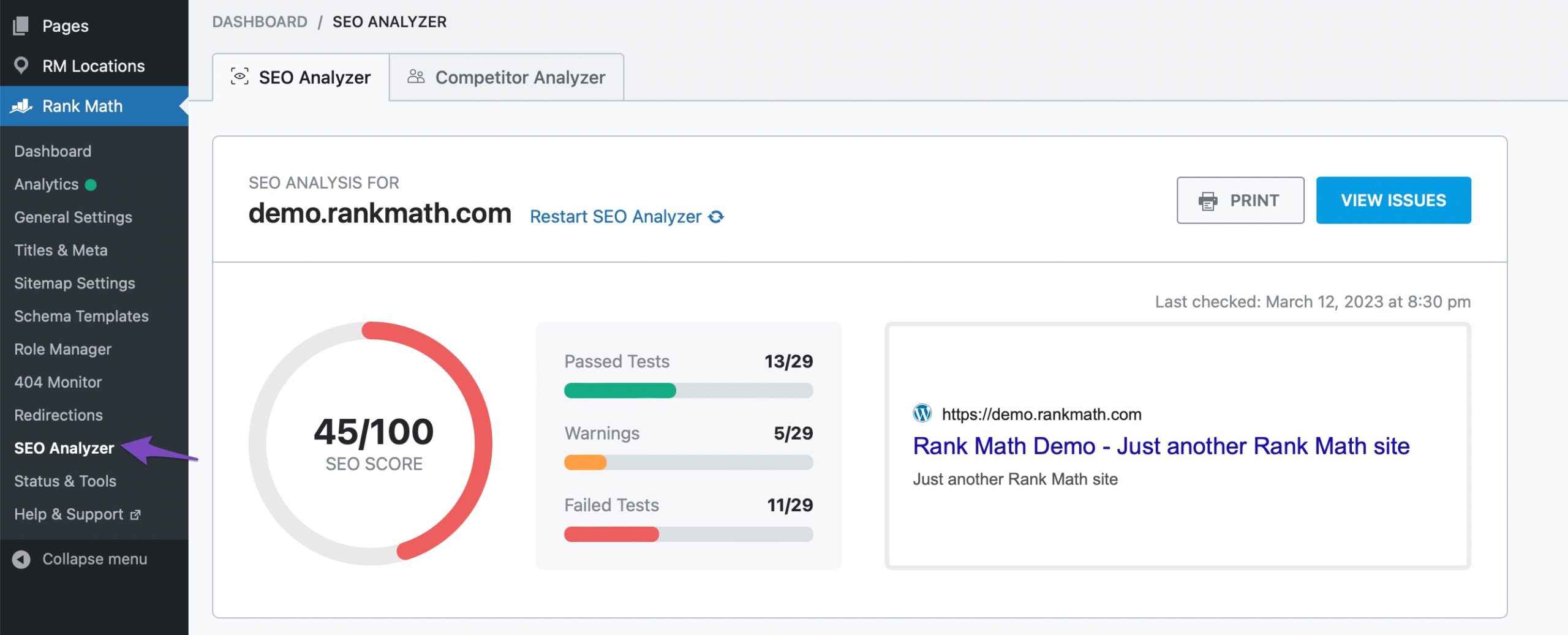
Um ein SEO-Audit auf Ihrer Website mit dem Rank Math-WordPress-Plugin durchzuführen, können Sie zu navigieren Rank Math SEO → SEO Analyzer Wie nachfolgend dargestellt:
Also, ohne weitere Umschweife, fangen wir gleich an.
3.1 Überprüfen Sie, ob Ihre Website eine einzelne URL verwendet
Je nachdem, wie Sie Ihre Website konfiguriert haben, sind beide www Version und die Nicht-www Version kann zugänglich sein. Das bedeutet, dass Ihre Website über beide der folgenden URLs erreichbar wäre:
Ideally, it should only be accessible from one of the above, meaning that if someone were to try to access it from the www Version zum Beispiel werden sie automatisch auf die gleiche Seite auf der umgeleitet Nicht-www Version (oder umgekehrt).
This is important because if your website were to be accessible on both versions, Google (and other search engines) might index both versions of your website, which can result in Probleme mit doppeltem Inhalt.
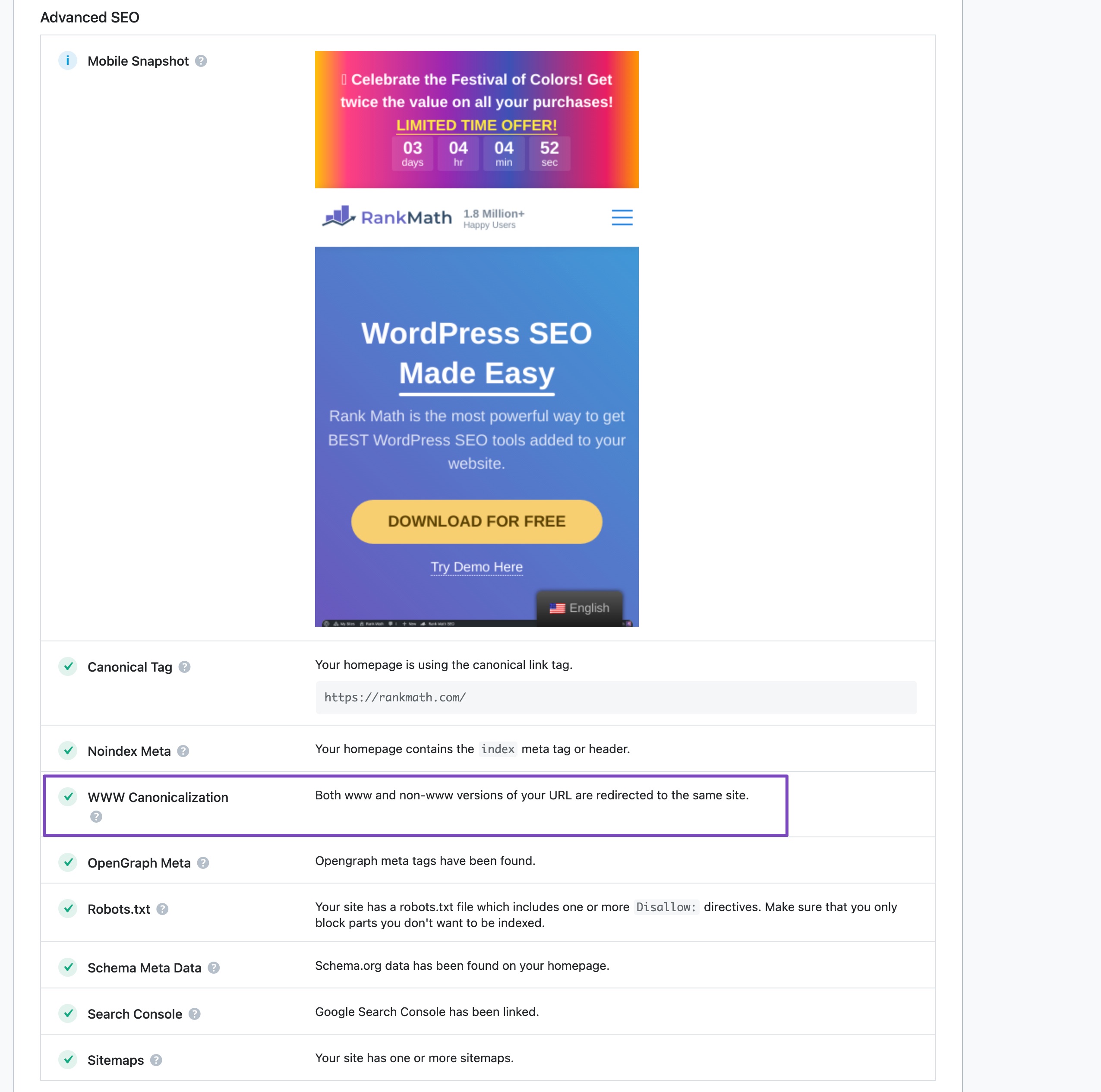
Wenn Sie die kluge Entscheidung getroffen haben, dieses SEO mit Rank Math durchzuführen, können Sie mit dem Plugin überprüfen, ob auf Ihrer Website dieses Problem auftritt und meldet den Status im SEO Audit Report.
Wenn Sie dies lieber manuell überprüfen möchten, versuchen Sie, über beide auf Ihre Website zuzugreifen www und das Nicht-www Versionen und prüfen Sie, ob Sie beide am Ende zu einer der beiden führen eins der Versionen, in diesem Fall wurde die Umleitung bereits ordnungsgemäß konfiguriert.
Wie kann man die Kanonisierung beheben? (Reparieren Sie das www und Nicht-wwwAusgabe)
Wenn Ihre Website auf beiden Seiten zugänglich ist www und das Nicht-www Versionen, dann gibt es einige mögliche Lösungen, die Sie implementieren können, um das Problem zu beheben. Die häufigste Lösung besteht darin, zu überprüfen, ob Sie in WordPress die richtige URL angegeben haben.
Wenn Ihre Website barrierefrei ist und auf beiden Seiten die gleichen Inhalte bereitstellt www und das Nicht-www Versionen gibt es einige mögliche Möglichkeiten, dieses Problem zu beheben.
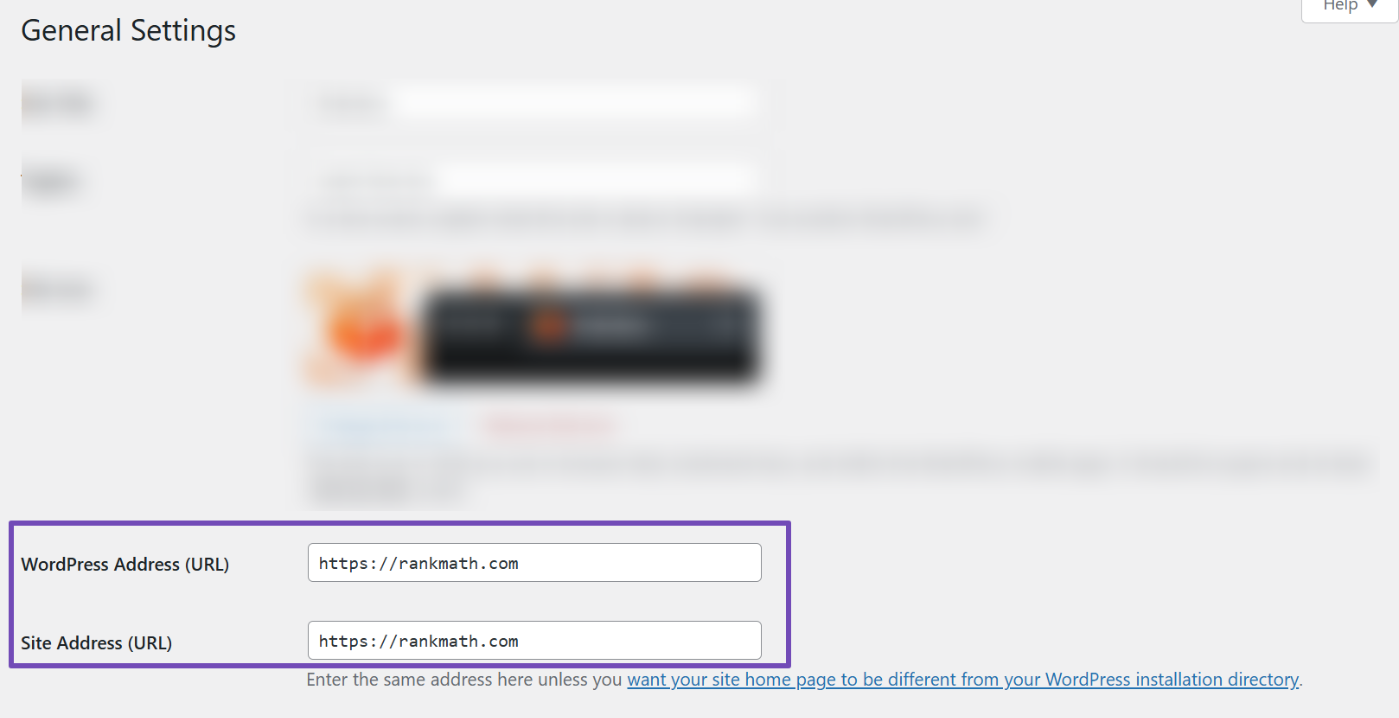
Das häufigste und erste, was Sie überprüfen sollten, ist, ob Sie das Richtige angegeben haben WordPress-Adresse (URL) und Site-Adresse (URL) unter Settings → General in your WordPress dashboard. As shown below, you’ll see which variation of your website’s URL has been set as the default in WordPress—both URLs should be the same.
In bestimmten Fällen ist die Option zum Bearbeiten der URL möglicherweise nicht verfügbar (ausgegraut). Wenn dies bei Ihrer Website der Fall ist, machen Sie sich keine Sorgen, es bedeutet lediglich, dass die Einstellung in Ihrer Website fest codiert wurde wp-config.php Datei. Die Einstellungen innerhalb der wp-config.php file override the settings in your WordPress admin area, which is what causes the setting to be unavailable.
Wenn Ihre Einstellungen ausgegraut sind, müssen Sie sie bearbeiten wp-config.php Datei direkt, um Änderungen an Ihrer URL vorzunehmen. Verwenden Sie Ihren bevorzugten FTP-Client, um auf Ihren Server zuzugreifen, und bearbeiten Sie dann die Datei. Die Regeln, nach denen Sie in der Datei wp-config.php suchen, lauten wie folgt:
Wenn Sie sie gefunden haben, stellen Sie sicher, dass Sie die Werte in die gewünschte URL ändern und die Datei speichern.
Nach dem Ändern der URL müssen Sie auch alle Ihre alten URLs auf die neuen URLs umleiten. Greifen Sie dazu auf Ihre .htaccess-Datei zu und fügen Sie den folgenden Codeausschnitt hinzu:
RewriteEngine auf RewriteCond %{HTTP_HOST} ^yourdomain.com [NC] RewriteRule ^(.*)$ http://www.yourdomain.com/$1 [L,R=301]
In most cases, if you are unsure how to take care of this yourself, reach out to your hosting provider and refer them to this step in this tutorial, and they will (likely) be more than happy to take care of it for you.
Stellen Sie sicher, dass Sie „yourdomain.com“ (selbstverständlich) durch Ihre tatsächliche Domain ersetzen. Auch im obigen Beispiel ist die Nicht-www Die Version wird auf die umgeleitet www Ausführung. Wenn Sie das Gegenteil versuchen und das bevorzugen Nicht-www Version verwenden Sie den folgenden Code:
RewriteEngine auf RewriteCond %{HTTP_HOST} ^www\.yourdomain\.com [NC] RewriteRule ^(.*)$ http://yourdomain.com/$1 [L,R=301]
Auch hier gilt: Wenn Sie dies nicht selbst ändern möchten, wenden Sie sich an Ihren Gastgeber und teilen Sie ihm mit, was Sie zu tun versuchen.
Notiz: Make sure to completely back up your website before making any changes, so that you can easily restore it in case something goes wrong.
3.2 Überprüfen Sie, ob Ihre Website ein SSL-Zertifikat verwendet
When installed, an SSL (Secure Socket Layer) certificate encrypts all communication between your website and its visitors. This ensures that any data transferred, such as login credentials, personal information, or payment details, is protected from potential interception or hacking attempts. SSL is especially critical for websites that handle sensitive information or online transactions.
Beyond security, SSL has also become a recognized SEO ranking factor. Search engines like Google prioritize secure websites in search results, which means having a properly configured SSL certificate can positively impact your rankings.
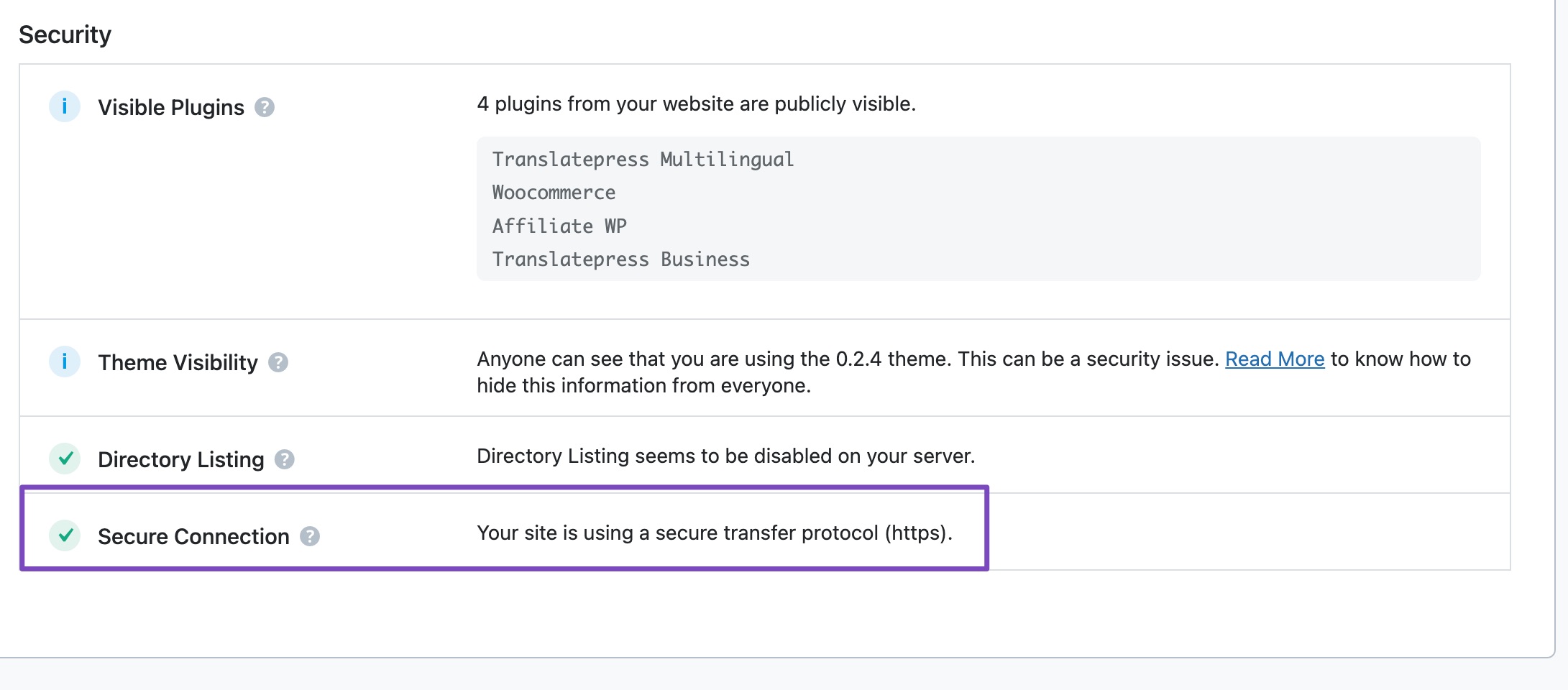
Rank Math SEO also checks if your website is using an SSL certificate and meldet den Status im SEO Audit Report.
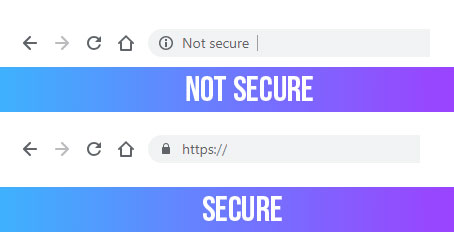
Um manuell zu überprüfen, ob Ihre Website vorhanden ist korrekt mit einem SSL-Zertifikat konfiguriert, Sie müssen sich nur die URL ansehen. Wenn die URL Ihrer Website mit beginnt https dann verwenden Sie SSL. Wenn die URL mit beginnt http, dann verwenden Sie kein SSL.
So wird es im Google Chrome-Browser aussehen:
Was passiert, wenn Ihre Website kein SSL-Zertifikat verwendet?
Profi-Tipp: Falls Sie es noch nicht tun: Wir sehr empfehlenswert you install an SSL certificate as it keeps your visitors’ data secure, instills confidence, and ensures that Google doesn’t penalize your website in search results.
Die gute Nachricht ist, dass es einfach und kostenlos ist, ein SSL-Zertifikat zu erhalten. Unternehmen wie z.B Lassen Sie uns verschlüsseln bieten SSL-Zertifikate kostenlos an. Hier finden Sie eine detaillierte Anleitung zur Installation der SSL-Zertifikate von Let's Encrypt cPanel-fähige Websites. Das Tutorial nimmt das Beispiel einer auf SiteGround gehosteten Website, ist aber auch auf andere Webhosting-Dienste anwendbar.
TL;DR: Stellen Sie sicher, dass auf Ihrer Website ein SSL-Zertifikat installiert ist Stellen Sie sicher, dass die nicht sichere (die HTTP-Version) Ihrer Website auf die sichere (https)-Version umgeleitet wird.
3.3 Überprüfen Sie die Sichtbarkeitseinstellungen von WordPress
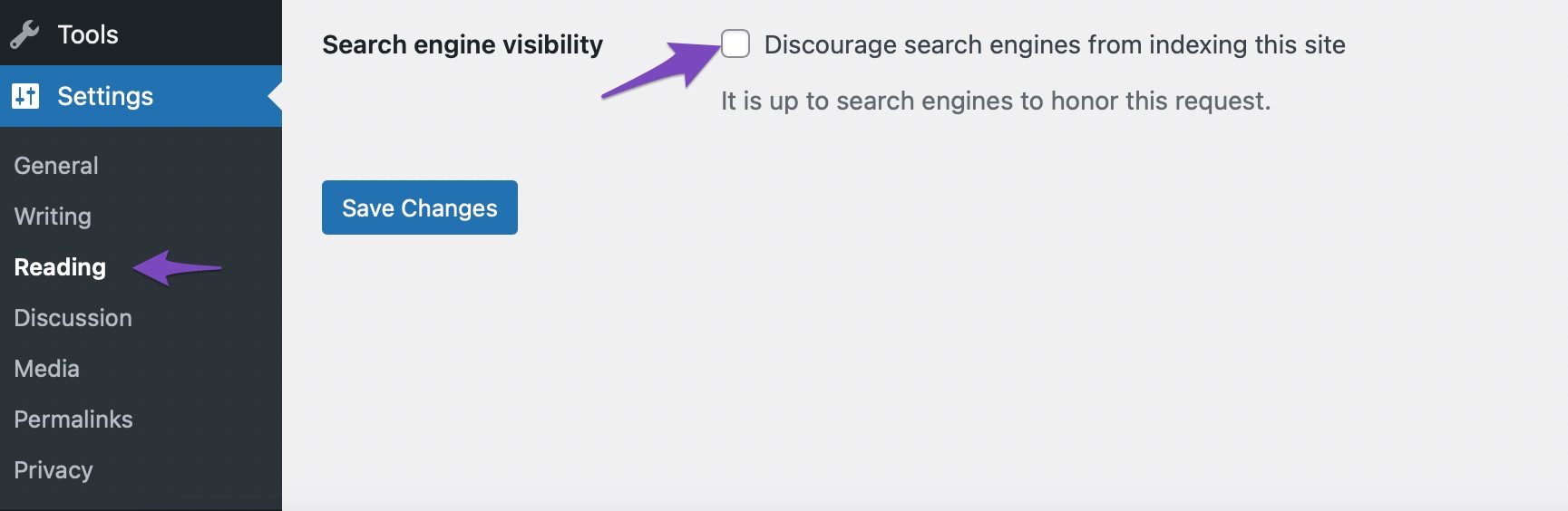
During development, it’s common to prevent search engines from indexing your site, especially when your content is incomplete or your design isn’t finalized. WordPress makes this easy with a built-in option to discourage search engines from indexing your site, which you can find under Einstellungen → Lesen.
However, if you enabled this setting during setup, it’s easy to forget to disable it once your site goes live.
When you perform a content audit with Rank Math SEO, it automatischerkennt, ob diese Einstellung versehentlich aktiviert wurde. Sie sehen es unter Basis SEO Abschnitt…
Wenn Sie vergessen haben, dies zu deaktivieren, sobald Ihre Website für die Indexierung bereit und für Leser/Betrachter verfügbar war, tun Sie dies sofort, um Suchmaschinen darüber zu informieren, dass sie mit der Indexierung Ihrer Website beginnen können SCHNELLSTMÖGLICH!
3.4 Überprüfen Sie Ihre Permalink-Struktur in WordPress
Die Permalink-Struktur bestimmt, wie WordPress die URLs für die von Ihnen erstellten Beiträge erstellt. Bei der Auswahl der bevorzugten Permalink-Struktur für Ihre Website sind zwei Dinge zu beachten:
Die Struktur der URL
Die URL selbst
Obwohl es verschiedene Möglichkeiten gibt, die URL zu strukturieren, ist die am einfachsten und effektivsten URL-Struktur ist yourwebsite.com/blog/post-name.
Während einer SEO-Analyse prüft Rank Math für WordPress, ob Ihre URL-Struktur ideal ist.
Sie können Ihre URL-Struktur auch manuell überprüfen, indem Sie einen Ihrer Beiträge öffnen und das Format der URL überprüfen.
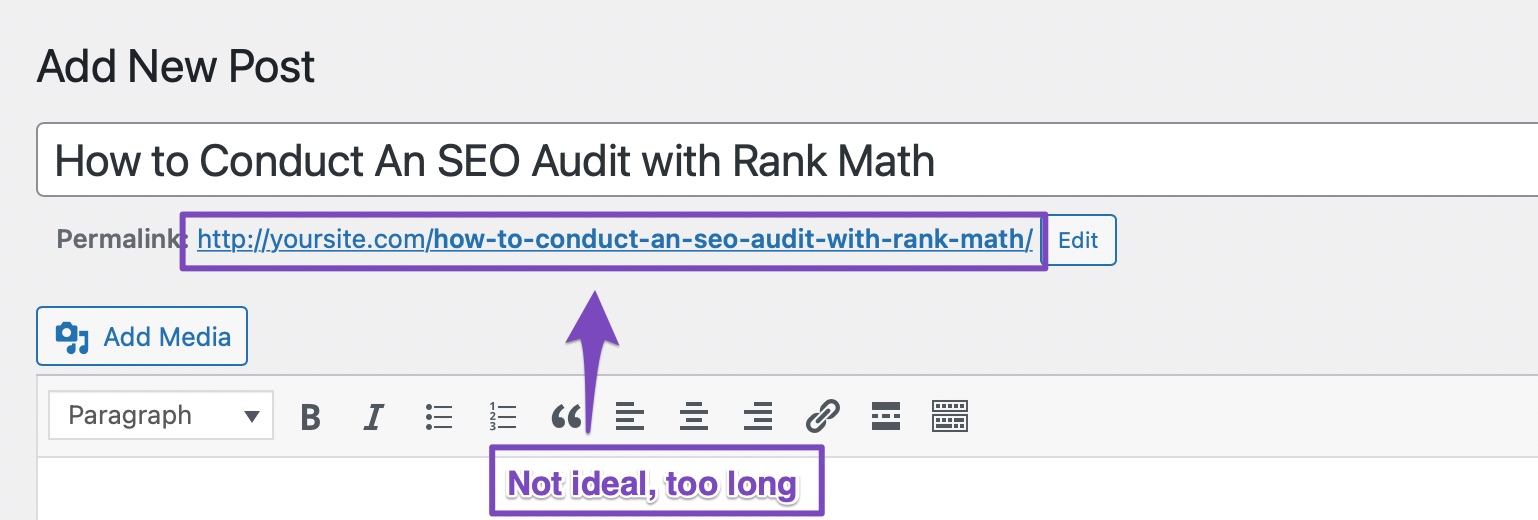
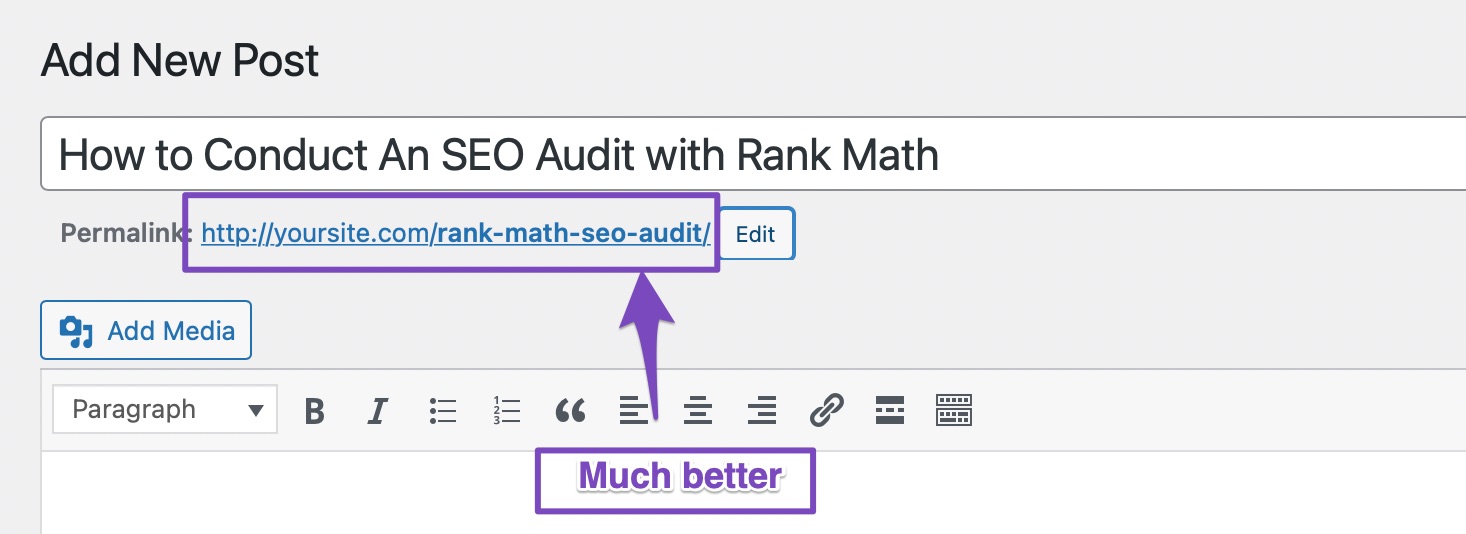
Then there’s the actual permalink itself. When you create a new post or page, WordPress automatically creates a title for it, but this tends to be too long, which is not ideal from an SEO perspective.
Google und andere Suchmaschinen bevorzugen kürzere Titel, da diese nicht abgeschnitten sind und prägnant vermitteln, worum es in dem Beitrag geht. Auch kürzere URLs werden von Benutzern bevorzugt und tragen nachweislich dazu bei, eine zu erreichen höhere Klickrate.
Um sicherzustellen, dass Ihre Beiträge (und Seiten) kurze und prägnante URLs haben, klicken Sie auf die Schaltfläche „Bearbeiten“ neben der vorgeschlagenen URL und geben Sie den Permalink Ihrer Wahl ein. So haben wir das für diesen Beitrag geändert:
So lösen Sie dieses Problem
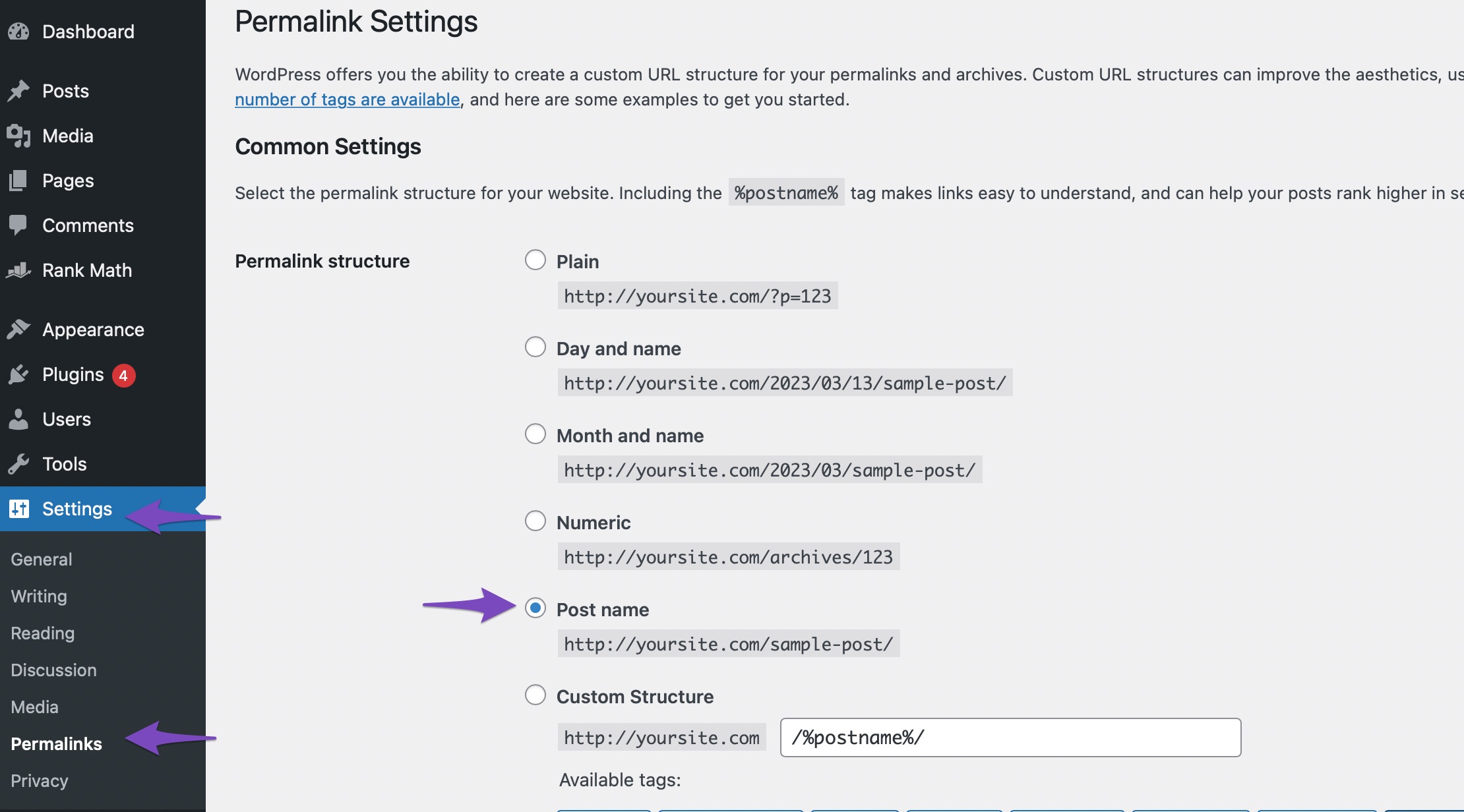
Wenn Ihre URLs nicht auf eingestellt sind /blog/%postname/ Anschließend wird im Rank Math für WordPress SEO-Analysebericht eine Warnung angezeigt. Um das Problem zu beheben, gehen Sie zu Ihrem WordPress-Menü und navigieren Sie zu Einstellungen → Permalinks. Dort sehen Sie alle Vorlagen, die WordPress standardmäßig unterstützt, und Sie können auch eine benutzerdefinierte Vorlage erstellen. Wählen Sie das Anschriftname Option, die Ihre Permalinks auf setzt yoursite.com/your-post-name.
Vergessen Sie nicht sparen Ihre Einstellungen.
Warnung: Changing your permalink structure will change the URLs of all of your existing posts, which will cause a lot of 404 errors. We highly recommend that you either perform this step on a new website or create redirections from the old URLs to the new URLs to avoid problems.
3.5 Überprüfen Sie die Leistung Ihrer Website
Jedes Mal, wenn ein Besucher auf Ihrer Website landet, pingt der Client (der Computer des Besuchers) den Server (den Webhost Ihrer Website) an bringen Inhalte wie die Datenbank, Bilder, CSS, Schriftarten und andere Assets.
Das alles braucht Zeit.
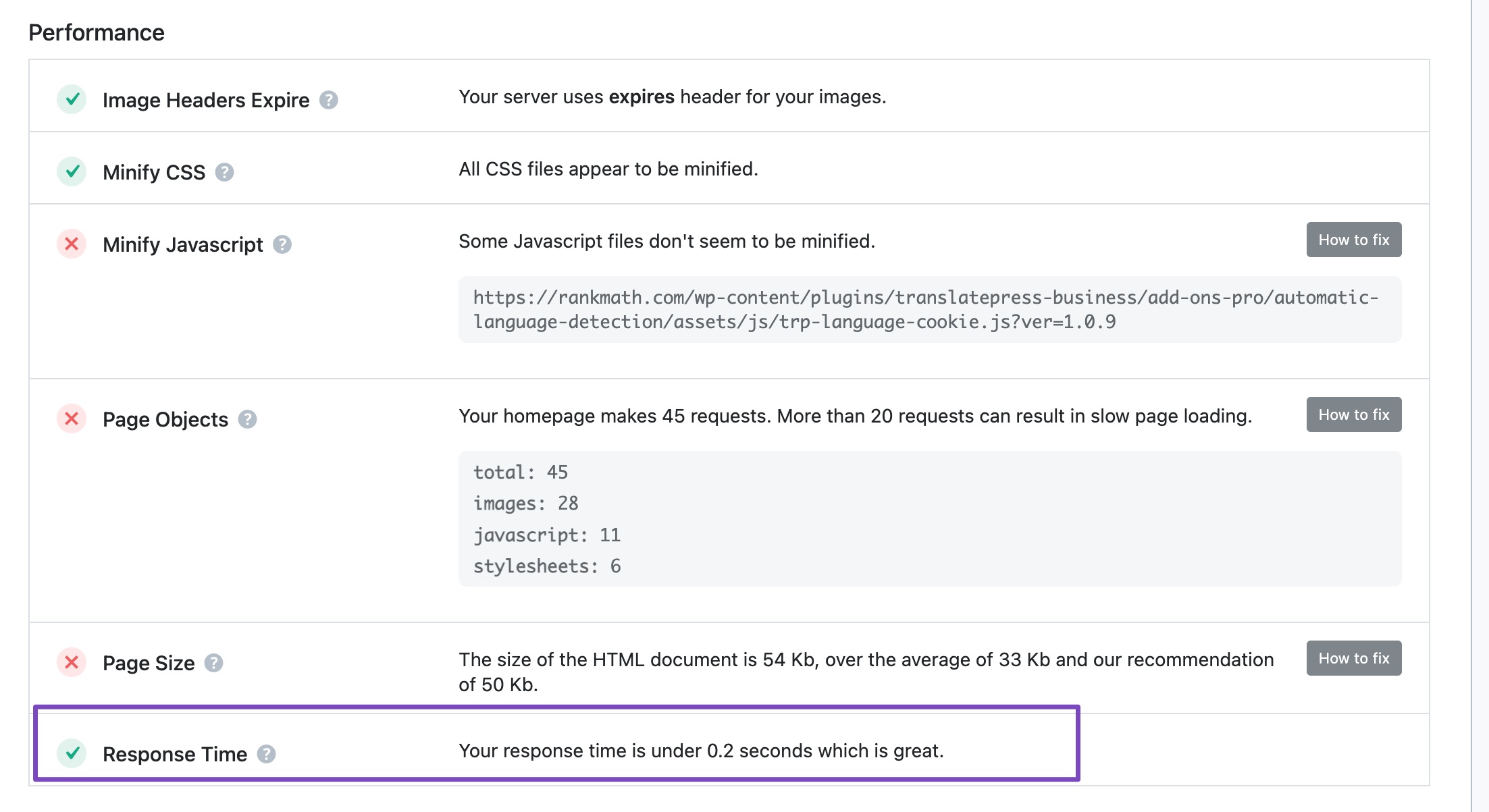
During an SEO Analysis in Rank Math, all this is reported under the Leistungsteil.
So beheben Sie dieses Problem
Wenn Ihre Website derzeit kein Caching-Plugin (oder Caching auf Serverebene) verwendet, ist Ihr Absprungrate wird durch die Decke gehen, weil, laut Google, Website-Besucher (jetzt mehr denn je) erwarten tatsächlich eine Website lädt extrem schnell.
And, if it doesn’t, they’ll just leave and go to a different website. As a result of this user behavior, page speed is now a ranking factor.
Allerdings gibt es, wie bei allem, was mit WordPress zu tun hat, eine Reihe von Caching-Plugins, um dieses Problem zu lösen. Wir empfehlen die Verwendung WP Rocket as it’s a really fantastic plugin that is regularly updated with new features and optimizations.
Das Einrichten von Caching kann ein komplizierter und einschüchternder Prozess sein, aber machen Sie sich keine Sorgen, denn hier finden Sie eine ausführliche Anleitung, die Ihnen dabei hilft set WP Rocket up Das wird sowohl Ihnen als auch Ihrer Website helfen Beschleunigen.
Server-Reaktionszeit
Bei der Beurteilung der Leistung Ihrer Website sind zwei Dinge zu berücksichtigen: Leistung und Empfänglichkeit.
Responsiveness defines how quickly your server responds to requests. One metric that can be used to evaluate this is Zeit bis zum ersten Byte (TTFB).
For the best possible performance, your website’s TTFB should be as low as possible – and as you might’ve guessed, Rank Math SEO checks this in its SEO Analyzer, so you don’t have to!
So beheben Sie eine langsame Serverantwort
Wenn die Reaktionszeit Ihres Servers langsam ist, können Sie nicht viel tun, um die Leistung Ihrer Website zu verbessern, außer Ihren Hosting-Anbieter zu wechseln. Auf dem MyThemeShop-Blog haben wir hat viele Gastgeber bewertet. Wir empfehlen Ihnen, einige der Rezensionen durchzulesen und Wechseln Sie zu einem besseren Host, um eine bessere Leistung zu erzielen.
3.6 Überprüfen Sie, ob Sie Ihre Website mit der Google Search Console verifiziert haben
Google bietet Websitebesitzern eine Reihe von Tools an, mit denen sie Probleme verstehen und lösen können, auf die Google bei der Indexierung ihrer Website stößt. Die Suite von Tools ist bekannt als Google Search Console, und wir empfehlen Ihnen, es sich zur Gewohnheit zu machen, alle Ihre Websites damit zu verknüpfen, so wie Sie es bereits für Google Analytics tun sollten.
As you might already know, it is vital that you Verbinden Sie Ihre Website mit der Google Search Console damit Sie Probleme proaktiv lösen und zusätzliche Informationen über Ihre Website sammeln können.
Usually, you would have to go through the lengthy process of logging into the Google Search Console when you want to see the data that it has collected for you. But with Rank Math SEO, you can view all your important metrics right inside WordPress.
When performing an SEO Analysis with Rank Math SEO, it automatically prüft, ob Ihre Website mit der Google Search Console verknüpft ist.
So lösen Sie dieses Problem
Wenn Ihre Website nicht bereits mit der Google Search Console verbunden ist, entgehen Ihnen wertvolle Daten, die Ihnen helfen können, Ihre Website zu verbessern und auftretende Probleme zu beheben. Wir empfehlen daher dringend, dies zu tun.
If you’re using Rank Math SEO, then verifying your website with the GSC is extremely easy and quick. Here’s a Kurzanleitung wie es geht.
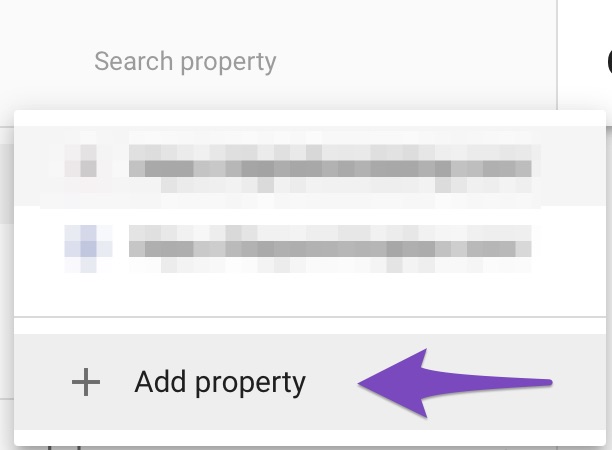
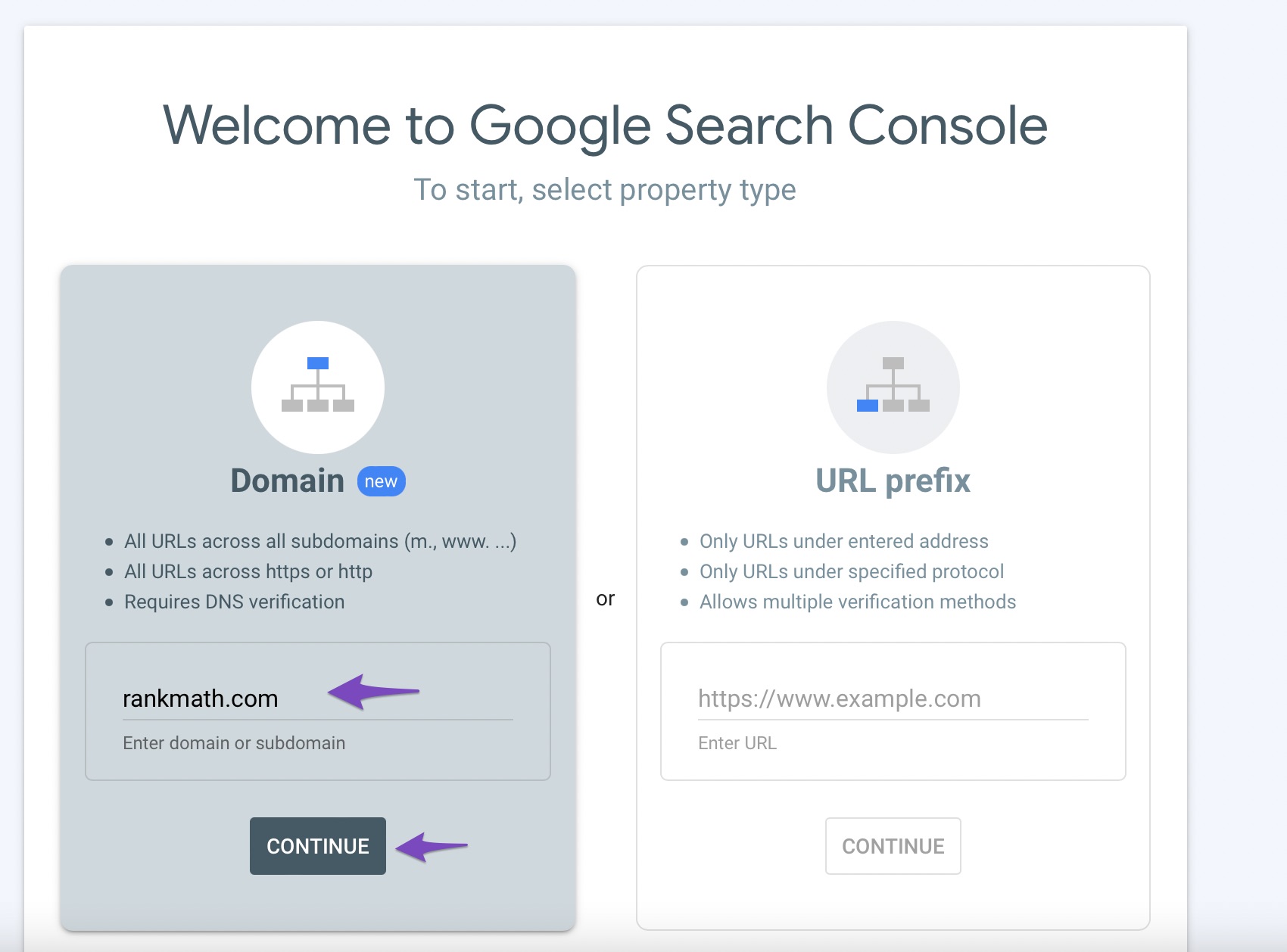
If you aren’t using Rank Math SEO, the process is slightly more complicated. Log in to Google Search Console and find the Eigenschaft hinzufügen Möglichkeit. Die Option befindet sich an einer anderen Stelle, je nachdem, ob Sie bereits andere Eigenschaften in der Search Console haben oder ob es Ihre erste Eigenschaft ist.
Enter your website’s address in the Domain section, then click Weitermachen.
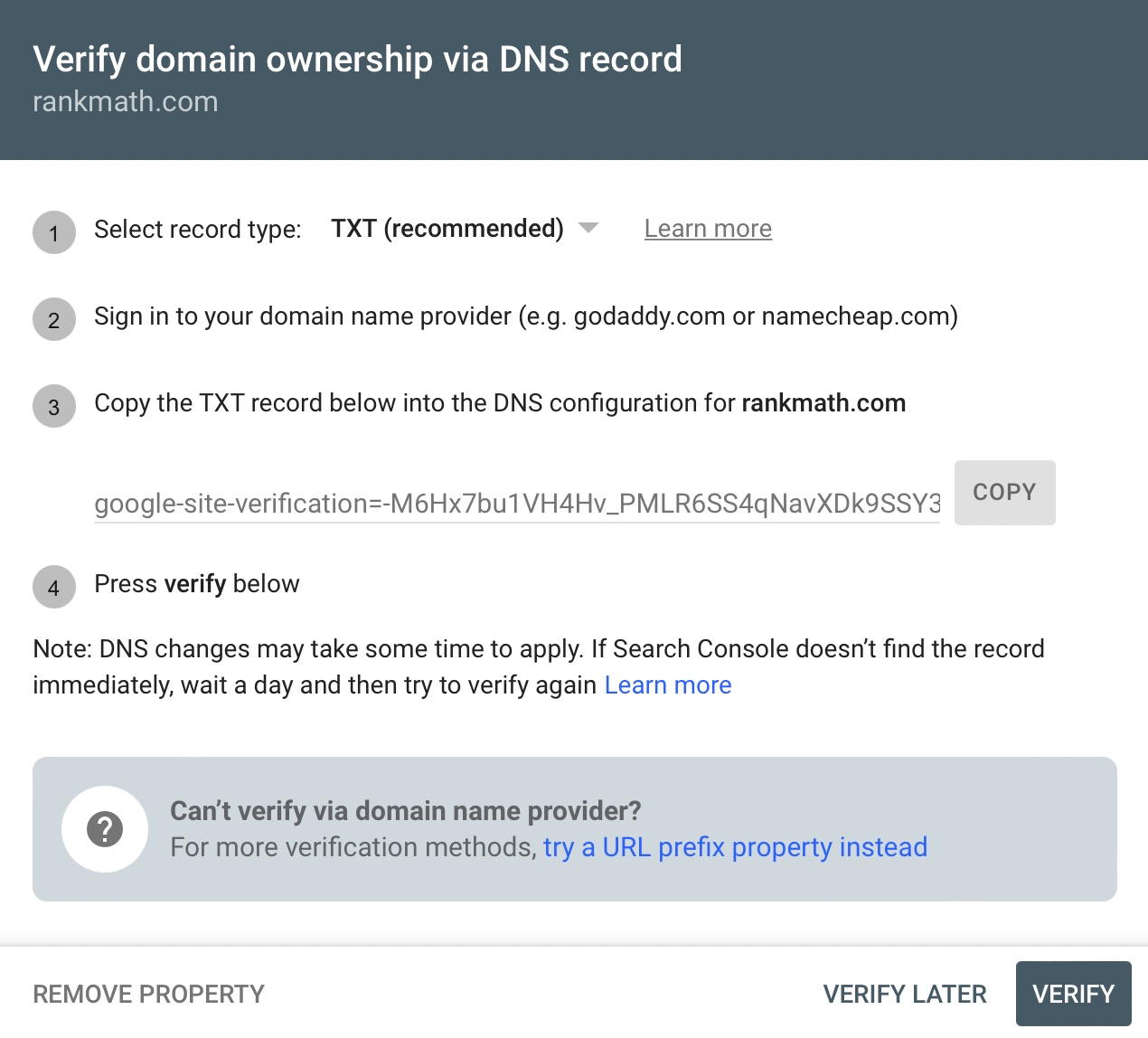
Die Google Search Console schlägt Ihnen dann einige Möglichkeiten vor, wie Sie Ihre Website verifizieren können. Nutzen Sie eine der Methoden und genießen Sie die erweiterten Analysen, die die Google Search Console bietet.
3.7 Überprüfen Sie, ob Ihre Website über eine kompatible Sitemap verfügt
EIN Seitenverzeichnis ist einfach ein detaillierter Index der URLs Ihrer Beiträge, Seiten und Inhalte, die von Suchmaschinen angezeigt werden sollen kriechen. There are three main types – sitemaps that are used during the planning of a website by its designers, human-visible listings, and structured listings intended for web crawlers such as search engines.
Having a sitemap on your website is a no-brainer, and usually, you’d have to use another third-party plugin to create a sitemap for your website. But if you have Rank Math SEO installed, it will Erstellen Sie automatisch eine Google-freundliche Sitemap für Sie. During the SEO audit process, it will also perform a check to see if the sitemap is created and accessible.
During the SEO Analysis, Rank Math SEO also checks to see if the sitemap has been created and is accessible.
So beheben Sie dieses Problem
Eine Sitemap ist wichtig, da sie Suchmaschinen (wie Google) dabei hilft, den Inhalt Ihrer Website effizienter zu verstehen und zu indizieren.
If you’re using Rank Math SEO, then make sure that the sitemap module is enabled and properly configured. The module list can be found under Rank Math SEO → Armaturenbrett, und die Sitemap-Einstellungen sind unter verfügbar Rank Math SEO → Sitemap-Einstellungen.
If you’re not using Rank Math SEO, then there are other plugins available that will do the job for you. A popular option is Google XML-Sitemaps.
3.8 Finden und reparieren Sie defekte Links
On a growing website, you have to add, remove, and update content constantly. This results in broken links. When a user tries to access a broken URL, Ihnen wird ein 404-Fehler angezeigt.
Obwohl Google erklärt hat, dass sie 404-Fehler nicht als Ranking-Signal betrachten, wirkt sich dies dennoch auf das Nutzererlebnis aus. Deshalb sollten Sie aktiv werden Suchen Sie nach defekten Links und repariere sie so schnell wie möglich.
Thankfully, Rank Math SEO saves the day (yet again!)
Using the Rank Math SEO 404 Monitor, you can automate the process of finding all the broken links on your website.
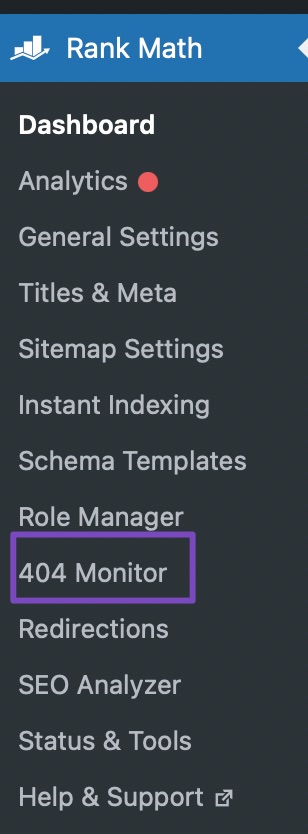
Sie können auf den 404-Monitor zugreifen, indem Sie zu navigieren Rank Math SEO → 404 Monitor.
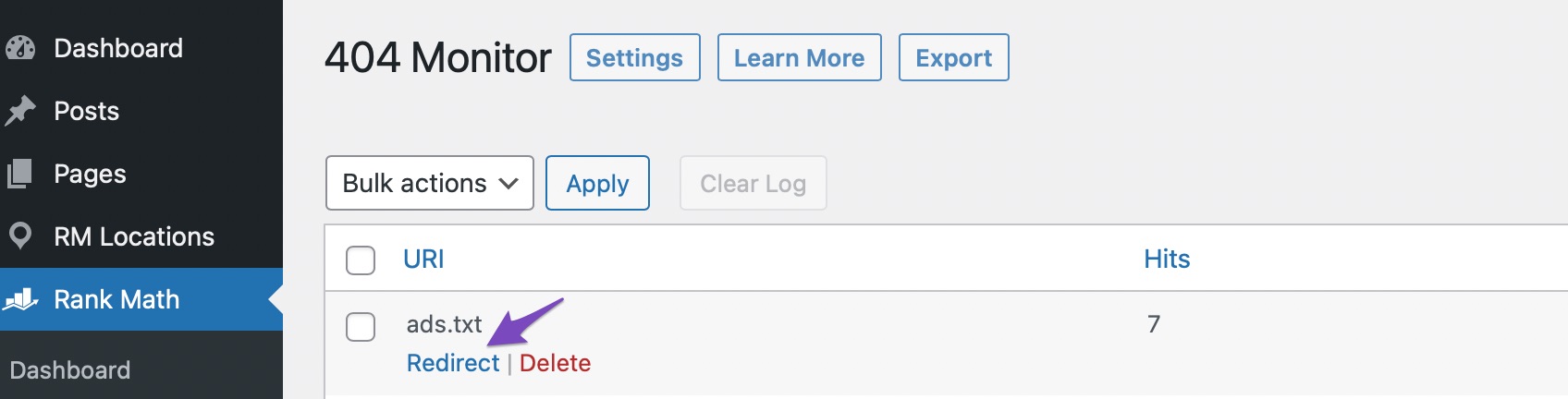
Hier sehen Sie alle defekten Links, die einen 404-Fehler auf Ihrer Website verursacht haben. Sie können sie sortieren, durchsuchen und sogar beheben, indem Sie alle URLs, die einen Fehler verursacht haben, auf einen neuen Beitrag oder eine neue Seite umleiten.
Dazu muss das Umleitungsmodul aktiviert sein.
So reparieren Sie defekte Links ohne Rank Math SEO
If you aren’t using Rank Math SEO and are still curious about broken links on your website, Es gibt einige Lösungen, die Sie verwenden können.
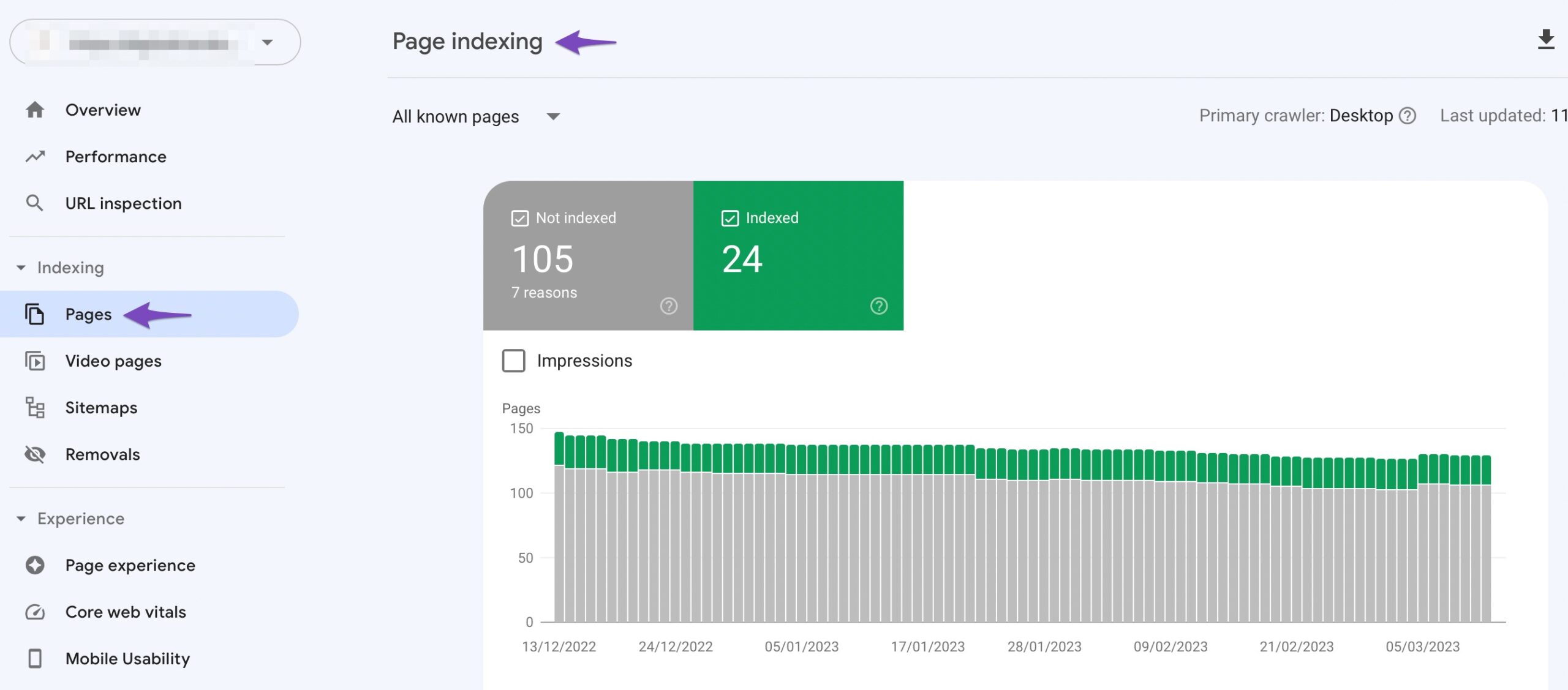
Erstens können Sie Überprüfen Sie alle defekten Links Ihrer Website in der Google Search Console. Wählen Sie die entsprechende Eigenschaft aus und überprüfen Sie dann den Seitenindizierungsbericht. Der Bericht zeigt Ihnen alle Fehler, die Google auf Ihrer Website gefunden hat, einschließlich 404-Fehler.
Alternatively, you can use a plugin to do the job for you. The Link Checker Plugin is just one example of a plugin that can help you find potential broken links on your website.
3.9 Content Optimizations
As you know, content is everything. To maximize search engine traffic, your content should also be well optimized.
Content optimization is usually a long and complicated process, but Rank Math SEO makes it effortless to find all the areas that you can improve upon.
We will assume here that you have a pretty solid understanding of how to write SEO friendly content while taking the newest SEO tips into consideration at all times.
In the SEO Analysis, look for the following sections to optimize your content.
Fokus-Schlüsselwörter
The Focus Keywords report tells you about all the posts, products (if you use WooCommerce), pages, and other content types that do not have a focus keyword set. You’ll find this report in the Basic SEO section of Rank Math’s SEO Analysis. If you are unsure what this means, you can read more about Stichwortforschung.
Fixing Content Optimizations
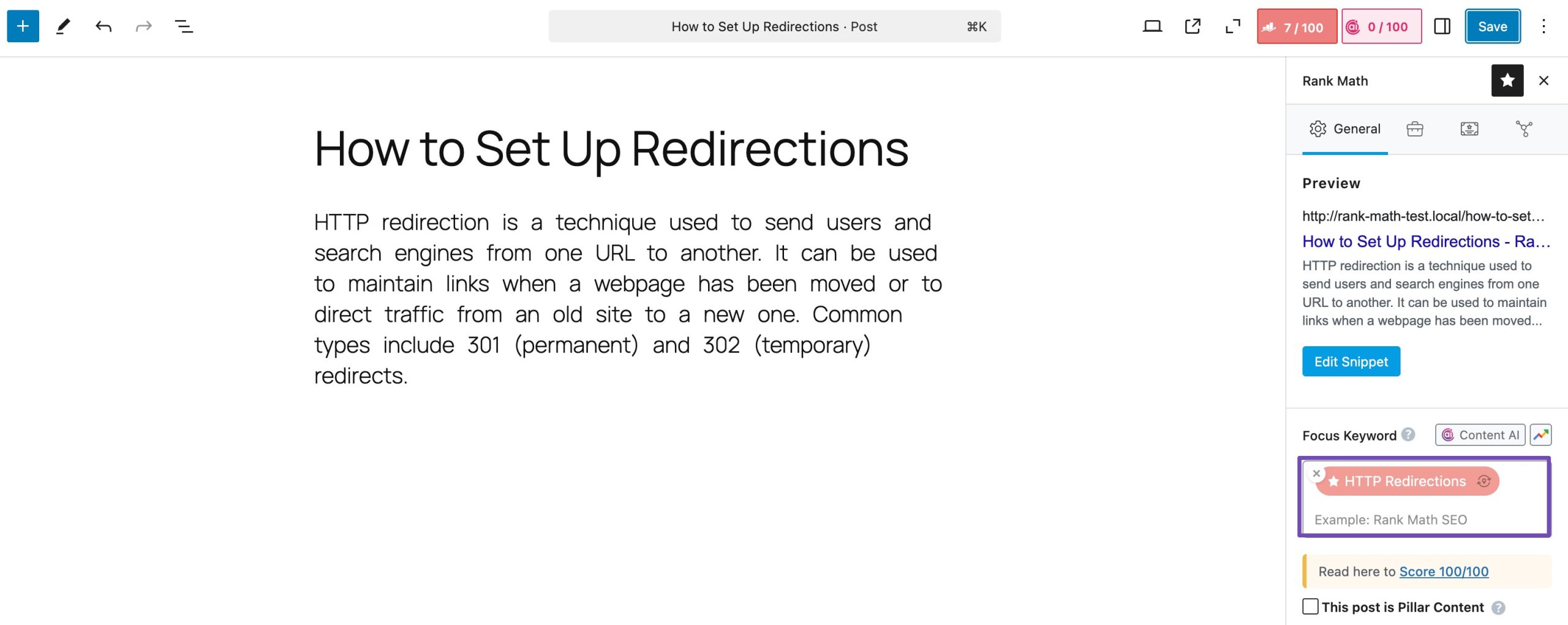
We recommend that you visit each of the pages, posts, and products with missing focus keywords and work your way through the list. The process is relatively simple. Open the post in your favorite editor (Gutenberg or Classic), and scroll to the Rank Math SEO Meta Box.
Once you’re there, add one or more (up to 5) focus keywords to the post.
Wait for a few seconds for Rank Math SEO to process your keywords, after which you’ll see that Rank Math SEO tells you the various ways you can optimize your content for your keywords. Use the advanced content insights that you will find in the Rank Math SEO Meta Box to improve your post. Go through the list of recommendations Rank Math offers, and at the same time, make sure your content reflects the Suchabsicht of the keyword you are targeting.
Title Optimizations
Using the desired focus keywords in the title of the post is a sure-fire way to ensure that your title is on-topic, which has been shown to help you generate more traffic from search. During the SEO Analysis, Rank Math SEO also flags up all of the posts where the focus keyword has not been used in the title.
How To Fix This
Having the focus keyword in the title is important for two reasons. Not only is it important for SEO, but it also helps the user understand what your content is about, which eventually leads them to click on your result in the SERPs. Go through all of the posts, pages, and products that Rank Math SEO recommends.
Profi-Tipp: Rank Math SEO for WordPress can only tell you when a post does not have the focus keyword in the title once you’ve set a focus keyword. Once you set the focus keyword for all the posts that do not have them yet, you should run the audit again to find more posts that may not have a relevant, descriptive title.
3.10 Schema (aka Rich Snippets)
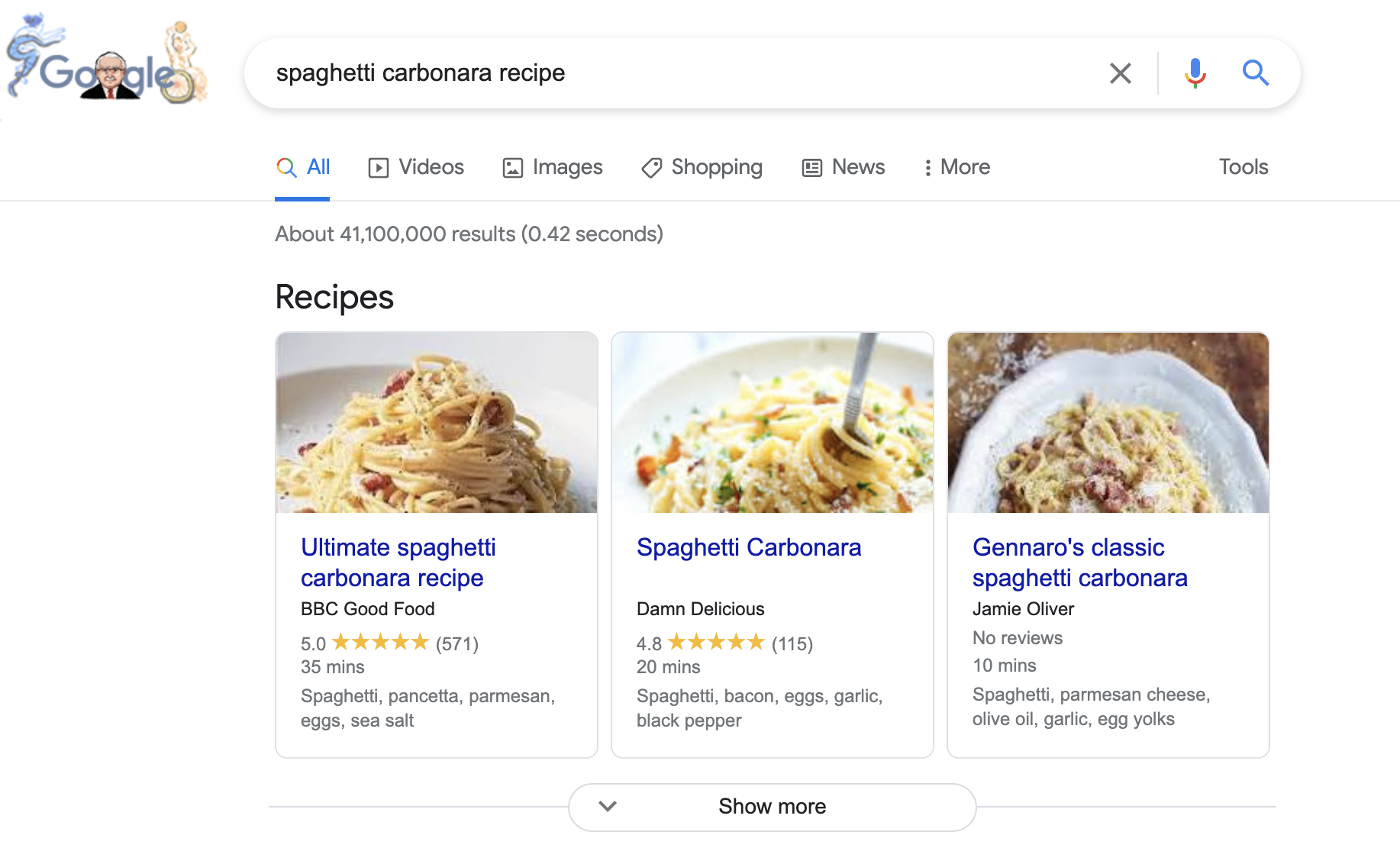
Schema, or Rich-Snippets, refers to code that you add to your website or post, which gives search engines additional information about your post. The search engines then use this to display extra information about your post in the search results.
There is a good chance that you have experienced the result of Schema markup already. If you’ve seen a result with a rating next to it, then you know what we are talking about.
All the details in the screenshot above have been pulled from the website’s Schema markup itself.
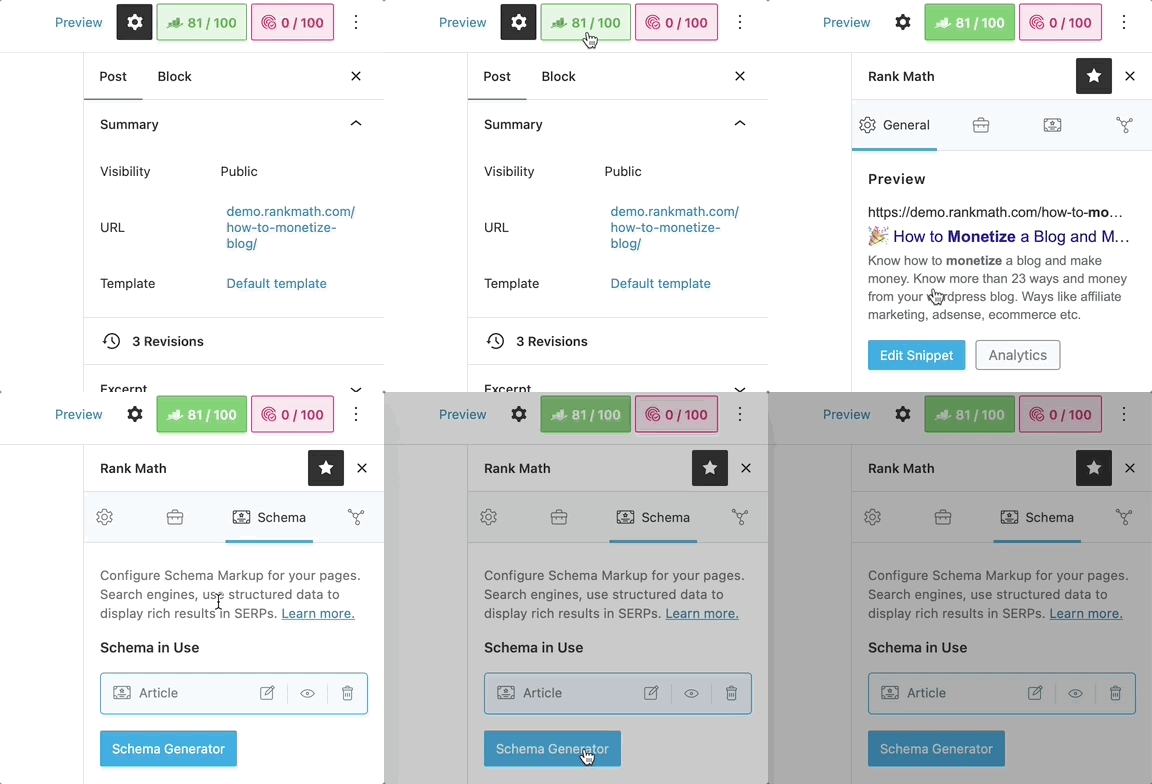
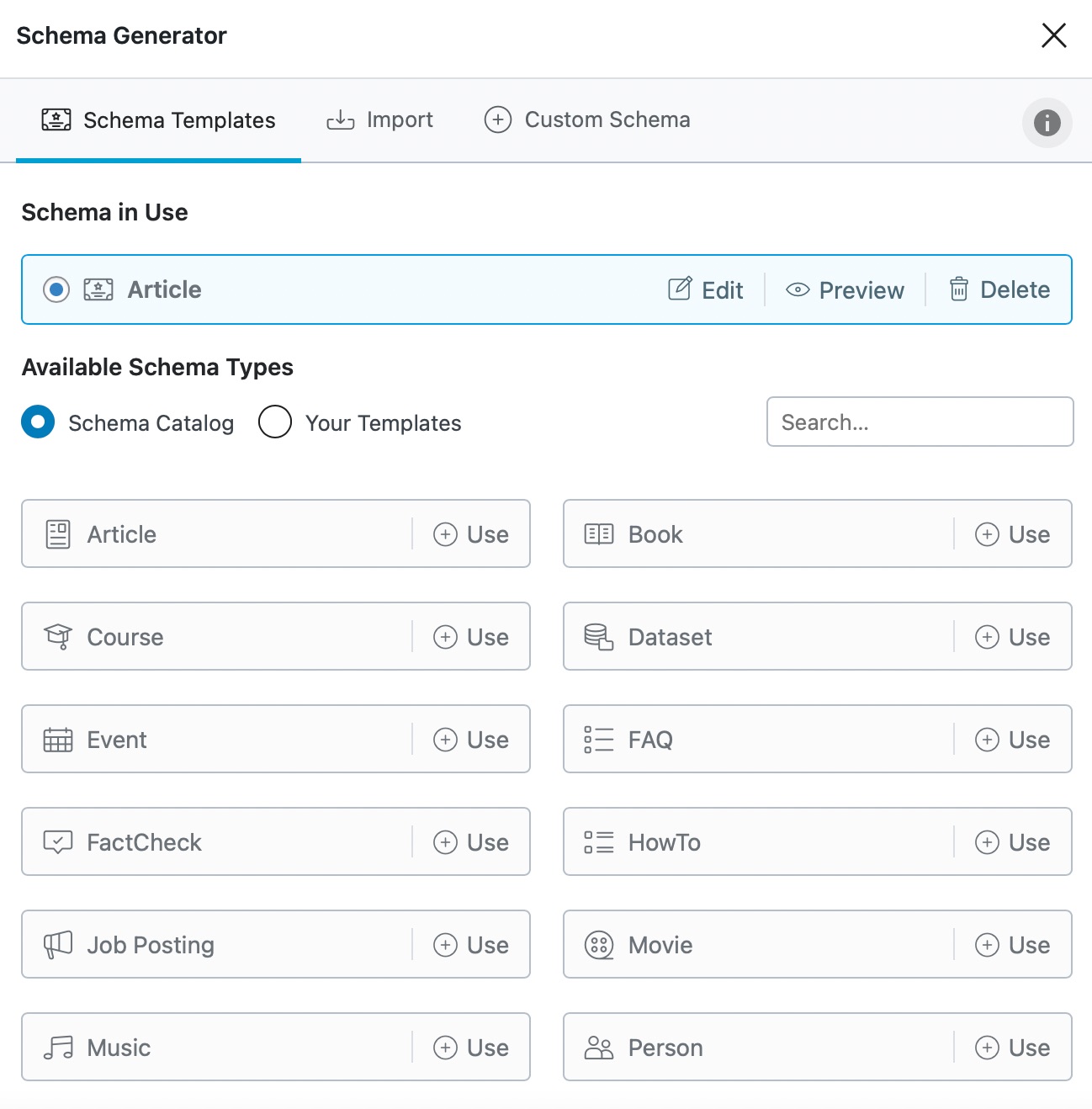
To add markup data to your post, open Rank Math in the Gutenberg sidebar, navigate to the Schema tab, and then select from the available Schema-Markup types you’d like to add:
Open Rank Math’s Schema Generator, and then select from one of the available Schema types that you’d like to add to this particular post or page:
When you perform an SEO audit with Rank Math SEO, it checks for the presence of Schema metadata on your website and informs you of the status in the Advanced SEO section of the SEO Analysis.
How to Add Schema Without Rank Math SEO
There are plenty of plugins and themes that allow you to add Schema markup to your website, and WP Review is one of the better ones. It is also free. If you’re looking for a paid solution, the Schema theme is also a great choice to consider.
Once you’ve added the plugin of your choice and added Schema data to your posts, you can prüfen if it has been added correctly using Google’s Rich Results Testing tool.
3.11 Image Optimization
Optimized images can go a long way to bring you targeted search traffic. Therefore, it is absolutely important that you optimize the images on your site in the best way possible. For the best results, you should optimize the following things.
Optimizing images is another important thing to consider when optimizing your entire website for search. For the best results, we recommend optimizing the following things:
Image Name
Bildgröße
Alt-Text
Die image name is pretty obvious. Always give your images descriptive names and include your target keywords if they are suitable. Here are a few examples of how to do it.
image 1.jpg <- Not an ideal name
imageoptimizationinrankmath.jpg <- Better, but can be improved
image optimization in rank math.jpg <- Good
image_optimization_in_rank_math.jpg <-Best
image-optimization-in-rank-math.jpg <- Another Variation
Using spaces in an image name is not mandatory, and not even recommended in many cases.
It is best if you use hyphens or underscores in your image name.
Als nächstes ist image size. This is a commonly overlooked part of the image optimization process and has a huge effect on SEO.
Ideally, you’d want your images to be the smallest possible size but still be relatively high-quality.
To achieve that, you can either compress your images before you upload them or use one of the many WordPress image optimization plugins there are to choose from so you don’t have to worry about it. Both approaches work well.
It’s also vital that you don’t forget to resize your images to be in the appropriate resolution.
The reasoning behind this is that it simply wouldn’t make sense to have an image of dimensions 4000×2000 pixels if your website’s maximum width is just 1500 pixels. Not only are you storing images of greater file sizes, but you’re also using extra bandwidth and consuming server resources. To avoid this issue, always resize your images before you upload them.
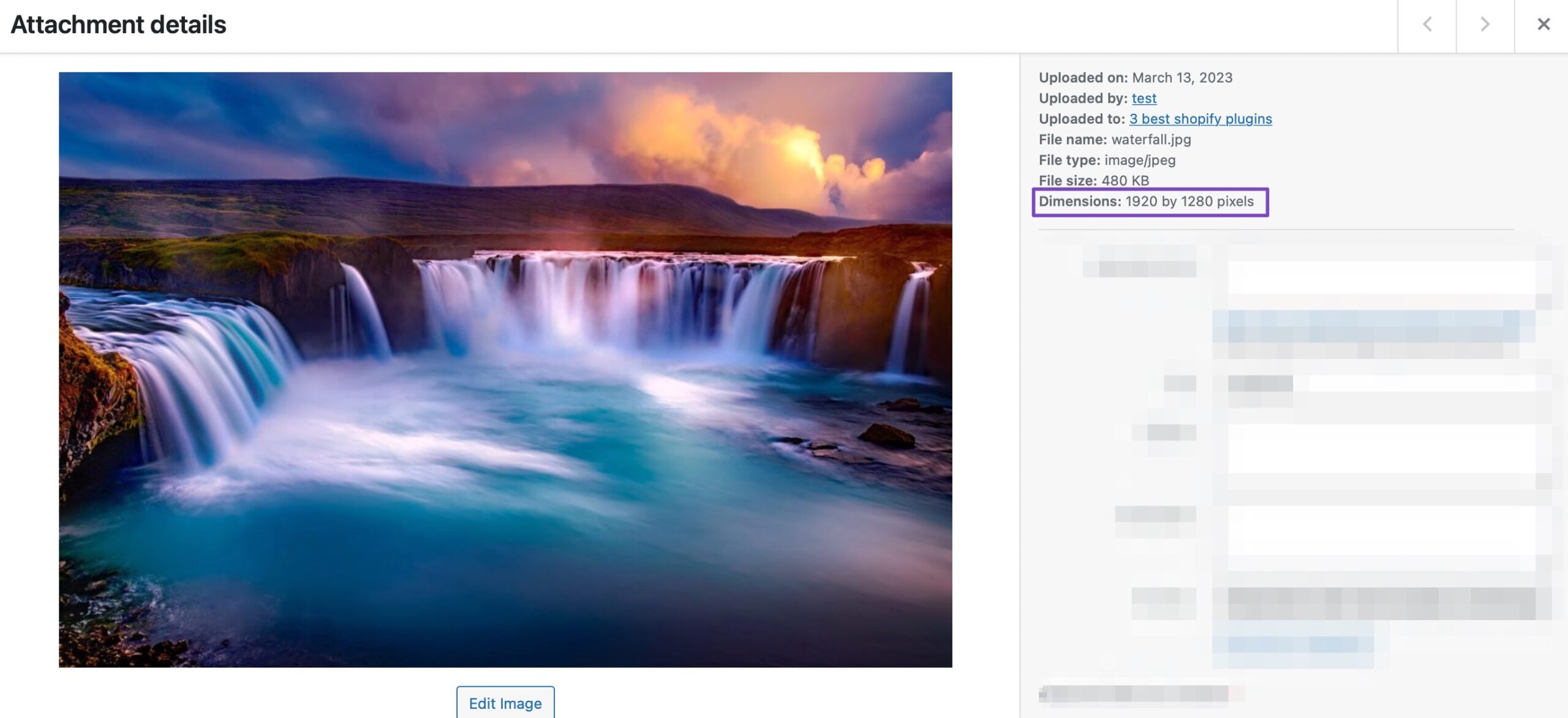
You can check the size of each of your images in the WordPress media gallery. Just open up an image, and you’ll be able to see the size of the image alongside the image with some other information.
The final way to optimize your images is to check the alt-text. The Alt-text is an optional piece of text that helps search engines understand what the image is about.
In addition, it should also be in place to help those who may be visually impaired and using some screen reader software to consume your content.
Rank Math SEO checks all the images on your website to see if they have alt-text associated with them. This helps you shortlist the images with missing alt-tags so you can quickly add alt-tags to optimize them.
How to Fix Image-Related Issues
If you’re not using Rank Math SEO, then you’ll need to use a combination of a number of third-party plugins, such as:
For Image File Names: Renaming and re-uploading images will be a nightmare. You can use a plugin like Phoenix Media Rename to start renaming your images right inside WordPress.
For Adding Alt Text: There are plenty of plugins that can add alt-text to images, and SEO Optimized Images seems like a good one.
For Compressing Images: Again, many plugins can do a fantastic job, and Imagify Image Optimization has a stellar reputation.
3.12 Check Mobile Optimization
It is likely that most of your website’s visitors are using their mobile phones to access your website. To serve them well, it is absolutely important that your website is responsive and is optimized for mobile phones.
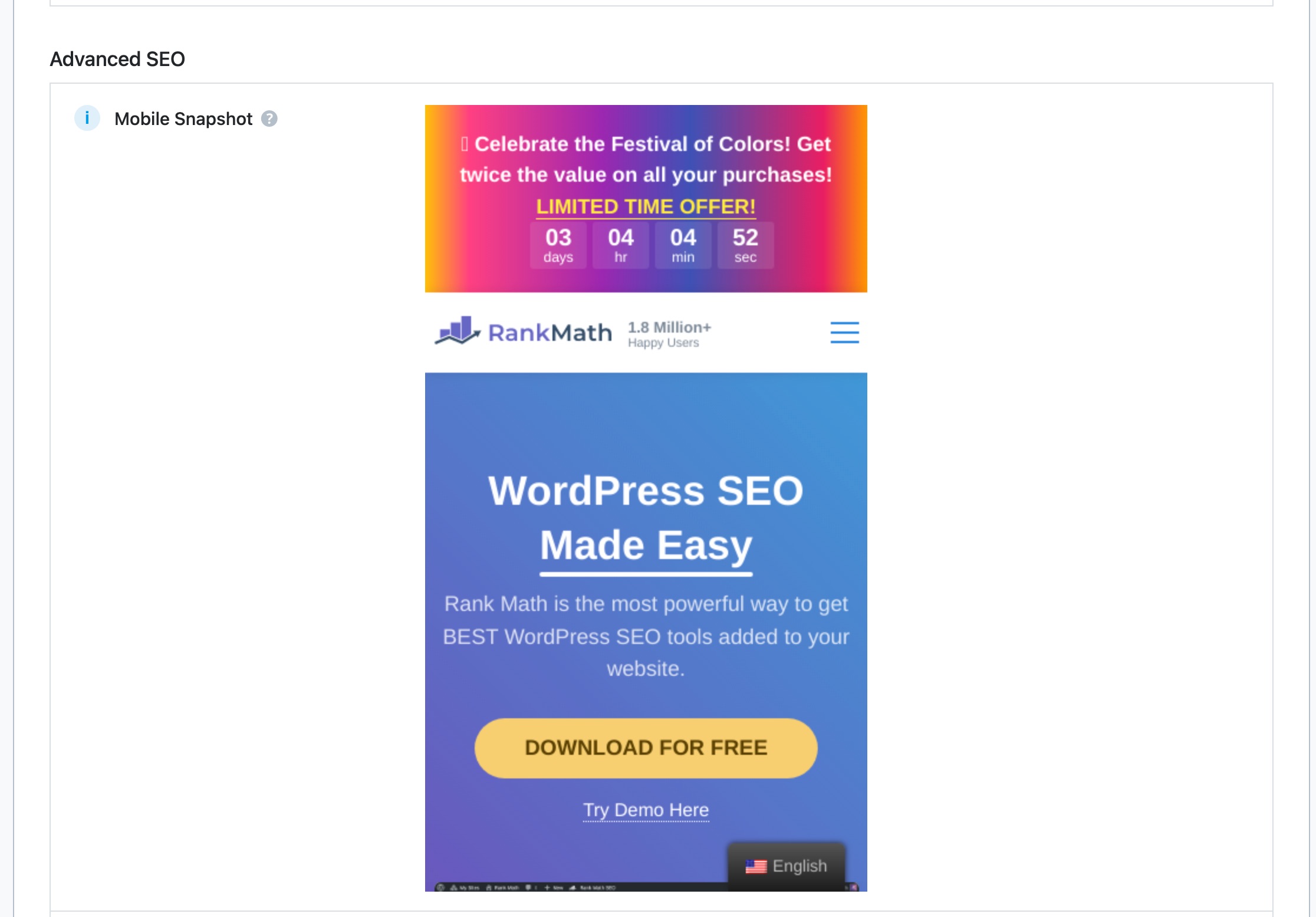
Rank Math SEO lets you check your website’s mobile optimization and also preview what your website will look like in mobile search results.
How to Fix Mobile Optimization Issues
To put it lightly, if your website still isn’t optimized to work on mobile devices in this day and age, you’re in trouble.
More than half of the world’s web traffic is through mobile phones, and not having a mobile-optimized website would be completely remiss if you’re trying to optimize your website for search.
To solve this issue, the easiest (and best) way would be to switch to a responsive theme. Responsive themes are built in a way that they automatically adjust the content based on the device on which they are being viewed.
We might be biased, but MeinThemenShop has some fantastic responsive themes that you should definitely check out.
4 SEO Audit Checklist
Use this checklist to make sure you’ve completed all the essential steps of your SEO audit.
Technisches SEO
Website resolves to one version only (www or non-www)
SSL certificate installed and HTTP redirects to HTTPS
WordPress Suchmaschinensichtbarkeit is turned off
SEO-friendly permalink structure set (Post Name)
Website loads fast with caching enabled
Server response time (TTFB) is within acceptable limits
Website is mobile-friendly and responsive
Search Engine Setup
Website verified in Google Search Console
Sitemap generated, accessible, and submitted
No major indexing or crawl errors reported
Content & On-Page SEO
All posts and pages have focus keywords
Focus keywords included in titles
Content matches Suchabsicht
Schema markup added where relevant
Images optimized:
Descriptive file names
Proper image sizes
Alt text added
User Experience & Maintenance
Broken links identified and fixed (404 errors)
Redirects set for removed or changed URLs
No unnecessary plugins slowing the site down
Fazit
Conducting an SEO audit is undoubtedly an essential part of optimizing your website to maximize the amount of traffic it generates from search. Traditional ways to audit your website may work, but they are not easy to do and in some cases not even possible. With Rank Math SEO, you can conduct a professional SEO audit of your website und fix all issues identified in hours, not weeks so you can finally kickstart the growth of your website.
If you have absolutely anything to add or have a question – please feel free to Tweet @rankmathseo!
Führen Sie eine gründliche SEO-Analyse Ihrer Website durch.
12 kinderleichte Schritte, um Ihr erstes kostenloses SEO-Audit mit Rank Math abzuschließen
Bhanu Ahluwalia
Eine fehlerfreie und optimierte Website ist für ein höheres Ranking bei Google unerlässlich. Führen Sie ein professionelles SEO-Audit Ihrer Website mit Rank Math SEO durch.