Als Sie Ihre WordPress-Website eingerichtet haben, haben Sie wahrscheinlich einfach eine E-Mail-Adresse eingegeben, ohne sich groß Gedanken darüber zu machen.
Diese Administrator-E-Mail-Adresse spielt eine wichtigere Rolle, als Sie vielleicht denken. WordPress verwendet sie, um Ihnen wichtige Updates, Links zum Zurücksetzen Ihres Passworts und Sicherheitswarnungen zu senden. Wenn die Adresse veraltet oder nicht erreichbar ist, könnten Ihnen wichtige Informationen zu Ihrer Website entgehen.
Die gute Nachricht? Das Ändern Ihrer WordPress-Administrator-E-Mail-Adresse ist einfach und dauert nicht länger als ein paar Minuten.
In diesem Beitrag erfahren Sie die einfachsten Möglichkeiten, die Administrator-E-Mail-Adresse zu ändern, damit Sie die Kontrolle behalten, wichtige Benachrichtigungen erhalten und Ihre Website reibungslos läuft.
WordPress is a popular blogging platform used to power millions of websites. It’s also one of the world’s most widely used content management systems.
But there’s a hidden feature in WordPress that might not be used to its maximum potential. Not everyone cares to update the WordPress admin email address. This might result in a loss of opportunities, a loss of messages, and numerous other problems.
Let’s look at some of the reasons why you may consider changing your WordPress admin email.
1.1 Security Breach
If your site has ever been hacked, your admin email might be exposed. Changing it helps secure your account and ensures you regain full control of your website.
1.2 Upgrading to a Professional Email
Let’s say you just got a professional email representing your business, and this email address ends with your domain name. If you want to look professional in email newsletters and blog articles, you might consider changing your admin email. This is especially helpful if you send transactional emails, as it helps build trust with your users.
1.3 Rebranding
If you’ve changed your business name or brand identity, updating your admin email to match your new domain ensures consistency and reinforces your brand image.
1.4 Lost Access to Your Email Account
If you no longer have access to the email linked to your site, you won’t receive critical WordPress notifications or password reset emails. Updating to an active email address keeps you connected.
1.5 You Had a Developer Set up Your Website
Sometimes developers use their own email during setup. If that’s the case, you’ll want to replace it with your own email to ensure you have complete ownership and access.
2 How to Change the Admin Email Address in WordPress?
Let us now discuss how to change the email address in WordPress.
2.1 Change the Admin Email from WordPress Settings
Beginners are advised to use this method because it is pretty simple. You will typically use this technique to modify the email address associated with your WordPress admin user account and your website.
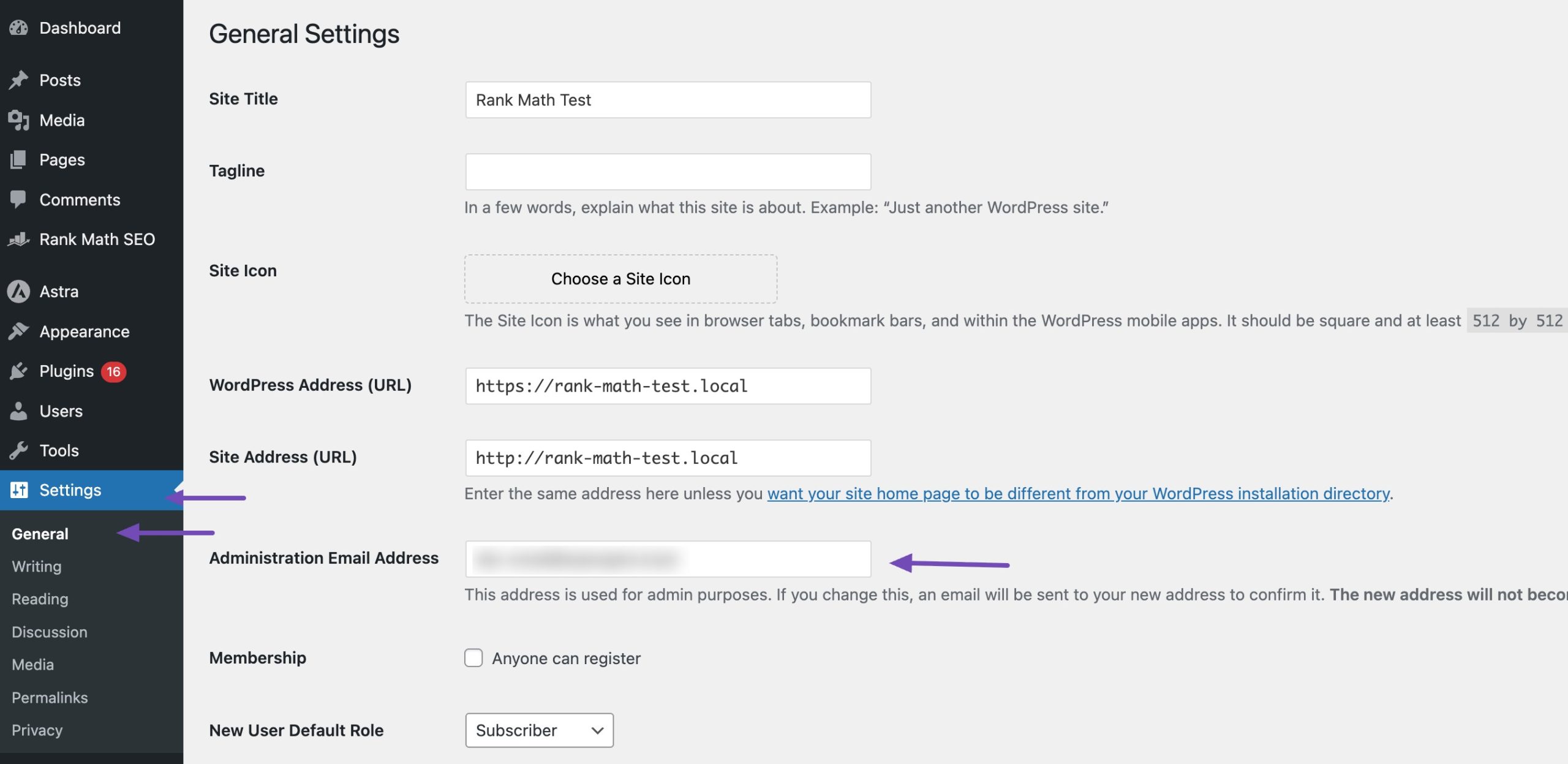
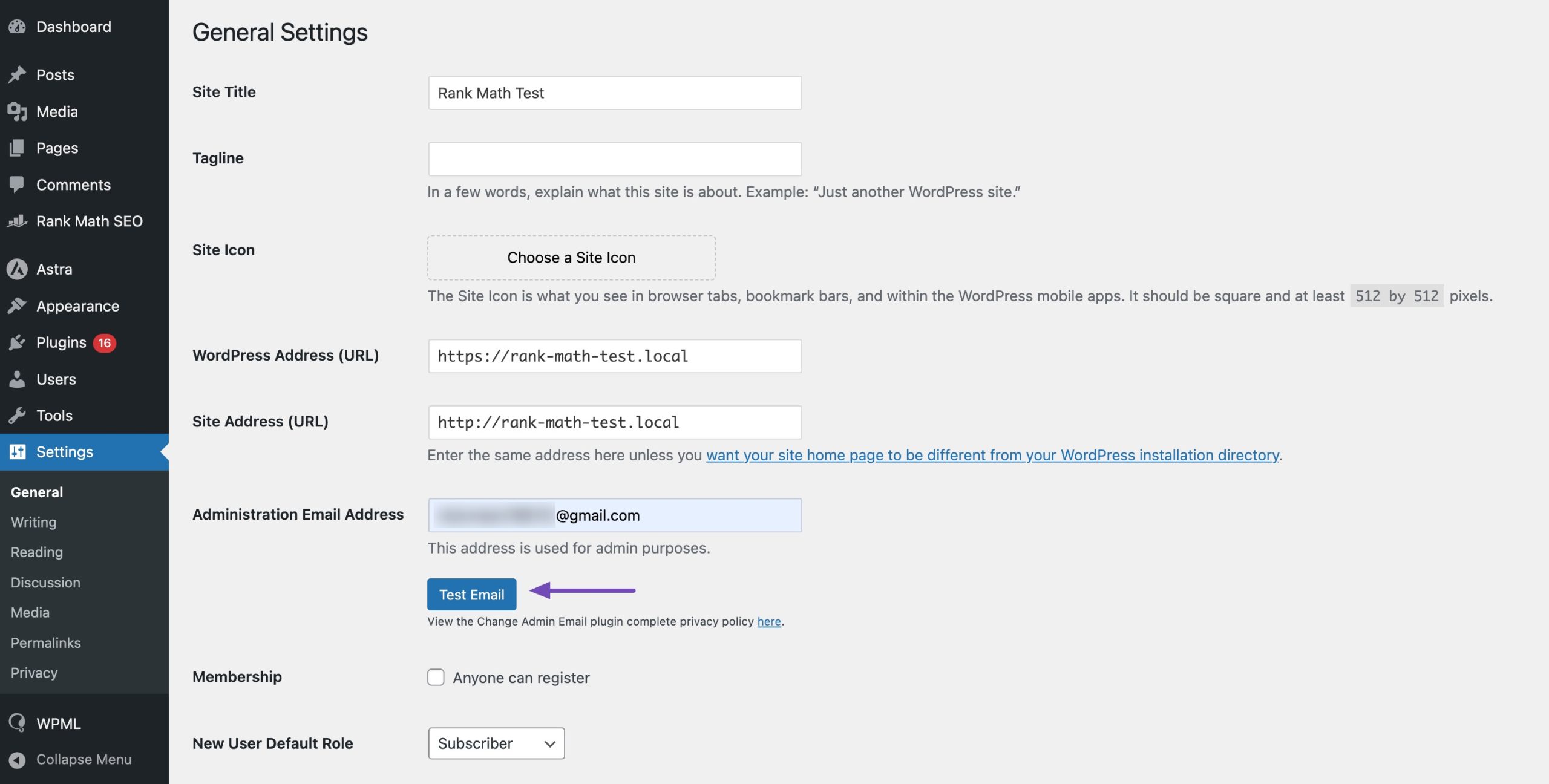
To change the WordPress website email address, navigate to Settings → General from your WordPress dashboard and change the email in the Administration Email Address Möglichkeit.
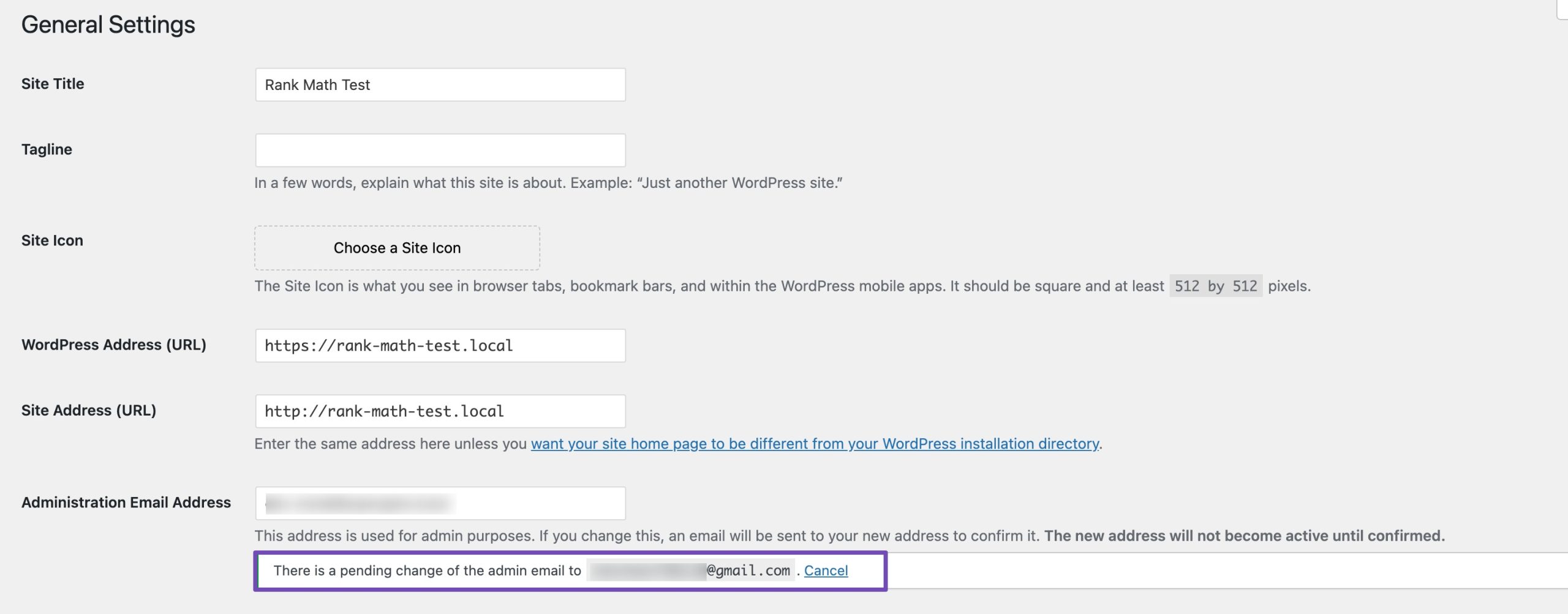
Wenn Sie fertig sind, klicken Sie auf Änderungen speichern button. WordPress will now save your new admin email address.
However, the admin email address won’t change until you confirm the email. WordPress will send all the emails to the new address once you’ve verified the email address.
2.2 Change the Admin Email Using Plugins
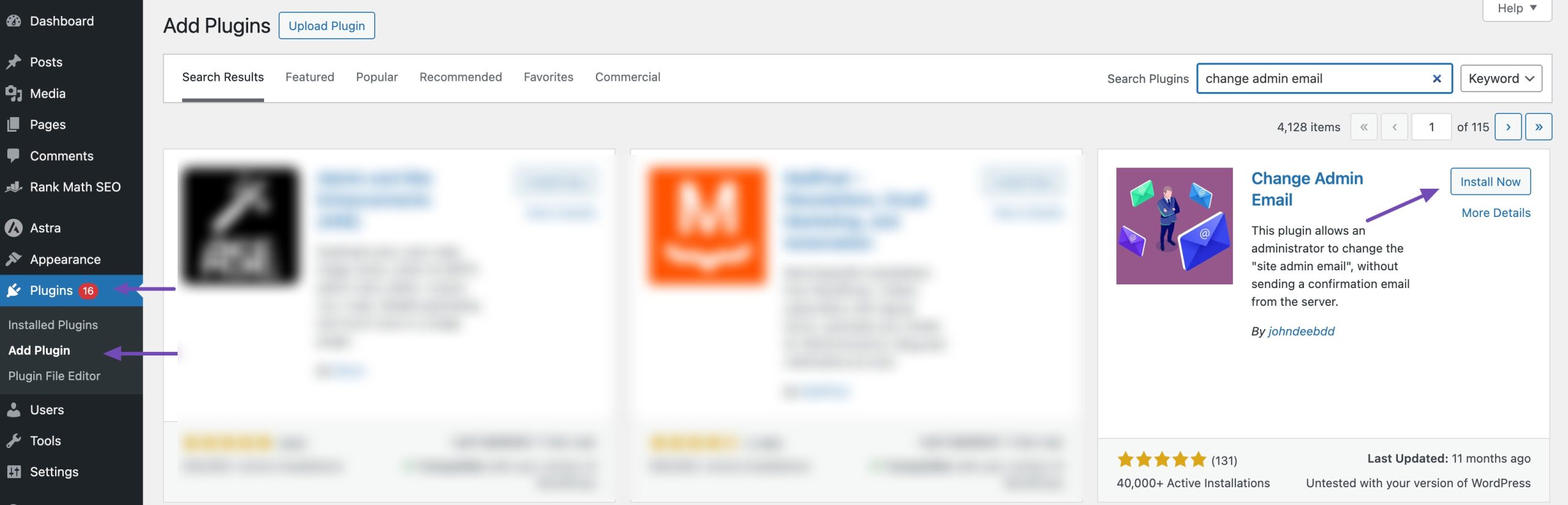
You can use a plugin if you cannot change the email address using the WordPress settings. First, you must install and activate the Change Admin Email plugin by navigating to Plugins → Add Plugin from your WordPress dashboard. Refer to our dedicated tutorial on installing WordPress plugins.
Once the plugin is activated, navigate to your WordPress dashboard’s Settings → General page. In the Administration Email Address option, enter the new email address you want to use.
You’ll notice a Test Email button below the email address field. Click on it after entering the new email address on the form. This will bypass the need for confirmation of the email address. Lastly, click on the Änderungen speichern button to store your changes.
Without authentication, the plugin will automatically change the admin address. Additionally, a test email to the new admin email address will be sent to you.
2.3 Change the Admin Email Using phpMyAdmin
This is another method to demonstrate how to use phpMyAdmin to change the email addresses, and it’s a sneaky one! You should use this method when you cannot access the WordPress admin area.
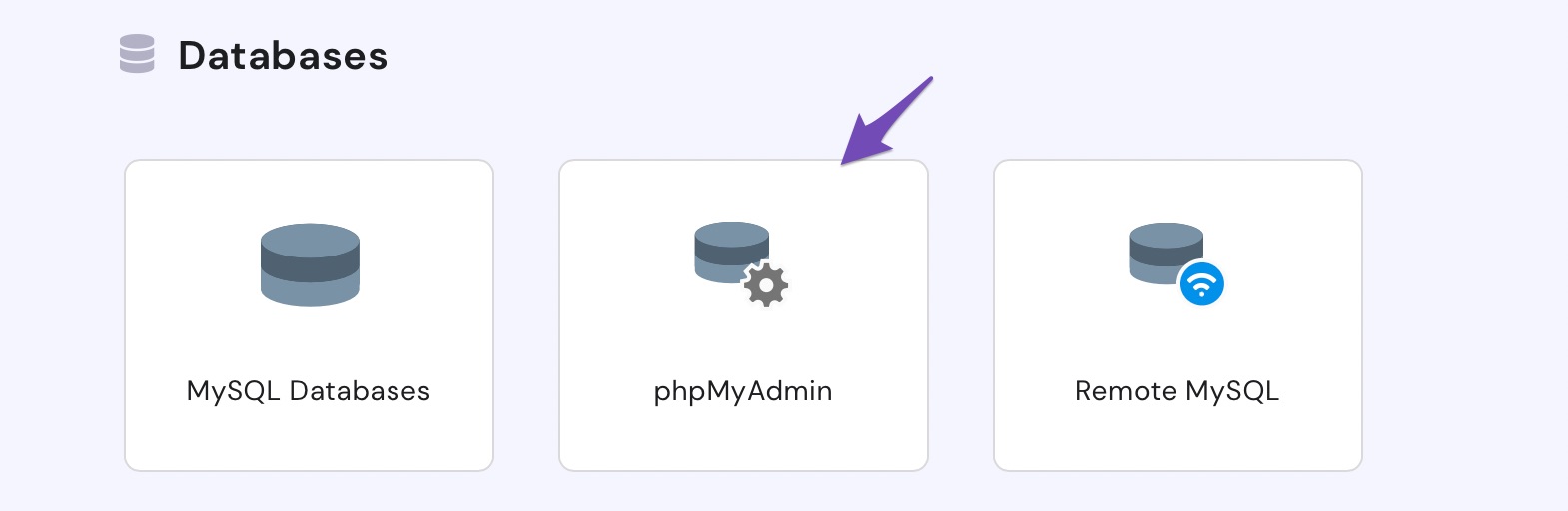
First, you need to visit the cPanel dashboard on your hosting account. Under the Datenbanken section, click on the phpMyAdmin icon as shown below.
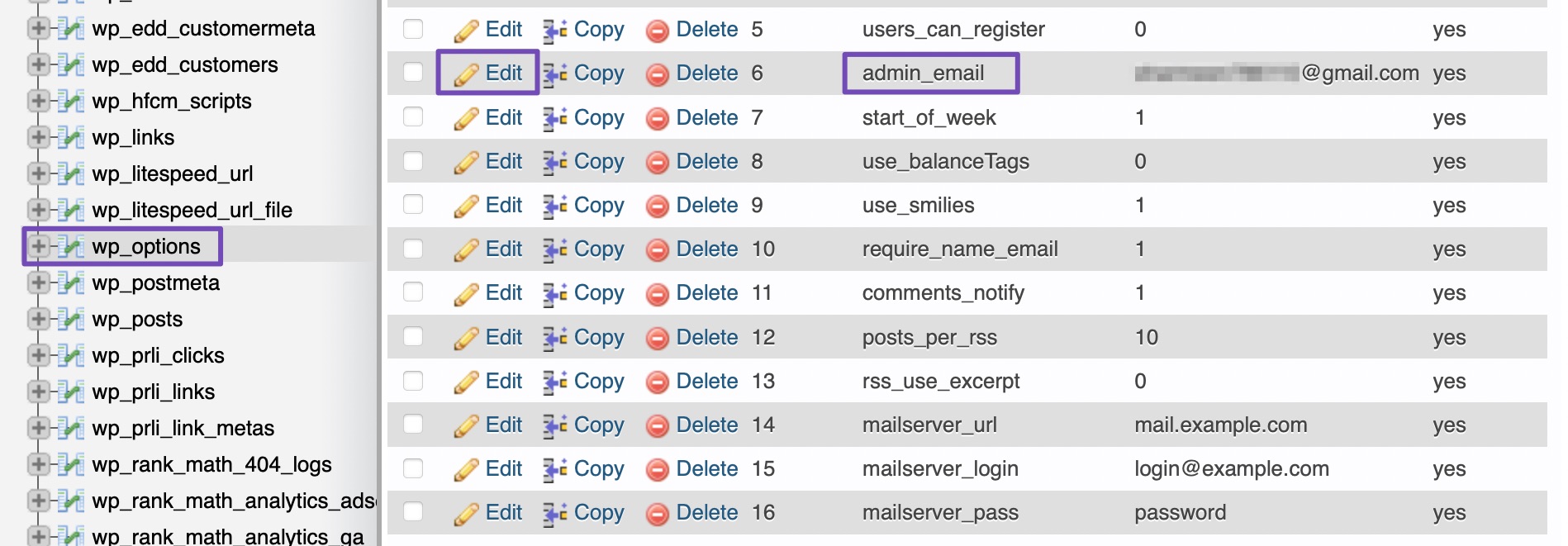
The phpMyAdmin window will pop up on the screen, and your database will be listed in the left column. Clicking on it will show you all the tables inside it. You need to locate the _options table and click to open it. Next, click Bearbeiten on the admin_email field as shown below.
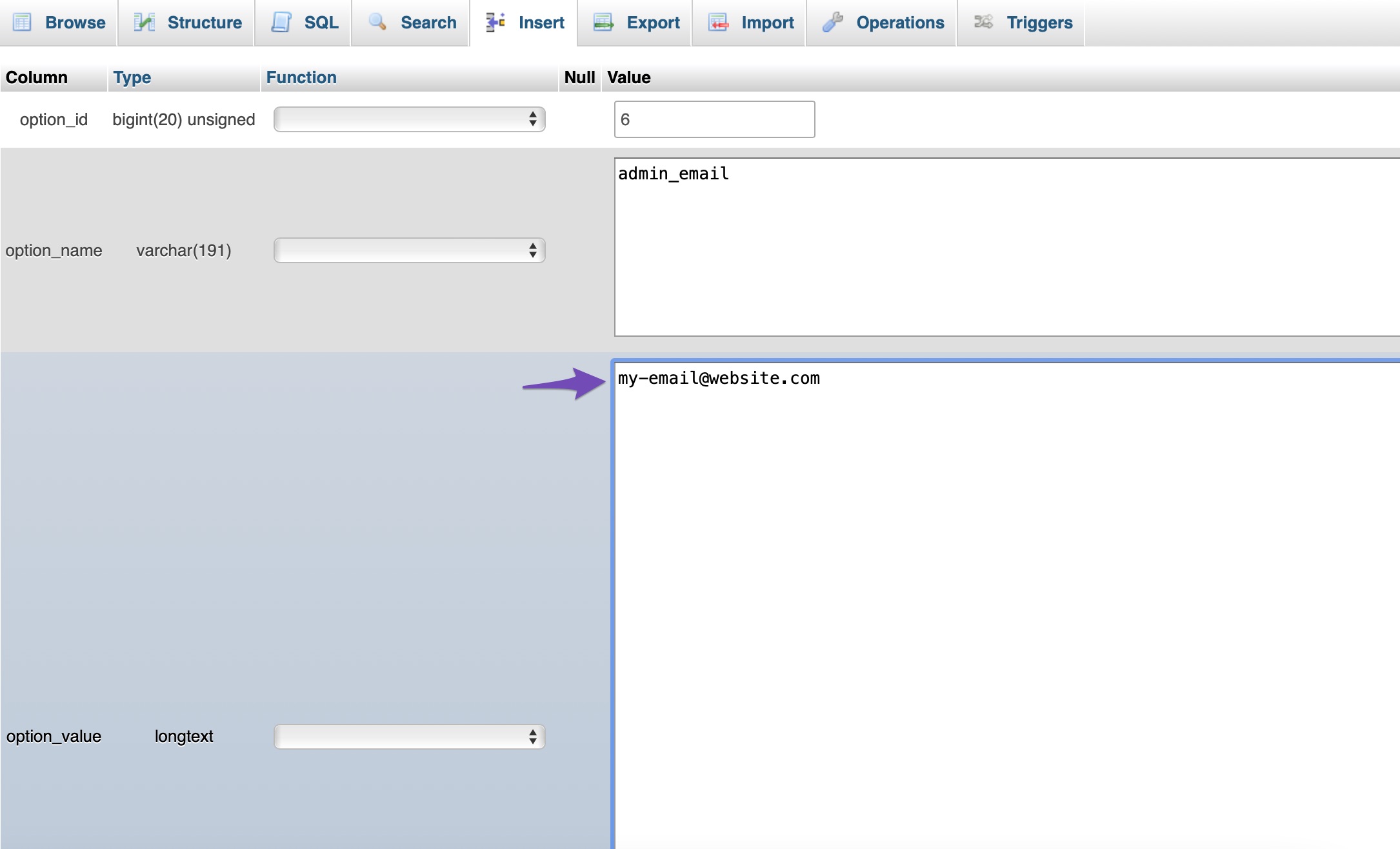
Input the new email address in the text field and click the Go Taste.
And that’s it! You’ve successfully changed the email address for WordPress website email notifications.
Notiz: WordPress will send important information, such as critical issues on the website, WordPress updates, etc., to the admin email address. The admin user’s email address is used for logging in, and everything relates to the specific user. These email addresses may or may not be the same.
3 Fazit
Updating your WordPress admin email may seem like a small task, but it plays a big role in keeping your site secure and ensuring you never miss critical updates or alerts.
By keeping your email current, you’ll always stay in the loop on site activity, security notifications, and important communications. Take a few minutes to update it today; it’s a quick step that saves a lot of trouble down the road.
I hope this article helped you learn how to change the WordPress admin email. If you found it helpful, share your thoughts by @rankmathseo twittern.